ORDS Access Logs in Kibana

There are countless ways to go about Application Process Monitoring for ORDS. The right choice is contingent on so many factors. These include, but are not limited to : budget, topology, system management practices and familiarity with the tools. This article is not a recommendation but rather a demonstration of quickly getting started from scratch with a visual and searchable representation of every request received by ORDS Standalone.

To achieve this we’ll use some free products which work together with the minimum of fuss

  • Elasticsearch – Stores data for quick search and retrieval.
  • Kibana – Visual interface to Elasticsearch data.
  • Filebeat – Monitors log files and publishes changes to Elasticsearch. Also configures Kibana for showing dashboard, log entries from ElasticSearch.

ORDS Standalone Access Log

To get from zero to hero quickly we’re going to take advantage of out of the box configurations that Filebeat comes with. In this case, the support for the Apache combined log file format. So that we can have ORDS Standalone produce an access log with this format we’ll specify a CustomRequestLog instance in $CONFIG_DIR/ords/standalone/etc/jetty.xml. In this case $CONFIG_DIR is the ORDS configuration directory.

<?xml version="1.0"?>
<!DOCTYPE Configure PUBLIC "-//Jetty//Configure//EN" "http://www.eclipse.org/jetty/configure.dtd">
<Configure id="Server" class="org.eclipse.jetty.server.Server">
    <Ref id="Handlers">
      <Call name="addHandler">
        <Arg>
          <New id="RequestLog" class="org.eclipse.jetty.server.handler.RequestLogHandler">
            <Set name="requestLog">
              <New id="RequestLogImpl" class="org.eclipse.jetty.server.CustomRequestLog">
                <Arg>/ords/ords-access.log</Arg>
                <Arg>%{remote}a - %u %t "%r" %s %O "%{Referer}i" "%{User-Agent}i"</Arg>
              </New>
            </Set>
          </New>
        </Arg>
      </Call>
    </Ref>
</Configure>

The highlighted custom request log format is the Eclipse Jetty representation of the Apache combined log format.

Startup ORDS standalone ( java -jar ords.war standalone ) and every request and it’s response summary is logged to /ords/ords-access.log.

0:0:0:0:0:0:0:1 - - [23/Jul/2021:15:02:13 +0000] "GET /ords/pdbadmin/soda/latest/metadata-catalog/?limit=1000&offset=0&q=%7B%7D HTTP/1.1" 200 28 "http://localhost:8080/ords/pdbadmin/_sdw/?nav=application&application=soda&page=Home" "Mozilla/5.0 (Macintosh; Intel Mac OS X 10_15_7) AppleWebKit/537.36 (KHTML, like Gecko) Chrome/91.0.4472.164 Safari/537.36"
0:0:0:0:0:0:0:1 - - [23/Jul/2021:15:02:13 +0000] "PUT /ords/pdbadmin/soda/latest/CarsWorkshopTour HTTP/1.1" 201 0 "http://localhost:8080/ords/pdbadmin/_sdw/?nav=application&application=soda&page=Home" "Mozilla/5.0 (Macintosh; Intel Mac OS X 10_15_7) AppleWebKit/537.36 (KHTML, like Gecko) Chrome/91.0.4472.164 Safari/537.36"
0:0:0:0:0:0:0:1 - - [23/Jul/2021:15:02:14 +0000] "POST /ords/pdbadmin/soda/latest/CarsWorkshopTour?action=insert HTTP/1.1" 200 652 "http://localhost:8080/ords/pdbadmin/_sdw/?nav=application&application=soda&page=Home" "Mozilla/5.0 (Macintosh; Intel Mac OS X 10_15_7) AppleWebKit/537.36 (KHTML, like Gecko) Chrome/91.0.4472.164 Safari/537.36"

Setup the stack

Now that ORDS is logging every request we can install and configure the stack for monitoring and analysing the log entries. This can be done through docker containers or package managers but for clarity of the constituents we’ll go through the download and installation for macOs. Let’s assume the starting point is a directory called /ords-monitoring/ and we have three separate terminal shells for running Elasticsearch, Kibana and Filebeat. Having java in the path is a prerequisite for all three.

Elasticsearch

# Get and run Elasticsearch
wget https://artifacts.elastic.co/downloads/elasticsearch/elasticsearch-7.13.4-darwin-x86_64.tar.gz
tar -xzf elasticsearch-7.13.4-darwin-x86_64.tar.gz
./elasticsearch-7.13.4/bin/elasticsearch

# Once running the output will show something like this...
[2021-07-23T09:52:55,825][INFO ][o.e.c.r.a.AllocationService] [my-mac] Cluster health status changed from [YELLOW] to [GREEN] (reason: [shards started [[.kibana-event-log-7.13.4-000001][0]]]).

Kibana

# Get and run Kibana
wget https://artifacts.elastic.co/downloads/kibana/kibana-7.13.4-darwin-x86_64.tar.gz
tar -xzf kibana-7.13.4-darwin-x86_64.tar.gz
./kibana-7.13.4-darwin-x86_64/bin/kibana

# Once running the output will show something like this...
log   [09:52:52.152] [info][server][Kibana][http] http server running at http://localhost:5601

Filebeat

# Get, configure and run Filebeat
wget https://artifacts.elastic.co/downloads/beats/filebeat/filebeat-7.13.4-darwin-x86_64.tar.gz
tar -xzf filebeat-7.13.4-darwin-x86_64.tar.gz
cd ./filebeat-7.13.4-darwin-x86_64
# Check the setup.kibana: host and output.elasticsearch: hosts are uncommented in the base filebeat configuration.
vi filebeat.yml
# Enable the Apache module
./filebeat modules enable apache
# Edit the config to point to the /ords/ords-access*.log
vi modules.d/apache.yml
# Have Filebeat configure Kibana
./filebeat setup
# Run Filebeat
./filebeat -e

Note that the filebeat.yml may have the output.elasticsearch hosts list already uncommented but you may have to uncomment the setup.kibana entry.

...
# =================================== Kibana ===================================

# Starting with Beats version 6.0.0, the dashboards are loaded via the Kibana API.
# This requires a Kibana endpoint configuration.
setup.kibana:

  # Kibana Host
  # Scheme and port can be left out and will be set to the default (http and 5601)
  # In case you specify and additional path, the scheme is required: http://localhost:5601/path
  # IPv6 addresses should always be defined as: https://[2001:db8::1]:5601
  host: "localhost:5601"

...
# ---------------------------- Elasticsearch Output ----------------------------
output.elasticsearch:
  # Array of hosts to connect to.
  hosts: ["localhost:9200"]

  # Protocol - either `http` (default) or `https`.
  #protocol: "https"
...

When Filebeat has started processing the file specified by apache.access.var.paths ( e.g. /ords/ords-access.log) you should see the following:

2021-07-23T10:57:06.700+0100	INFO	[publisher_pipeline_output]	pipeline/output.go:151	Connection to backoff(elasticsearch(http://localhost:9200)) established
2021-07-23T10:57:32.706+0100	INFO	[monitoring]	log/log.go:144	Non-zero metrics in the last 30s	{"monitoring": {"metrics": {"beat":{"cpu":{"system":{"ticks":488,"time":{"ms":488}},"total":{"ticks":792,"time":{"ms":792},"value":792},"user":{"ticks":304,"time":{"ms":304}}},"info":{"ephemeral_id":"4432101e-4924-4c2a-835d-2da35c4551aa","uptime":{"ms":30288}},"memstats":{"gc_next":17666800,"memory_alloc":13072376,"memory_sys":75580416,"memory_total":46621616,"rss":73383936},"runtime":{"goroutines":43}},"filebeat":{"events":{"added":20,"done":20},"harvester":{"open_files":1,"running":1,"started":1}},"libbeat":{"config":{"module":{"running":1,"starts":1},"reloads":1,"scans":1},"output":{"events":{"acked":19,"active":0,"batches":1,"total":19},"read":{"bytes":10240},"type":"elasticsearch","write":{"bytes":25382}},"pipeline":{"clients":2,"events":{"active":0,"filtered":1,"published":19,"retry":19,"total":20},"queue":{"acked":19,"max_events":4096}}},"registrar":{"states":{"current":1,"update":20},"writes":{"success":2,"total":2}},"system":{"cpu":{"cores":4},"load":{"1":11.3442,"15":5.8877,"5":6.8467,"norm":{"1":2.8361,"15":1.4719,"5":1.7117}}}}}}

Kibana Analytics

You have used Filebeat to configure Kibana so point your browser to http://localhost:5601/ to get started with the reviewing and searching your ORDS access logs.

Please note that the convenience of such a quick setup has left out security configuration steps which are essential for a production environment. However, in less than 30 minutes you have put together a system where you can start learning more about one approach to monitoring ORDS.

Load Balancing ORDS with NGINX

For high availability, scalability and efficient use of computing resources many computing systems are deployed with a load balancer as the client facing interface which distributes the task load.

The product documentation for Oracle REST Data Services does not go into detail on how to put a load balancer in front of your ORDS instances because all of that documentation would be covering configuration specifics for another product. Namely, the load balancer of your choice.

Kris Rice has provided detailed steps on using ORDS with Consul and Fabio load balancer which is an excellent approach which requires very little configuration.

In this article I cover what is perhaps the quickest way to spin up a load balancer in front of your ORDS instances: NGINX with Load Balancing configuration and docker official NGINX image.

In my scenario I have ORDS running in a WebLogic Server on one machine and Tomcat on another. That’s server1:7001 and server2:8888 respectively, This isn’t your typical setup but since the headers returned by both containers are slightly different, it makes it clearer which server handled the request. Both ORDS instances are configured to talk to the same database where HR schema has an AutoREST EMPLOYEES table. That’s accessible at /ords/hr/employees/.

This nginx.conf has the bare minimum to get up and running.

events {}
http {
    upstream ords {
        server server1:7001;
        server server2:8888;
    }

    server {
        location / {
            proxy_pass http://ords;
            proxy_set_header Host $host;
        }
    }
}

It will route each request to one of the upstream servers in a round-robin fashion. Note the proxy_set_header directive. This is essential so that whichever ORDS instance receives the request it knows what URL the client submitted to make the request. Having valid absolute Link Relation URLs in the response relies on this.

Assuming your working directory is the same directory where you have this nginx.conf just spin up a docker container:

docker run -p 8080:80 -v ${PWD}/nginx.conf:/etc/nginx/nginx.conf:ro -d nginx

The port mapping is up to you. By default the docker nginx will listen on port 80 and in this case I have it mapped to 8080 on the host machine.

Now a request to http://localhost:8080/ords/hr/employees/ will be routed to the whatever server is next in the round-robin list.

Tomcat response
WebLogic Server response

Note that in both cases the ETag header is the same because the same response body is being returned to the client each time for the same URL http://localhost:8080/ords/hr/employees/.

It’s that quick and easy. I’ll leave it to you to discover what happens when one or both ORDS instances are stopped and to refer to NGINX documentation on configuring it for high availability.


The next article in this series HTTPS Load Balance: NGINX & ORDS will build on this NGINX concept and go through the steps of generating a self signed certificate so that HTTPS traffic can be encrypted.


HR Web Application – Tomcat & UCP

Many years ago a sample web application for using JDBC was published as part of the oracle-db-examples GitHub repository. The HR Web Application example was the starting point for some to build their first simple web interface to their database. Who knows how many simple, in-house applications have this as their inspiration?

The example had a particular focus on Apache Tomcat and the steps to getting it built and deployed where simple for the standard Apache Tomcat setup at the time.

-- Get the code
git clone https://github.com/oracle/oracle-db-examples.git
cd oracle-db-examples/java/HRWebApp
-- Copy the tomcat-users.xml and start tomcat
cp tomcat-users.xml $CATALINA_HOME/conf
catalina.sh start
-- Build the war file and deploy it
mvn package
cp target/JdbcWebSamples.war $CATALINA_HOME/webapps

By copying the JdbcWebSamples.war into the $CATALINA_HOME/webapps directory, the web application is automatically deployed by Apache Tomcat. The context path is based on the file name so the URL is http://localhost:8080/JdbcWebSamples/

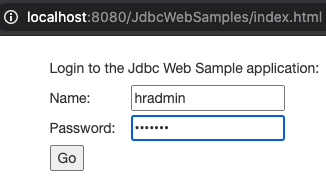
Use your browser to access the web application.

The tomcat-users.xml defined two new users: hradmin and hrstaff. Both have welcome as their password. Login and click on the List All menu item to see the list of HR.EMPLOYEES records. Of course, that’s if the database connection details are correct.

Your JdbcBeanImpl.java will have to be changed to point to the correct database in the getConnection() method.

 public static Connection getConnection() throws SQLException {
    DriverManager.registerDriver(new oracle.jdbc.OracleDriver());
    Connection connection = DriverManager.getConnection(
         "jdbc:oracle:thin:@//mydatabaseserver:1521/orclpdb1", 
         "hr", 
         "hr");

    return connection;
  }

Make the above change for your database, run mvn package and copy the JdbcWebSamples.war to $CATALINA_HOME/webapps to get that running with the new connection details.

Take a look through JdbcBeanImpl methods in detail and you’ll notice that getConnection() method is called using the try-with-resource syntax so the connection is automatically closed after every operation. It’s a good practice because it does not leave INACTIVE sessions on the database. In fact, if you check your database v$session you shouldn’t find any records.

SELECT
    *
FROM
    v$session
WHERE
    program = 'JDBC Thin Client'
    AND schemaname = 'HR';

Creating a database connection for every request does have an overhead and if that is a remote database the network latency could be sufficient to cause problems for the users of the web application. To see the impact of creating a connection every time, let’s add some basic logging on the elapsed time to that getConnection() method.

 public static Connection getConnection() throws SQLException {
    final long start = System.currentTimeMillis();
    DriverManager.registerDriver(new oracle.jdbc.OracleDriver());
    Connection connection = DriverManager.getConnection(
         "jdbc:oracle:thin:@//mydatabaseserver:1521/orclpdb1", 
         "hr", 
         "hr");
    final long end = System.currentTimeMillis();
    logger.log(Level.INFO, 
         "Creating a connection duration(ms): " + (end - start));

    return connection;
  }

Like before, make the above change for your database, run mvn package and copy the JdbcWebSamples.war to $CATALINA_HOME/webapps. Every time the list of employees is retrieved, or any action that involves the connection, the cataline.out will show a log message.

Creating a connection to my remote database takes over 2 seconds!

One way to address this is by using Oracle’s Universal Connection Pool. This could be used through a data source defined in the Tomcat configuration but it can also be done used programmatically. Let’s do that.

The first thing is to upgrade to a more recent version of JDBC/UCP. Not the latest 21.1 version, more on that later, but we’ll use 19.9.0.0 for now. Note that the group id has changed from com.oracle.jdbc to com.oracle.database.jdbc and that’s what we’ll use in the pom.xml

Change this

    <dependency>
      <groupId>com.oracle.jdbc</groupId>
      <artifactId>ojdbc8</artifactId>
      <version>12.2.0.1</version>
    </dependency>

to this

    <dependency>
      <groupId>com.oracle.database.jdbc</groupId>
      <artifactId>ojdbc8</artifactId>
      <version>19.9.0.0</version>
    </dependency>
    <dependency>
      <groupId>com.oracle.database.jdbc</groupId>
      <artifactId>ucp</artifactId>
      <version>19.9.0.0</version>
    </dependency>

Now add a class to create and configure a Universal Connection Pool PoolDataSource. Let’s call it JdbcSource in the com.oracle.jdbc.samples.bean package.

package com.oracle.jdbc.samples.bean;

import java.sql.Connection;
import java.sql.SQLException;

import java.util.logging.Level;
import java.util.logging.Logger;

import oracle.ucp.jdbc.PoolDataSource;
import oracle.ucp.jdbc.PoolDataSourceFactory;

public class JdbcSource {
  JdbcSource() {

    //Create pool-enabled data source instance.
    this.pds = PoolDataSourceFactory.getPoolDataSource();

    //set the connection properties on the data source.
    try {
      pds.setConnectionPoolName(POOL_NAME);
      pds.setConnectionFactoryClassName("oracle.jdbc.pool.OracleDataSource");
      pds.setURL("jdbc:oracle:thin:@//mydatabaseserver:1521/orclpdb1");
      pds.setUser("hr");
      pds.setPassword("hr");

      //Override any pool properties.
      pds.setInitialPoolSize(2);

    } catch (SQLException ex) {
      logger.log(Level.SEVERE, null, ex);
      ex.printStackTrace();
    }
  }

  public Connection connection() throws SQLException {
      return this.pds.getConnection();
  }

  private final PoolDataSource pds;
  private static final String POOL_NAME = "JdbcWebSamples_pool";

  // Singleton data source. Not a great pattern but simple for demonstrations.
  public static JdbcSource INSTANCE = new JdbcSource();
  static final Logger logger = Logger.getLogger("com.oracle.jdbc.samples.bean.JdbcSource");
}

The above will create a pool of database connections that can be reused every time connection() method is called. The pool is initialised with 2 connections. That means there will be two sessions on the database that will be INACTIVE most of the time. The web application may deal with concurrent requests so having an extra connection ready will help with that additional load.

Let’s revisit that JdbcBeanImpl getConnection() method and change it to use the new pooled connection. It’s not all that complicated…

 public static Connection getConnection() throws SQLException {
    final long start = System.currentTimeMillis();
    DriverManager.registerDriver(new oracle.jdbc.OracleDriver());
    Connection connection = JdbcSource.INSTANCE.connection();
    final long end = System.currentTimeMillis();
    logger.log(Level.INFO, 
         "Creating a connection duration(ms): " + (end - start));

    return connection;
  }

Like before, make the above for your code, run mvn package and copy the JdbcWebSamples.war to $CATALINA_HOME/webapps. Everytime the list of employees is retrieved, or any action that involves the connection, the cataline.out will show a log message for the first connection taking a long time, but every subsequent call takes milliseconds.

There’s an overhead for the 1st connection but subsequent requests get a connection in milliseconds

The query on v$sessions will show 2 INACTIVE sessions at least. As more concurrent requests are received, the pool size will grow automatically so more sessions could be created. In fact, hit that List All menu item repeatedly 20 or 30 times and you’ll see the number of v$sessions for HR schema grow. There’s more to explore here on setting UCP properties for optimising pool behaviour.

Upgrade to JDBC / UCP 21.1

Let’s leave that as a bonus point exercise for you and discuss upgrading to 21.1.0.0. This version has support for defining data sources in JBoss and Spring. That enhancement does break these example web applications which include the UCP jars in them.

Update the pom.xml to use the new 21.1.0.0 JDBC and UCP jars.

    <dependency>
      <groupId>com.oracle.database.jdbc</groupId>
      <artifactId>ojdbc8</artifactId>
      <version>21.1.0.0</version>
    </dependency>
    <dependency>
      <groupId>com.oracle.database.jdbc</groupId>
      <artifactId>ucp</artifactId>
      <version>21.1.0.0</version>
    </dependency>

Rebuild and deploy to see the following SEVERE error messages.

SEVERE [Catalina-utility-1] org.apache.catalina.core.StandardContext.startInternal One or more listeners failed to start. Full details will be found in the appropriate container log file
SEVERE [Catalina-utility-1] org.apache.catalina.core.StandardContext.startInternal Context [/JdbcWebSamples] startup failed due to previous errors

The localhost log will have more details.

SEVERE [Catalina-utility-1] org.apache.catalina.core.StandardContext.listenerStart Error configuring application listener of class [oracle.ucp.jdbc.UCPServletContextListener]
	java.lang.NoSuchMethodException: oracle.ucp.jdbc.UCPServletContextListener.<init>()
		at java.base/java.lang.Class.getConstructor0(Class.java:3427)
		at java.base/java.lang.Class.getConstructor(Class.java:2165)
		at org.apache.catalina.core.DefaultInstanceManager.newInstance(DefaultInstanceManager.java:151)
		at org.apache.catalina.core.StandardContext.listenerStart(StandardContext.java:4607)
		at org.apache.catalina.core.StandardContext.startInternal(StandardContext.java:5146)
		at org.apache.catalina.util.LifecycleBase.start(LifecycleBase.java:183)
		at org.apache.catalina.core.ContainerBase.addChildInternal(ContainerBase.java:717)
		at org.apache.catalina.core.ContainerBase.addChild(ContainerBase.java:690)
		at org.apache.catalina.core.StandardHost.addChild(StandardHost.java:705)
		at org.apache.catalina.startup.HostConfig.deployWAR(HostConfig.java:978)
		at org.apache.catalina.startup.HostConfig$DeployWar.run(HostConfig.java:1849)
		at java.base/java.util.concurrent.Executors$RunnableAdapter.call(Executors.java:515)
		at java.base/java.util.concurrent.FutureTask.run(FutureTask.java:264)
		at org.apache.tomcat.util.threads.InlineExecutorService.execute(InlineExecutorService.java:75)
		at java.base/java.util.concurrent.AbstractExecutorService.submit(AbstractExecutorService.java:118)
		at org.apache.catalina.startup.HostConfig.deployWARs(HostConfig.java:773)
		at org.apache.catalina.startup.HostConfig.deployApps(HostConfig.java:427)
		at org.apache.catalina.startup.HostConfig.check(HostConfig.java:1620)
		at org.apache.catalina.startup.HostConfig.lifecycleEvent(HostConfig.java:305)
		at org.apache.catalina.util.LifecycleBase.fireLifecycleEvent(LifecycleBase.java:123)
		at org.apache.catalina.core.ContainerBase.backgroundProcess(ContainerBase.java:1151)
		at org.apache.catalina.core.ContainerBase$ContainerBackgroundProcessor.processChildren(ContainerBase.java:1353)
		at org.apache.catalina.core.ContainerBase$ContainerBackgroundProcessor.processChildren(ContainerBase.java:1357)
		at org.apache.catalina.core.ContainerBase$ContainerBackgroundProcessor.run(ContainerBase.java:1335)
		at java.base/java.util.concurrent.Executors$RunnableAdapter.call(Executors.java:515)
		at java.base/java.util.concurrent.FutureTask.runAndReset(FutureTask.java:305)
		at java.base/java.util.concurrent.ScheduledThreadPoolExecutor$ScheduledFutureTask.run(ScheduledThreadPoolExecutor.java:305)
		at java.base/java.util.concurrent.ThreadPoolExecutor.runWorker(ThreadPoolExecutor.java:1130)
		at java.base/java.util.concurrent.ThreadPoolExecutor$Worker.run(ThreadPoolExecutor.java:630)
		at org.apache.tomcat.util.threads.TaskThread$WrappingRunnable.run(TaskThread.java:61)
		at java.base/java.lang.Thread.run(Thread.java:832)
SEVERE [Catalina-utility-1] org.apache.catalina.core.StandardContext.listenerStart Skipped installing application listeners due to previous error(s)

Put simply there is an annotated class that Tomcat discovers in the web application classpath and tries to initialise it, and it fails. It’s not a great work around, but a quick fix is to use the web.xml to tell Tomcat the names of components it should attempt to initialise. In this example web application there are two servlets defined: GetRole and WebController. These are in the com.oracle.jdbc.samples.web package. We’ll mention their names explicitly in the web.xml. Add this absolute-ordering entry just after the login-config.

  </login-config>
  <absolute-ordering>
    <name>GetRole</name>
    <name>WebController</name>
  </absolute-ordering>
</web-app>

It may not be a feasible work around for all, and it sort of defeats the purpose of having annotated servlets, but explicitly mentioning their names in absolute-ordering makes upgrading the JDBC/UCP jars possible.

Duplicate stream parameter

Oracle REST Data Services has a useful Implicit Parameter feature which conveniently are automatically available to use in Resource Module Handlers without declaring them. More information about Resource Module Handlers is available in the Developing Oracle REST Data Services Applications section of the ORDS documentation.

Amongst other things, these implicit parameters provide access to the request body for a POST or PUT either as a BLOB through :body or CLOB through :body_text. For both parameters the documentation says they should only be referred to once.

parameter must be dereferenced only once in a PL/SQL block.

ORDS Implicit Parameter documentation

The documentation for the :body implicit parameter explains why. If it is dereferenced more than once, then the second and subsequent dereferences will appear to be empty. This is because the client sends the request body only once. So the first :body reference will return a BLOB but the second reference will return null. The same applies to :body_text which is a CLOB representation of the same request body.

That is in the Resource Module Handler PL/SQL block if the source references :body and then :body_text the :body_text will return null.

begin
 insert into tab1(content) values (:body); -- request body will be inserted
 dbms_output.put_line('Request body ' || :body_text); -- request body will be null
end;

However, a second call to :body_text will result in an error at runtime – SQL Error Code: 17270, Error Message: Duplicate stream parameter: 2.

begin
 dbms_output.put_line('Request body ' || :body_text); -- request body as CLOB
 dbms_output.put_line('Request body ' || :body_text); -- error occurs
end;

There is an inconsistency here in how a second call to get the request body content is handled but if you’re getting this Duplicate steam parameter error message do review the source for duplicate references to :body_text implicit parameter.

Tomcat ~ override that web.xml

For many, their first experience with Java Servlets and Java Server Pages was on Apache Tomcat. For decades Tomcat has been a viable production platform for Java web applications. It’s Open-Source, free, configurable and stable.

Like many web applications, the Oracle REST Data Services application can be automatically deployed in a running Tomcat container just by copying the ords.war to the host’s appBase ( $CATALINA_BASE/webapps by default). There is a prerequisite step though. The ords.war must be updated with the location of the configuration directory. That location is written to the web.xml as a <context-param> called config.dir.

Since ORDS a standard Java web application, Tomcat can be configured to use a different web.xml than what is in the WAR file. There are not many valid cases where one might wish to do this though and there are often better alternatives. For example, if you want the ords.war to be unchanged but use a different database, just update the files in the configuration directory. That’s what they are there for.

Perhaps there are additional settings you want to define for your environment that are only applicable to the ORDS web application. Those entries probably don’t belong in the central server.xml or web.xml. So what can one do? Once an application is deployed, the web.xml can be edited in $CATALINA_BASE/webapps but those changes are transient and may not survive a server restart. One approach is to use a Context configuration file for the deployment. Here’s an example, using a Tomcat 9.0.29 server with the default configuration.

In my case, I want to have a different display name and point the config.dir to a different location. This allows me to have the exact same ords.war used in two different Tomcat servers. Let’s say that my ords.war config.dir has the correct location for where to find the configuration files on the production server, but I want to use the exact same war, unmodified on a developer server for testing.

Note that the approach outlined here is not specific to ORDS and applies to any web application in Tomcat.

So I define my custom web.xml for ORDS and call it ords_tomcat_test_web.xml because that sounds descriptive enough. I’m changing the display name to Oracle REST Data Services on Apache Tomcat and the config.dir to /scratch/ords_conf. Let’s say the previous values were Oracle REST Data Services and /u01/oracle/ords/config/ respectively.

<?xml version="1.0" encoding="UTF-8"?>
<web-app xmlns="http://java.sun.com/xml/ns/j2ee" id="WebApp_ID" version="2.4" xmlns:xsi="http://www.w3.org/2001/XMLSchema-instance" xsi:schemaLocation="http://java.sun.com/xml/ns/j2ee http://java.sun.com/xml/ns/j2ee/web-app_2_4.xsd">
	<display-name>Oracle REST Data Services on Apache Tomcat</display-name>

	<context-param>
		<param-name>config.dir</param-name>
		<!-- Enter the location where configuration settings should be stored -->
		<param-value>/scratch/ords_conf</param-value>
	</context-param>
	<context-param>
		<param-name>version</param-name>
		<param-value>20.3.0.301.1819</param-value>
	</context-param>

	<listener>
		<listener-class>oracle.dbtools.entrypoint.WebApplicationEntryPoint</listener-class>
	</listener>

	<servlet>
		<description>
		</description>
		<display-name>HttpEndPoint</display-name>
		<servlet-name>HttpEndPoint</servlet-name>
		<servlet-class>oracle.dbtools.entrypoint.WebApplicationRequestEntryPoint</servlet-class>
	</servlet>

	<servlet-mapping>
		<servlet-name>HttpEndPoint</servlet-name>
		<url-pattern>/*</url-pattern>
	</servlet-mapping>

	<servlet>
		<description>
		</description>
		<display-name>Forbidden</display-name>
		<servlet-name>Forbidden</servlet-name>
		<servlet-class>oracle.dbtools.entrypoint.Forbidden</servlet-class>
	</servlet>

	<servlet-mapping>
		<servlet-name>Forbidden</servlet-name>
		<url-pattern>/oracle/dbtools/jarcl</url-pattern>
	</servlet-mapping>

	<welcome-file-list>
		<welcome-file>index.html</welcome-file>
		<welcome-file>index.htm</welcome-file>
		<welcome-file>index.jsp</welcome-file>
		<welcome-file>default.html</welcome-file>
		<welcome-file>default.htm</welcome-file>
		<welcome-file>default.jsp</welcome-file>
	</welcome-file-list>

</web-app>

To tell Apache Tomcat to use this ords_tomcat_test_web.xml instead of the web.xml in the ords.war I define a Context configuration xml file in $CATALINA_BASE/conf/[enginename]/[hostname]/. In my case $CATALINA_BASE/conf/Catalina/localhost/ords.xml and the entry defines a altDDName attribute. The value is the absolute path to the alternative deployment descriptor for this context. This overrides the default deployment descriptor located at /WEB-INF/web.xml.

<?xml version="1.0" encoding="UTF-8"?>
<Context altDDName="/scratch/ords_tomcat_test_web.xml">
</Context>

The link between the Context configuration and the ords.war is that, ignoring suffix, they have the same filename. ords.xml is the Context configuration for ords.war. At startup, Tomcat will expect to find an ords web application in the webapps directory. If ords.war is not there, Tomcat will still attempt to deploy a web application with the path /ords. An error will show in the logs, and since there’s no real application to run, it will not be in a started state but will be deployed.

2020-12-16T12:45:05.831Z INFO        Deploying deployment descriptor [/scratch/apache-tomcat-9.0.29/conf/Catalina/localhost/ords.xml]
2020-12-16T12:45:05.838Z SEVERE      Error deploying deployment descriptor [/scratch/apache-tomcat-9.0.29/conf/Catalina/localhost/ords.xml]
java.lang.IllegalStateException: Error starting child
	at org.apache.catalina.core.ContainerBase.addChildInternal(ContainerBase.java:720)
	at org.apache.catalina.core.ContainerBase.addChild(ContainerBase.java:690)

... removed for brevity ...

2020-12-16T12:45:05.839Z INFO        Deployment of deployment descriptor [/scratch/apache-tomcat-9.0.29/conf/Catalina/localhost/ords.xml] has finished in [7] ms

Just drop in the ords.war as you would with any other web application for auto deployment and Tomcat picks up the change…

2020-12-16T12:46:25.877Z INFO        Reloading context [/ords]
2020-12-16T12:46:34.238Z INFO        Configuration properties for: |apex|pu|
database.api.enabled=true
db.connectionType=basic
db.hostname=localhost
db.port=1521
db.servicename=mydevdb

... removed for brevity ...

2020-12-16T12:46:46.402Z INFO        Oracle REST Data Services initialized
Oracle REST Data Services version : 20.3.0.r3011819
Oracle REST Data Services server info: Apache Tomcat/9.0.29

The configuration properties are being picked up from /scratch/ords_conf/ords/defaults.xml which point to mydevdb. Also the display name is coming from the alternative deployment descriptor.

Display name from customer deployment descriptor

Auto deployment continues to work and the Context configuration survives restarts. Keep in mind that undeploying the application will remove the Context configuration ords.xml as well as the application files from webapps.

Note that this is not the prescribed way to use ORDS in Tomcat and providing your own web.xml to override the package one may result in unspecified behaviour with future versions of ORDS or Tomcat.