Tomcat ~ override that web.xml

For many, their first experience with Java Servlets and Java Server Pages was on Apache Tomcat. For decades Tomcat has been a viable production platform for Java web applications. It’s Open-Source, free, configurable and stable.

Like many web applications, the Oracle REST Data Services application can be automatically deployed in a running Tomcat container just by copying the ords.war to the host’s appBase ( $CATALINA_BASE/webapps by default). There is a prerequisite step though. The ords.war must be updated with the location of the configuration directory. That location is written to the web.xml as a <context-param> called config.dir.

Since ORDS a standard Java web application, Tomcat can be configured to use a different web.xml than what is in the WAR file. There are not many valid cases where one might wish to do this though and there are often better alternatives. For example, if you want the ords.war to be unchanged but use a different database, just update the files in the configuration directory. That’s what they are there for.

Perhaps there are additional settings you want to define for your environment that are only applicable to the ORDS web application. Those entries probably don’t belong in the central server.xml or web.xml. So what can one do? Once an application is deployed, the web.xml can be edited in $CATALINA_BASE/webapps but those changes are transient and may not survive a server restart. One approach is to use a Context configuration file for the deployment. Here’s an example, using a Tomcat 9.0.29 server with the default configuration.

In my case, I want to have a different display name and point the config.dir to a different location. This allows me to have the exact same ords.war used in two different Tomcat servers. Let’s say that my ords.war config.dir has the correct location for where to find the configuration files on the production server, but I want to use the exact same war, unmodified on a developer server for testing.

Note that the approach outlined here is not specific to ORDS and applies to any web application in Tomcat.

So I define my custom web.xml for ORDS and call it ords_tomcat_test_web.xml because that sounds descriptive enough. I’m changing the display name to Oracle REST Data Services on Apache Tomcat and the config.dir to /scratch/ords_conf. Let’s say the previous values were Oracle REST Data Services and /u01/oracle/ords/config/ respectively.

<?xml version="1.0" encoding="UTF-8"?>
<web-app xmlns="http://java.sun.com/xml/ns/j2ee" id="WebApp_ID" version="2.4" xmlns:xsi="http://www.w3.org/2001/XMLSchema-instance" xsi:schemaLocation="http://java.sun.com/xml/ns/j2ee http://java.sun.com/xml/ns/j2ee/web-app_2_4.xsd">
	<display-name>Oracle REST Data Services on Apache Tomcat</display-name>

	<context-param>
		<param-name>config.dir</param-name>
		<!-- Enter the location where configuration settings should be stored -->
		<param-value>/scratch/ords_conf</param-value>
	</context-param>
	<context-param>
		<param-name>version</param-name>
		<param-value>20.3.0.301.1819</param-value>
	</context-param>

	<listener>
		<listener-class>oracle.dbtools.entrypoint.WebApplicationEntryPoint</listener-class>
	</listener>

	<servlet>
		<description>
		</description>
		<display-name>HttpEndPoint</display-name>
		<servlet-name>HttpEndPoint</servlet-name>
		<servlet-class>oracle.dbtools.entrypoint.WebApplicationRequestEntryPoint</servlet-class>
	</servlet>

	<servlet-mapping>
		<servlet-name>HttpEndPoint</servlet-name>
		<url-pattern>/*</url-pattern>
	</servlet-mapping>

	<servlet>
		<description>
		</description>
		<display-name>Forbidden</display-name>
		<servlet-name>Forbidden</servlet-name>
		<servlet-class>oracle.dbtools.entrypoint.Forbidden</servlet-class>
	</servlet>

	<servlet-mapping>
		<servlet-name>Forbidden</servlet-name>
		<url-pattern>/oracle/dbtools/jarcl</url-pattern>
	</servlet-mapping>

	<welcome-file-list>
		<welcome-file>index.html</welcome-file>
		<welcome-file>index.htm</welcome-file>
		<welcome-file>index.jsp</welcome-file>
		<welcome-file>default.html</welcome-file>
		<welcome-file>default.htm</welcome-file>
		<welcome-file>default.jsp</welcome-file>
	</welcome-file-list>

</web-app>

To tell Apache Tomcat to use this ords_tomcat_test_web.xml instead of the web.xml in the ords.war I define a Context configuration xml file in $CATALINA_BASE/conf/[enginename]/[hostname]/. In my case $CATALINA_BASE/conf/Catalina/localhost/ords.xml and the entry defines a altDDName attribute. The value is the absolute path to the alternative deployment descriptor for this context. This overrides the default deployment descriptor located at /WEB-INF/web.xml.

<?xml version="1.0" encoding="UTF-8"?>
<Context altDDName="/scratch/ords_tomcat_test_web.xml">
</Context>

The link between the Context configuration and the ords.war is that, ignoring suffix, they have the same filename. ords.xml is the Context configuration for ords.war. At startup, Tomcat will expect to find an ords web application in the webapps directory. If ords.war is not there, Tomcat will still attempt to deploy a web application with the path /ords. An error will show in the logs, and since there’s no real application to run, it will not be in a started state but will be deployed.

2020-12-16T12:45:05.831Z INFO        Deploying deployment descriptor [/scratch/apache-tomcat-9.0.29/conf/Catalina/localhost/ords.xml]
2020-12-16T12:45:05.838Z SEVERE      Error deploying deployment descriptor [/scratch/apache-tomcat-9.0.29/conf/Catalina/localhost/ords.xml]
java.lang.IllegalStateException: Error starting child
	at org.apache.catalina.core.ContainerBase.addChildInternal(ContainerBase.java:720)
	at org.apache.catalina.core.ContainerBase.addChild(ContainerBase.java:690)

... removed for brevity ...

2020-12-16T12:45:05.839Z INFO        Deployment of deployment descriptor [/scratch/apache-tomcat-9.0.29/conf/Catalina/localhost/ords.xml] has finished in [7] ms

Just drop in the ords.war as you would with any other web application for auto deployment and Tomcat picks up the change…

2020-12-16T12:46:25.877Z INFO        Reloading context [/ords]
2020-12-16T12:46:34.238Z INFO        Configuration properties for: |apex|pu|
database.api.enabled=true
db.connectionType=basic
db.hostname=localhost
db.port=1521
db.servicename=mydevdb

... removed for brevity ...

2020-12-16T12:46:46.402Z INFO        Oracle REST Data Services initialized
Oracle REST Data Services version : 20.3.0.r3011819
Oracle REST Data Services server info: Apache Tomcat/9.0.29

The configuration properties are being picked up from /scratch/ords_conf/ords/defaults.xml which point to mydevdb. Also the display name is coming from the alternative deployment descriptor.

Display name from customer deployment descriptor

Auto deployment continues to work and the Context configuration survives restarts. Keep in mind that undeploying the application will remove the Context configuration ords.xml as well as the application files from webapps.

Note that this is not the prescribed way to use ORDS in Tomcat and providing your own web.xml to override the package one may result in unspecified behaviour with future versions of ORDS or Tomcat.

Diagnose JDBC proxy connection

Oracle REST Data Services connects to your database through JDBC. When a request is initially received by ORDS, it will use the database credentials in the pool configuration file ( e.g. apex_pu.xml ) to determine which REST enabled schema should be used to execute the corresponding SQL. The database connection for that REST enabled schema is achieved through a Oracle JDBC proxy connection. This uses the connect through concept in Oracle database. When a schema is REST enabled, GRANT CONNECT THROUGH to that schema is given to the ORDS_PUBLIC_USER role.

All good so far. This works across different versions of Oracle database and different deployment topologies. However, in some cases the database configuration can cause this proxy connection feature to fail.

For ORDS, this manifests as a TargetNotAvailableException. The error message looks like this:

The database user for the connection pool named |apex|pu|, is not able to proxy to the schema named HR. This could be a configured restriction on the maximum number of database sessions or an authorization failure.

The cause could be a login trigger, resource constraints on sessions per schema, or something else configured on the database. Trying to diagnose this issue can be problematic because ORDS can only report on the exception it’s getting from JDBC. That exception can be found in the stacktrace:

Caused by: java.sql.SQLException: ORA-01017: invalid username/password; logon denied

To reiterate, this is not an ORDS configuration problem. It is some database configuration causing a problem for Oracle JDBC. In an article earlier this year, Kris Rice covers the same JDBC openProxySession logic and provides steps to use SQLcl to confirm the JDBC behaviour: Debugging ORDS Proxy Connection Issues.

To help diagnose this problem and move closer to determine the root cause on the database side, a reproducible test case without ORDS, using JDBC logging is an essential step. Here’s how to do it…

JDBC Jars

The first step is to get the publicly available JDBC jars for logging. ORDS currently ships with the 19.3 JDBC drivers for Java 1.8. Also known as OJDBC8. Get the ojdbc8 diagnostic jars from https://www.oracle.com/database/technologies/appdev/jdbc-ucp-19c-downloads.html. All you need is ojdbc8_g.jar.

ProxyTest class

The next step is to write a class to use JDBC. This java class makes a JDBC connection to the database using one set of credentials and then attempts to proxy to the specified schema. The credentials and schema don’t have to be ORDS specific but if you have found this article, you’ve probably encountered this problem after installing ORDS and testing with your first REST Enabled schema. The credentials and schema could just as easily be any database account that has CONNECT THROUGH privilege to another schema.

import java.sql.Connection;
import java.sql.DatabaseMetaData;
import java.sql.DriverManager;
import java.sql.SQLException;
import java.util.Properties;

import oracle.jdbc.OracleConnection;

public class ProxyTest {
  public static void main(final String args[]) throws SQLException {
    if (args.length < 4) {
      System.out.println("Tests that a user can proxy to another schema. Parameters by position ...");
      System.out.println("\turl      JDBC url to for the database. For example jdbc:oracle:thin:@localhost:1521/orclpdb1");
      System.out.println("\tusername Username for a DB account with connect through privilege");
      System.out.println("\tpassword Password for that DB account");
      System.out.println("\tschema   Name of the schema that the DB account has permission to proxy as");
      System.out.println("");
      System.out.println("Example");
      System.out.println("\tProxyText jdbc:oracle:thin:@localhost:1521/orclpdb1 ORDS_PUBLIC_USER oracle HR");

      return;
    }
    final String url = args[0];
    final String username = args[1];
    final String password = args[2];
    final String schema = args[3];

    try {

      final Connection conn = DriverManager.getConnection(
          url, username, password);

      final Properties prop = new Properties();

      System.out.println("Trying to open proxy connection ...");

      prop.put(OracleConnection.PROXY_USER_NAME, schema);

      ((OracleConnection) conn).openProxySession(OracleConnection.PROXYTYPE_USER_NAME, prop);
      final DatabaseMetaData meta = conn.getMetaData();

      System.out.println("Connection user: " + meta.getUserName());
      System.out.println("Product Version: " + meta.getDatabaseProductVersion());

      ((OracleConnection) conn).close(OracleConnection.PROXY_SESSION);
      System.out.println("Succeeded. Proxy connection closed");

    } catch (final SQLException e) {
      e.printStackTrace();
    }
  }
}

The above class uses the Oracle JDBC openProxySession in the same way that ORDS does. It should reproduce the issue and show the same SQLException. Save the above text in a file called ProxyTest.java in the same directory you have the ojdbc8_g.jar.

Compile

Using JDK 1.8, compile ProxyTest.java to produce ProxyTest.class in the same directory:

javac -classpath ojdbc8_g.jar ProxyTest.java

Why JDK 1.8? It’s the Oracle Java for JDBC that corresponds to the OJDBC8. If using a more recent Oracle Java in production you could use that version but in this example, I’m using JDK 1.8.

Logging configuration

The purpose of this exercise is to get a detailed log of what JDBC is doing, as well as what it is receiving from the database, to get closer to diagnosing the root cause of the proxy connection failure. Let’s create a logging configuration to get all that diagnostic data. We’ll call the file oracledebug.properties and give it the following content:

.level=SEVERE
oracle.jdbc.level=FINEST
oracle.ucp.level=FINEST
jdbcbug.level=FINEST
.handlers=java.util.logging.FileHandler
java.util.logging.FileHandler.level=ALL
java.util.logging.FileHandler.pattern=jdbc.log
java.util.logging.FileHandler.count=1
java.util.logging.FileHandler.formatter=java.util.logging.SimpleFormatter

In summary, this configuration will result in JDBC logging entries at the FINEST level showing up in a file called jdbc.log

Run it

Run the ProxyTest class with parameters to connect to the database, attempt the openProxySession call and log everything to jdbc.log

java -classpath ojdbc8_g.jar:. \
     -Doracle.jdbc.Trace=true \
     -Djava.util.logging.config.file=oracledebug.properties \
     ProxyTest \
     jdbc:oracle:thin:@localhost:1521/orclpdb1 \
     ORDS_PUBLIC_USER \
     MySecretPassword \
     HR

Note the classpath includes ojdbc8.jar and the current working directory. The latter is essential to find ProxyTest.class. The other parameters are:

  • -Doracle.jdbc.Trace=true – this enables the logging
  • -Djava.util.logging.config.file=oracledebug.properties – this says how and what to log
  • ProxyTest – the name of the class to run
  • jdbc:oracle:thin:@localhost:1521/orclpdb1 – the JDBC connection string for the database
  • ORDS_PUBLIC_USER – the database account used for the initial connection.
  • MySecretPassword – the password for the above database account
  • HR – the schema to open a proxy session for

As you would expect, for your environment, some of these parameters will be different. The output should look something like this if there are no issues:

Trying to open proxy connection ...
Connection user: HR
Product Version: Oracle Database 19c Enterprise Edition Release 19.0.0.0.0 - Production
Version 19.3.0.0.0
Succeeded. Proxy connection closed

Of course, the only reason you are running this is because the environment has issues and you will see a SQLException stack trace instead. Moreover, you’ll have jdbc.log detailing everything that JDBC did. It will include entries that may get you closer to the root cause of the JDBC openProxySession connection problem:

Dec 09, 2020 12:20:57 PM oracle.jdbc.driver.T4CConnection doProxySession
 FINEST: 6EA12C19 Enter: 1, {PROXY_USER_NAME=HR}
 Dec 09, 2020 12:20:57 PM oracle.jdbc.driver.T4CTTIoauthenticate doOAUTH
 FINEST: 65D6B83B Enter: 1, {PROXY_USER_NAME=HR}, 702, 43458
 Dec 09, 2020 12:20:57 PM oracle.jdbc.driver.DBConversion StringToCharBytes
 FINEST: 4E7DC304 Enter: "HR"
 Dec 09, 2020 12:20:57 PM oracle.jdbc.driver.DBConversion stringToDriverCharBytes
 FINEST:          Enter: "HR", 873
 Dec 09, 2020 12:20:57 PM oracle.jdbc.driver.DBConversion stringToDriverCharBytes
 FINEST:          Return: [B@21b2e768
 Dec 09, 2020 12:20:57 PM oracle.jdbc.driver.DBConversion stringToDriverCharBytes
 FINEST:          Exit: [0.018982 ms]
 Dec 09, 2020 12:20:57 PM oracle.jdbc.driver.DBConversion StringToCharBytes
 FINEST: 4E7DC304 Return: [B@21b2e768
 Dec 09, 2020 12:20:57 PM oracle.jdbc.driver.DBConversion StringToCharBytes
 FINEST: 4E7DC304 Exit: [0.042244 ms]
 Dec 09, 2020 12:20:57 PM oracle.jdbc.driver.T4CTTIoauthenticate doOAUTH
 FINEST: 65D6B83B Enter: [B@21b2e768, "", "", 0, null, true, null, null, null, 702, 43458, null

At the very least, you have a log file to begin a meaningful conversation in the JDBC developer community. In fact, some of these steps and java code are based on forum entries, blog posts from Oracle employees and Oracle Support documents. I’m grateful that such a body of knowledge is easily accessible.

Automation with OSB and ORDS

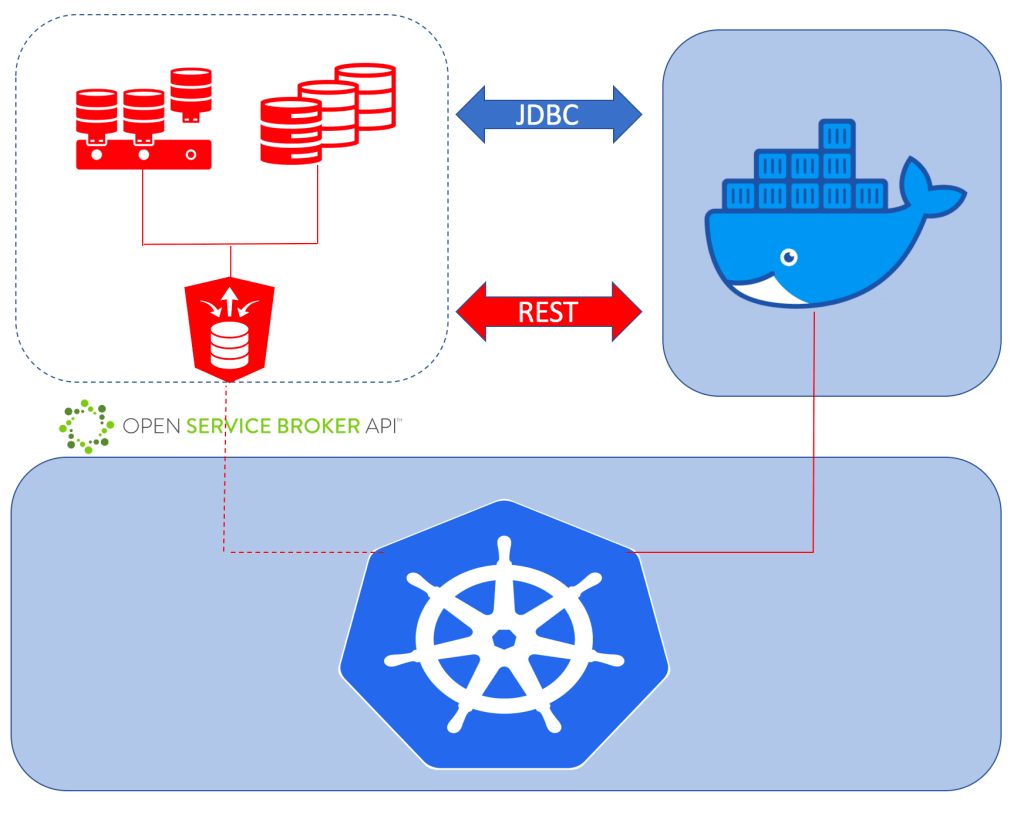
Oracle REST Data Services implements an Open Service Broker API for each connection pool. More information about the services and plans available through the service broker can be found in the ORDS User Guide – Configuration of Database API with Open Service Broker API Compatible Platforms. This post provides an overview of why an Open Service Broker provided by ORDS could change how you automate the provision of databases and users.

Most software systems require a database for data storage & retrieval and database users to perform operations on that data. Applications can interact with the database through an API specific to the programming language ( such as JDBC ) or REST.

These ORDS OSB services open up new automation possibilities for provisioning databases and users using tools and scripting platforms that developers and system operators will already be familiar with. Scripts to run Oracle DBCA or specific SQL commands can now be replaced with more platform specific artifacts that are used with the tools for that platform. For example, to creat a new User Acceptance Test pluggable database instance by cloning:

kubectl create -f clone-user-acceptance-test-instance.yaml

Where the clone-user-acceptance-test-instance.yaml might look like this:

apiVersion: servicecatalog.k8s.io/v1beta1
   kind: ServiceInstance
   metadata:
     name: pdbtest1-instance
     namespace: ords-osb
   spec:
     clusterServiceClassExternalName: create-pluggable-database
     clusterServicePlanExternalName: clone-database
     parameters:
       pdb_name: pdbtest1
       src_pdb_name: db0918_pdb1

In the above case, the create-pluggable-database service has been defined in the ‘ords-osb’ namespace and the administrator has not had to share the credentials . Sensitive information can be managed in a manner that is more suitable for the platform. The Kubernetes Service Catalog topics for operators provides more information on best practice for this.

Cloning existing pluggable databases is likely to be the fastest way to provision new test environments because the source database can have all the necessary object structures, seed data and users for the application to be tested. Depending on the application there might be more database users required too. ORDS can not only provision pluggable databases through it’s open service broker interface, but also database users and those database users can be REST enabled too!

If you’re already using kubernetes or cloud foundry as part of your development or production infrastructure then take a look at how you can do more with your existing Oracle databases through Oracle REST Database Services.

Get notified about new releases

In a previous post I mentioned how to check the version of ORDS you’re using. How do you findout that there is a new release of Oracle REST Data Services available?

One option is to follow @OracleREST on twitter. You’ll get more than just updates on releases too so it’s well worth it.

Another option is to use a website monitoring service to track the download page. The URL could change, but for now, it’s https://www.oracle.com/database/technologies/appdev/rest-data-services-downloads.html

As an example, here are the steps to use the visualping free service plan to monitor the ORDS download page once a day. We are relying on the URL for ORDS downloads to remain the same and for the positioning of release information to remain in the same place on the page. If any of that changes, the monitoring job definition will have to change.

The obvious first step is to sign up and create an account. Once logged in, create a monitoring job.

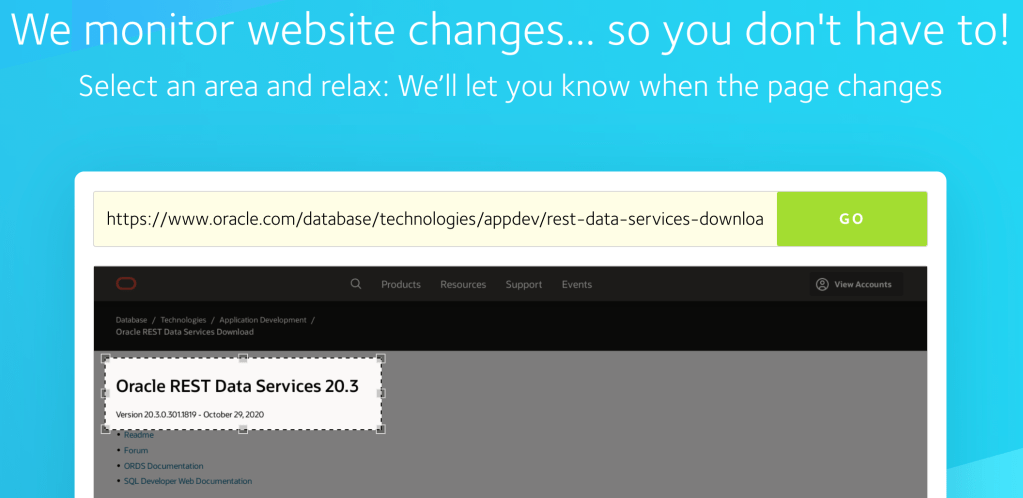
Enter the ORDS download page URL, press GO. When the image renders, position the monitoring box. This defines the section of the page that will be monitored for changes.
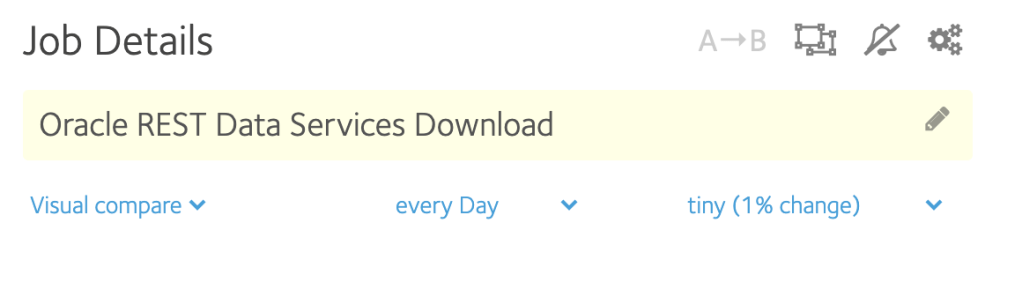
Give the job a name. The type is Visual Compare which is checked everyday for tiny changes.
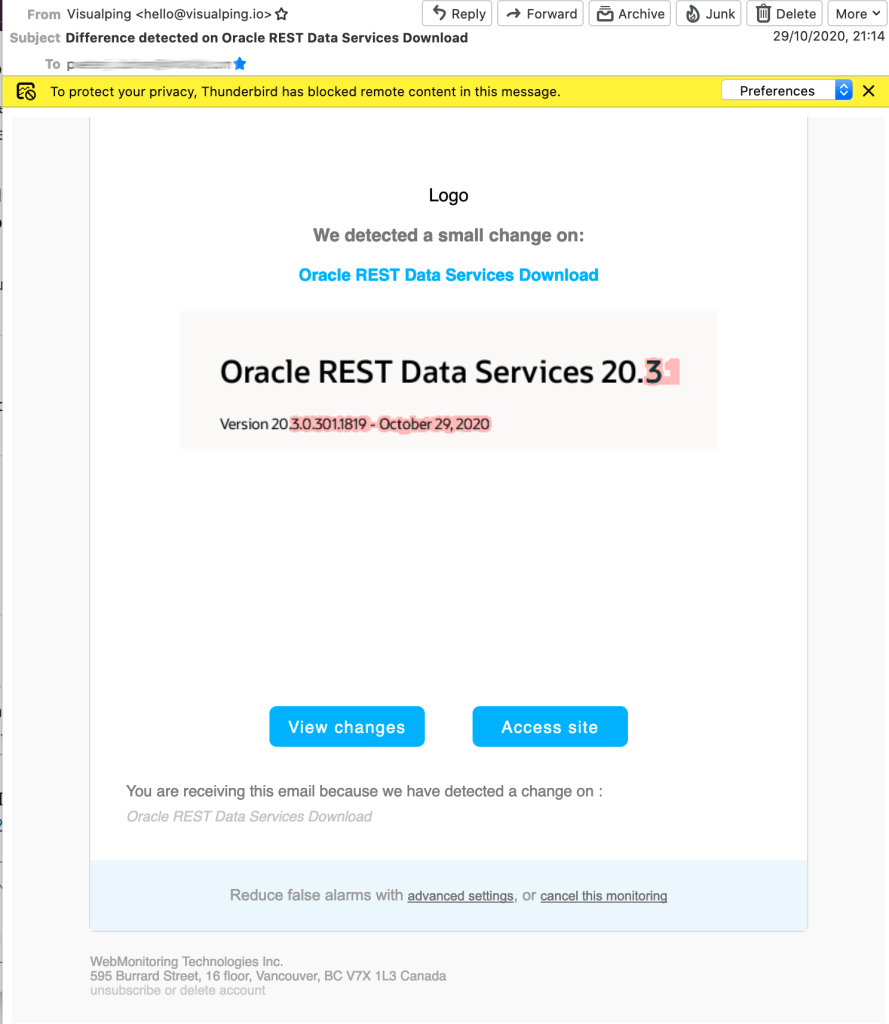
When a change is identified you’ll receive an email like this one

There are alternative website monitoring software available to you. Some are free and some you have to install and run yourself. The above concept of tracking the ORDS download page for changes can be used in most.

Either way, following @OracleREST is always a good idea.

[Update for ORDS 22+] So what version of ORDS am I actually running?

A little while ago ORDS version 20.2.1.227.0350 became available for download from oracle.com and was also rolled out to Autonomous Database Shared regions around the world. Oracle REST Data Services has been available on Oracle Cloud for quite some time but this is the first time the release notes specifically mention Autonomous Database Shared.

If you are running a customer-managed ORDS for your Autonomous Transaction Processing, Autonomous Data Warehouse, or Autonomous JSON Database, you must upgrade your ORDS to version 20.2.1. Failure to do so could lead to service disruptions.

Oracle REST Data Services 20.2.1.r2270350 Release Note

Why does this matter? Before answering that, some basic concepts to cover first. At a high level, an ORDS installation consists of three parts:
– The Java application that accepts, validates and processes the HTTP requests. This is the ords.war running standalone, in WebLogic Server or Tomcat Server.
– The file system that contains the configuration settings for the ords.war to make and manage database connections, as well as static files and so on.
– The database that ORDS connects to and where users define & run their REST services in. This information and the database procedures for running these services are in the ORDS_METADATA schema.

When a customer first installs and configures ORDS the database(s) which ORDS will provide a RESTful interface for, will also have ORDS specific database objects installed. The version of the ords.war and the version of the ORDS_METADATA should be the same because they are coded, built and tested together before release. While it is possible that ORDS will work just fine if the ords.war and ORDS_METADATA versions are out of synch the expected behaviour is unspecified in this scenario.

At a high level, an ORDS installation consists of the application, file system and database.

ORDS Java application ( ords.war ) version

There are a number of ways to get the application version. From the command line…

java -jar ords.war version

Update for ORDS 22+

When using ORDS 22+ the above command will show you the version but will also show this error message:

java -jar ords.war version
Warning: Support for executing: java -jar ords.war has been deprecated.
Please add ords to your PATH and use the ords command instead.
...
ORDS: Release 22.4 Production 
...

The output does give you the high level version number but the correct command to use with ORDS 22+ is in fact:

ords --version

That’s assuming the ords script is in your path. If not, the correct command is:

$ORDS_INSTALL_DIR/bin/ords --version

Now, back to the other steps to get the ORDS Java Application version number…

From the SQL Developer Web through Preferences > About…

From within APEX through SQL Workshop > RESTful Services > ORDS RESTful Services…

From within APEX through Help (?) > About. In this case it’s called the APEX_LISTENER_VERSION…

ORDS repository ( ORDS_METADATA ) version

The metadata version can be obtained through an SQL query in the database…

select ords.installed_version from dual;

The above query can be executed in SQL Developer Web worksheet, APEX SQL Workshop > SQL Commands, sqlplus, sqlcl, SQL Developer. Effectively, anywhere you can run a query from.

Conclusion

It is possible for an ORDS installation to have the ords.war and ORDS_METADATA versions out of synch. This can happen if one runs a new version of ords.war against a database that already has ORDS installed without going through the installation or upgrade process or the database metadata is upgraded but the runtime ords.war is not. The latter can happen for Customer Managed ORDS on Autonomous Database. When doing so, always regularly check the application and database versions are in synch.