Getting requestor’s IP address through Oracle WSM

Oracle Web Services Manager (OWSM – some people pronounce it as ‘Awesome’) plays an important roll in Oracle’s contribution to SOA governance. Put simply, it brings better control and visibility over how, when and by whom, web services are invoked. OWSM, which is a key product in the Oracle SOA Suite, was voted one of the best security solutions by SYS-CON Media, the world’s leading i-technology media and events company in it’s 2007 SOAWorld Readers’ Choice Awards.

Apart from the predefined policies, OWSM provides an extensibility point to define a custom policy step that can be executed as part of the request or response pipeline. There is an Oracle by Example (OBE) tutorial available that provides details for creating a custom step. The custom step authenticates the user against a fixed set of username/password credentials configured in the policy step pipeline.

You can go one step further and check IP address of the requesting client by accessing the HttpServletRequest in the MessageContext in the execute operation of your custom step code.

import com.cfluent.pipelineengine.container.MessageContext;

((HttpServletRequest) ((
MessageContext) messageContext).getProperty(“javax.servlet.request”)).getRemoteHost()

Remember that if there are proxies or NAT address translations between the requester and the provider you won’t know the real source IP. Clearly this only works for HTTP based requests. However, a similar approach could be used for JMS.

It is worth mentioning Vikas Jain’s Web Services Security blog which is a treasure trove of useful information on OWSM.
Best in class for digital camera advice

Now that I’m doing more Flex development I’m branching out into all sorts of wonderful animations, charts, and countless ways to navigate through and manipulate images. So, after years of ‘server side’ I’m discovering pictures! I’m also discovering that lot’s of people I know include photography amongst their list of hobbies. Some of them go even further by trying to make some money out of it, and they do, sometimes. Of course it doesn’t necessarily always cover the cost of the equipment. Or at least I thought so until I started noticing that not everyone is using a hi-tech superduper gizmo and gadgets to take good photos. Quite a few use cameras from the Canon PowerShot range because they are fast, but not ridiculously expensive.

After a while you begin to notice that they actually have more than one camera, quite a few actually. So how do they choose which is right one? Many are using BestInClass to research digital cameras in particular. Using the unbiased recommendations of qualified hobbyists and professionals, and a clever set of simple search criteria, this simple site is a good place to start when looking for best in class advice on digital cameras.

Performance testing of asynchronous processes

Generally, the most complicated part of performance testing is getting the data shape right. Populating the system with thousands of users, records and so on is made easier by data generation tools, but it still requires a lot of thought. Often the testing simply involves making a request and asserting that the response time was within acceptable limits. Systems that validate the parameters, particularly time based parameters, in these requests make it a bit more complicated to automate the performance testing. Think of session tokens, or other sets of data that are only valid for a short period of time.

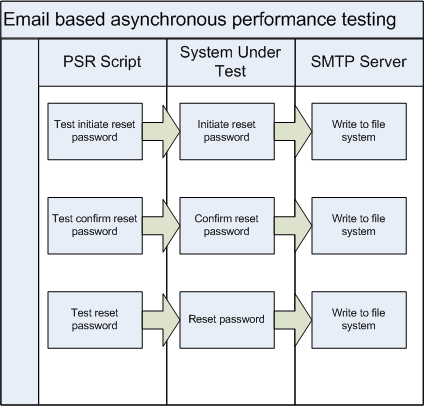
When working on Social CRM we had a similar challenge. There are a number of processes that are asynchronous and to further complicate matters, involve email. The reset password process is a good example. There are 3 steps:

  1. Initiate reset password – A user specifies an email address and the system sends an email asking do they really want to reset their password. This email contains a URL with a number of parameters to verify that only the person receiving the email can move to the next step.
  2. Confirm reset password – A user clicks on the URL link in the email to confirm that they want to reset their password. The system verifies the parameters, generates a new temporary password and sends the user an email. The user can not log in with this temporary password.
  3. Complete reset password – A user clicks on the URL link in the email, enters their temporary password and their new password in order to be able to log into the system.


A number of these parameters are not stored anywhere, except in the email. There are other system checks and balances to verify some of these parameters. Therefore, when automating the performance testing, it is not possible to populate the database with a full set of valid data and run the script. Access to the generated email content is required. This is where SubEthaSMTP and Wiser help out.

By having an implementation of Wiser to write the emails to a file, all of the time based parameters, that are not stored anywhere, are available for a subsequent performance testing script to refer to.

When is automated testing required?

This question gets asked a lot, particularly as there is a cost in implementing automated tests. There is also a benefit, but it is harder to quantify. When a development team has a limited amount of time between releases there is often a preference to implement new functionality rather than automate testing for existing functionality. With Agile Software Development methodologies, the role of the tester is more complex, but automation of testing is clearly a responsibility.

It is easy to say that 100% of the system functionality should be tested automatically and to ensure that regressions do not occur, that this testing should be performed by a developer before they check in changes. It is hard to justify the cost of doing so as the information on how many defects automated testing prevented does not often get recorded.

The simplest place to start is to review the regression defects that have been raised in the past. This should highlight the functionality that tends to break the most when changes are made. After implementing automated regression testing the journey starts in growing the range of automated test suites. Assuming, of course, that developers are using the automated testing before checking in their changes, one should also see a reduction of the regression defects being raised in areas with automated testing.

Social CRM @ OOW 2008

At this years Oracle Open World watch out for some fantastic Social CRM sessions and demonstrations. Below are two sessions in particular to put into your diary where the next generation of Social CRM applications will be shown off. Since the launch of the Oracle Social CRM Applications earlier in the year Tara Roberts, amongst others, have been blogging about the new Social CRM paradigm.

Session ID: S300050
Session Title: Social CRM Applications Strategy Overview and Road Map
Session Abstract: Oracle’s social CRM applications provide a new level of end-user productivity that finally gives sales professionals the kinds of tools they need for accelerating sales cycles. In this session, learn from Oracle product experts how organizations can use these applications to increase user adoption and make their sales teams more productive.
Duration: 60 minutes
Speaker: Mark Woollen, Oracle
Session ID: S300051
Session Title: Social Sales Applications: Focus on End-User Productivity
Session Abstract: Oracle’s new Social Sales Applications — Oracle Sales Prospector, Oracle Sales Campaigns, and Oracle Sales Library — deliver specific end-user functionality to make sales professionals more productive throughout the sales cycle. This session will highlight social capabilities and social intelligence supported by these applications and provide demonstrations of these applications at work.
Duration: 60 minutes
Speaker: Tara Roberts, Oracle