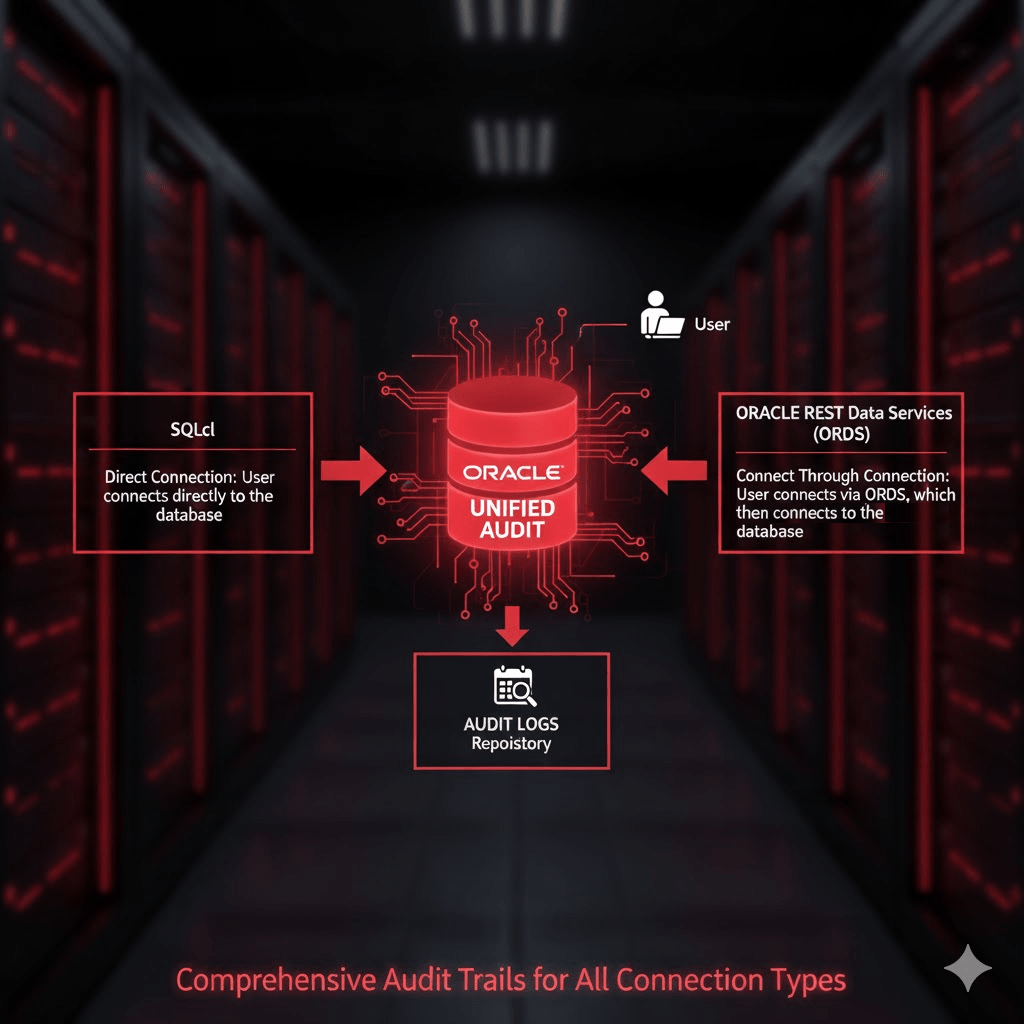
Oracle REST Data Services (ORDS) 26.1.0 is out and one of the new features is Vector Search which we’ll explore in this article. Before diving in, this post assumes you have already worked through:
👉 Getting Started with Vectors in 23ai
That article is the foundation and introduces the CCNEWS dataset (200,000 news headlines) along with embedding generation and SQL-based vector search. The step by step article is easy to follow and even involves using ORDS to define a REST service for performing that vector search. What is also nice about the article is that everything it covers is easy to implement and does not require any external services. In my case, I run all of it locally using ORDS and Oracle AI Database 26ai Free Container Image in docker.
Here, we build directly on that article and show how Oracle REST Data Services 26.1.0 simplifies exposing that Vector Search functionality over REST with no code in Oracle Database 26ai.
1. The CCNEWS Table (From the Prerequisite)
Assuming you have followed all the steps in the article you have a 26ai database with a VECTOR_USER schema that has a CCNEWS table.
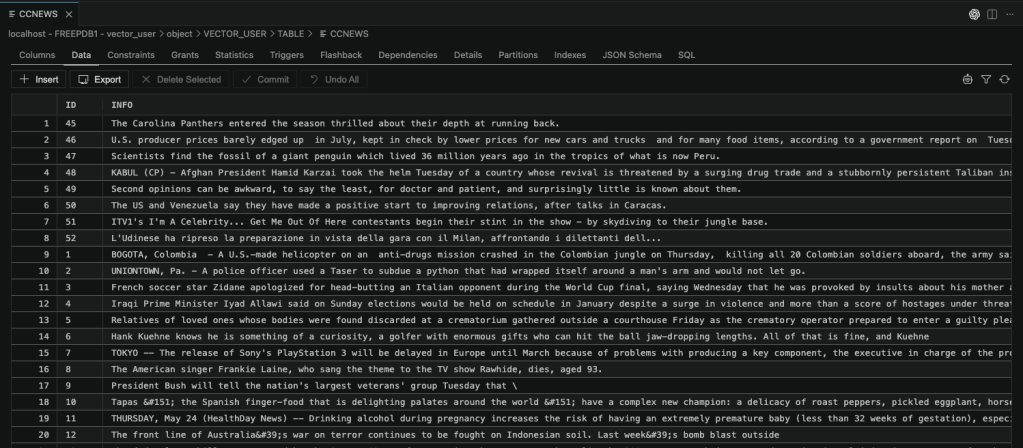
So that table was created with this statement from the original blog post:
create table if not exists CCNEWS (
    id number(10) not null,
    info VARCHAR2(4000),
    vec VECTOR
);
Important: Primary Key Requirement
ORDS Vector Search on REST enabled objects requires a primary key. If not already defined, run this:
ALTER TABLE VECTOR_USER.CCNEWS
ADD CONSTRAINT CCNEWS_PK PRIMARY KEY (ID);
2. Vector Search in SQL (From the Article)
The Database & Cloud Technology article uses Oracle’s VECTOR_DISTANCE function combined with VECTOR_EMBEDDING for a similarity search:
select id, info
from CCNEWS
order by vector_distance(vec, TO_VECTOR(VECTOR_EMBEDDING(doc_model USING 'little red corvette' as data)), COSINE)
fetch approx first 5 rows only;
Key points:
VECTOR_EMBEDDINGgenerates the query vectorVECTOR_DISTANCEcomputes similarityCOSINEis used as the distance metricFETCH APPROXlimits the number of rows returned using an approximate nearest neighbour search
3. The ORDS Handler Approach
To expose that vector_distance based query via ORDS previously, you needed a custom service:
BEGIN
  ORDS.define_service(
    p_module_name    => 'vectorsearch',
    p_base_path      => 'ai/',
    p_pattern        => 'ccnews/:mysentence',
    p_method         => 'GET',
    p_source_type    => ORDS.source_type_collection_feed,
    p_source         => 'SELECT id,info from CCNEWS
                         order by vector_distance(
                           vec,
                           TO_VECTOR(VECTOR_EMBEDDING(doc_model USING :mysentence as data)),
                           EUCLIDEAN
                         )
                         fetch approx first 5 rows only',
    p_items_per_page => 0);  COMMIT;
END;
/
Call it
curl 'http://localhost:8080/ords/vector_user/ai/ccnews/little%20red%20corvette'
That will get you a response like this:
{
   "count" : 5,
   "hasMore" : false,
   "items" : [
      {
         "id" : 142622,
         "info" : "CHICAGO -- Small cars have been getting great copy lately. They're lauded for their anti-gas guzzling efficiency and improved safety features."
      },
      {
         "id" : 79167,
         "info" : "A red car will start on pole as usual, but the probability that Ferrari will end the season with yet another win, their 16th in 18 races, is not quite as grim as it sounds."
      },
      {
         "id" : 182103,
         "info" : "With her red velvet hooded cape, Cybill Shepherd could have been Little Red Riding Hood."
      },
      {
         "id" : 182000,
         "info" : "When it comes to helping the environment or saving money at the pump, it's hard to beat one of the new mini-cars, like the Nissan Versa, Toyota Yaris and Mini Cooper."
      },
      {
         "id" : 57282,
         "info" : "Customized cars that use commercial logos as a creative palette."
      }
   ],
   "limit" : 0,
   "links" : [
      {
         "href" : "http://localhost:8080/ords/vector_user/ai/ccnews/little%20red%20corvette",
         "rel" : "self"
      },
      {
         "href" : "http://localhost:8080/ords/vector_user/metadata-catalog/ai/ccnews/item",
         "rel" : "describedby"
      }
   ],
   "offset" : 0
}
Observations
- The query string (
:mysentence) is passed directly intoVECTOR_EMBEDDING - Distance metric is explicitly set to EUCLIDEAN
- ORDS handles binding, but you still manage:
- Module definition
- URL structure
- SQL text
This works—but it involves encoding a query as a service.
4. ORDS 26.1.0: Built-in Vector Search
With ORDS 26.1.0, none of that is required for basic vector search.
Step 1: Enable AutoREST
As the VECTOR_USER run this to REST Enable the CCNEWS table.
BEGIN
  ORDS.enable_object(
    p_object       => 'CCNEWS'
  );
  COMMIT;
END;
/
That will give you a huge range of RESTful services for interacting with the table without any coding.
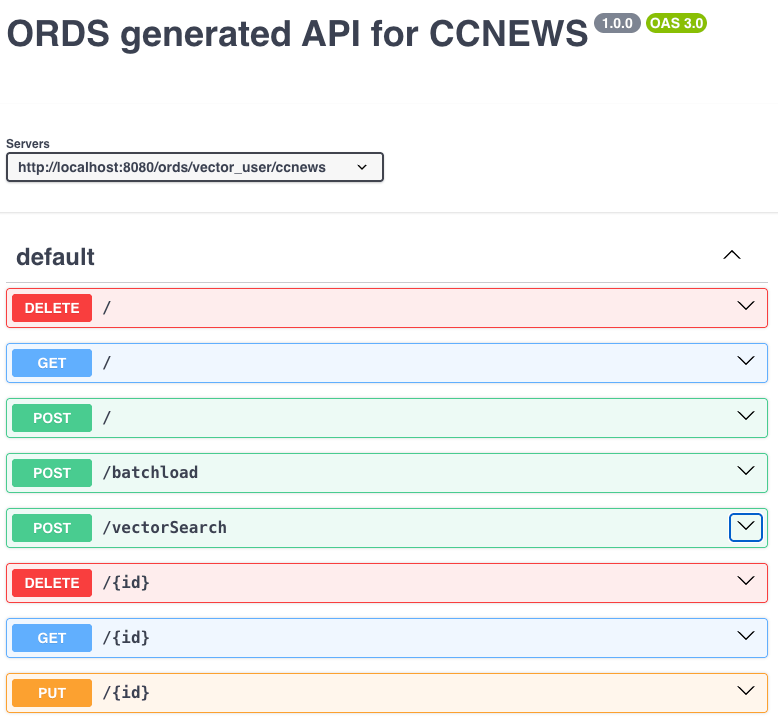
Step 2: Use the Built-in Endpoint
Let’s look at the POST /vectorSearch operation. To perform the Vector Search there are certain values that must be provided in the request body. The ORDS Vector Search documentation describes them all so we will not go into details here.
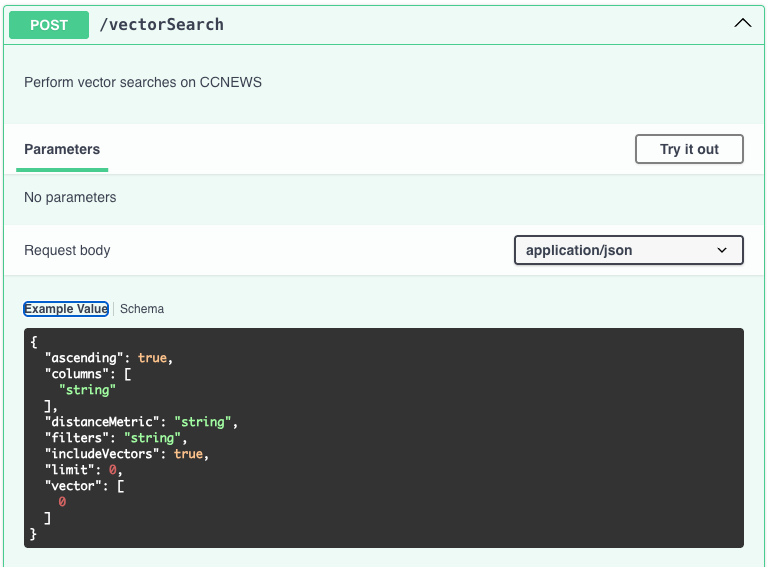
The full path for the Vector Search operation on the CCNEWS table in the VECTOR_USER will look like this:
POST /ords/vector_user/ccnews/vectorSearch
5. Equivalent Vector Search via ORDS
Instead of embedding generation happening inside SQL, the client supplies the vector:
curl -X POST http://localhost:8080/ords/vector_user/ccnews/vectorSearch \
  -H "Content-Type: application/json" \
  -d '{
    "vector": [/* embedding for "little red corvette" */],
    "vectorColumn": "VEC",
    "columns": ["ID", "INFO"],
    "limit": 5,
    "distanceMetric": "EUCLIDEAN"
  }'
The client will have to know the AI model used for populating the VECTOR data but it has a wider range of options. That includes further filtering of rows in the same manner as what can be achieved through GET on the same table. See Filtering In Queries section of the ORDS documentation.
Key Difference vs Custom Handler Approach
| Custom Hander | AutoREST Vector Search |
|---|---|
Embedding generated in SQL (VECTOR_EMBEDDING) | Embedding supplied by client |
| Custom handler required | Built-in endpoint |
| SQL embedded in ORDS | No SQL required |
URL parameter (:mysentence) | JSON payload |
| No refinement on search criteria | Client can specify order, number of rows to return, specific columns to include in the response and additional filter criteria. |
| Primary Key Hyperlinks require extra coding | Automatic Primary Key Hyperlinks for each row in the response. |
Keep in mind that both approaches can be used at the same time. In some scenarios the client will know the model for the table or have the means to generate a vector array to search with.
Note that as with the initial article, the services provided are not secured and the ORDS instance is not using HTTPS for traffic. That’s fine for this exercise but not for production.
6. Let’s see it in action
Since the client now has to provide the vector to search for, to perform the exact same search one must get an embedding for little red corvette using the same model. Easily done by running:
select VECTOR_EMBEDDING(doc_model USING 'litle red corvette' as data)
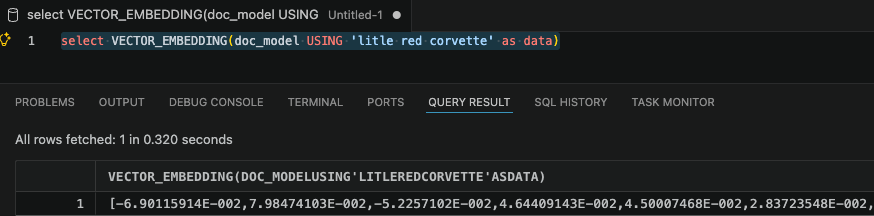
Using that in a cURL command will look like this:
curl --location 'http://localhost:8080/ords/vector_user/ccnews/vectorSearch' \
--header 'Content-Type: application/json' \
--data '{
  "limit": 5,
  "vector": [-3.07053532E-002,5.85529916E-002,-6.74578473E-002,1.2257684E-002,6.316524E-002,-2.40801703E-002,7.64445635E-003,3.26403342E-002,-5.40543646E-002,6.23201914E-002,8.92788619E-002,6.09119842E-003,8.08357634E-003,-2.87142694E-002,-3.36633772E-002,-1.59669053E-002,1.10877827E-001,5.03755994E-002,-3.0524137E-003,2.27314071E-003,-8.80712047E-002,4.54846956E-002,-1.76324453E-002,5.4300325E-003,-7.49083012E-002,-7.84977898E-003,-1.03094578E-001,3.23520638E-002,-5.20449802E-002,-8.81914124E-002,5.09979203E-003,-2.28075747E-004,8.27756822E-002,1.80074794E-003,-2.35566851E-002,-5.18809892E-002,2.15939945E-003,-2.15763152E-002,-4.92988527E-002,4.24234103E-003,-3.89126204E-002,-1.08256757E-001,1.64869614E-002,1.02524489E-001,9.25767645E-002,-2.06774045E-002,-1.8368477E-002,1.33422706E-002,8.78902823E-002,-6.02279529E-002,3.43158655E-002,-9.60535407E-002,-2.74095945E-002,-2.8675979E-002,4.55864891E-002,2.63328925E-002,1.72216333E-002,-1.97178405E-002,6.42947182E-002,-2.79306769E-002,-2.80832332E-002,3.09923105E-002,-2.81780143E-003,-2.21623778E-002,1.51646696E-002,-5.2848449E-003,3.95465866E-002,-3.46338265E-002,-5.43230511E-002,3.11623141E-002,3.56283262E-002,-3.72483805E-002,-3.45825478E-002,-5.79019776E-003,-5.63643761E-002,-3.12294867E-002,8.83353204E-002,-3.03997919E-002,-1.23773552E-002,-5.15865511E-004,-3.59914801E-003,-1.69582665E-002,-7.76734948E-002,-4.63231243E-002,6.63533583E-002,-3.5777919E-002,4.40812893E-002,5.63600361E-002,-5.28740976E-003,5.69755659E-002,-5.50081208E-002,6.87551275E-002,3.28732915E-002,1.58981874E-003,-5.56428321E-002,-7.57648051E-002,5.8034081E-002,-6.68441579E-002,-3.73762697E-002,1.87148571E-001,1.12300172E-001,4.12532054E-002,1.00773335E-001,5.72219677E-003,-3.81047241E-002,3.35666686E-002,7.77937025E-002,4.77051288E-002,-2.15624534E-002,-1.18911706E-001,-2.00342126E-002,7.05829309E-003,-8.89590383E-002,-2.68359855E-002,-6.41334206E-002,-4.22521196E-002,-7.08332583E-002,-5.96234351E-002,-3.76171395E-002,3.2652244E-002,-4.96881641E-002,-7.7103138E-002,-2.48034019E-002,5.12335682E-003,7.085336E-002,-1.47623777E-001,5.37105873E-002,3.64335366E-002,-2.60975622E-002,5.82129369E-003,-8.14416409E-002,6.67800754E-002,2.08732914E-002,1.19046867E-001,5.18846847E-002,9.57678165E-003,-3.64857614E-002,7.76776895E-002,-3.93842794E-002,-9.8264575E-002,-4.7032699E-002,-5.16803861E-002,3.27760428E-002,3.26377489E-002,-6.59162626E-002,-1.05144009E-001,-3.22745182E-002,-5.92551716E-002,-1.13562755E-001,1.25622064E-001,1.14990778E-001,8.03940892E-002,7.66430572E-002,5.89383543E-002,-9.20753181E-003,-3.60060111E-002,-2.22714879E-002,6.28050696E-003,3.42132933E-002,6.13801964E-002,1.75386257E-002,-1.80134606E-002,-3.39894332E-002,-2.67520901E-002,-3.81485149E-002,-1.25639021E-001,2.98075918E-002,-4.81692702E-003,-5.38430316E-003,-2.68271938E-002,-8.80813152E-002,7.9674378E-002,8.1708869E-003,4.49210731E-003,4.93363179E-002,9.08218604E-003,2.98463684E-002,1.67458635E-002,4.30809148E-002,-6.30635628E-003,-3.66868116E-002,2.24808641E-002,-1.97107941E-002,4.19183187E-002,-2.07382943E-002,7.16343299E-002,-1.17987087E-002,2.83470232E-004,5.55337667E-002,3.85905765E-002,2.60068625E-002,2.47582365E-002,5.64134903E-002,7.59846391E-003,-6.95330277E-002,-5.1294744E-002,-2.89460607E-002,3.93225159E-003,2.4446765E-002,-5.46594113E-002,4.43796702E-002,-7.10089058E-002,3.78895737E-002,-7.63406715E-005,3.07969283E-002,-1.99558139E-002,1.54345371E-002,-8.88657868E-002,8.84383637E-003,-2.23286971E-002,-2.45919079E-002,-3.978635E-002,5.16027845E-002,-2.32025366E-002,-2.45015081E-002,7.69026503E-002,-2.96384431E-002,1.53524885E-002,-2.90377047E-002,-2.80109104E-002,4.53478694E-002,-3.58900763E-002,2.99728755E-002,-1.45389412E-033,1.88392568E-002,-6.47298545E-002,1.01908617E-001,-1.31587433E-002,-1.85926091E-002,-2.86066998E-002,-1.33587588E-002,-1.80519139E-003,-1.71739608E-002,-4.6595633E-002,-4.6931956E-002,8.30989629E-002,1.53468493E-002,-5.12199767E-004,1.04117207E-001,-1.2125371E-002,-1.8739434E-002,4.73202318E-002,2.74012014E-002,8.04362372E-002,-2.32837833E-002,-7.19153807E-002,2.11932212E-002,2.4031328E-002,-3.77282277E-002,5.17850779E-002,-6.48160726E-002,3.25367749E-002,-2.89279353E-002,-6.88138753E-002,-2.91798194E-003,-4.56949286E-002,2.95383874E-002,1.14016305E-003,-3.78589332E-002,-6.03643758E-003,2.98500806E-002,-4.85490002E-002,4.10790853E-002,-2.5354486E-002,-9.72109195E-003,-2.7718816E-002,-4.33942713E-002,6.56506717E-002,9.87958163E-004,-6.58345083E-003,5.29988557E-002,-1.82564501E-002,6.05667047E-002,-2.87184888E-003,1.63399044E-003,-8.17960426E-002,2.47597024E-002,3.14391218E-002,-2.03312412E-002,4.33304794E-002,4.25058976E-002,6.37011081E-002,3.73960882E-002,-1.86836459E-002,1.70387905E-002,2.79710498E-002,-3.8476523E-002,-2.18143836E-002,-2.01852974E-002,-2.65123788E-002,-1.21113239E-002,1.73476618E-002,-2.11952161E-002,-2.85385773E-002,-8.24076403E-003,2.16407981E-002,9.9034654E-003,-4.52033617E-002,-1.22422148E-002,1.14305643E-002,9.72609892E-002,4.52578627E-002,4.41269763E-002,-2.55465172E-002,-3.49305272E-002,-5.51500618E-002,5.64764142E-002,1.05597645E-001,-1.18475445E-002,-6.03516959E-002,4.99546118E-002,4.38831076E-002,-4.56738211E-002,4.00517136E-002,1.65134482E-002,8.81506428E-002,-2.3371242E-002,9.05854441E-003,-1.08199259E-002,1.63877298E-032,-1.96534507E-002,6.13839971E-003,2.32135262E-002,-3.43828648E-002,5.41330278E-002,1.27508137E-002,5.94790131E-002,-6.85228733E-003,-9.60054323E-002,-6.71492144E-002,-5.39250374E-002,-1.74073465E-002,1.59162041E-002,-7.3701553E-002,-2.2581771E-002,3.65978405E-002,1.47042209E-002,-7.16396943E-002,7.73388445E-002,-1.16045386E-001,2.4834685E-002,7.23040178E-002,3.32084112E-002,3.31360511E-002,1.10893575E-002,-9.28622484E-002,-4.19785641E-002,2.29144283E-002,9.44261849E-002,-8.33413657E-003,2.91968007E-002,5.88697419E-002,-1.39651537E-001,-6.11314899E-004,2.57693212E-002,-4.38742265E-002,1.74329523E-002,8.57599378E-002,5.69615103E-002,-9.78489816E-002,1.14794098E-001,-1.86840519E-002,-7.20299184E-002,3.69497389E-002,1.7280845E-002,2.3233227E-003,2.18159296E-002,-7.62700588E-002,4.16742787E-002,-3.8183827E-002,2.58755721E-002,4.36592326E-002,-3.85195836E-002,-1.25658726E-002,-6.86033443E-002,-2.30002753E-003,-4.88031134E-002,5.49012981E-002,-8.51705298E-002,2.89389715E-002,-4.43107588E-003,-2.64256331E-003,-2.68490277E-002,2.34105438E-002]
}'
Since it is not easy to manage long cURL commands like this I imported the OpenAPI V3 document from http://localhost:8080/ords/vector_user/open-api-catalog/ccnews/ into Postman..
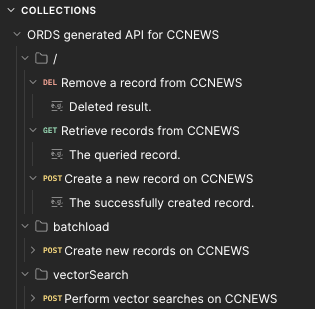
Making that little red corvette search now looks like this:
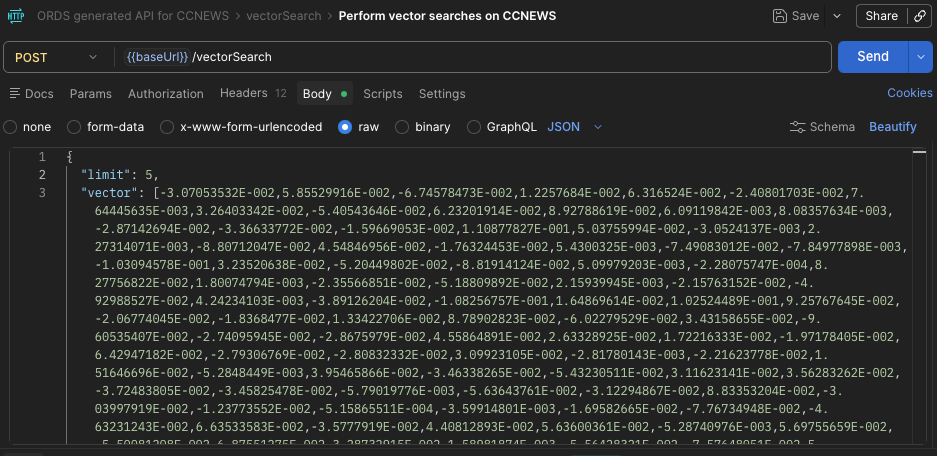
Everything else, such as what columns to return or what distance metric to use, will default. The response will look like this:
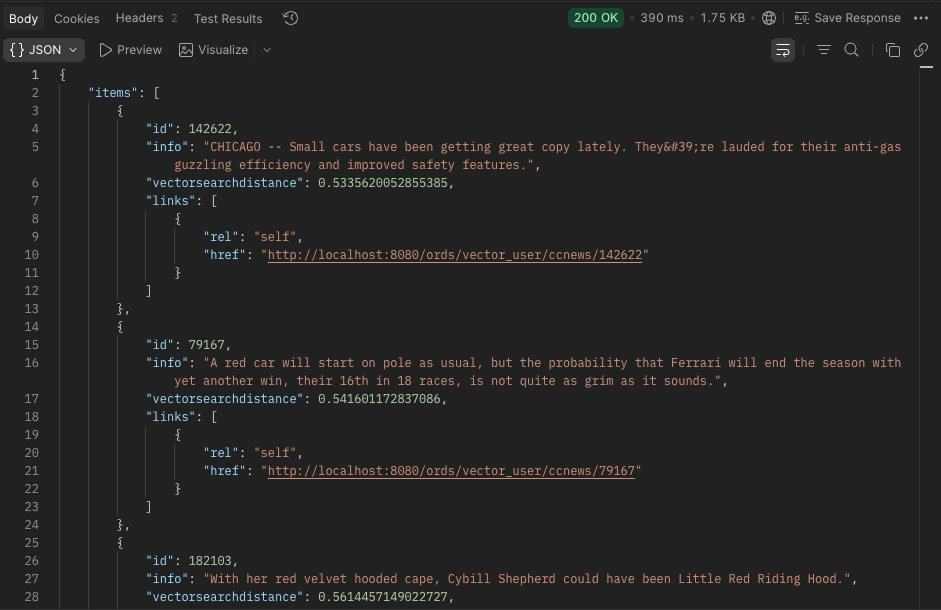
Runtime error?
If you are getting a ORA-25716: The identifier contains a double quotation mark (") character exception when calling the /vectorSearch service then check that you have defined a primary key for the CCNEWS table.
7. Distance Metric Comparison
Notice an important shift:
- Old handler used:
EUCLIDEAN - SQL example used:
COSINE - ORDS allows either via
distanceMetric
Example
{
  "distanceMetric": "EUCLIDEAN"
}
or
{
  "distanceMetric": "COSINE"
}
Impact at Scale (200K Headlines)
- COSINE → best semantic similarity (recommended for text)
- EUCLIDEAN → slightly different ranking due to magnitude sensitivity
This is now a runtime choice, not hardcoded in SQL.
8. What Changed Architecturally?
Then
- SQL handled:
- embedding generation
- similarity calculation
- ORDS:
- exposed SQL via REST
Now (ORDS 26.1.0)
- Database:
- stores vectors
- performs similarity search
- Client:
- generates embeddings
- ORDS:
- provides a native vector search endpoint
Final Thoughts
Using the same CCNEWS dataset from the prerequisite article, we’ve moved from:
Custom REST services wrapping SQL
to:
Native vector search exposed automatically via ORDS
With Oracle Database 26ai + ORDS 26.1.0, the requirements are minimal:
- A
VECTORcolumn - A primary key
- One
ORDS.enable_objectcall
And your dataset becomes:
A fully functional semantic search API