Oracle REST Data Services (ORDS) provides a powerful way to expose Oracle databases via REST, what if you could extend this capability to databases like DB/2, MySQL, PostgreSQL, and SQL Server—without installing ORDS on each database? In summary, your applications can interact with multiple databases, because a universal RESTful interface can streamline access and reduce development complexity.
Find out more and see the custom code in action!
As an extensible product where you can develop your own plugins, you can code your own ORDS JDBC AutoREST Plugin. To learn more about plugins in ORDS see: Crafting your ORDS plugin the Maven way
What is the ORDS JDBC AutoREST Plugin?
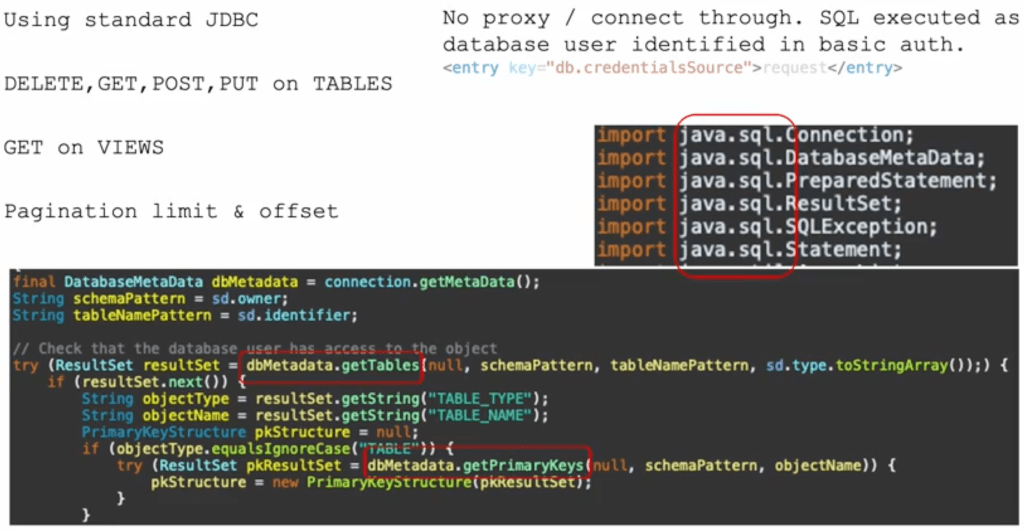
The ORDS JDBC AutoREST Plugin is a custom plugin for Oracle REST Data Services that enables RESTful access to a variety of relational databases. Using standard JDBC, it acts as a bridge between ORDS and databases beyond Oracle, providing a unified API layer.
Key Features
Multi-Database Support: Works with DB/2, MySQL, Oracle, PostgreSQL, and SQL Server.
Standard JDBC: Uses JDBC drivers to communicate with target databases.
No ORDS Installation Required: The target database does not need an ORDS installation.
RESTful Interface: Automatically generates REST endpoints for CRUD operations.
API Driven: The service definition metadata is in an OpenAPIV3 document which is reloaded every 5 minutes. Changes are picked up without a restart.
How It Works
Architecture Overview
The plugin integrates with ORDS and utilizes JDBC to interact with databases. ORDS remains the entry point, processing RESTful requests and translating them into SQL queries executed via JDBC connections.
A client sends a REST request to ORDS.
ORDS uses the basic authentication credentials to make a JDBC connection to the target database.
The ORDS JDBC AutoREST Plugin reads the API document that describes the database objects and services. It then generates the SQL statement and executes it over JDBC.
The database processes the request and returns results.
ORDS formats and sends back the response.
Subtle difference from ORDS AutoREST:
No installation required in the database
No HATEOS links generated
Only basic authentication
Of course, since you are building your own custom plugin, you can code any additional functionality you want.
Uses standard JDBC classes. No vendor specific code references.
Example Usage
Once configured, the plugin enables RESTful endpoints that map to database tables and views. For instance, a request to:
GET /autorest/employees/
Could return JSON data from an employees table, regardless of whether the underlying database is Oracle, MySQL, PostgreSQL, etc. Note that a HTTP request will require basic authentication with credentials for a database user and that user must have access to the underlying data.
Setting Up the Plugin
Prerequisites
Oracle REST Data Services (ORDS) installed and running.
JDBC drivers for the target databases.
Installation Steps
Clone the repository:git clone https://github.com/pobalopalous/ords-jdbc-autorest.git
Build the plugin and deploy it into your ORDS instance.
Configure database connections using JDBC connection strings.
Update the API document for your database to target tables or views.
Using x-autorest extension
An extension called x-autorest is used in the API document to define what tables and views are to be available, as well as what operations ( DELETE, GET, PUT, POST ) are permitted. Note that this requires that tables are defined with a primary key.
The REST service path can be an alias for the database object.For databases that use the concept of an object owner, it can be specified here.
A description of the x-autorest extension.
x-autorest:
  owner: DB2INST1 // Database user that owns the object
  identifier: INVENTORY // The database object
  type: table // The type of object table or view
Benefits & Use Cases
Why Use This Plugin?
Simplified API Development: Unified RESTful API for multiple databases.
Reduced Overhead: No need to install ORDS on every database.
Flexible Database Integration: Easily switch between databases without major application changes.
Ideal Use Cases
Multi-database applications needing a standardized REST API.
Data migration projects requiring uniform RESTful access.
Reporting and analytics tools aggregating data from multiple sources.
Conclusion
The ORDS JDBC AutoREST Plugin provides a powerful way to extend RESTful database access beyond Oracle to DB/2, MySQL, PostgreSQL, and SQL Server. With minimal setup and configuration, developers can use ORDS to expose database resources through a standard REST API, ensuring reliability without needing to install ORDS on each target database.
Explore the source code and start using it today: GitHub Repository.
Oracle REST Data Services (ORDS) can be run in standalone mode, making it easy to serve RESTful APIs without needing a separate application server. However, when running multiple ORDS instances on the same machine, each serving HTTPS traffic on a different port, users may encounter an issue: ORDS still attempts to bind to the default HTTP port 8080.
The Issue: ORDS Listens on Port 8080 by Default
In standalone mode, ORDS can listen for HTTP, HTTPS and MongoDB Wire Protocol traffic at the same time. The port numbers that ORDS listens on are configurable:
mongo.port – API for MongoDB Wire Protocol listen port, default 27017
When running more than one ORDS instance on the same machine you will want to share the same configuration, but not the same port numbers. The ORDS serve command line gives you some options around that. Quite literally…
ords serve --help
ORDS: Release 24.4 Production on Mon Feb 10 21:48:05 2025
--secure HTTPS listen port, default 8443. Must specify options --secure --port <PORT> to use HTTPS.
This allows you to run multiple ORDS instances in standalone mode from the command specifying a different port for HTTP:
ords serve --port 8081

ORDS: Release 24.4 Production on Mon Feb 10 21:53:30 2025

Copyright (c) 2010, 2025, Oracle.
...
2025-02-10T21:53:31.005Z INFO        HTTP and HTTP/2 cleartext listening on host: 0.0.0.0 port: 8081
...
2025-02-10T21:53:34.361Z INFO        Oracle REST Data Services initialized
Oracle REST Data Services version : 24.4.0.r3451601
Oracle REST Data Services server info: jetty/12.0.13
Oracle REST Data Services java info: Java HotSpot(TM) 64-Bit Server VM  (build: 17.0.12+8-LTS-286 mixed mode, sharing)
Then in another shell window…
ords serve --port 8091

ORDS: Release 24.4 Production on Mon Feb 10 21:53:30 2025

Copyright (c) 2010, 2025, Oracle.
...
2025-02-10T21:53:31.005Z INFO        HTTP and HTTP/2 cleartext listening on host: 0.0.0.0 port: 8091
...
2025-02-10T21:53:34.361Z INFO        Oracle REST Data Services initialized
Oracle REST Data Services version : 24.4.0.r3451601
Oracle REST Data Services server info: jetty/12.0.13
Oracle REST Data Services java info: Java HotSpot(TM) 64-Bit Server VM  (build: 17.0.12+8-LTS-286 mixed mode, sharing)
That’s great for HTTP. As many ORDS instances as you like so long as you specify a unique port number for each.
For HTTPS, just add the --secure option like this:
ords serve --port 8444 --secure
Well, that would work for one instance but not for your second. By default, when ORDS runs in standalone mode, it listens for HTTP traffic on port 8080 and HTTPS traffic on the port specified by the --port argument when using ords serve --secure. This means that even if you specify a different secure port for each ORDS instance, the HTTP listener on 8080 may cause conflicts if multiple instances are running.
Could not start Standalone Mode because the listen port: 8080 is already in use by another process. Check if another instance of ords is already running
The upshot is that you can not start that second ORDS instance no mater what secure port you specify. There’s a solution…
The Solution: Disable the HTTP Listener
To avoid conflicts, you must explicitly disable the HTTP listener by setting the standalone.http.port configuration parameter to 0. This prevents ORDS from attempting to bind to port 8080 when serving HTTPS traffic.
Steps to Run Multiple ORDS Instances with Different Secure Ports
Disable HTTP Listener Use the ORDS command line to set the HTTP listen port to zero: ords config set standalone.http.port 0
Start Each ORDS Instance on a Different HTTPS Port When launching each ORDS instance, specify a unique HTTPS port: ords serve --secure --port 8443
For a second instance: ords serve --secure --port 8444 This ensures each instance runs on a different secure port without conflicts.
Summary
This simple configuration allows multiple ORDS services, listening for secure HTTPS traffic, to coexist on the same machine without interference.
Now more than ever, data insights are crucial in driving informed decision-making and improving operational efficiency in the information age. The role of data science in uncovering these insights is more and more important, as it enables organisations to harness vast amounts of information effectively. In this article, I will showcase three ways to obtain concert event data from the Oracle REST Data Services (ORDS) Sample Application, stored in a hosted Autonomous Database, using R programming.
Oracle JDBC
REST Enable SQL Export
Secured REST Enabled view
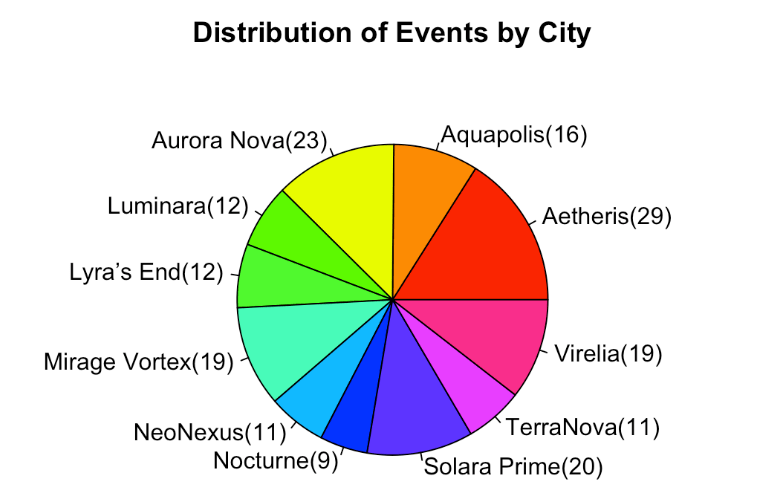
These approaches have pros and cons. In all three R scripts we go through the data retrieval process and use R’s capabilities for data analysis and visualisation. More specifically, we’ll have an R programming language script which loads live Sample Application event data from the Autonomous Database straight into the R environment and produce a pie chart of the number of events in each city.
Let’s come to an understanding…
Understanding R
RStudio IDE is an integrated development environment for R
R is a powerful programming language and environment specifically designed for statistical computing and data analysis. Widely used by data scientists, statisticians, and researchers, R offers a rich ecosystem of packages and libraries that facilitate a broad range of data manipulation, visualisation, and modelling tasks. Its syntax is intuitive, making it accessible for newcomers, while its flexibility allows advanced users to create custom solutions for complex analytical challenges. With strong support for data visualisation and robust statistical capabilities, R has become a go-to tool for transforming raw data into meaningful insights. Additionally, the active R community continuously contributes to its development, ensuring that users have access to the latest advancements in data science methodologies.
Most people programming with R will use RStudio. It provides cross platform consistency, a clean visual interface to the R environment and simplifies development steps ( automatically importing referenced libraries for example ). This article will assume you are running the provided R file in RStudio. Desktop IDE or hosted, the steps are the same.
Install R and RStudio locally or use the hosted RStudio from posit
Understanding Oracle REST Data Services (ORDS)
Oracle REST Data Services (ORDS) enables developers to easily expose Oracle Database data and functionality as RESTful web services. ORDS simplifies the process of building modern web applications by providing a straightforward interface for accessing database resources through standard HTTP methods.
Key Features of ORDS:
RESTful APIs: Easily create and manage RESTful APIs for your Oracle Database objects.
Integration with SQL, PL/SQL & JavaScript: Use SQL, PL/SQL or JavaScript directly within your APIs to access and manipulate data.
Secure: With OAuth 2.0 integration there are multiple options for authentication and authorisation flows.
Understanding the ORDS Sample Application
The Oracle REST Data Services (ORDS) Sample Application serves as a practical demonstration of best practice in building scalable and secure applications using ORDS to expose Oracle Database functionality through RESTful APIs. Designed to help developers to understand ORDS capabilities, this sample application showcases how to define RESTful services securely and interact with them using modern web application development practices. Primarily react and remix in this case.
React is a popular open-source JavaScript library developed by Facebook for building user interfaces, particularly for single-page applications.
Remix, on the other hand, is a modern web framework built on top of React that focuses on providing an enhanced developer experience and performance.
Artist, Concerts and Venues data from your Oracle Database render in a modern web browser interface – Powered by ORDS!
The EVENTS_VIEW provides a Concert focus with additional data about Artists and Venues
Understanding OCI and the Autonomous Database
Oracle Cloud Infrastructure (OCI) is a comprehensive cloud platform that offers a range of services for building, running, and managing applications and databases. One of its standout offerings is the Autonomous Database (ADB), a self-driving, self-securing, and self-repairing database service designed to streamline data management. ADB automates routine tasks like patching, scaling, and tuning, allowing users to focus on data-driven synergies rather than maintenance. It comes in different flavours, such as Autonomous Data Warehouse (ADW) for analytics and Autonomous Transaction Processing (ATP) for transaction-based workloads. With built-in AI and machine learning capabilities, ADB optimises performance and enhances security, making it a robust choice for organisations looking to leverage the power of data with minimal manual intervention. Some of these features are premium but you can still do a lot with the Always Free services in OCI. One of the most significant features of the Autonomous Database is that each database comes with ORDS installed and ORDS servers managed and maintained by Oracle. All though you can run the ORDS Sample Application with any ORDS supported Oracle Database the ease of provisioning a database in OCI with ORDS ready to go makes the whole experience a breeze.
The OCI Free Tier is a way to try out Oracle Cloud Infrastructure (OCI) services without any cost. It gives you access to a set of free cloud resources that are available in two forms: Always Free services and Free Trial credits.
Always Free Services: These are free forever and include services like Autonomous Database, Compute VMs, and Object Storage. You can use these to build and run small applications without worrying about costs.
Free Trial Credits: When you sign up, you get a set amount of credits to try out any OCI service you want for 30 days. This lets you explore more powerful services and features before deciding if you want to upgrade.
With the OCI Free Tier, you can start experimenting with cloud computing, build projects, and learn how to use different tools and technologies without committing any money upfront.
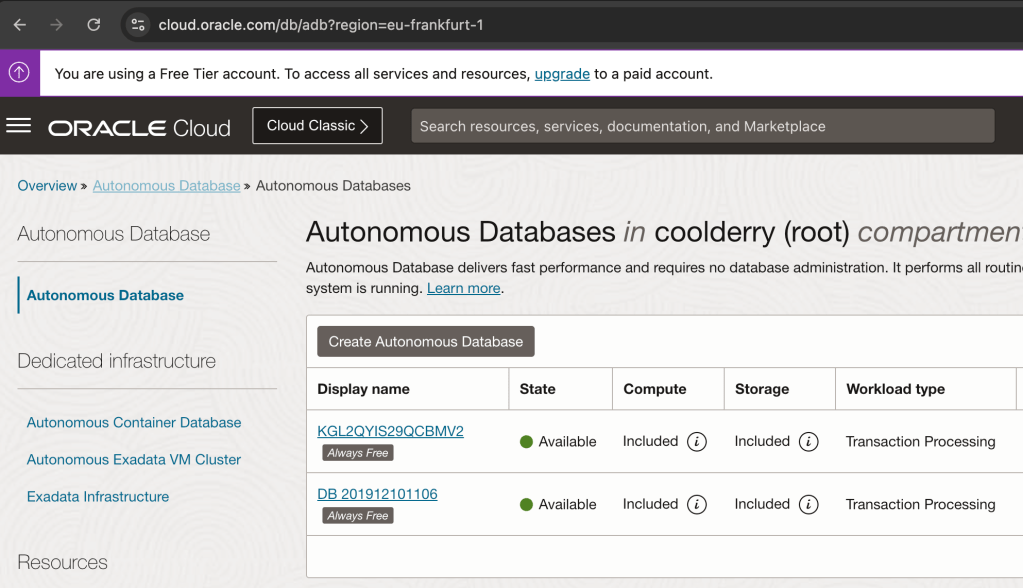
I use the Always Free services for hosting my instance of the ORDS Sample Application
Understanding the scripts
In this article I walk through the steps of using JDBC, REST Enabled SQL and REST Enabling a view to bring EVENTS_VIEW data into the R environment for analysis and data visualisation.
Each R script will end with the same set of instructions to show a summary of the data and generate a pie chart.
# Display the first few rows of the combined data
head(data)
# Summarize the data to count occurrences of each CITY_NAME
city_counts <- table(data$city_name)
# Create the pie chart
pie(city_counts,
    main = "Distribution of Events by City",
    col = rainbow(length(city_counts)),
    labels = paste(names(city_counts),
                   "(", city_counts, ")",
                   sep=""
                  )
   )
The result of the pie function in R
Another R function that you’ll see is askpass which prompts for a secret and does not hold the value as a variable which can be easily interrogated. And now, on with the 3 script options to produce the above chart…
Java Database Connectivity (JDBC)
Java Database Connectivity (JDBC) is a standard way for Java applications to connect to databases, run SQL queries, and get results. It works with different databases, making it a popular choice for accessing data. The more experienced R programmers at this stage will no doubt be thinking that JDBC is not the only horse at the races. There are already a few options for connecting to an Oracle Database and bringing data into an R environment. The commercial edition of RStudio provides a range of database connection packages. JDBC provides a free option which matches nicely with our Free Tier use of OCI.
Free: It’s the perfect price for my experimentation budget!
RJDBC makes it possible to use Java Database Connectivity to talk to any database if you have the JDBC Driver classes
Although JDBC is designed for Java, you can also use it in R with the help of the RJDBC package. This package lets R connect to databases using JDBC drivers, allowing you to run SQL queries and bring the data into R for analysis.
Using JDBC in R
To connect to a database using JDBC in R, you need:
JDBC Driver: A file (usually at least one .jar but more than one might be needed) that helps R talk to the database.
Connection String: A string that provides details on how to connect to the database, such as the database URL, port number, and credentials.
More specifically for the Autonomous Database you will need two JDBC related jars, the database wallet archive file extracted and the TNS name to reference in your connection string.
Let’s build that connection string first and let’s start with looking at the TNS Names for the various service levels available for your database. Since we’ll only be loading in data once we can use the low service. For more details on connection options to your Autonomous Database see https://docs.oracle.com/en-us/iaas/autonomous-database-serverless/doc/connect-preparing.html
Below are some screen shots of the Database connection information for my database in Frankfurt region. I’m going to show them backwards to explain some concepts. TNS name references an entry in a wallet that you will download, Mutual TLS requires a certificate that will also be in that wallet. There’s also some information to say you don’t really need to use Mutual TLS in all cases but it is a good practice and keeps your JDBC setup as simple as it can be.
I’m going to use db201912101106_low as the service to connect to using Mutual TLS. All the details will be in the client wallet which I must download.
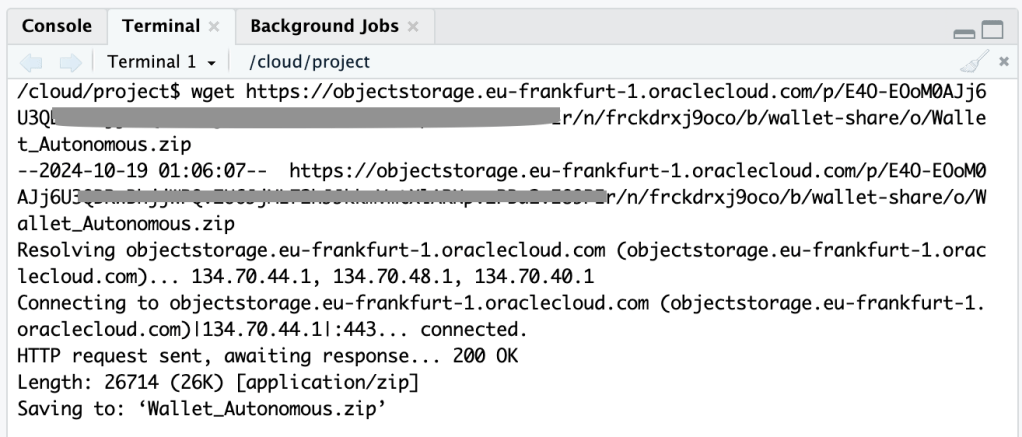
Download your wallet ( as a ZIP file ) to make connecting the database easier.
Once you have the TNS Name and the wallet file extracted to a directory your JDBC connection string is
Using an OCI Object Storage Pre-Authenticated Request to get the wallet
Just so I could run my script in the hosted RStudio on posit Cloud. I needed that wallet accessible there. To get the zip file there I went through a couple of hoops: upload to OCI object storage, create a PAR for the file, use that PAR to get the file and then extract it into a directory called /cloud/project/db201912101106 because db201912101106 just happens to be the autogenerated name of my database when I created back in 2019 and I haven’t changed it since.
Now that we have a connection string, what about the Oracle JDBC jar? The quickest way is to use wget again to just download the most recent version from Maven Central. See https://mvnrepository.com/artifact/com.oracle.database.jdbc/ojdbc11/23.5.0.24.07 for the jar URL. You’re going to need one more jar because of that wallet and Mutual TLS. Get the corresponding OraclePKI jar too.
Get the ojdbc and oraclepki jars
Which now means you are ready to specify the correct JDBC Driver and Connection String for connecting to your database. For example:
# Specify the path to the JDBC driver
jdbc_driver <- JDBC(driverClass = "oracle.jdbc.OracleDriver",
                    classPath = "/cloud/project/ojdbc11-23.5.0.24.07.jar:/cloud/project/oraclepki-23.5.0.24.07.jar")  # Replace with your path

username <- "ords_sample_app"

# Establish the connection
# Replace TNS Name and wallet location with your actual values
conn <- dbConnect(jdbc_driver,
                  "jdbc:oracle:thin:@db201912101106_low?TNS_ADMIN=/cloud/project/db201912101106",
                  username,
                  askpass::askpass("Enter your password: "))
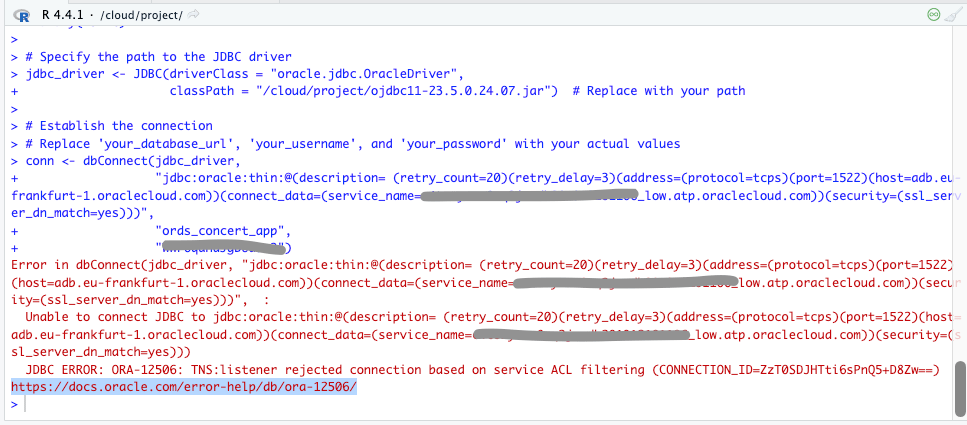
I did get some errors along the way when I used the wrong JDBC connection, didn’t use the wallet, and did not have Oracle PKI jar in the classpath
Load event_views data over JDBC
Here’s the full ords_sample_app_event_views_jdbc.R script. It requires two libraries and if you are using RStudio either on your desktop or in posit Cloud they, and their dependencies will be imported.
# ------------------------------------------------------------------------------
# File:        ords_sample_app_event_views_jdbc.R
# Description: This script performs data analysis on the ORDS Sample Application
#              events dataset to generate summary statistics and visualizations.
#              Data is loaded from source DB using JDBC.
#
#              JDBC Connection Requires:
#               - JDBC Jars
#               - Autonomous DB Wallet Archive
#
# Author:      https://peterobrien.blog/
# Date:        2024-10-17
# Version:     1.0
# ------------------------------------------------------------------------------
#
# Notes:
# - Requires the packages: askpass,rjdbc
# - Data source: events_view from the ORDS Sample Application database.
# - Authentication: JDBC authentication with prompt for password.
# Load the necessary packages
library(askpass)
library(RJDBC)
# Specify the path to the JDBC driver
jdbc_driver <- JDBC(driverClass = "oracle.jdbc.OracleDriver",
                    classPath = "/cloud/project/ojdbc11-23.5.0.24.07.jar:/cloud/project/oraclepki-23.5.0.24.07.jar")  # Replace with your path
# Use database username for your ORDS Sample Application.
username <- "ords_sample_app"
# Establish the connection
# Replace TNS Name and wallet location with your actual values
conn <- dbConnect(jdbc_driver,
                  "jdbc:oracle:thin:@db201912101106_low?TNS_ADMIN=/cloud/project/db201912101106",
                  username,
                  askpass::askpass("Enter your password: "))
# Check the connection
if (!is.null(conn)) {
  print("Connection successful!")
  data <- dbGetQuery(conn, "SELECT * FROM events_view")
  dbDisconnect(conn)

  # Display the first few rows of the data
  head(data)

  # Summarise the data to count occurrences of each CITY_NAME
  city_counts <- table(data$CITY_NAME)

  # Create the pie chart
  pie(city_counts,
      main = "Distribution of Events by City",
      col = rainbow(length(city_counts)),
      labels = paste(names(city_counts), "(", city_counts, ")", sep=""))
}
If you leave all the comments out, that is essentially 12 lines of R code to load the data and create both a summary and a pie chart. Set the username variable to the database username for your ORDS Sample Application.
Pros
Simple, uncomplicated code
Very flexible – You can write any query you like
The JDBC driver is fast and efficient
Cons
Dependencies such as jars and wallets have to be obtained
Too flexible – You can write any data manipulation statement to change the data
Relying on sharing database username and password
Using a wrong password will lock the account
REST Enabled SQL Export
Export is a little known aspect of the ORDS REST Enabled SQL service that can save files as CSV, JSON, XML and TEXT. The httr package is used to make the POST request, the jsonlite package looks after the JSON formatting and rio is for loading the data.
Load event_views data over REST Enabled SQL Export
Here’s the full ords_sample_app_event_views_rese.R script. It requires more libraries than the JDBC script but again, if you are using RStudio either on your desktop or in posit Cloud they, and their dependencies will be imported.
# ------------------------------------------------------------------------------
# File:        ords_sample_app_event_views_rese.R
# Description: This script performs data analysis on the ORDS Sample Application
#              events dataset to generate summary statistics and visualizations.
#              Data is exported using Oracle REST Data Services feature:
#              REST Enabled SQL Export
#
#              Export instruction comprises:
#               - SQL select statement for data from events_view
#               - Format for export file to be JSON
#
# Author:      https://peterobrien.blog/
# Date:        2024-10-17
# Version:     1.0
# ------------------------------------------------------------------------------
#
# Notes:
# - Requires the packages: askpass, httr, jsonlite, rio
# - Data source: events_view from the ORDS Sample Application database.
# - Authentication: basic authentication with prompt for password.
# Load the necessary packages
library(askpass)
library(httr)
library(jsonlite)
library(rio)
# Define the ORDS REST Enabled SQL Export URL, username, and password to use.
# Change the URL to match your server and
# use database username for your ORDS Sample Application.
username <- "ords_sample_app"
ords_concert_app_url <- paste0("https://mydatabase.adb.myregion.oraclecloudapps.com/ords/", username, "/")
export_url <- paste0(ords_concert_app_url, "_/sql/export")
# Define the export details including select statement and output format
export_instructions <- list(
  statementText = "select * from events_view",
  formatDetails = list(
    format = "JSON"
  )
)
# Format the export_instructions as a string
request_body <- list(
  data = toJSON(export_instructions, auto_unbox = TRUE)
)
# Specify the basic authentication for every HTTP request but prompt for the password at runtime
set_config(authenticate(username, askpass::askpass("Enter your password: ")));
# Define the local file path where you want to save the file
file_path <- tempfile()
# Make a POST request ot ORDS REST Enabled SQL Export
response <- POST(
  url = export_url,
  body = request_body,
  encode = "form",  # Specifies application/x-www-form-urlencoded encoding
  write_disk(file_path, overwrite = TRUE)
  )
# Check the status code to ensure the request was successful
if (status_code(response) == 200) {
  message("File successfully downloaded to: ", file_path)
} else {
  stop("Failed to download file. Status code: ", status_code(api_response))
}
# Import the downloaded file into R
data <- import(file_path, "json")
# Display the first few rows of the data
head(data)
# Create a frequency table for the city_name column
city_counts <- table(data$city_name)
# Create the pie chart
pie(city_counts,
    main = "Distribution of events across Cities",
    col = rainbow(length(city_counts)),
    labels = paste(names(city_counts), ":", city_counts))
Although we no longer have the overhead of setting up JDBC jars and a wallet file this R script is much more complicated. We’re now at about 25 lines of R code to use the ORDS REST Enabled SQL Export service to run a query and save the output as a JSON file which we then use rio package to load. Remember, if you are going to run this script in your environment you must set the database username for your ORDS Sample Application.
Pros
No additional setup such as JARS or Wallet
Very flexible – You can write any query you like
Cons
Too flexible – You can write any data manipulation statement to change the data
Relying on sharing username and password
Using a wrong password will lock the account
Secured REST Enabled view
Also referred to as AutoREST, this feature in Oracle REST Data Services (ORDS) makes it incredibly easy to expose database objects as RESTful web services. With AutoREST, tables, views, and PL/SQL packages in your Oracle Database can be instantly accessible via REST APIs without writing any additional code. Moreover, these services can be secured, requiring authorisation to access. See Developing Oracle REST Data Services Applications and ORDS.ENABLE_OBJECT for details but the step is as simple as:
Get the CLIENT_ID and CLIENT_SECRET for the client just created.
SELECT
    CLIENT_ID,
    CLIENT_SECRET
FROM
    USER_ORDS_CLIENTS
WHERE
    NAME = 'RStudio';
That’s the value that we’ll use in the R script to get an access token every time the script is executed.
# Define base URL for all requests
username <- "ords_concert_app"
ords_concert_app_url <- paste0("https://c4tozyxuw8nq2ja-db201912101106.adb.eu-frankfurt-1.oraclecloudapps.com/ords/", username, "/")
# Define your OAuth 2.0 credentials and token endpoint
client_id <- "139ZODb9nig15blwlSlUNQ.."
client_secret <- "DAIdfS8C5Wg2nN9SGxwCfQ.."
token_url <- paste0(ords_concert_app_url, "oauth/token")
# Make the request to get the access token
response <- POST(
  url = token_url,
  authenticate(client_id, client_secret),
  encode = "form",
  body = list(
    grant_type = "client_credentials"
  )
)
# Parse the response to extract the access token
token_data <- content(response, as = "parsed", type = "application/json")
access_token <- token_data$access_token
The access_token variable can be used as the bearer token for any requests to the REST service. By default, it will expire in 1 hour after it is issued.
The other interesting part of this script is handling the paginated response from the REST Enabled view which contains information on how to make subsequent requests until all the data is retrieved. Here’s an example of the response structure:
The R script will loop through the data in blocks. By default the pagination is 25 rows but we can make that 100 rows at a time:
base_url <- paste0(ords_concert_app_url, "events_view/?limit=100")
all_items <- list()
# Function to fetch data from the API using the next link
fetch_paginated_data <- function(url) {
  # Display the GET request URL
  print(paste("GET ", url))
  response <- GET(url, add_headers(Authorization = paste("Bearer", access_token)))
  data <- content(response, as = "parsed", type = "application/json")
  return(data)
}
# Start the loop to fetch all paginated data
next_url <- base_url
repeat {
  # Fetch the data from the current page
  data <- fetch_paginated_data(next_url)

  # Append the items from the current page to the list of all items
  all_items <- c(all_items, data$items)

  # Check if there's a "next" link in the response
  next_link <- NULL
  for (link in data$links) {
    if (link$rel == "next") {
      next_link <- link$href
      break
    }
  }

  # Exit the loop if there's no more data to fetch
  if (is.null(next_link) || !data$hasMore) {
    break
  } else {
    next_url <- next_link
  }
}
# Convert the list of all items into a data frame
data <- do.call(rbind, lapply(all_items, as.data.frame))
Of course 100 records at a time is not all that efficient but I have it set here so that you can see at least two requests.
Load event_views data using secured REST Enabled view
Here’s the full ords_sample_app_event_views_oauth.R script. It requires less libraries than the REST Enabled SQL Export script because it doesn’t involve exporting the data to a temporary file and then loading it. More importantly though, OAuth 2.0 Client Credential flow is used rather than database username and passwords.
# ------------------------------------------------------------------------------
# File:        ords_sample_app_event_views_oauth.R
# Description: This script performs data analysis on the ORDS Sample Application
#              events dataset to generate summary statistics and visualizations.
#              Data is exported using Oracle REST Data Services features:
#               - Protected REST Enabled object ( events_view in this case)
#               - OAuth Client Credentials
#
# Author:      https://peterobrien.blog/
# Date:        2024-10-17
# Version:     1.0
# ------------------------------------------------------------------------------
#
# Notes:
# - Requires the packages: httr, jsonlite
# - Data source: events_view from the ORDS Sample Application database.
# - Authentication: oauth 2.0 client credentials flow
library(httr)
library(jsonlite)
# Define base URL for all requests
username <- "ords_concert_app"
ords_concert_app_url <- paste0("https://c4tozyxuw8nq2ja-db201912101106.adb.eu-frankfurt-1.oraclecloudapps.com/ords/", username, "/")
# Define your OAuth 2.0 credentials and token endpoint
client_id <- "139ZODb9nig15blwlSlUNQ.."
client_secret <- "DAIdfS8C5Wg2nN9SGxwCfQ.."
token_url <- paste0(ords_concert_app_url, "oauth/token")
# Make the request to get the access token
response <- POST(
  url = token_url,
  authenticate(client_id, client_secret),
  encode = "form",
  body = list(
    grant_type = "client_credentials"
  )
)
# Parse the response to extract the access token
token_data <- content(response, as = "parsed", type = "application/json")
access_token <- token_data$access_token
# Display the access token
print(access_token)
# Initialize the base URL for the API and a list to store all items
# Requesting 100 records at a time
base_url <- paste0(ords_concert_app_url, "events_view/?limit=100")
all_items <- list()
# Function to fetch data from the API using the next link
fetch_paginated_data <- function(url) {
  # Display the GET request URL
  print(paste("GET", url))
  response <- GET(url, add_headers(Authorization = paste("Bearer", access_token)))
  content_data <- content(response, as = "parsed", type = "application/json")
  return(content_data)
}
# Start the loop to fetch all paginated data
next_url <- base_url
repeat {
  # Fetch the data from the current page
  paginated_data <- fetch_paginated_data(next_url)

  # Append the items from the current page to the list of all items
  all_items <- c(all_items, paginated_data$items)

  # Check if there's a "next" link in the response
  next_link <- NULL
  for (link in paginated_data$links) {
    if (link$rel == "next") {
      next_link <- link$href
      break
    }
  }

  # Exit the loop if there's no more data to fetch
  if (is.null(next_link) || !paginated_data$hasMore) {
    break
  } else {
    next_url <- next_link
  }
}
# Convert the list of all items into a data frame
data <- do.call(rbind, lapply(all_items, as.data.frame))
# Display the first few rows of the combined data
head(data)
# Summarize the data to count occurrences of each CITY_NAME
# Note that the column name is lowercase in the REST response
city_counts <- table(data$city_name)
# Create the pie chart
pie(city_counts,
    main = "Distribution of Events by City",
    col = rainbow(length(city_counts)),
    labels = paste(names(city_counts),
                   "(", city_counts, ")",
                   sep="")
                  )
Leaving out the comments we’re now looking at about 50 lines to code to
Get the access token
Retrieve the data over REST calls
Output the summary and generate the pie chart
Unlike the other scripts, you should be able to run this “as is” in your R environment even if you do not have your own ORDS Sample Application because the CLIENT_ID, CLIENT_SECRET and URLs are valid. At the time of writing anyway 😀
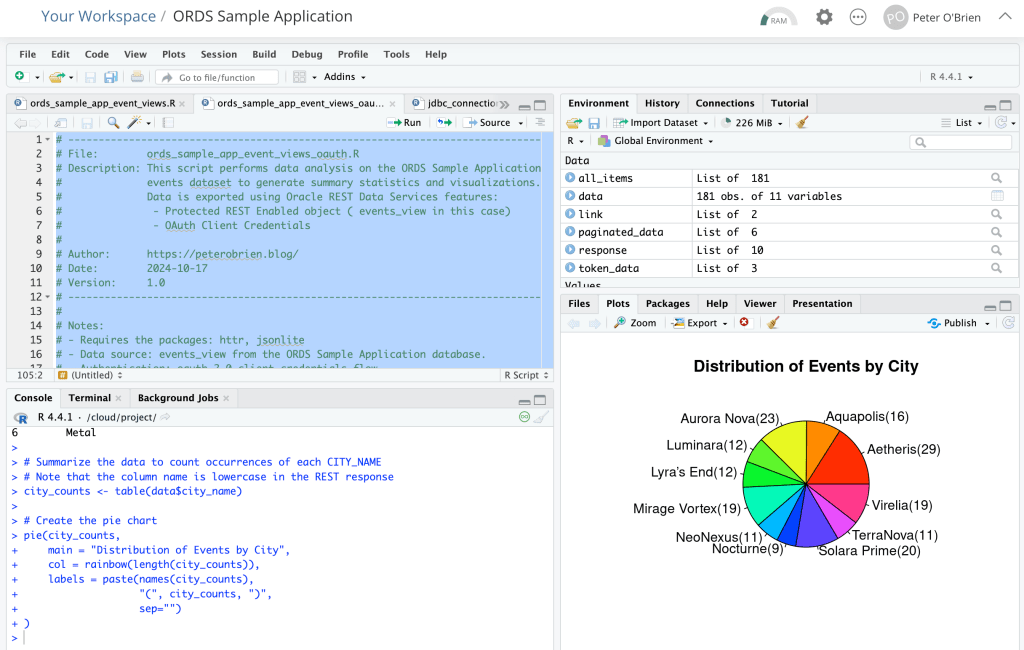
Running ords_sample_app_event_views_oauth.R in hosted RStudio
Pros
No additional setup such as JARS or Wallet
Creating a secured service for accessing the specific view is really easy
No exposure of database username and password
OAuth client access can be revoked at any time
Read only view so no risk of manipulation of data
Cons
Not as flexible as being able to run any query one wants from R
More complicated code to get the access_token AND loop through the paginated responses
Further Reading and Resources
For a deeper understanding of how to utilise ORDS in a modern application context, I recommend checking out Jeff Smith’s article on the ORDS Sample Application. Jeff’s blog is immensely valuable providing insightful tips and a practical approach to building REST APIs effectively.
Conclusion
Integrating R with Oracle REST Data Services provides a powerful toolset for retrieving and analysing data. In this article I detailed three options:
JDBC
REST Enabled SQL Export
REST Services ( AutoREST )
By following the steps outlined in this post, you can set up your R environment to interact with ORDS seamlessly. This integration opens up a wealth of possibilities for data analysis and application development.
Feel free to share your thoughts or questions in the comments below!
In a previous post, we explored how to use the Mustache template engine with ORDS mle/javascript Handlers to transform SQL query responses into application/json responses. If you missed that, check it out – Transform your SQL Results with Mustache and ORDS JavaScript Handlers.
The idea was inspired by a tweet from @FriedholdMatz and I put together an initial implementation at the time which I have since refined.
Easily done with @OracleREST ! I haven't written this up yet…TEMPLATES table contains a list of templates and mle/javascript handler does the work 👍 pic.twitter.com/mRQvTcbQJE
This follow-up dives deeper into the concept of using Mustache as a service, enabling users to submit their own template definitions and payloads for dynamic transformations. This service can be incredibly useful when you need to allow external users or applications to define how they want data structured without modifying your code every time.
In fact, this article is going to cover a wide range of subjects related to developing services with ORDS. These include:
Use of implicit parameters both in query, PL/SQL and mle/javascript handlers.
Protecting all services defined in a module using a single privilege definition.
Invoking the secured services from Postman using OAuth 2.0 Client Credentials to automatically obtain a new bearer token.
Let’s walk through the implementation steps. As a REST Enabled user connect to your 23ai database where you have already defined your MLE library for Mustache as covered in the previous article. Just like in that article, our REST Enabled user in this article is the HR schema and all statements are executed in the database as that user.
NOTE! The following steps are based on Oracle 23ai MLE database objects which you should have created from Transform your SQL Results with Mustache and ORDS JavaScript Handlers. Having the MLE Module for Mustache and an MLE library making it available to mle/javascript handlers is a prerequisite.
Step 1: Setting up the Database Table for Mustache Templates
First, we need a database table to store the template definitions. This table will allow clients to create and manage their templates, identified by a unique ID.
CREATE TABLE mustache_templates (
    template_id NUMBER GENERATED BY DEFAULT AS IDENTITY PRIMARY KEY,
    template_name VARCHAR2(100) not null,
    template_text CLOB not null,
    template_owner VARCHAR2(200) not null,
    template_content_type VARCHAR2(100) not null,
    created_at TIMESTAMP DEFAULT CURRENT_TIMESTAMP
);
In this table, template_name is used for a meaningful description of the Mustache template, while template_text will store the Mustache template itself. You will also notice a template_owner column which we will use to keep the rows distinct for each template owner. Put simply, a user, identified by their OAuth client identifier, manages their own templates. Both the primary key template_id and the created_at columns are automatically assigned values on insert.
Step 2: Defining ORDS services for Mustache Template creation, retrieval and use
Now, we need an API endpoint to submit, retrieve and use templates. Access to each row is going to be restricted based on the OAuth client identifier so we will require a slightly more complex set of logic than what REST Enabling the mustache_templates table will provide. That will all be taken care of in one module with base path = /templates/ and a few of REST Service templates defined. These are:
/templates/. – This will have a GET handler to retrieve all rows the user has access to and a POST handler to add new Mustache templates.
/templates/:id – This will have a GET handler to retrieve a specific Mustache template by template_id and a PUT handler to update that specific Mustache template.
/templates/id/generate – This will have a single POST handler to apply the Mustache template to the request body and return the generated content.
The GET handlers will be simple query handlers. The PUT and handler will involve a PL/SQL block. One of the POST handlers will be defined using PL/SQL and the other will use JavaScript. In all cases they will use the ORDS provided implicit parameter for referencing the current user which will be the Client ID of the OAuth client used at runtime.
Define the ORDS REST module
This PL/SQL block will create the module which all the service handlers will belong to.
ORDS uses templated REST Service definitions and we will create three now:
BEGIN
  ORDS.DEFINE_TEMPLATE(
      p_module_name    => 'templates',
      p_pattern        => '.',
      p_comments       => 'Retrieve all Mustache templates the runtime user has access to and create new ones');

  ORDS.DEFINE_TEMPLATE(
      p_module_name    => 'templates',
      p_pattern        => ':id',
      p_comments       => 'Retrieve or update a specific Mustache template');

  ORDS.DEFINE_TEMPLATE(
      p_module_name    => 'templates',
      p_pattern        => ':id/generate',
      p_comments       => 'Transform the request payload using the specified Mustache template');

  COMMIT;
END;
With these in place the next step is to define the relevant handlers for the GET, PUT and POST methods.
GET: /templates/
This will retrieve all Mustache template records that the runtime user has access to. This query uses the implicit parameter :current_user and a special column alias $.id which is used to generate a self reference link in the response.
BEGIN
  ORDS.DEFINE_HANDLER(
      p_module_name    => 'templates',
      p_pattern        => '.',
      p_method         => 'GET',
      p_source_type    => 'json/collection',
      p_source         =>
'select TEMPLATE_ID as "$.id",
TEMPLATE_ID, TEMPLATE_NAME, TEMPLATE_CONTENT_TYPE, TEMPLATE_TEXT, CREATED_AT from MUSTACHE_TEMPLATES where TEMPLATE_OWNER = :current_user');
  COMMIT;
END;
The above handler will return a response similar to this when invoked by an authorised user:
This handler is a PL/SQL handler which will insert a new Mustache template record. This handler has some content of note.
The implicit parameter :current_user is used to limit queries to rows that the runtime user has access to.
Once the runtime user has 10 Mustache templates they can not create any more.
The implicit parameters :status_code and :forward_location are used to generate a reference to the just inserted Mustache template. ORDS will generate a response body containing the json representation of that new record.
You will notice that parameters are not defined for :template_name, :template_content_type and :template_text. When not explicitly defined they are assumed to be fields in the request body.
The p_mimes_allowed argument makes it clear that application/json payloads are expected by this handler.
BEGIN
  ORDS.DEFINE_HANDLER(
      p_module_name    => 'templates',
      p_pattern        => '.',
      p_method         => 'POST',
      p_source_type    => 'plsql/block',
      p_mimes_allowed  => 'application/json',
      p_source         =>
'DECLARE
  existing_templates_count NUMBER;
  new_template_id NUMBER;
BEGIN
    select count(*) into existing_templates_count from mustache_templates where TEMPLATE_OWNER = :current_user;
    if existing_templates_count < 10 then
      insert into MUSTACHE_TEMPLATES (TEMPLATE_NAME, TEMPLATE_CONTENT_TYPE, TEMPLATE_TEXT, TEMPLATE_OWNER) VALUES(:template_name, :template_content_type, :template_text, :current_user)
      RETURNING template_id INTO new_template_id;
      :status_code := 201;
      :forward_location := new_template_id;
    else
-- Too many records
       :status_code := 400;
    end if;
  END;');
  COMMIT;
END;
This handler will take a request payload such as the following…
This will retrieve a Mustache template by its unique identifier. Similar to the GET /templates/ handler it is a simple query but uses the :current_user implicit parameter and the $.id alias for generating a self link in the response. Note that the value for :id in the query comes from the URL path pattern of the template.
BEGIN
  ORDS.DEFINE_HANDLER(
      p_module_name    => 'templates',
      p_pattern        => ':id',
      p_method         => 'GET',
      p_source_type    => 'json/item',
      p_source         =>
'select
   TEMPLATE_ID as "$.id",
   TEMPLATE_ID,
   TEMPLATE_NAME,
   TEMPLATE_CONTENT_TYPE,
   TEMPLATE_TEXT,
   CREATED_AT
from MUSTACHE_TEMPLATES
where TEMPLATE_OWNER = :current_user and TEMPLATE_ID = :id');

COMMIT;
END;
This returns the specific Mustach template requested so one can see what it produces based on the content in the template_text. Hopefully the template_name is descriptive too 😀
PUT: /templates/{id}
This handler will update an existing Mustache template if the runtime user has access to the row. Similar to the POST /templates/ handler it uses implicit parameters for the SQL query but also to instruct ORDS on how to generate the response.
And now the mle/javascript handler that will apply the Mustache template to the request body to return a generated document. The request payload will be the data to be used into the Mustache template which is specified by the templates identifier. This endpoint will:
Retrieve the template corresponding to template_id.
Use the JavaScript Mustache engine to transform the payload.
Similar to the mle/javascript handler in the previous article it relies on an MLE environment to reference the Mustache template. Other items to note about this mle/javascript handler:
Checks the content_type implicit parameter and returns an appropriate status code if it is not application/json.
Provides fetchInfo to database session so that it knows how to represent CLOB values from the TEMPLATE_TEXT column.
Refers to the :id parameter using the uri_parameters of the request.
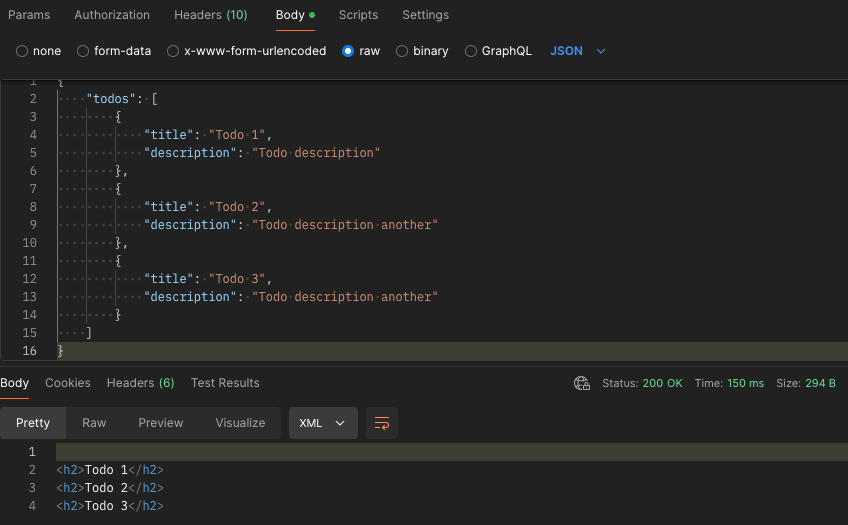
Invoking this service specifying the Mustache template id in the URL will transform the request payload into a generated document using the specified template. It will even set the response content type as specified by the Mustache template.
The eagle eyed reader will have noticed that this mle/javascript handler source is checking that the content type of the request is application/json and strictly speaking the Mustache Templating Engine can work with more than JSON as the source context. As an additional homework exercise you could explore working with different request payload structures.
Step 3: Protecting the Services
For this service we’re going to restrict access to only authenticated users. Note that every handler refers to the implicit parameter :current_user. Every row will belong to a specific template_owner user and that will correspond to an OAuth client that we can issue for each prospective user. To achieve that a Role must be defined and a Privilege explicitly protecting the module created earlier is required. Run this…
DECLARE
L_PRIV_ROLES owa.vc_arr;
L_PRIV_PATTERNS owa.vc_arr;
L_PRIV_MODULES owa.vc_arr;
BEGIN

ORDS.CREATE_ROLE(
    P_ROLE_NAME => 'blog.peterobrien.MustacheTemplateUser'
);

L_PRIV_MODULES( 1 ) := 'templates';
L_PRIV_ROLES( 1 ) := 'blog.peterobrien.MustacheTemplateUser';

ORDS.DEFINE_PRIVILEGE(
    P_PRIVILEGE_NAME => 'blog.peterobrien.MustachTemplate',
    P_ROLES => L_PRIV_ROLES,
    P_PATTERNS =>  L_PRIV_PATTERNS,
    P_MODULES => L_PRIV_MODULES,
    P_LABEL => 'Mustache Template Privilege',
    P_DESCRIPTION => 'Protects access to the Mustache Template module',
    P_COMMENTS=> 'Mustache Template module provides the managed and use of Mustache Template as a Service.'
);
COMMIT;
END;
Send a request to one of the handlers now and one should get a HTTP 401 response.
With the module now directly protected let’s create an OAuth client that can access it. Note that this is using OAUTH package but ORDS is moving to a new OAUTH_SECRETS package which I will refer to here when the documentation for it is published…
BEGIN
    ORDS_METADATA.OAUTH.CREATE_CLIENT(
        P_NAME => 'TemplateClient1',
        P_GRANT_TYPE => 'client_credentials',
        P_OWNER => 'HR',
        P_DESCRIPTION => 'A client for the Mustache Template as a Service module',
        P_SUPPORT_EMAIL => 'test@example.com',
        P_PRIVILEGE_NAMES => 'blog.peterobrien.MustachTemplate'
    );
    ORDS_METADATA.OAUTH.GRANT_CLIENT_ROLE(
        P_CLIENT_NAME => 'TemplateClient1',
        P_ROLE_NAME => 'blog.peterobrien.MustacheTemplateUser'
    );
    COMMIT;
END;
Execute a select statement on USER_ORDS_CLIENTS to get the CLIENT_ID and CLIENT_SECRET for this TemplateClient1.
select
   client_id, client_secret
from user_ords_clients
where name = 'TemplateClient1';
With that client_id and client_secret you can get an access token which can then be used to invoke the Mustache template services we have created. The :current_user value in our handlers will be the client_id value from the request.
The access token will expire after an hour and another one will have to be requested. Rather than going through all that manually we can use our REST client to manage that, even automatically requesting a new access token when the current one expires. In this article we’ll use Postman but there are alternatives. In fact if you are coding a client application to use the Mustache Template as a Service endpoints then a similar framework for handling the OAuth token lifecycle will be required. For Postman, we’ll define our authorisation flow and requests in a collection called Mustache.
In “My Workspace” I have a collection called Mustache
The collection is useful for keeping important metadata in one place such as how authentication and authorisation will be achieved…
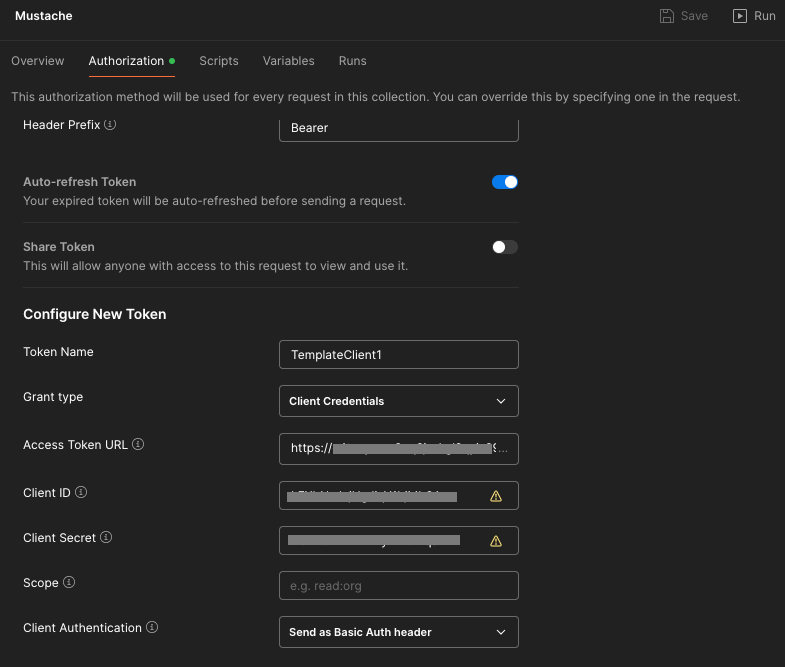
In the Authorization definition of my Mustach collection I specify that I will use OAuth 2.0 as the Auth Type
Keep on scrolling down to enter specifics.
Let’s look at some of those specifics…
The token name doesn’t really matter. You can use any name you want.
The grant type should match your ORDS OAuth client definition: Client Credentials
The access token URL will be the full URL for your REST Enabled schema’s access endpoint. Generally that is <server>/ords/<schema alias>/oauth/token For example: https://ords.example.com/ords/hr/oauth/token
The client ID and client secret comes from the query on user_ords_clients earlier.
The client authentication should be Send as Basic Auth header. Postman will send the Client ID and Client Secret as basic authentication to the Access Token URL endpoint to get an access token.
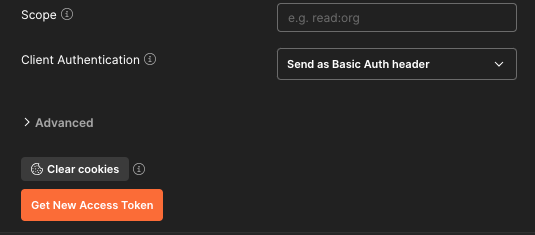
Keep on scrolling down and press that Get New Access Token button to verify it all works.
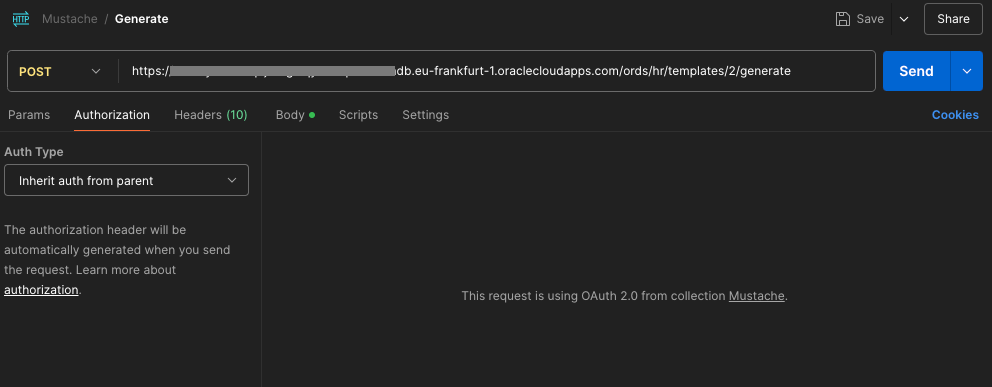
With that in place then every request defined in the Mustache collection can just inherit that definition from the collection and the OAuth client token lifecycle is all automagically taken care of.
Of course, I’m running all this on my Oracle Free Tier 23ai Autonomous Database in Frankfurt
Note that if you import that Mustache Collection into Postman the hostname referred to will be ords-23ai.adb.eu-frankfurt-1.oraclecloudapps.com which doesn’t exist. You will have to change those entries to point to your own system.
Don’t want to set this up yourself but still want to try it out? Leave a comment below and I’ll get back to you with your own Client ID and Client Secret for you to use on a trial basis for a few days. All I have to do is create a new OAuth client with the same privilege and role and then forward you the Client ID and Client Secret. After a few days I can just delete the OAuth client.
Conclusion
By extending ORDS with Mustache templates as a service, you now have a flexible system that allows users to dynamically define and utilize templates. This can be a practical, reusable tool for building customisable reporting, notifications, or any scenario where the structure of data needs to be adaptable.
Feel free to experiment with more complex templates and explore how Mustache’s logic-less approach can simplify many data transformation tasks in your applications.
Stay tuned for future articles where we dive deeper into templating and ORDS functionalities!
If you have any questions or feedback, drop a comment below.
When dealing with SQL data, format and structure is crucial. Raw data isn’t always the most readable or useful format, especially when you need to expose it through an API. This is where Oracle REST Data Services (ORDS) comes in handy. It provides a secure and convenient JSON representation of the SQL query results in a JSON format by default. In this article, we’ll walk through using ORDS JavaScript handlers with the Mustache template engine to format an XML response from SQL query results. What we cover here is based on the previous article Multilingual Engine (MLE) for JavaScript Handlers. That article introduced an ORDS Module called demo_mle_javascript and in this article we will add to it.
The high level flow
Introducing the key components
Oracle REST Data Services (ORDS)
Oracle REST Data Services (ORDS) is a powerful tool that allows you to expose database functionalities as RESTful services. It simplifies the process of creating APIs for your Oracle database, making it easier to integrate with other systems and applications.
Mustache Template Engine
Mustache is a logic-less template engine that helps you format data into any desired format. Its simplicity and flexibility make it a great choice for rendering text in a wide variety of formats: HTML, JSON, XML, etc. Mustache uses templates to define the structure of the output, which can then be populated with data.
Oracle 23ai Database and the Multilangual Engine
With Oracle Database Multilingual Engine (MLE), developers have the option to run JavaScript code through dynamic execution or with persistent MLE modules stored directly in the database.
Bringing all together
Just as with the previous article which showcased Multilingual Engine (MLE) for JavaScript Handlers in ORDS we will use the 23ai database available at Oracle Autonomous Database. There we have a /ords/hr/demojs/employee/:id GET handler which has a JavaScript implementation for running a SELECT query to get an employee record for a employee_id provided in the URI.
In this article we’ll implement in JavaScript a GET handler to return all employee records but in an XML format. It will be very similar to the previous handler but reuse a JavaScript library so there’s actually less code. The additional step is that the JavaScript Mustache template engine will be imported into an MLE Module and then referred to by our JavaScript source in our ORDS JavaScript handler to transform the JSON representation of a query result set into an XML document returned by the service.
Defining the Mustache MLE Module
Mustache JavaScript
To use Mustache in ORDS JavaScript handler, you need to define it as an MLE module so that it can be imported by the dynamic MLE JavaScript in the handler source. The simplest way to get this done is include it from a content delivery network like jsDelivr. Here’s the URL for Mustache version 4.2.0: https://cdn.jsdelivr.net/npm/mustache@4.2.0/mustache.mjs.
The availability of JavaScript components like this supports self-contained and reusable code, key to developing successful software projects. We will use this library unmodified. However, due to a difference in architecture, module imports behave slightly differently in the Oracle Database when compared to other development environments. For example, JavaScript source code used with Node.js is stored in a specific directory structure on disk. MLE modules are stored together with the database, rather than in a file system, so must be referenced in a different manner. Let’s get that Mustache MLE module defined
Creating the MLE Module in Autonomous Database
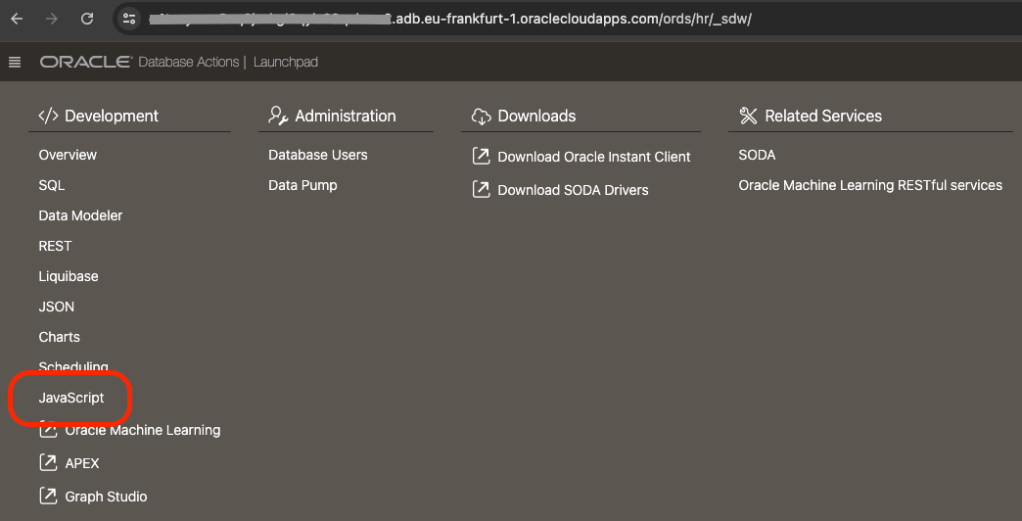
The simplest way to define a module, from an external source, in an 23ai Autonomous Database is to use ORDS Database Actions. Note that one must be using a 23ai database, otherwise the menu option in Database Actions does not appear. So, first step, login to Database Actions ( AKA SQL Developer Web ) https://my-autonomous-database.oraclecloudapps.com/ords/sql-developer and choose the Development->JavaScript menu option…
The Development->JavaScript section provides a handy UI for managing MLE Modules
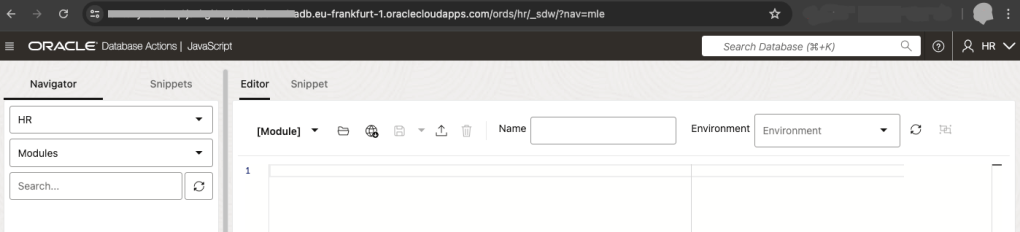
If this is your first time defining an MLE Module the JavaScript area in Database Actions will look like this
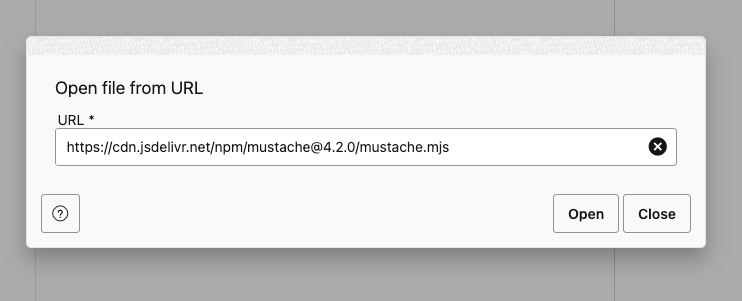
In the MLE Editor there is a globe icon with an arrow pointing downwards. This is the Open from URL button. Press that, enter the URL https://cdn.jsdelivr.net/npm/mustache@4.2.0/mustache.mjs and press the Open button to load the text.
You should then see the source in the MLE Module editor. Enter MUSTACHE as the name ( leave the Environment info blank ) and press the Save icon to create the MLE Module.
Save the MLE Module source and call it MUSTACHE
The last part of that source, at line 764, the JavaScript exports a mustache object and that is what we will refer to in our own JavaScript: export default mustache;
Now, to use that MLE Module it must be included in an MLE Environment. Amongst other things, MLE environments are used for name resolution of JavaScript module imports. For this example we will define an MLE Environment called LIBRARY_ENV where we specify a namespace for modules we want to reuse.
Let’s switch to an SQL Worksheet environment for the rest of this article. Run this to create that environment…
With that in place, we’re now ready to create our JavaScript handler.
Developing the ORDS REST Service
Now, define a JavaScript handler that will query all records from HR.EMPLOYEES table and format the SQL results into an XML response using Mustache. The service will be part of the existing demo_mle_javascript module and available at employees/ so we will define a template and a handler:
Not much to explain about the above. We’re defining a pattern for a URI to add to an existing ORDS REST Service module and will have one or more handlers defined.
The parameters to the DEFINE_HANDLER procedure are more interesting so let’s take a look at them:
p_module_name    => 'demo_mle_javascript',
This states which module the handler belongs to.

p_pattern        => 'employees/',
This states which template in that module the handler belongs to.

p_method         => 'GET',
Handlers are define for a specific HTTP method. This handler will be for GET requests.

p_source_type    => 'mle/javascript',
Handler source can be of various types. Some simple such as a basic select query and some more complex such as pl/sql block. This handler's source is dynamic MLE JavaScript.

p_mle_env_name   => 'LIBRARY_ENV',
When dynamic MLE JavaScript imports a module it must state the MLE Environment where that module's namespace is defined. This is important for this handler's source and MUST be specified.
The p_source parameter content is more complex and deserves it’s own explanation. At a high level the steps are:
Define a query and execute it, storing the reference to the results in a variable called res
Import the Mustache MLE module and refer to it as mustache. Note that import is asynchronous so we wait for it to complete.
Defines a Mustache template for the XML structure. The curly bracket syntax is Mustache specific. Refer to Mustache documentation for more information.
Formats the data using Mustache and save that as a variable called output. Note that we reference the default object because that is what was in the export definition in the imported mustache.mjs
Sends the formatted XML as the HTTP response.
Remember that, as per ORDS REST JavaScript Handler developer guide documentation that the defined JavaScript code must be inside an anonymous function that receives the following two parameters: ORDS request object and ORDS response object. In the p_source parameter for this handler those two parameters are called req and resp respectively.
(req, resp) => {
    // define the query
    const query = 'select * from employees order by employee_id';
    // execute it
    const res = session.execute(query);
    // import the mustache JavaScript library
    const mustache = await import('mustache');

    // define the template
    var template = '<employees>{{#rows}} <employee id="{{EMPLOYEE_ID}}" first_name="{{FIRST_NAME}}" last_name="{{LAST_NAME}}" salary="{{SALARY}}"/>{{/rows}}</employees>';

    // format the data from the result set
    var output = mustache.default.render(template, res);

    // send the formatter XML as the HTTP response
    resp.content_type('application/xml');
    resp.status(200);
    resp.send(output);
}
Testing and Debugging
Testing the Endpoint
To test your new RESTful service, use tools like Postman or curl. Here’s an example using curl:
curl -X GET https://cust-23aidb.adb.eu-frankfurt-1.oraclecloudapps.com/ords/hr/demojs/employees/
Obviously your server hostname will be different. Also, you don’t have to be using the HR schema or have your ORDS REST Service module base path as demojs. So your URL could be way different but if you’ve gotten this far, you’ve already figured that out.
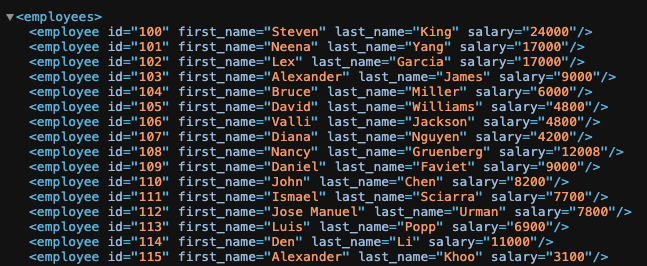
You should see an XML response formatted according to your Mustache template.
Debugging Common Issues
JavaScript Errors: Check for syntax errors or issues with the JavaScript handler.
SQL Query Problems: Ensure your SQL query is correct and returns the expected results.
Template Errors: Verify the Mustache template syntax and placeholders.
Conclusion
In this article, we’ve shown how to use Mustache and ORDS JavaScript handlers to transform SQL query results into beautifully formatted XML. By following these steps, you can enhance the presentation of your data and make it more accessible and readable.


















 Peter's Random Topic Library