[Update for ORDS 22+] So what version of ORDS am I actually running?

A little while ago ORDS version 20.2.1.227.0350 became available for download from oracle.com and was also rolled out to Autonomous Database Shared regions around the world. Oracle REST Data Services has been available on Oracle Cloud for quite some time but this is the first time the release notes specifically mention Autonomous Database Shared.

If you are running a customer-managed ORDS for your Autonomous Transaction Processing, Autonomous Data Warehouse, or Autonomous JSON Database, you must upgrade your ORDS to version 20.2.1. Failure to do so could lead to service disruptions.

Oracle REST Data Services 20.2.1.r2270350 Release Note

Why does this matter? Before answering that, some basic concepts to cover first. At a high level, an ORDS installation consists of three parts:
– The Java application that accepts, validates and processes the HTTP requests. This is the ords.war running standalone, in WebLogic Server or Tomcat Server.
– The file system that contains the configuration settings for the ords.war to make and manage database connections, as well as static files and so on.
– The database that ORDS connects to and where users define & run their REST services in. This information and the database procedures for running these services are in the ORDS_METADATA schema.

When a customer first installs and configures ORDS the database(s) which ORDS will provide a RESTful interface for, will also have ORDS specific database objects installed. The version of the ords.war and the version of the ORDS_METADATA should be the same because they are coded, built and tested together before release. While it is possible that ORDS will work just fine if the ords.war and ORDS_METADATA versions are out of synch the expected behaviour is unspecified in this scenario.

At a high level, an ORDS installation consists of the application, file system and database.

ORDS Java application ( ords.war ) version

There are a number of ways to get the application version. From the command line…

java -jar ords.war version

Update for ORDS 22+

When using ORDS 22+ the above command will show you the version but will also show this error message:

java -jar ords.war version
Warning: Support for executing: java -jar ords.war has been deprecated.
Please add ords to your PATH and use the ords command instead.
...
ORDS: Release 22.4 Production 
...

The output does give you the high level version number but the correct command to use with ORDS 22+ is in fact:

ords --version

That’s assuming the ords script is in your path. If not, the correct command is:

$ORDS_INSTALL_DIR/bin/ords --version

Now, back to the other steps to get the ORDS Java Application version number…

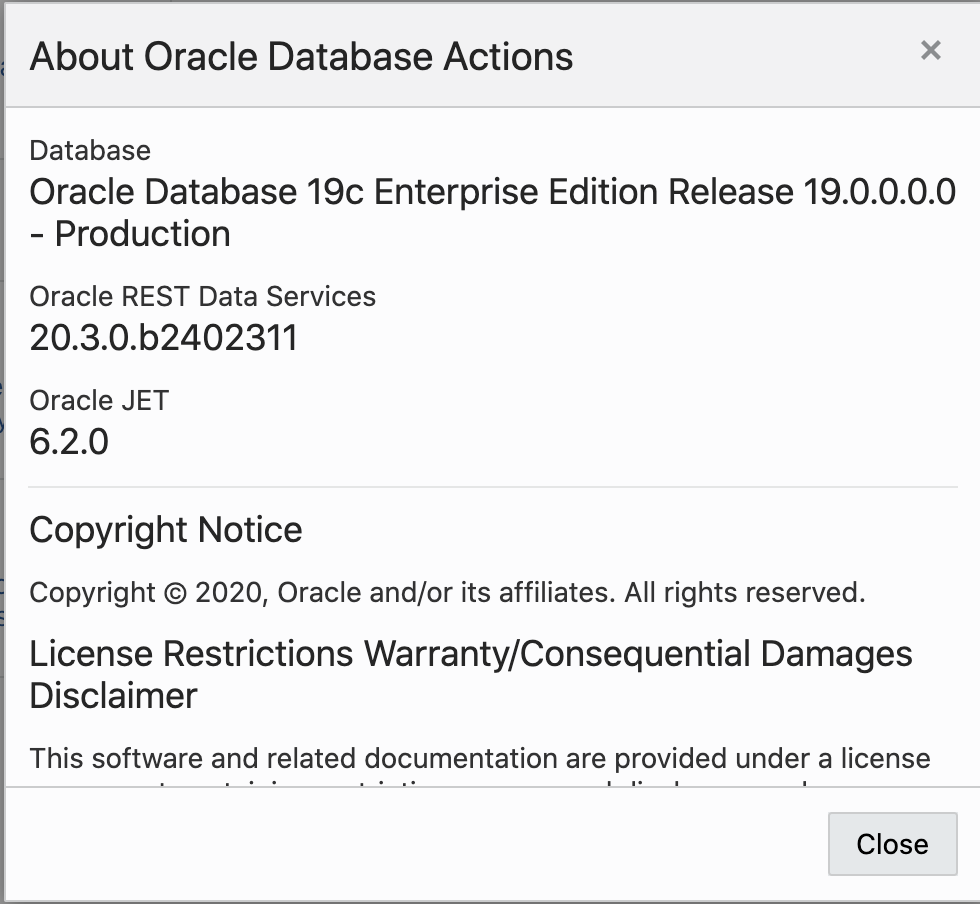
From the SQL Developer Web through Preferences > About…

From within APEX through SQL Workshop > RESTful Services > ORDS RESTful Services…

From within APEX through Help (?) > About. In this case it’s called the APEX_LISTENER_VERSION…

ORDS repository ( ORDS_METADATA ) version

The metadata version can be obtained through an SQL query in the database…

select ords.installed_version from dual;

The above query can be executed in SQL Developer Web worksheet, APEX SQL Workshop > SQL Commands, sqlplus, sqlcl, SQL Developer. Effectively, anywhere you can run a query from.

Conclusion

It is possible for an ORDS installation to have the ords.war and ORDS_METADATA versions out of synch. This can happen if one runs a new version of ords.war against a database that already has ORDS installed without going through the installation or upgrade process or the database metadata is upgraded but the runtime ords.war is not. The latter can happen for Customer Managed ORDS on Autonomous Database. When doing so, always regularly check the application and database versions are in synch.

Match your METHOD with your SOURCE

Oracle REST Data Service makes it easy to provide a RESTful service interface to tables, views and procedures in your database. When two paradigms meet there’s rarely an exact one to one match between the concepts. It’s the same with Relational Database concepts and RESTful service concepts. These considerations must be kept in mind when when moving from one paradigm to another.

One thing to consider is the rule that most methods in a RESTful API must be idempotent. In the context of ORDS handlers this applies to GET, DELETE and PUT. However, ORDS does not enforce the rule because it can not be easily determined from a PL/SQL block if it is idempotent or not. To do so requires an understanding of not just the PL/SQL block itself, but also any functions or procedures it calls.

Idempotent considerations applies to the resource the endpoint represents. Therefore, if an audit entry must be written when a customer record is accessed, the PL/SQL that is defined in a GET handler can insert that audit record and still be considered idempotent because it is not modifying the customer record.

The ORDS handlers, particularly PL/SQL ones, that we have created should be reviewed from time to see if their declared method is correct. To get a list of your PL/SQL handlers that are not already defined with a POST method, run this query

SELECT
m.name,
m.uri_prefix,
t.uri_template,
h.source
FROM
user_ords_handlers h,
user_ords_templates t,
user_ords_modules m
WHERE
h.source_type = 'plsql/block'
AND h.method != 'POST'
AND h.template_id = t.id
AND t.module_id = m.id;

Review the results and ask does the source match the method?

Although there are more HTTP method types, these are the most common, and supported by Oracle REST Data Services.

Unplug a jar from Oracle REST Data Services

Oracle REST Data Services has a plugin programming model which allows for an incredible degree of extensibility in the product. The Getting Started guide provides a walk through of creating a plugin to add custom functionality. After developing the plugin, the key command to add it to ORDS is:

java -jar ords.war plugin built/plugin-demo.jar

From time to time, it may be necessary to remove the custom jar. There is not a specific command in ORDS to do that but there is an option with ZIP at the command line. In this case, the plugin-demo.jar is packaged in the ords.war at WEB-INF\lib so unplugging it is as simple as this on Windows:

zip -d ords.war WEB-INF\lib\plugin-demo.jar

On Linux or Mac, that would be:

zip -d ords.war WEB-INF/lib/plugin-demo.jar

It really is that easy.

Read only REST endpoints with ORDS

Getting access to data, and logic, in your Oracle database is made so very easy with Oracle REST Data Services (ORDS). With a few clicks you can REST-enable a table so that clients can query, insert, update and delete records in it. That’s all via REST requests and all without writing any custom SQL. Moreover, these REST services can be secured so that only users with the required role has access.

What if you wanted to provide open access to a subset of data without the overhead of authentication and role authorisation configuration? Consider an internal employee directory for example where employees, or other systems, in the organisation’s intranet can search for employees. Some Oracle customers have achieved this by creating a read only view and ORDS enabling that. There is another approach that does not involve ORDS enabling the schema where the data resides or creating views. Let’s explore that…

Context

In the scenarios outlined below there is database called ORCLPDB1 with a HR schema. ORDS is running on localhost:8080 and the URL for accessing the database is http://localhost:8080/ords/orclpdb1/

The example command line requests shown below uses HTTPie. You may be more familiar with curl, but HTTPie is worth exploring if you script REST calls because there’s less typing involved!

The HR application uses HR schema for managing employee details, contact information and sensitive information including salaries and bonuses. The EMPLOYEES table in the HR schema is the ultimate source of truth about the people employed in the organisation. It is only employee_id, first_name, last_name, email, phone_number, and manager_id that should be made available through a REST interface.

Which schema?

An ORDS Enabled schema is required because it will be with that user that queries on the HR.EMPLOYEES table will be performed in the database. One can ORDS Enable the HR schema or create a new schema which only exists to provide a REST interface and ORDS enable that.

In these examples we’re going to create a new schema called HR_REST and only give it the minimum of privileges required. You can call the schema whatever suits the nomenclature in your organisation. Some may consider HR_READ_ONLY or the shorter HR_RO names in this context.

Create schema

With a DBA or some other suitable privileged user, connect to the database and run the following:

CREATE USER HR_REST IDENTIFIED BY <password>;

GRANT CONNECT TO HR_REST ;
GRANT SELECT ON HR.EMPLOYEES TO HR_REST;

BEGIN
   ORDS_ADMIN.ENABLE_SCHEMA(p_schema => 'HR_REST');
END;

You will notice that the HR_REST can only CONNECT and SELECT so it is restricted at the database level as to what it can do.

Define Service

This is the point where we define a REST endpoint to retrieve just the columns required by taking advantage of the DEFINE_SERVICE procedure. Connect to the database as HR_REST user and run the following:

BEGIN
  ORDS.DEFINE_SERVICE(
            p_module_name => 'hr.read_only.employees',
            p_base_path => '/employees/',
            p_pattern => '.',
            p_source => 'select employee_id, first_name, last_name, email, phone_number, manager_id from hr.employees'
          );
  COMMIT;
END;

The employee list can now be accessed at http://localhost:8080/ords/orclpdb1/hr_rest/employees/ using GET.

http http://localhost:8080/ords/orclpdb1/hr_rest/employees/ 

HTTP/1.1 200 OK
Content-Type: application/json
Date: Fri, 22 Mar 2019 18:14:04 GMT
ETag: "CfvOiafv+Tw6EyXoXwWPS8ZT8w0wkv0gHAy297hSqILBnV6OdzJ8MlTgngdhPuPv9p9MfsLCqSkyqmXiHedNlA=="
Transfer-Encoding: chunked

{
    "count": 25,
    "hasMore": true,
    "items": [
        {
            "email": "DOCONNEL",
            "employee_id": 198,
            "first_name": "Donald",
            "last_name": "OConnell",
            "manager_id": 124,
            "phone_number": "650.507.9833"
        },
...items removed for brevity...
        {
            "email": "DGRANT",
            "employee_id": 199,
            "first_name": "Douglas",
            "last_name": "Grant",
            "manager_id": 124,
            "phone_number": "650.507.9844"
        },
        {
            "email": "JWHALEN",
            "employee_id": 200,
            "first_name": "Jennifer",
            "last_name": "Whalen",
            "manager_id": 101,
            "phone_number": "515.123.4444"
        },
        {
            "email": "MHARTSTE",
            "employee_id": 201,
            "first_name": "Michael",
            "last_name": "Hartstein",
            "manager_id": 100,
            "phone_number": "515.123.5555"
        },
        {
            "email": "PFAY",
            "employee_id": 202,
            "first_name": "Pat",
            "last_name": "Fay",
            "manager_id": 201,
            "phone_number": "603.123.6666"
        }
    ],
    "limit": 25,
    "links": [
        {
            "href": "http://localhost:8080/ords/orclpdb1/hr_rest/employees/",
            "rel": "self"
        },
        {
            "href": "http://localhost:8080/ords/orclpdb1/hr_rest/metadata-catalog/employees/",
            "rel": "describedby"
        },
        {
            "href": "http://localhost:8080/ords/orclpdb1/hr_rest/employees/",
            "rel": "first"
        },
        {
            "href": "http://localhost:8080/ords/orclpdb1/hr_rest/employees/?offset=25",
            "rel": "next"
        }
    ],
    "offset": 0
}

Note the link to the metadata-catalog for the service. The one downside of this approach is that there’s no metadata about the structure of the response. If one had ORDS enabled a view, the metadata-catalog would at least describe the properties for each column.

However, the downside of ORDS enabling a view is that anything other than a GET will result in a HTTP 500 error response which is not ideal. The advantage of this DEFINE_SERVICE approach is that other HTTP methods will result in a very clear HTTP 405 Method Not Allowed response. For example:

http -v POST http://localhost:8080/ords/orclpdb1/hr_rest/employees/ first_name=Peter

HTTP/1.1 405 Method Not Allowed
Allow: GET
Content-Length: 15798
Content-Type: text/html

Similar to when a view is ORDS enabled, the ORDS pagination and query filter object query parameters can be used to find specific employees.

http http://localhost:8080/ords/orclpdb1/hr_rest/employees/ q=='{"first_name":"Alana"}'

HTTP/1.1 200 OK
Content-Type: application/json
ETag: "YNh9iZn3p5zFLO1zjlpaPtXBcdAGR3QMAatiPatERoTt5gievnW7Bz7qYFLNVP19H83pfE7rRRZiy0kRc5wXfg=="
Transfer-Encoding: chunked

{
    "count": 1,
    "hasMore": false,
    "items": [
        {
            "email": "AWALSH",
            "employee_id": 196,
            "first_name": "Alana",
            "last_name": "Walsh",
            "manager_id": 124,
            "phone_number": "650.507.9811"
        }
    ],
    "limit": 25,
    "links": [
        {
            "href": "http://localhost:8080/ords/orclpdb1/hr_rest/employees/?q=%7B%22first_name%22:%22Alana%22%7D",
            "rel": "self"
        },
        {
            "href": "http://localhost:8080/ords/orclpdb1/hr_rest/metadata-catalog/employees/",
            "rel": "describedby"
        },
        {
            "href": "http://localhost:8080/ords/orclpdb1/hr_rest/employees/?q=%7B%22first_name%22:%22Alana%22%7D",
            "rel": "first"
        }
    ],
    "offset": 0
}

Conclusion

By introducing another database schema, with restricted access just to the table required the level of exposure through the REST interface is reduced. While this could be achieved with a read only view, the response to clients that attempt to POST, PUT or DELETE is a HTTP 500 so it is much cleaner, and more RESTful one could argue, to use DEFINE_SERVICE in this case.