Updated for 23ai. The structure for Duality Views changed from 23free to 23ai release. In summary, the identifiers for rows are now _id rather than driverId, raceId, teamId.
ORDS 24.1.0 was released today and is available for download at https://oracle.com/rest. The release notes outline the enhancements and bug fixes. Many are notable. That includes performance improvements for JSON-Relational Duality Views and AutoREST in general.
Here’s an outline of test results using ORDS 24.1.0 running in my Developer DB VM on my laptop. It’s not a blindingly fast Oracle Exadata database setup so the absolute response times are nothing to write home about but the comparison of ORDS 24.1.0 over 2 previous ORDS releases is the point of the exercise here.
Noticeable improvement in the Duality View response time statistics for ORDS 24.1.0
Similarly, a noticeable improvement in the Table response time statistics for ORDS 24.1.0
Data Shape
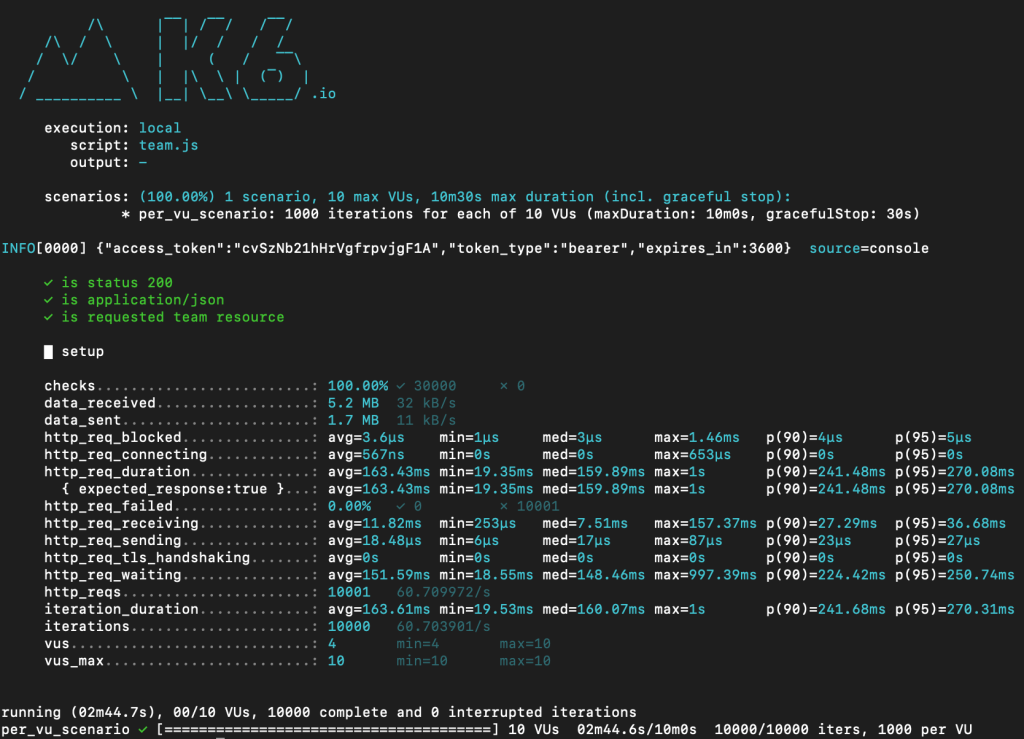
The data shape is the RESTful Car-Racing Example. In particular the GET of TEAM and TEAM_DV data through ORDS. Using k6 scripts for generating requests, there are 10 concurrent clients that are sending GET resource item requests 1,000 times each. The resource item identifier, team_id, is random so not the same row is returned ever time. The data set is not huge by any stretch of the imagination and does not reflect a likely production data shape. However, the purpose here is to compare changes in response times and throughput.
Authentication
Those AutoREST services provided by ORDS for the tables and duality views are protected because that’s most likely to be the situation in production. The k6 script is hard coded with client id and client secret for authentication. When the k6 test script starts the first thing performed is to get an access / bearer token which is then subsequently used for every request generated by the script. You will notice in every script run this output indicating the token that will be sent for every request.
There is also the output for checks performed on every response to ensure the expected data is returned. For example, if the authorisation token was invalid, the response status code would not be 200.
     ✓ is status 200
     ✓ is application/json
     ✓ is requested team resource
More on the k6 scripts later. Now let’s look at the database and ORDS configuration.
Configuration
Here’s a breakdown of the Developer DB VM configuration where the database and various versions of ORDS were run for the tests. The version of both ORDS and the Java Runtime Environment have been modified so if you are not familiar with that process see Get the latest – Enhance your DB Developer VM
Database
The same Oracle Database 23 Free edition that came with the Developer DB Virtual Machine is used. The HR schema is REST Enabled and contains the Car-Racing Duality View database objects.
ORDS Settings
The default configuration settings are used. These are the same configuration settings for all versions included in the test.
Default, out of the box, configuration that came with the Developer DB VM
Java Runtime Environment
The virtual machine was originally packaged with Oracle Java 11.0.19 but it is easy to change that. In this virtual machine Oracle GraalVM for Java 17 is used.
It is straight forward to download another JRE distribution and create a symbolic link to it from your $ORDS_HOME/jre directory. The ORDS shell script will use that Java Runtime Environment irrespective of the $PATH or $JAVA_HOME environment variable.
[oracle@localhost ~]$ /home/oracle/ords/jre/bin/java --version
java 17.0.9 2023-10-17 LTS
Java(TM) SE Runtime Environment Oracle GraalVM 17.0.9+11.1 (build 17.0.9+11-LTS-jvmci-23.0-b21)
Java HotSpot(TM) 64-Bit Server VM Oracle GraalVM 17.0.9+11.1 (build 17.0.9+11-LTS-jvmci-23.0-b21, mixed mode, sharing)
That is the setup for every test run. Startup a specific version of ORDS in standalone mode using the same configuration folder, and JRE, for each ORDS version.
Start ORDS in standalone mode: /home/oracle/ords-23.3.0/bin/ords serve
Start the test run: k6 run team_dv.js
Gather the results
Start the test run: k6 run team.js
Gather the results
Shutdown ORDS
Repeat for /home/oracle/ords-23.4.0/ and /home/oracle/ords-24.1.0/ to cover those releases too. Not sure how to get your Developer DB VM to have multiple versions of ORDS? Take a look at Get the latest – Enhance your DB Developer VM.
Results
The test runs involve sending requests to GET a random team record, either as a Team Duality View query or query directly on the Team Table that the duality view uses.
Now for the test run with the latest version of ORDS.
Oracle REST Data Services version : 24.1.0.r0960841
Oracle REST Data Services server info: jetty/10.0.20
Oracle REST Data Services java info: Java HotSpot(TM) 64-Bit Server VM 17.0.9+11-LTS-jvmci-23.0-b21
ords_auth.js provides a function for getting a bearer token
team.js tests the AutoREST endpoint for TEAM table and uses a function imported from ords_auth.js to get an access token. It is hardcoded with a client_id and client_secret and randomly gets team data based on their team_id.
team_dv.js tests the AutoREST endpoint for TEAM_DV duality view and uses a function imported from ords_auth.js to get an access token. It is hardcoded with a client_id and client_secret and randomly gets team data based on their team_id.
Do it yourself
With the RESTful Car-Racing Example data you should be able to run the same k6 scripts for testing your environment. If you have not done so already install k6 and download the team.js and team_dv.js script files. Just note that the CLIENT_ID and CLIENT_SECRET values will have to change for you database.
It is explained in the RESTful Car-Racing Example article how to get this information from the database. If your schema or port number is different, you’ll have to modify those too.
The upshot from my test runs is approximately 3 times improvement on throughput per second for JSON-Relational Duality Views and 2 times improvement for the throughput per second for a table. Your results may show different absolute response times but I expect you will see a similar improvement ratio when comparing with previous versions of ORDS.
Reply in the comments with your own findings. I look forward to hearing from you.
Updated for 23ai. The structure for Duality Views changed from 23free to 23ai release. In summary, the identifiers for rows are now _id rather than driverId, raceId, teamId.
Oracle Database 23c Free introduced the concept of JSON-Relational Duality Views which allows you to overlay a JSON document representation over a relational data model. In this article we’ll take Car-Racing Duality View Tutorial setup script and build on that to explore Oracle’s RESTful interface to Duality Views – Oracle REST Data Services (ORDS)
What Are JSON-Relational Duality Views?
JSON-Relational Duality Views provide a seamless way to interact with both JSON documents and relational data within Oracle Database. These views expose relational data as JSON documents, allowing developers to perform query and DML (Data Manipulation Language) operations using conventional SQL or directly with JSON.
Key Features and Benefits:
Unified Access:
Developers can choose their preferred approach: SQL for relational data or JSON for document-centric applications.
Changes made via one method automatically reflect in the other, maintaining consistency.
Updatable Views:
Duality views allow insertion, update, deletion, and querying of documents.
Inserting a row into the root table creates a new document, and changes propagate automatically.
Document-Identifier Field:
Each document has an identifier (e.g., _id) that corresponds to the primary-key columns of the underlying tables.
Ensures efficient updates and consistency.
Integration with APIs:
Use SQL/JSON functions, Oracle Database API for MongoDB, Simple Oracle Document Access (SODA), or Oracle REST Data Services (ORDS) to manipulate data.
Analytics, reporting, and machine learning can operate on the same data using SQL, PL/SQL, JavaScript, or C.
Car-Racing Example: The Track Ahead
Data related to Formula 1 car races are used in Oracle documentation to present the feature. In our car-racing example, we’ll explore three kinds of documents:
1. Team Document
Contains information about racing teams, including team names and the drivers associated with each team. The underlying tables are TEAM and DRIVER. Example team duality view structure:
Represents individual drivers, including their names, and team affiliations. The underlying tables are DRIVER, TEAM and DRIVER_RACE_MAP. Example driver duality view structure:
{
  "_id":115,
  "name":"Alexander Albon",
  "points":15,
  "teamId":307,
  "team":"Williams",
  "race":[
    {
      "driverRaceMapId":22,
      "raceId":202,
      "name":"Saudi Arabian Grand Prix",
      "finalPosition":3
    }
  ]
}
3. Race Document
Captures race details, podium standings, and results for each driver. The underlying tables are RACE, DRIVER, and DRIVER_RACE_MAP. Example driver duality view structure:
{
  "_id":202,
  "name":"Saudi Arabian Grand Prix",
  "laps":50,
  "date":"2022-03-27T00:00:00",
  "podium":{},
  "result":[
    {
      "driverRaceMapId":24,
      "position":1,
      "driverId":101,"
      name":"Max Verstappen"
    }
  ]
}
Here’s an additional script for REST Enabling the tables and views so that an access token is required to access them. The following has been tested using the Oracle Developer DB Virtual Machine with Oracle 23free Database. See previous articles on the topic: Oracle Developer DB Virtual Machine – a closer look and Get the latest – Enhance your DB Developer VM. The database account used is HR which has already been REST Enabled. From here on, every URL will start with http://localhost:8080/ords/hr/ because that is the easiest to reference with the Developer DB Virtual Machine.
That pl/sql block makes the tables and views available through ORDS AutoREST but to access them requires authorisation and Car Racing Client OAuth client is created with the necessary roles to do that. It is a client credentials OAuth client so to see the username and password generated for it just run this query:
SELECT client_id, client_secret
FROM user_ords_clients
WHERE name = 'Car Racing Client';
That CLIENT_ID and CLIENT_SECRET are the username and password to use to get an access token so that the tables and views can be accessed through ORDS. More on getting that access token later. For now, let’s look at the tables and views. Send a request to http://localhost:8080/ords/hr/open-api-catalog/ and list of services available will include:
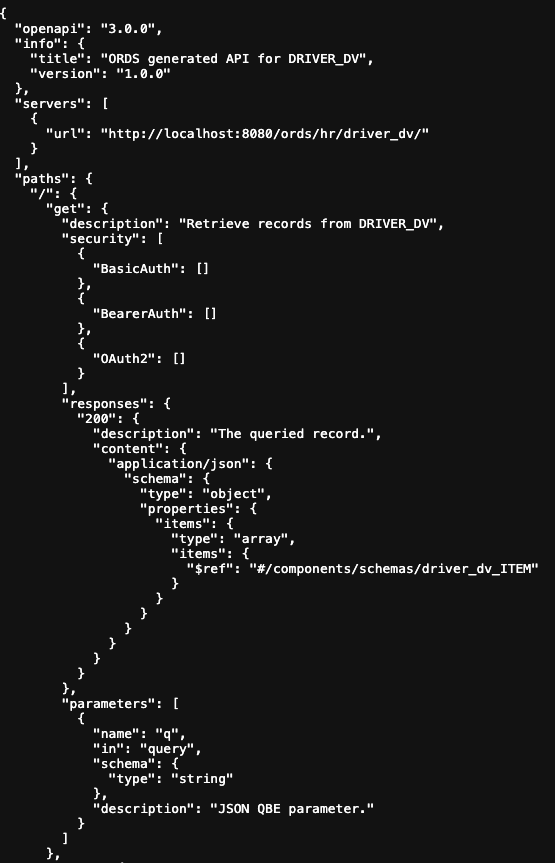
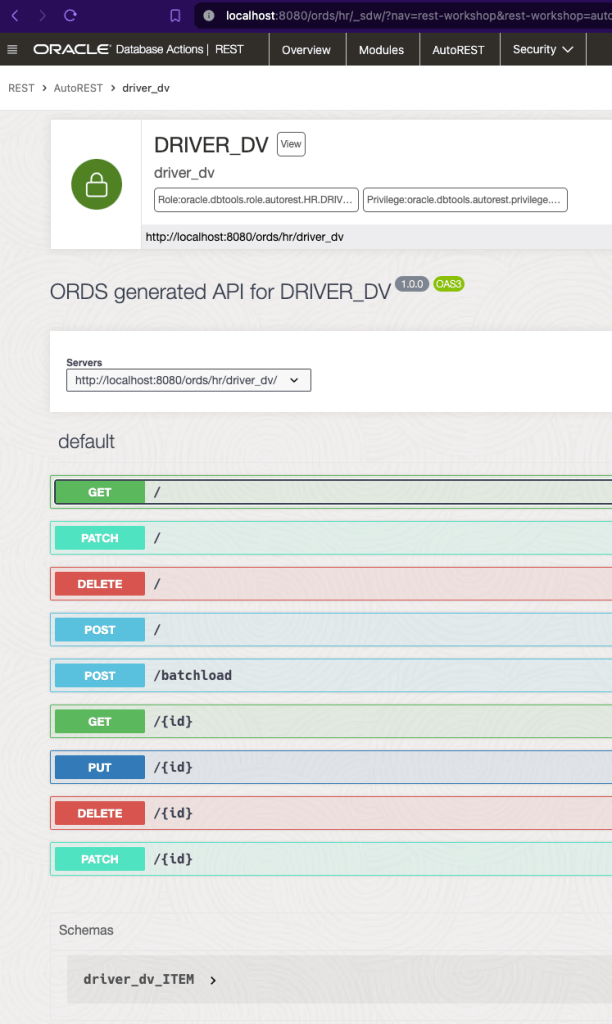
Follow those canonical links for an OpenAPI V3 description of the services available. For example, http://localhost:8080/ords/hr/open-api-catalog/driver_dv/ will show something like this…
Portion of the OpenAPI V3 document for driver_dv Duality View
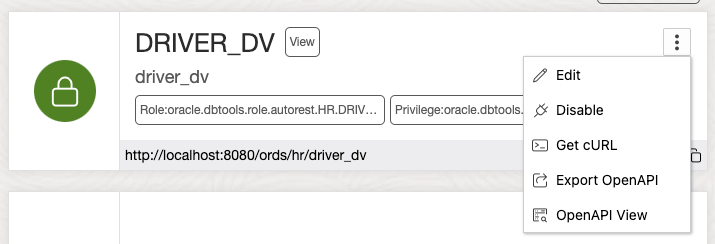
That OpenAPI V3 document can be imported into your development or integration tools so you can get started with building clients to use the services straight away. As a convenience, ORDS Database Actions provides a graphical interface for the OpenAPI document.
In the AutoREST section of ORDS Database Actions REST Workshop the REST Enabled objects are listed. Select OpenAPI View for a visual representation of the OpenAPI V3 document.
Try It Out
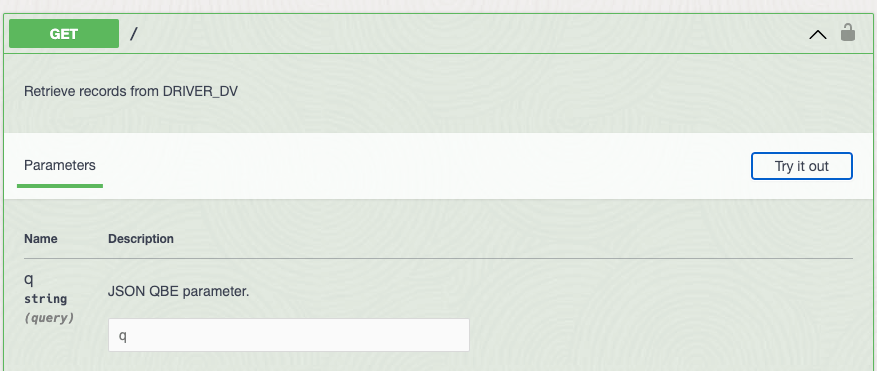
In that OpenAPI View there’s even the option to invoke that service directly from your browser.
Expand the operation and details of parameters, expected responses, etc. are shown included this “Try it out” button
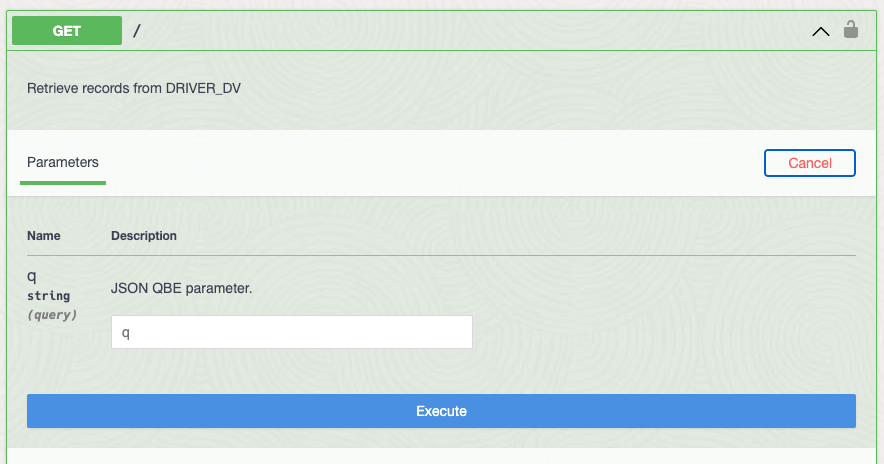
Click on “Try it out” and an Execute button appears at the bottom of the Parameters section.
While in “Try it out” mode we can specific parameters and execute a request.
The parameters are optional so just press that Execute button to “Retrieve records from DRIVER_DV”. Note that this is the same as running the following from the command line:
The DRIVER_DV endpoint is protected so a request without a valid access token will be rejected.
The DRIVER_DV, in fact none of the Car-Racing example tables and duality views, can be accessed through ORDS without authorisation.
Client Access Token
Let’s get that access token. The PL/SQL block for REST Enabling the tables and views also created a client with the necessary roles for access them: Car Racing Client. We retrieved the Client ID and Client Secret ( aka username and password ) earlier. Those credentials are used to obtain an access token and that access token is sent with every request to ORDS. The database user can revoke that access token and even remove the OAuth client so it is more secure than always relying on usernames & passwords. ORDS supports a variety of OAuth types as well as JWT Profiles for OpenID Connect. Now back to getting that access token…
Command Line
Using the Client ID and Client Secret as username and password the access token can be retrieved using cURL:
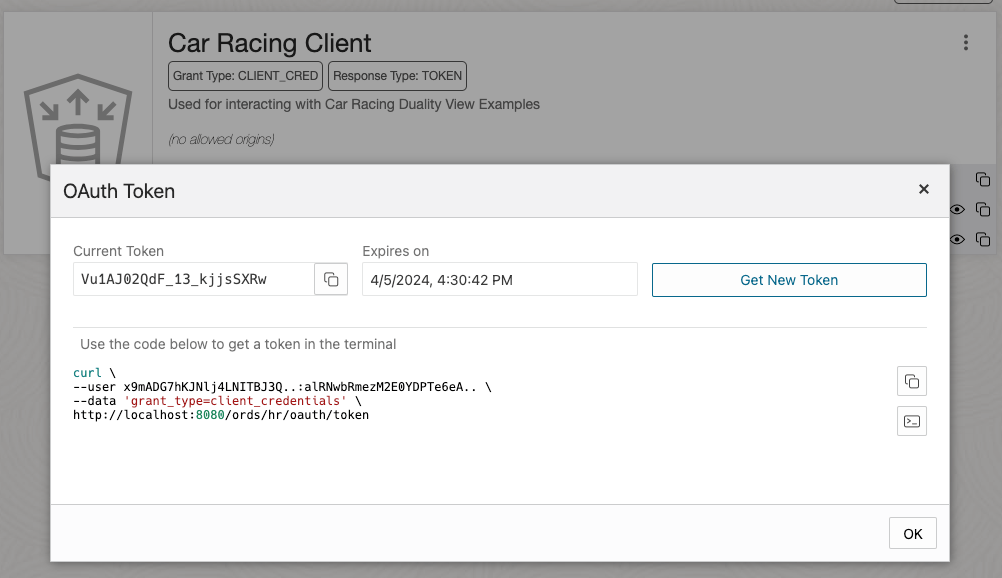
Note that every time a new OAuth access token ( aka Bearer token ) is issued the previous one issued for that OAuth client is invalidated. You only need to request a new one when the current one is about, or has already, expired.
Using Database Actions
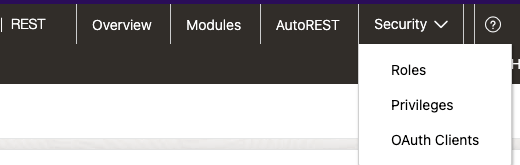
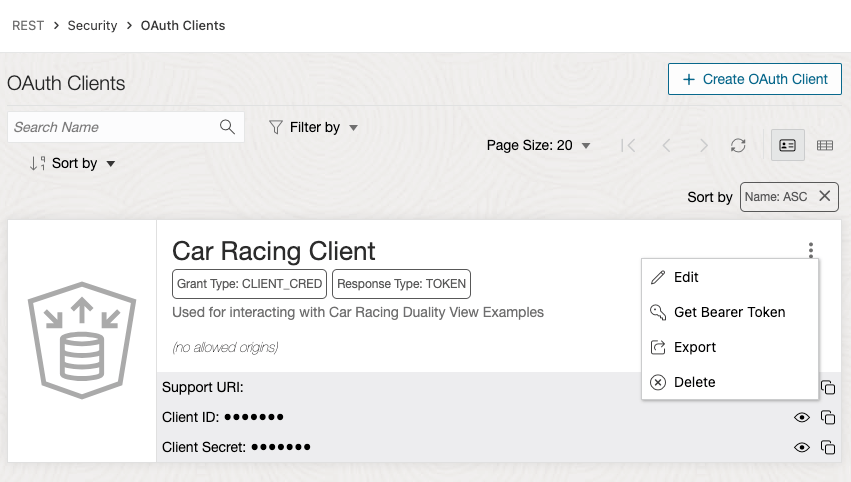
While in ORDS Database Actions REST Workshop and logged in as the HR user you can retrieve that information too by selecting Security -> OAuth Clients.
Head to OAuth Clients view for managing OAuth Clients
OAuth Clients can be managed from here or through ORDS OAuth package subprograms
Obtain a new token – note this value is different from the one previously retrieved and has invalidated it.
Try It Out Again!
Now that we have a valid bearer token Vu1AJ02QdF_13_kjjsSXRw let’s use that in the OpenAPI View to try executing requests again. Navigate back to the OpenAPI View for DRIVER_DV.
Notice that the padlocks are unlocked indicating that now bearer / access token is saved
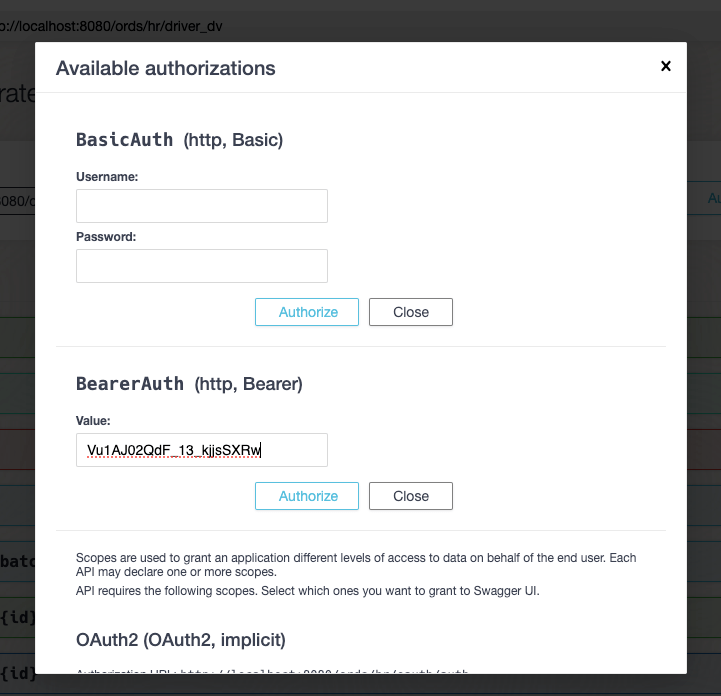
The Authorize button will launch a dialog box to set the bearer / access token to be used when making requests. Other authorisation flows are supported but since we have a bearer token already we’ll just set that…
A number of authorisation types are available but we’ll use the BearerAuth.
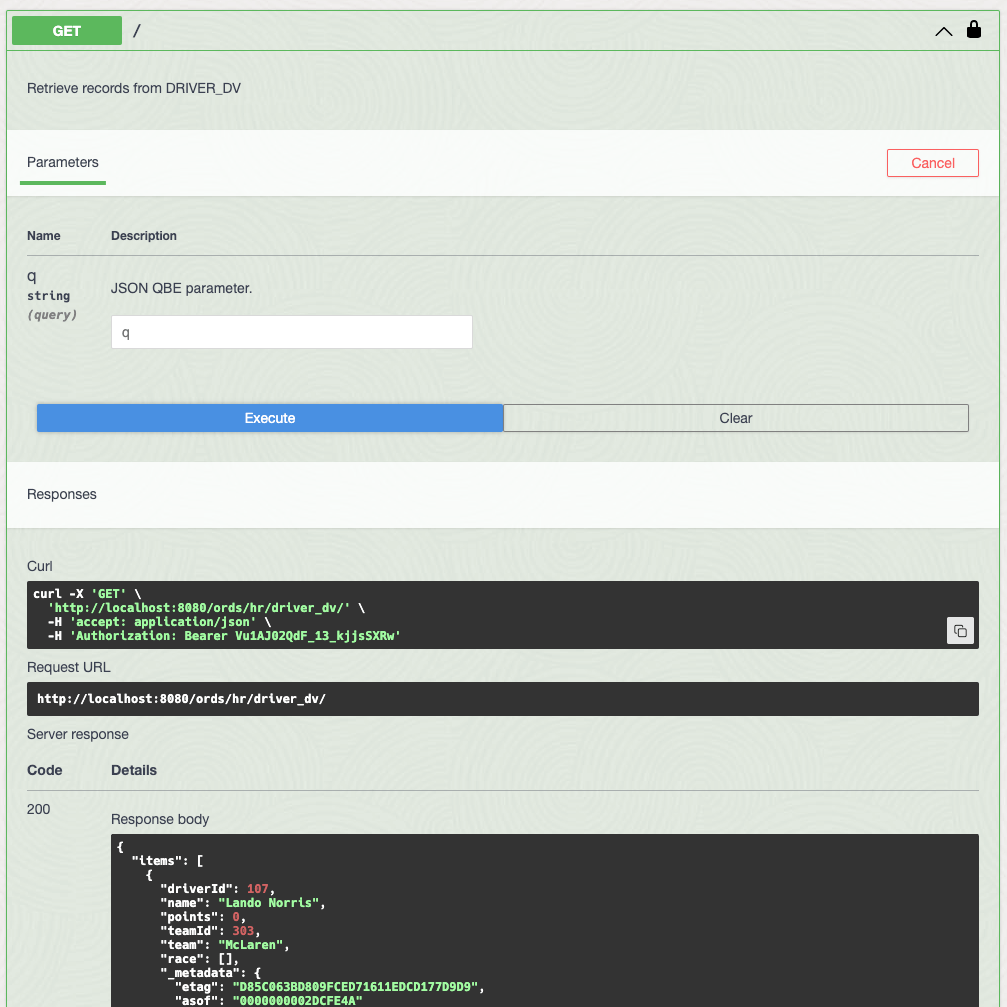
Enter the BearerAuth value and press Authorize to have it saved in the browser session. Now all HTTP requests executed in the OpenAPI View will have this token until you go back this “Available authorizations” dialog and press Logout. Let’s now use that token. Press the “Close” button and now you’ll see that the padlocks now show as locked. Repeating the steps for executing a GET request to Retrieve records from DRIVER_DV we now see data returned…
Success ! The Bearer token is accepted by ORDS and data is returned.
Note that the corresponding cURL command is also displayed so this could also has been executed from the command line as:
There are a lot more operations listed so experiment on what you can do through the OpenAPI View or from cURL. Note that Duality View JSON QBE parameter for querying uses the same syntax as SODA so it is not exactly the same as the Filter Object syntax used for AutoREST of relational tables and views.
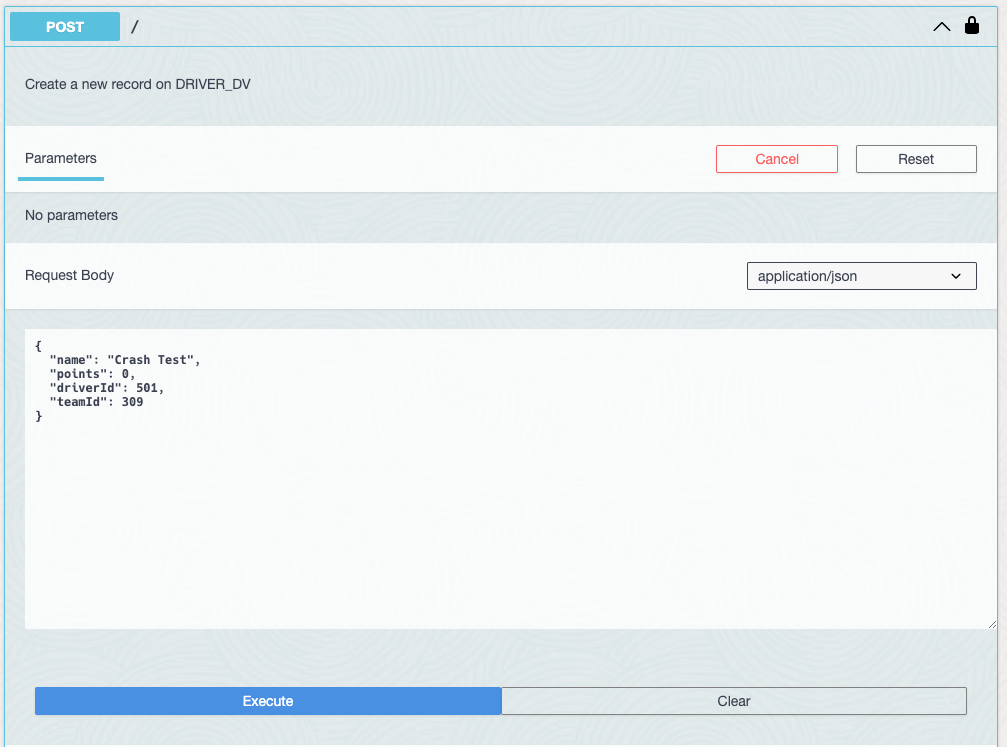
How about trying to create a new driver record?
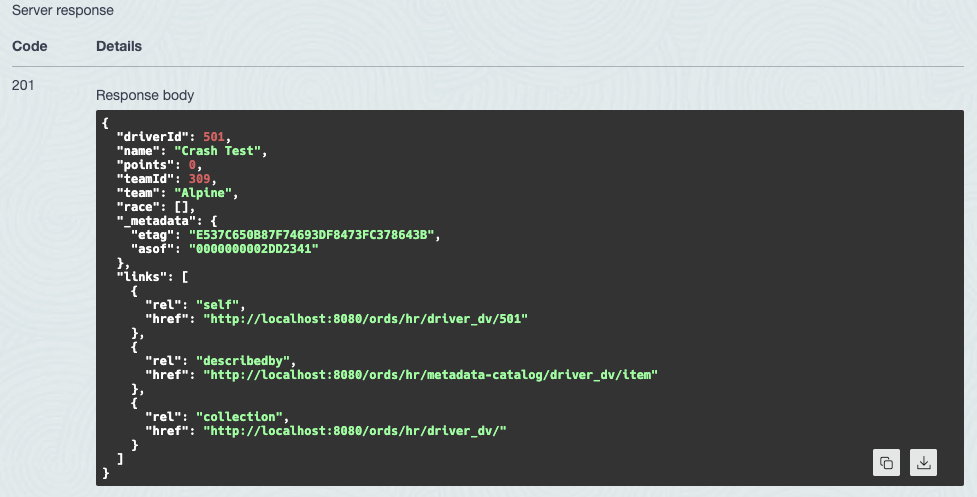
Try out the POST operation to insert a new Driver!
“Crash Test” is now the latest driver for team Alpine!
Build out the team
Using those Duality View services now let’s start creating new teams and drivers using batchload which is covered in the ORDS documentation. This allows you to perform multiple inserts of data that spans multiple tables. In this case the TEAM and DRIVER tables behind the TEAM_DV Duality View. The add-team.json file contains data for 7 more teams with 2 drivers each. Download it and use the file to populate those tables in one single request…
HTTP/1.1 200 OK
Content-Type: text/plain
Transfer-Encoding: chunked

#INFO Number of rows processed: 7
#INFO Number of rows in error: 0
#INFO Last row processed in final committed batch: 7
SUCCESS: Processed without errors
Loading data to TEAM_DV creates Team and Driver records.
Relational Table
So far the focus has been on Duality Views but as one can see from the above image, the underlying table(s) for a Duality View get updated. ORDS can also provide access to these relational tables and the above PL/SQL block provided we have already configured that.
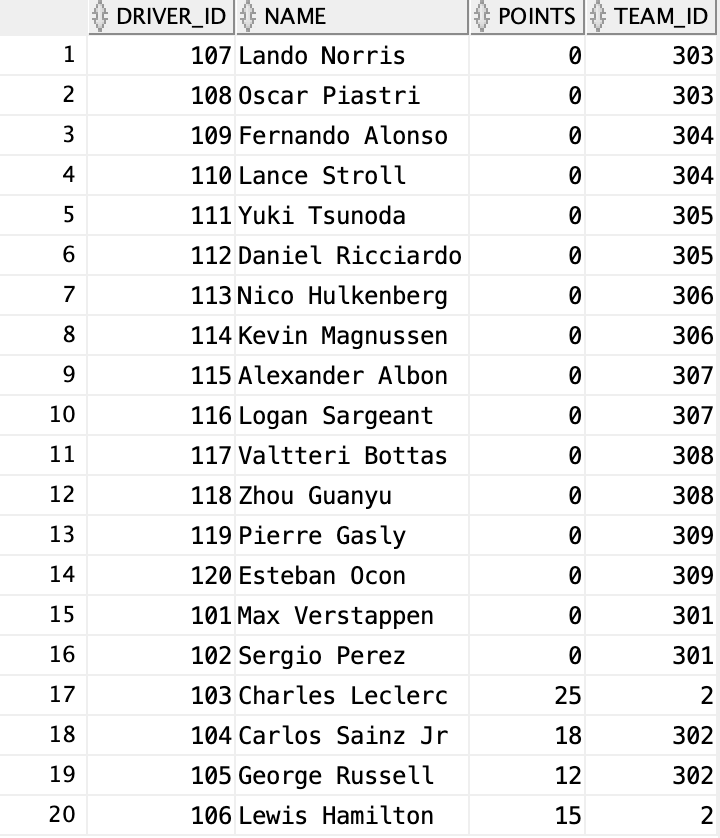
Thanks to the driver_race_map_trigger created when we ran the DualityViewTutorial.sql script we can now see the impact on the DRIVER table with Max Verstappen going from zero points to 25.
The insert to DRIVER_RACE_MAP resulted in a points increase on DRIVER
GraphQL
In this Car-Racing example the underlying tables for the Duality Views have been REST Enabled which also means they can be queried using GraphQL if ORDS is running on Oracle GraalVM Enterprise Edition with JS component installed. The advantage of GraphQL is that it allows you to define a query across the relational tables without having to define a Duality View but it would be a read only query. You do not get the create, update and delete capabilities of JSON-Relational Duality Views.
In this section we will take a look at a GraphQL query which can return the race date which is not currently included in the Driver Duality View. As a reminder, the Driver DV row looks like this:
{
  "_id":101,
  "name":"Max Verstappen",
  "points":25,
  "teamId":301,
  "team":"Red Bull",
  "race":[
    {
      "driverRaceMapId":8,
      "raceId":202,
      "name":"Saudi Arabian Grand Prix",
      "finalPosition":1
    }
  ]
}
It shows the data from DRIVER table, the team name from TEAM table, the RACE name and DRIVER_RACE_MAP finalPosition. However, it does not show the date of the race. Albeit in a slightly different structure, this GraphQL query will return the same data, plus the date of the race:
query Drivers {
  driver
  {
    driver_id
    name
    points
    team_id
    team_team_id {
        name
    }
    driver_race_map_driver_id {
        driver_race_map_id
        race_id
        race_race_id {
            name
            race_date
        }
        position
    }
  }
}
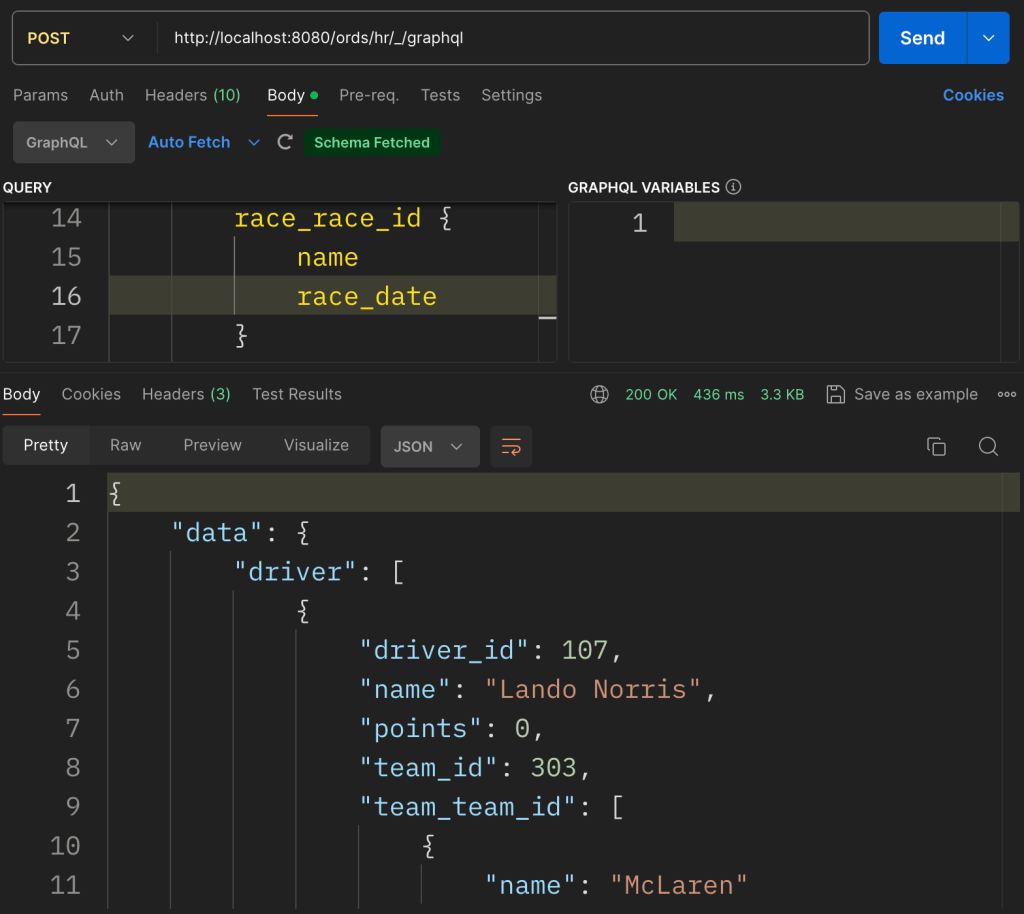
It is slightly more nested and uses names reflecting the foreign key constraints between the tables but it does include race_date. Running the query through cURL is simply a POST to the GraphQL endpoint.
Note that running the query through postman still requires setting the access bearer token. The added advantage of postman’s support for GraphQL is that it will use the same endpoint ( /ords/hr/_/graphql ) to automatically fetch the GraphQL schema so developing the query is guided. Here is the GraphQL query response for that query. It is quite long but it is informative to compare it with the corresponding DRIVER_DV Duality View structure.
GraphQL requires ORDS to be running on GraalVM with the JS component installed but unlike Duality Views, you don’t require Oracle RDBMS 23 to use it. The Car-Racing relational tables could still be used in a 19c database for example. However, JSON-Relational Duality Views in Oracle RDBMS release 23 can do so much more.
Crossing the Finish Line
In this blog post we have taken the Car Racing example Duality Views and their corresponding tables, created using DualityViewTutorial.sql, and REST Enabled them for secure RESTful access through ORDS. Using batchload we loaded multiple team and driver records in one single request. We have interacted with the underlying tables and even performed dynamic cross table join queries using GraphQL. By introducing GraphQL into the conversation it makes the Duality View advantages much clearer.
JSON-Relational Duality Views provide a powerful bridge between the structured world of relational databases and the flexible world of JSON documents. Whether you’re building APIs, applications, or analytical tools, these views offer a unified approach to data manipulation on the fast track. 🏁🚀
About a year ago Oracle 23c Database Free became available as a preview of the new “converged database” which introduces a huge range of application developer concepts right in the database. Since then I’ve written a couple of articles about it in the context of the Oracle Developer DB Virtual Machine…
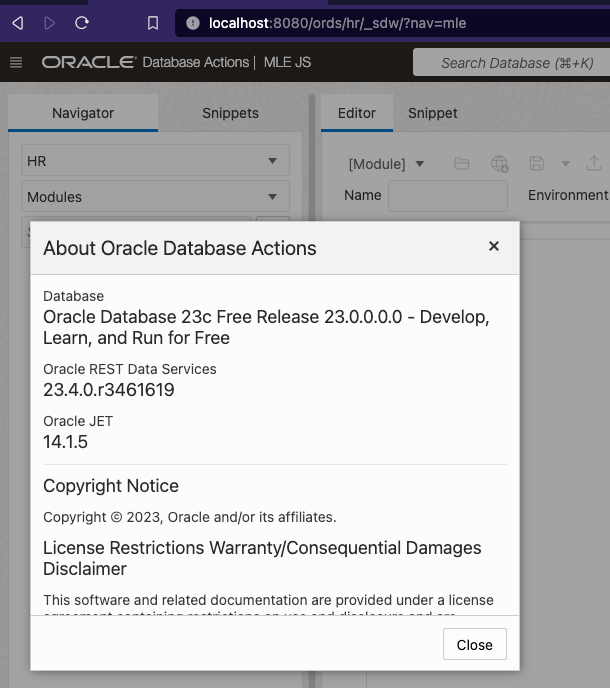
The latter covers upgrading your version of ORDS which is important for this article which will explore some Oracle Multilingual Engine ( MLE ) concepts which will require ORDS 23.4.0 ( or later ) just for the simplicity of the MLE editing support in Database Actions.
The goal here is to take Javascript based function which generates sample data and make that available as a REST service which will return data in a format which can be POSTed to the REST Enabled HR Employees table. Strictly speaking there’s no great advantage there because you could do that all in the DB anyway, but what gets covered here is the approach to take JSON data from Javascript and return it in the snake case format which can be used in Oracle REST Data Services.
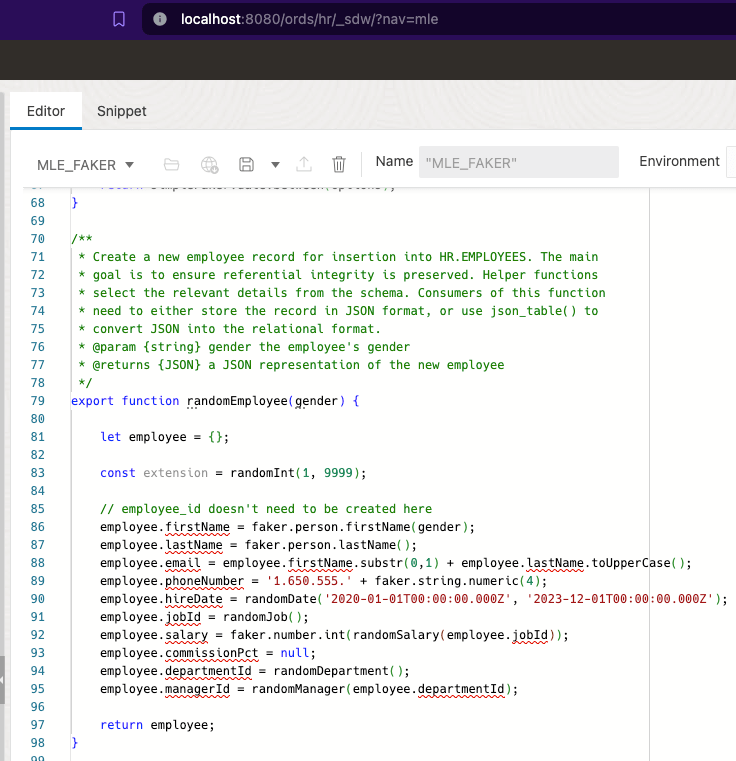
Today we’re building on previous articles. In fact, the starting point is Jeff Smith’s Using JavaScript to create test data in Oracle Database 23c. Jeff’s blog post highlights all that Martin Bach’s article Using faker-js/Faker to generate test data respecting referential integrity in Oracle Database 23c delivers, showing how to follow Martin’s steps in Database Actions MLE JS editor. That can be run in your Oracle Developer DB Virtual Machine with ORDS 23.4.0. Of course you could just use the database in the VM and have ORDS 23.4.0 running outside it too. Either way, once you’ve gone through Jeff’s blog post you will have an MLE JavaScript module in place called MLE_FAKER and an MLE Call Specification called MLE_FAKER_API.
Therefore you can run this select statement to get a JSON object with random data for the HR Employee record:
Employee is a JSON object with random values but should be valid
The randomEmployee function uses camel case for field names
Responses for REST Enabled objects use snake case
You would think that you could use the generated JSON object as the payload body for a POST to the REST Enabled HR Employees table. The difference in naming convention for field names prevents that from happening. Send the mle_faker_api.random_employee JSON object to ORDS and you will get a HTTP 400 Bad Request response. Of course we could change the MLE_MAKER function implementation to use snake case. That would deviate from what Martin has implemented and he may have subsequent articles building on that implementation so it’s best to avoid interfering with that.
Camel to Snake – we’ll handle it
It is quite simple really, we write a PL/SQL block handler which will take the fields from the JSON object and define the OUT parameters using the field naming convention we want. The handler takes a gender parameter to pass to the call specification and defines the data types for the fields. The database JSON_VALUE function is key here…
DECLARE
  random_employee JSON;
BEGIN
select mle_faker_api.random_employee(:gender)
       into random_employee;
:first_name := JSON_VALUE(random_employee, '$.firstName');
For your convenience here is a script to define the module/template/handler…
Which in turn can be used in a POST request to insert the record for real and generate an employee id.
The Employee JSON object is accepted and Tommie is employee number 221 !
Since one of the steps covered in Martin’s blog posts dealt with importing existing Javascript libraries ( Faker ) into the database, the transformation of the generated Employee JSON structure could possibly be achieved through Javascript libraries such as change-case. That’s a homework exercise for extra merit.
The real foundational work for this simple example of generating HR Employee sample data has been laid by Martin Bach. It was through building on that with a visual representation of the steps through ORDS’s Database Action UI that Jeff Smith brought it to my attention. I am grateful to both for the starting point they provided.
Everyone was happy. The web application uptime and response rates have been well within the Service Level Agreements for months. Uptake of the published REST Services was on the rise. Both internally and externally, more and more systems were consuming the services and the three ORDS instances behind an NGINX load balancer took it all in their stride. No long running queries or inefficient PL/SQL code locking DB resources. Everything humming along like a finely tuned engine. Then it came time to upgrade…
The ORDS product team have been operating to the usual cadence of one major release every 3 months. Although not ancient, our system is a few releases behind and not only are there interesting new features that are worth exploring but there’s always the security fixes to recent critical 3rd party Common Vulnerabilities and Exposures ( CVE ) that justifies being at the most recent stable release.
Upgrade time comes around so the test environment is setup to run through the ORDS upgrade process before applying the same to production. Then this happens for all the requests: HTTP ERROR 400 Invalid SNI
But this was working before I upgraded !
What is my SNI and how did it get invalid?
The same web server could be hosting multiple sites. In the case of ORDS, the same ORDS instance could have multiple domain name entries that route to it. Server Name Indication ( SNI ) is an extension to the Transport Layer Security (TLS) networking protocol for a client ( such as your browser ) to indicate to the server ( ORDS running standalone mode for example ) which site it wishes to talk to. To put it simply, SNI is used at the start of the secure connection handshake between client and server. The client sends a Host header in the request to indicate what site it is requesting and the server goes looking for its certificate for that server name. See https://datatracker.ietf.org/doc/html/rfc4366#section-3.1 for more details on the role of Server Name Indication in keeping communication secure.
You’ll notice from the stack trace and the error page that the Invalid SNI response does not look like a standard ORDS error page. It is in fact generated by the Eclipse Jetty embedded in ORDS when running in standalone mode.
A typical ORDS generated error page. It looks a lot different from the Invalid SNI error page!
It is a feature, not a bug – Jetty 10
When running ORDS in standalone mode an embedded Eclipse Jetty server is used. Before ORDS 22.3.0 that was Jetty 9 but since that release ORDS has been using Jetty 10 and for very good reason: more secure. As mentioned in the second paragraph at the start of this article there a fixes and optimisation that are worth making the upgrade for. Jetty 10 addressed some issues in the TLS handshake. Not least Better handling for wrong SNI #5379. Beforehand it didn’t really matter what the client sent in the Host header, Jetty would return any certificate it had.
What is in that certificate anyway?
The certificate, self-signed or otherwise, holds some important information about the server and is essential in establishing trust. To see the contents of the certificate, use the keytool utility in your Java distribution.
The above output shows that the Owner of this certificate has a Common Name ( CN ) value localhost which is the default standalone.https.host configuration setting value.
What to do about it
Now that you know the root cause how do you go about resolving it? It is as simple as ensuring the Common Name ( CN ) or Subject Alternative Name ( SAN ) field in the certificate matches what the client is sending the in Host header of the request. For more information on having more than one hostname in a single certificate see a previous article: Beyond the Common Name: Secure multiple domains with a single self-signed certificate
ORDS will generate a self-signed certificate if necessary when it is started in standalone mode and configured for HTTPS. In other words, the standalone.https.port is specified in the global configuration settings or --secure option is used in the ords serve command. If no certificate exists at the configured standalone.https.cert location, ORDS will generate the self-signed certificate and key file.
The Common Name used for the self-signed certificate is taken from the standalone.https.host configuration setting. If not set, the value is localhost. Traditional certificate practices often rely solely on the Common Name (CN) field. That’s the approach taken by ORDS by default when generating the self-signed certificate.
This can sometimes catch people out when they start up ORDS in secure standalone mode the first time. The self-signed certificate is generated but they may not have specified the standalone.https.host configuration setting and when they do later, they still get HTTP 400 Invalid SNI responses. That’s because the self-signed certificate is already generated so no matter what the standalone.https.host configuration setting says, the certificate will not be generated again.
Simple steps
The simplest course of action is to rename the self-signed certificate and key files and restart ORDS. It will not find the files and therefore will attempt to generate new self-signed certificates.
In summary, make sure the standalone.https.host configuration setting matches the Host header value that clients will send for requests being routed to your ORDS standalone server.
As technology evolves, staying ahead is not just an option but a necessity. We can’t run headlong into every new technology though. Trying out new concepts without disrupting the systems that are relied upon day in, day out, requires caution. This year I have found the Oracle Developer DB Virtual Machine to be really useful for trying out new converged database concepts without impacting what I’m working with on a daily basis. By keeping the database and tools in a sandbox that I can just park and come back to when I’ve got time, I can comfortably fire up the VM and start experimenting.
In April of 2023 the Oracle DB Developer VM was released with the Oracle 23c Free database and related database tools which were released at the time. Just under 6 months later the virtual machine image was update in September 2023 to have more recent versions of those tools. In December 2023 ORDS 23.4.0 was released. Do you have to wait another 5 – 6 months before you can start using the latest release of ORDS? No – and this article will walk you through the steps to achieve that…
Inside Job
Everything is going to take place inside the VM so make sure that is running…
VirtualBox Graphical User Interface
In fact, most of the steps will be commands in one of the terminals. The user is oracle and the working directory is /home/oracle/. This is our starting point…
One of the terminal sessions already started
Current running ORDS
By default there’s only one ORDS instance running in your VM. Get the details of the current ORDS instance using the jps command with some options which will tell you what the startup parameters were. Piping through grep keeps the list to just the ords instances running in standalone mode…
From the above we have a process id but more importantly, confirmation that the configuration directory is /home/oracle/ords_config and that certain serve options are provided too. We will use that information later.
Download latest ORDS
Oracle REST Data Services is available under the Oracle Free Use Licence so the latest released version is always available at https://download.oracle.com/otn_software/java/ords/ords-latest.zip. Remember all these commands are taking place in /home/oracle/ unless otherwise stated.
As you can see there’s the /home/oracle/ords/ directory that has the ORDS distribution that the VM shipped with. The /home/oracle/ords_config/ directory for ORDS configuration settings. The ords-latest.zip file which at the time of writing is ORDS 23.4.0. The /home/oracle/ords_previous/ directory which is a copy of the ORDS distribution that came with the virtual machine. Hopefully we’ll never have to use it.
Extract the ords-latest
Let’s put the most recent release of ORDS into it’s own directory…
[oracle@localhost ~]$ mkdir ords-latest
[oracle@localhost ~]$ unzip ords-latest.zip -d ords-latest
Archive:  ords-latest.zip
   creating: ords-latest/bin/
   creating: ords-latest/linux-support/
   creating: ords-latest/linux-support/man/
...
  inflating: ords-latest/examples/plugins/lib/ords-plugin-apt-23.4.0.346.1619.jar
  inflating: ords-latest/examples/plugins/lib/jakarta.inject-api-2.0.0.jar
  inflating: ords-latest/examples/plugins/lib/ords-plugin-api-23.4.0.346.1619-javadoc.jar
[oracle@localhost ~]$ ls -l ords-latest
total 110032
drwxr-xr-x. 2 oracle oracle        34 Dec 12 16:36 bin
drwxr-xr-x. 3 oracle oracle        21 Dec 12 16:36 docs
drwxr-xr-x. 7 oracle oracle        93 Mar 27  2023 examples
drwxr-xr-x. 2 oracle oracle        28 Nov 24 17:50 icons
drwxr-xr-x. 3 oracle oracle        17 Nov 24 17:50 lib
-rw-r--r--. 1 oracle oracle      5996 Dec 12 05:35 LICENSE.txt
drwxr-xr-x. 3 oracle oracle        86 Dec 12 16:36 linux-support
-rw-r--r--. 1 oracle oracle       210 Dec 12 05:35 NOTICE.txt
-rw-r--r--. 1 oracle oracle 112653905 Dec 12 16:36 ords.war
drwxr-xr-x. 4 oracle oracle        38 Mar 27  2023 scripts
-rw-r--r--. 1 oracle oracle       365 Dec 12 05:35 THIRD-PARTY-LICENSES.txt
[oracle@localhost ~]$
Perform upgrade to DB
Now that you have the most recent version of ORDS you can upgrade the ORDS Metadata in the database. We must tell ORDS where the configuration directory is but we have that information from earlier…
Enter a number to select the type of installation [1] Install or upgrade ORDS in the database only [2] Create or update a database pool and install/upgrade ORDS in the database [3] Create or update a database pool only Choose [1]:
Just go with the default to upgrade ORDS in the database only and use SYS as the administrator. Remember that the password for everything in this Developer DB virtual machine is oracle. Here’s the output from running my upgrade…
Oracle REST Data Services - Interactive Install

  Enter a number to select the type of installation
    [1] Install or upgrade ORDS in the database only
    [2] Create or update a database pool and install/upgrade ORDS in the database
    [3] Create or update a database pool only
  Choose [1]:
  Enter a number to select the database pool to use or specify the database connection
    [1] default      jdbc:oracle:thin:@//localhost:1521/FREEPDB1
    [2] Specify the database connection
  Choose [1]:
  Provide database user name with administrator privileges.
    Enter the administrator username: sys
  Enter the database password for SYS AS SYSDBA:
Connecting to database user: SYS AS SYSDBA url: jdbc:oracle:thin:@//localhost:1521/FREEPDB1

Retrieving information.
Connecting to database user: ORDS_PUBLIC_USER url: jdbc:oracle:thin:@//localhost:1521/FREEPDB1
2024-01-03T13:07:08.935Z INFO        Created folder /opt/oracle/userhome/oracle/ords_config/logs
2024-01-03T13:07:08.936Z INFO        The log file is defaulted to the current working directory located at /opt/oracle/userhome/oracle/ords_config/logs
2024-01-03T13:07:09.036Z INFO        Upgrading Oracle REST Data Services schema 23.2.3r2421937 to version 23.4.0.r3461619 in FREEPDB1
2024-01-03T13:07:16.182Z INFO        Completed upgrade for Oracle REST Data Services version 23.4.0.r3461619. Elapsed time: 00:00:07.1

2024-01-03T13:07:16.183Z INFO        Log file written to /opt/oracle/userhome/oracle/ords_config/logs/ords_upgrade_2024-01-03_130708_93718.log
Symbolic gesture
This is not entirely necessary but we are going to make /home/oracle/ords/ a soft symbolic link so we can point it to whatever directory we like. If necessary, pointing it to /home/oracle/ords_previous/ if we encounter a problem.
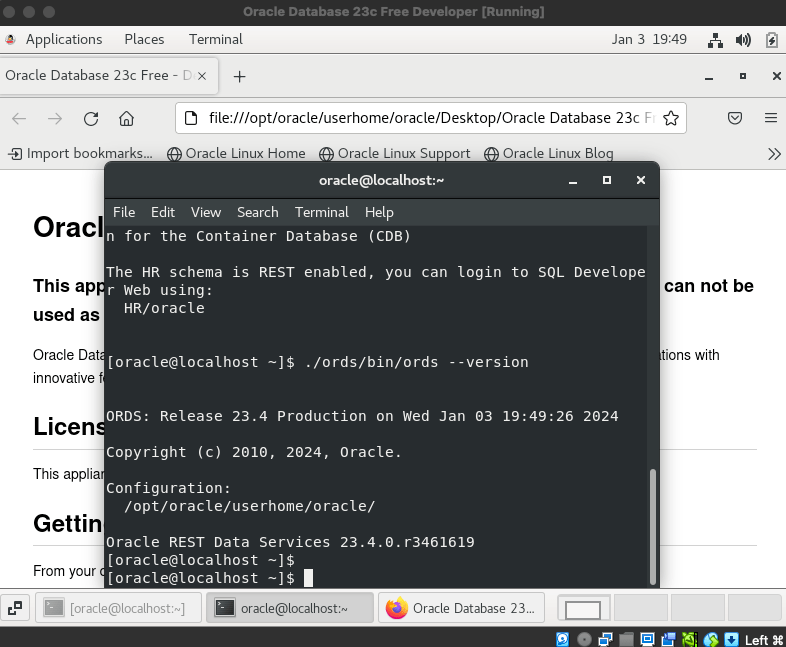
ORDS: Release 23.4 Production on Wed Jan 03 13:13:10 2024
Copyright (c) 2010, 2024, Oracle.
Configuration: /opt/oracle/userhome/oracle/
Oracle REST Data Services 23.4.0.r3461619 [oracle@localhost ~]$
That confirms we have /home/oracle/ords/ now pointing to the ORDS we just downloaded.
Serve it up!
Although /home/oracle/ords/ now points to the latest release of ORDS the currently running version of ORDS is the previous one. We could just restart the VM to address that. The ORDS service is defined with the DB service in /etc/init.d/oracle so the database and ORDS can be restarted together. Just for now, let’s find the ORDS standalone instance, stop it and start it in the terminal window just to see that the same startup command gives us ORDS 23.4.0.
# Find the currently running ORDS instance and kill it ps -ef | grep ords kill -9 <pid>
Mapped local pools from /home/oracle/ords_config/databases: /ords/ => default => VALID
2024-01-03T13:22:51.547Z INFO Oracle REST Data Services initialized Oracle REST Data Services version : 23.4.0.r3461619 Oracle REST Data Services server info: jetty/10.0.18 Oracle REST Data Services java info: Java HotSpot(TM) 64-Bit Server VM 11.0.19+9-LTS-224
That confirms the same ORDS serve command that we saw at the top of this article will startup ORDS in standalone mode listening on port 8080.
ORDS 23.4.0 running on Database Developer VM
Stop and Start
Starting ORDS in standalone mode is part of the service startup for the VM so powering off the VM and starting it again will bring you back to the clean state of new terminal windows, but the version of ORDS running is now 23.4.0. When there is a more recent version of ORDS released that can be extracted into a new directory and the /home/oracle/ords/ soft symbolic link could be changed to point to that.
Restart the VM and the version of ORDS is the latest