
Managing Oracle database accounts is an essential part of database security and operational hygiene. One key task is identifying accounts that have not been used for extended periods, such as over 30 days. While queries against DBA_USERS or ALL_USERS provide basic metadata about database accounts, they do not reliably indicate actual usage, particularly for REST-enabled schemas. This is because Oracle REST Data Services (ORDS) and other middleware may connect to the database via a “connect through” mechanism, creating sessions on behalf of the schema without a traditional direct login.
For precise auditing of user activity, Oracle 26ai’s Unified Audit framework offers a reliable solution.
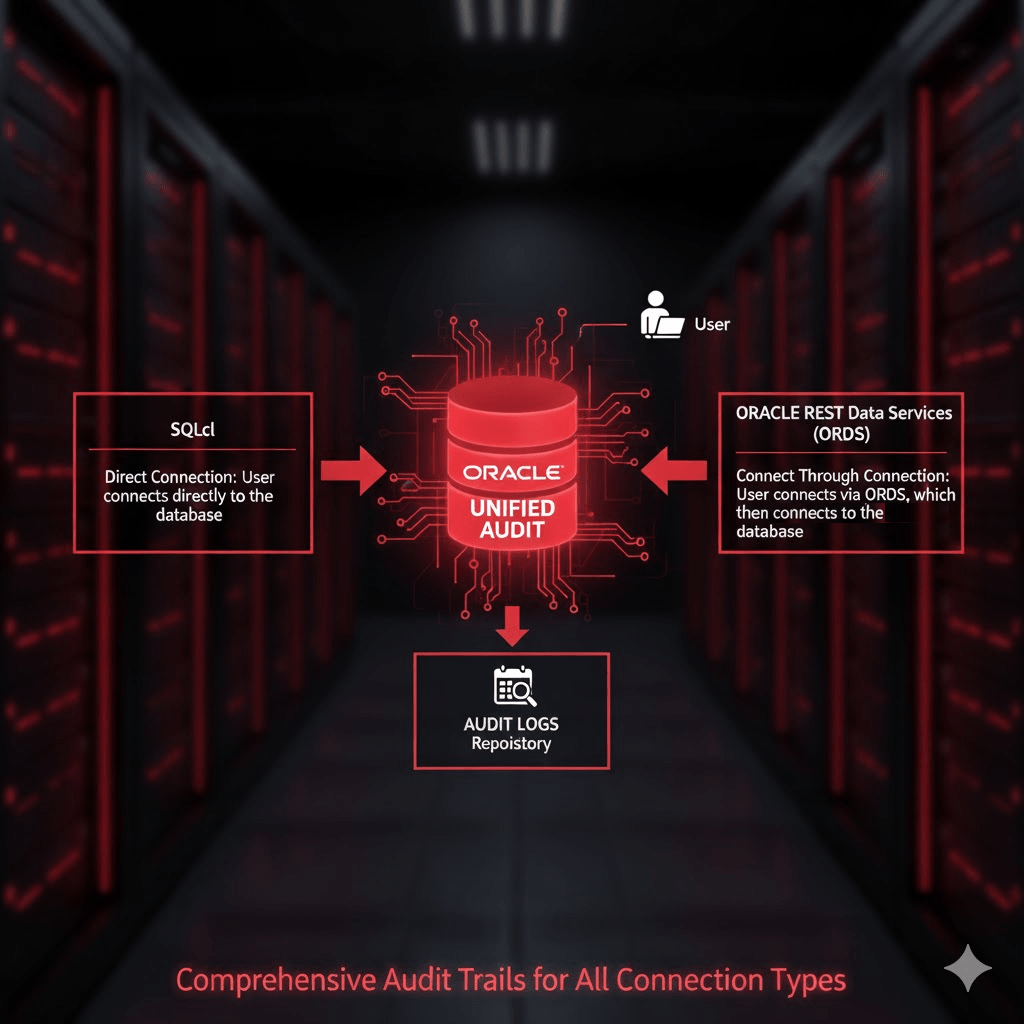
What is a Unified Audit Policy?
Unified Auditing consolidates Oracle’s auditing mechanisms into a single, consistent framework. It allows administrators to define audit policies that track database activity across sessions, users, and even system-level events.
A Unified Audit Policy is a set of rules that specifies which actions are audited. When enabled, it records events in the UNIFIED_AUDIT_TRAIL view, including logins, logouts, DML operations, and privilege usage. This provides a reliable, timestamped record of actual database activity.
Define The Policy
Oracle 26ai ships with a predefined Unified Audit Policy called ORA_LOGIN_LOGOUT. This policy is designed to track user logins and logouts. However, by default it only tracks failures unless your System Administrator has altered the policy definition. So lets verify your audit policy state.
To confirm that Unified Audit is enabled in your database run this query. It should return TRUE.
SELECT VALUE
FROM V$OPTION
WHERE PARAMETER = 'Unified Auditing';
Now check the status of the predefined ORA_LOGIN_LOGOUT policy…
SELECT * FROM audit_unified_enabled_policies where POLICY_NAME = 'ORA_LOGIN_LOGOUT';

If the predefined ORA_LOGIN_LOGOUT policy is not recording on SUCCESS then define a new policy to achieve that and activate it…
CREATE AUDIT POLICY ALL_LOGONS ACTIONS LOGON;

AUDIT POLICY ALL_LOGONS;
You can verify that policy definition and that it is enabled by running the following queries:
SELECT * FROM audit_unified_enabled_policies where POLICY_NAME = 'ALL_LOGONS';

select * from AUDIT_UNIFIED_POLICIES where policy_name = 'ALL_LOGONS';
You can verify that LOGON activity is now being recorded based on this policy by checking the UNIFIED_AUDIT_TRAIL:
SELECT * from UNIFIED_AUDIT_TRAIL where UNIFIED_AUDIT_POLICIES = 'ALL_LOGONS' order by EVENT_TIMESTAMP_UTC desc;
Refer to Oracle documentation for more details: Unified Audit Policies.
Identifying Inactive Users
Now that you are recording the LOGON activity you can review the audit trail view. To find database accounts that have not logged in for over 30 days, you can query the UNIFIED_AUDIT_TRAIL using the following SQL:
SELECT
    UAT.DBUSERNAME,
    MAX(UAT.EVENT_TIMESTAMP_UTC) AS LAST_LOGIN_UTC
FROM
    UNIFIED_AUDIT_TRAIL UAT,
    ALL_USERS           AU
WHERE
    UAT.ACTION_NAME = 'LOGON'
    AND UAT.DBUSERNAME = AU.USERNAME
GROUP BY
    UAT.DBUSERNAME
HAVING
    MAX(UAT.EVENT_TIMESTAMP_UTC) < SYSTIMESTAMP AT TIME ZONE 'UTC' - INTERVAL '30' DAY
ORDER BY
    LAST_LOGIN_UTC DESC;
Explanation of the query:
DBUSERNAMEidentifies the database account.EVENT_TIMESTAMP_UTCcaptures the precise UTC timestamp of the last login.MAX(EVENT_TIMESTAMP_UTC)gives the most recent login per user.- The join on
ALL_USERSensures you only see database users that still exist. HAVING MAX(EVENT_TIMESTAMP_UTC) < SYSTIMESTAMP AT TIME ZONE 'UTC' - INTERVAL '30' DAYfilters accounts that have been inactive for over 30 days.ORDER BY LAST_LOGIN_UTC DESClists the accounts from least to most recently active.
This approach is far superior to just using DBA_USERS.LAST_LOGIN or ALL_USERS because it captures all session activity, including sessions initiated via REST services like ORDS. Accounts that appear “inactive” in DBA_USERS may, in fact, be used regularly through REST-enabled access.
Why DBA_USERS or ALL_USERS Isn’t Enough
Traditional queries like:
SELECT username, last_login
FROM dba_users;
or
SELECT username
FROM all_users;
have limitations:
- No REST context – They only reflect direct database logins, missing sessions created via middleware using “connect through” mechanisms.
- Potentially outdated –
DBA_USERS.LAST_LOGINis only updated on direct logins.
Unified Auditing solves all these limitations by taking advantage of UNIFIED_AUDIT_TRAIL, recording every login event centrally, giving administrators a reliable view of database account activity.
Conclusion
By taking advantage of UNIFIED_AUDIT_TRAIL, administrators can:
- Accurately determine which accounts are truly inactive.
- Include REST-enabled schemas in their audits.
- Improve security by identifying accounts that may no longer require access.
If it is enabled for SUCCESS then the ORA_LOGIN_LOGOUT Unified Audit Policy is the recommended approach for identifying inactive database accounts in Oracle 26ai. Otherwise, you will have to define a new policy as detailed in this article.
Enabling and managing the audit policies is a critical best practice for modern Oracle databases, particularly those supporting REST services through ORDS. It is important to also have procedures in place to archive old audit trail records so they do not fill disk space.
What audit policies for ORDS do you have in place for monitoring activity?
 Peter's Random Topic Library