JSON-RPC in ORDS Using MLE JavaScript (Oracle 23ai)

From time to time we get asked if Oracle REST Data Services ( ORDS ) can support certain formats or specifications such as YAML, OData or JSON-RPC. The simple answer is yes. Previously I provided an example plugin to convert the JSON response from ORDS into a YAML structure. A plugin is not the only option. One can create a user defined resource to implement almost anything. If using Oracle 23ai, that implementation can be in PL/SQL or JavaScript.

With the advent of a Model Context Protocol server for the Oracle Database it is timely to revisit the JSON-RPC options because MCP uses JSON-RPC as its transport wire format.

So let’s look at how one can use JSON-RPC with ORDS and Oracle 23ai in the hosted Oracle Autonomous Database.

JSON-RPC Protocol

The JSON-RPC protocol offers a minimal, transport-agnostic mechanism for structured remote procedure calls using JSON. It’s widely used in blockchain, embedded systems, and distributed APIs.

With Oracle Database 23ai, you can now implement a JSON-RPC endpoint directly inside the database using ORDS and the Multilingual Engine (MLE) with JavaScript — no extra middle tier or external Node.js runtime required.

In this post, we’ll build a standards-compliant JSON-RPC handler using ORDS MLE JavaScript, based on the canonical example from Wikipedia.

🧪 JSON-RPC Example

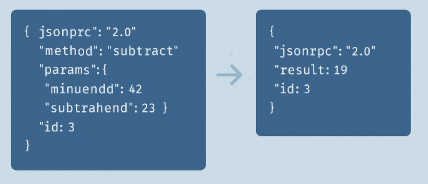
We’ll accept this standard JSON-RPC request:

{
"jsonrpc": "2.0",
"method": "subtract",
"params": { "minuend": 42, "subtrahend": 23 },
"id": 3
}

And return this result:

{
"jsonrpc": "2.0",
"result": 19,
"id": 3
}

The example implementation will just perform subtract, no other methods. However, this is essentially what the documented JSON-RPC V2 example is all about.

Using ORDS and Oracle 23ai with Autonomous Database

The entire example brings together a number of components and hosted services. One can accomplish all this on-premise, but it is more effort. Let’s briefly talk about those key constituents…

Oracle Autonomous Database (Serverless) is a fully managed, cloud-native database service on Oracle Cloud Infrastructure (OCI) that eliminates the complexity of database administration. It automatically handles provisioning, scaling, patching, tuning, backups, and security. The serverless deployment model allows developers to focus purely on data and logic without worrying about infrastructure or resource management.

Oracle Database 23ai introduces advanced AI and developer features, including the Multilingual Engine (MLE) — a lightweight JavaScript runtime embedded inside the database. MLE allows developers to write and run JavaScript code natively alongside SQL and PL/SQL, enabling modern use cases like JSON processing, protocol translation, and procedural logic without leaving the database.

Oracle REST Data Services (ORDS) is also hosted and managed within the Autonomous Database environment. ORDS enables developers to expose RESTful APIs directly from SQL, PL/SQL, or JavaScript (via MLE) using the Oracle 23ai database. It supports secure endpoints, OAuth2, pagination, OpenAPI integration, and more — without the need for an external application server.

Together, this stack allows developers to:

  • Build microservices and APIs with JavaScript inside the database
  • Expose data securely using REST over HTTPS via hosted ORDS
  • Deploy completely serverless solutions on Oracle Cloud, fully managed and auto-scaled

Many of these are accessible for free in the OCI Free Tier. Yes for free.

Step by step

In this example I’ll start with an Oracle 23ai database in the Frankfurt region using the Free Tier. I have a REST Enabled database user called JSONRPCEXAMPLE with the standard roles to create a database session and resources in the database.

Granted Roles for JSONRPCEXAMPLE database user

🔒 Step 1: Grant Required Privileges

Using Oracle 23ai is a necessity because it contains the Multi Language Engine for running JavaScript but each database user does require permission to use it. My JSONRPCEXAMPLE database user has been given that permission:

GRANT EXECUTE ON JAVASCRIPT TO JSONRPCEXAMPLE;
GRANT EXECUTE DYNAMIC MLE TO JSONRPCEXAMPLE;
Granting required MLE privileges.

In my hosted Oracle 23ai database I executed the above as the ADMIN user.

Now to connect as the REST Enabled JSONRPCEXAMPLE user and actually implement that User Defined Resource.

🚀 Step 2: Create the ORDS Module and Handler

There are plenty of options to get a connection to the database for running this SQL Script. The most popular options are sqlcl, SQL Developer for VS Code and Database Actions.

Use the following script to define the ORDS module, template, and MLE handler. This version is fully correct for Oracle 23ai and adheres to the format specified in the ORDS Developer Guide.

BEGIN
  ORDS.DEFINE_MODULE(
    p_module_name    => 'jsonrpc',
    p_base_path      => '/rpc/',
    p_comments       => 'JSON-RPC endpoint'
  );

  ORDS.DEFINE_TEMPLATE(
    p_module_name => 'jsonrpc',
    p_pattern     => 'handler'
  );

  ORDS.DEFINE_HANDLER(
    p_module_name      => 'jsonrpc',
    p_pattern          => 'handler',
    p_method           => 'POST',
    p_source_type      => ORDS.source_type_mle_javascript,
    p_source           => q'~ 
 (req, resp) => {
   let jsonrpc_response = {
    jsonrpc: "2.0",
    id: null
   };

   try {
    const jsonrpc_request = req.body;
    jsonrpc_response.id = jsonrpc_request.id ?? null;

    if (jsonrpc_request.jsonrpc !== "2.0") {
      jsonrpc_response.error = {
        code: -32600,
        message: "Invalid Request"
      };
    } else if (jsonrpc_request.method === "subtract") {
      const { minuend, subtrahend } = jsonrpc_request.params;
      jsonrpc_response.result = minuend - subtrahend;
    } else {
      jsonrpc_response.error = {
        code: -32601,
        message: "Method not found"
      };
    }

   } catch (e) {
    jsonrpc_response.error = {
      code: -32700,
      message: "Parse error",
      data: e.message
    };
  }
  resp.content_type("application/json");
  resp.status(200);
  resp.send(JSON.stringify(jsonrpc_response));
 }
~',
    p_comments         => 'MLE JavaScript JSON-RPC handler'
  );

  COMMIT;
END;
/

Running the script in the hosted Database Actions

Since this is only an implementation for subtract, you can take it on as an additional exercise to introduce more calculator operations.

Also consider moving the logic into an MLE Module or even using a predefined JavaScript Mathematics library for your calculator logic. See Transform your SQL Results with Mustache and ORDS JavaScript Handlers for an example of using JavaScript libraries through the MLE Module concept.

You have probably noticed that the handler always returns HTTP Status Code 200 even if there is an error. The JSON-RPC Error Object section of the specification does not state any expected behaviour around the transport protocol for an error scenario so you will have to determine what is appropriate for your organisation.

🧪Step 3: Test the Endpoint

Use curl, Postman, or any HTTP client:

curl -X POST \
https://my-db.oraclecloudapps.com/ords/jsonrpcexample/rpc/handler \
-H "Content-Type: application/json" \
-d '{
"jsonrpc": "2.0",
"method": "subtract",
"params": { "minuend": 42, "subtrahend": 23 },
"id": 3
}'

You’ll get this JSON-RPC 2.0 response:

{
"jsonrpc": "2.0",
"result": 19,
"id": 3
}

Try it without specifying an id or without params to see how the implementation responds.

You will also note that this service is not secured and it would be best practice to restrict access to authorised users only. This can be achieved by defining an ORDS Privilege for the module or pattern of the service URI. Take a look at Configuring Secure Access to RESTful Services to find out more.

✅ Conclusion

Oracle Database 23ai’s MLE JavaScript support allows you to run lightweight protocol handlers—like JSON-RPC—directly in the database, without the need for a plugins. With just a few lines of code, ORDS becomes a smart, standards-compliant backend for modern APIs to meet your integration needs.

Key takeaways:

  • Use (req, resp) => {} function syntax for MLE JavaScript in ORDS.
  • Grant EXECUTE ON JAVASCRIPT and EXECUTE DYNAMIC MLE to your user.
  • Validate incoming JSON-RPC payloads according to spec.
  • Secure access using ORDS privileges.

Universal RESTful Database Access

Introduction

Oracle REST Data Services (ORDS) provides a powerful way to expose Oracle databases via REST, what if you could extend this capability to databases like DB/2, MySQL, PostgreSQL, and SQL Server—without installing ORDS on each database? In summary, your applications can interact with multiple databases, because a universal RESTful interface can streamline access and reduce development complexity.

Find out more and see the custom code in action!

As an extensible product where you can develop your own plugins, you can code your own ORDS JDBC AutoREST Plugin. To learn more about plugins in ORDS see: Crafting your ORDS plugin the Maven way

What is the ORDS JDBC AutoREST Plugin?

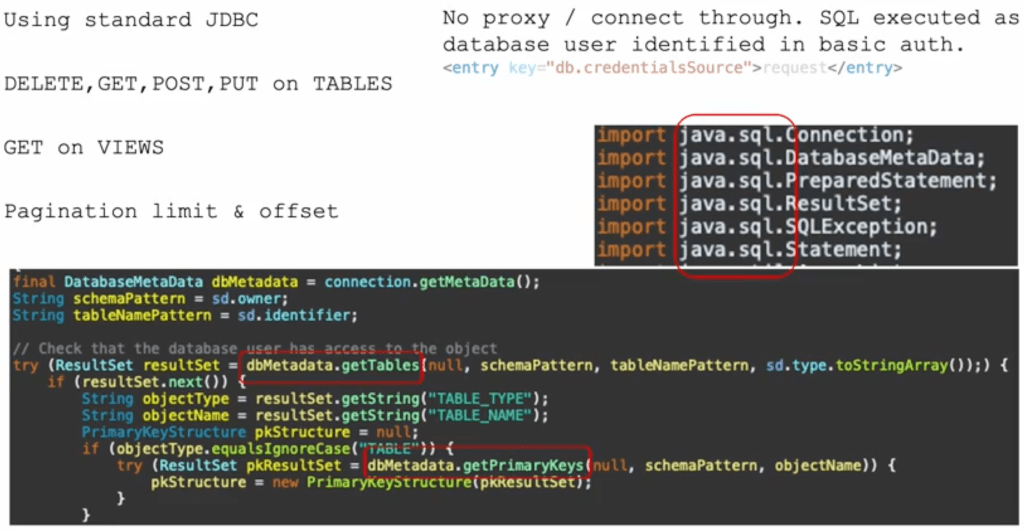
The ORDS JDBC AutoREST Plugin is a custom plugin for Oracle REST Data Services that enables RESTful access to a variety of relational databases. Using standard JDBC, it acts as a bridge between ORDS and databases beyond Oracle, providing a unified API layer.

Key Features

  • Multi-Database Support: Works with DB/2, MySQL, Oracle, PostgreSQL, and SQL Server.
  • Standard JDBC: Uses JDBC drivers to communicate with target databases.
  • No ORDS Installation Required: The target database does not need an ORDS installation.
  • RESTful Interface: Automatically generates REST endpoints for CRUD operations.
  • API Driven: The service definition metadata is in an OpenAPIV3 document which is reloaded every 5 minutes. Changes are picked up without a restart.

How It Works

Architecture Overview

The plugin integrates with ORDS and utilizes JDBC to interact with databases. ORDS remains the entry point, processing RESTful requests and translating them into SQL queries executed via JDBC connections.

  1. A client sends a REST request to ORDS.
  2. ORDS uses the basic authentication credentials to make a JDBC connection to the target database.
  3. The ORDS JDBC AutoREST Plugin reads the API document that describes the database objects and services. It then generates the SQL statement and executes it over JDBC.
  4. The database processes the request and returns results.
  5. ORDS formats and sends back the response.

Subtle difference from ORDS AutoREST:

  • No installation required in the database
  • No HATEOS links generated
  • Only basic authentication

Of course, since you are building your own custom plugin, you can code any additional functionality you want.

Uses standard JDBC classes. No vendor specific code references.

Example Usage

Once configured, the plugin enables RESTful endpoints that map to database tables and views. For instance, a request to:

GET /autorest/employees/

Could return JSON data from an employees table, regardless of whether the underlying database is Oracle, MySQL, PostgreSQL, etc. Note that a HTTP request will require basic authentication with credentials for a database user and that user must have access to the underlying data.

Setting Up the Plugin

Prerequisites

  • Oracle REST Data Services (ORDS) installed and running.
  • JDBC drivers for the target databases.

Installation Steps

  1. Clone the repository:git clone https://github.com/pobalopalous/ords-jdbc-autorest.git
  2. Build the plugin and deploy it into your ORDS instance.
  3. Configure database connections using JDBC connection strings.
  4. Update the API document for your database to target tables or views.

Using x-autorest extension

An extension called x-autorest is used in the API document to define what tables and views are to be available, as well as what operations ( DELETE, GET, PUT, POST ) are permitted. Note that this requires that tables are defined with a primary key.

The REST service path can be an alias for the database object.
For databases that use the concept of an object owner, it can be specified here.

A description of the x-autorest extension.

x-autorest:
  owner: DB2INST1 // Database user that owns the object
  identifier: INVENTORY // The database object
  type: table // The type of object table or view

Benefits & Use Cases

Why Use This Plugin?

  • Simplified API Development: Unified RESTful API for multiple databases.
  • Reduced Overhead: No need to install ORDS on every database.
  • Flexible Database Integration: Easily switch between databases without major application changes.

Ideal Use Cases

  • Multi-database applications needing a standardized REST API.
  • Data migration projects requiring uniform RESTful access.
  • Reporting and analytics tools aggregating data from multiple sources.

Conclusion

The ORDS JDBC AutoREST Plugin provides a powerful way to extend RESTful database access beyond Oracle to DB/2, MySQL, PostgreSQL, and SQL Server. With minimal setup and configuration, developers can use ORDS to expose database resources through a standard REST API, ensuring reliability without needing to install ORDS on each target database.

Explore the source code and start using it today: GitHub Repository.

Multiple ORDS Instances on the Same Machine

Oracle REST Data Services (ORDS) can be run in standalone mode, making it easy to serve RESTful APIs without needing a separate application server. However, when running multiple ORDS instances on the same machine, each serving HTTPS traffic on a different port, users may encounter an issue: ORDS still attempts to bind to the default HTTP port 8080.

The Issue: ORDS Listens on Port 8080 by Default

In standalone mode, ORDS can listen for HTTP, HTTPS and MongoDB Wire Protocol traffic at the same time. The port numbers that ORDS listens on are configurable:

  • standalone.http.port – HTTP listen port, default 8080
  • standalone.https.port – HTTPS listen port, default 8443
  • mongo.port – API for MongoDB Wire Protocol listen port, default 27017

When running more than one ORDS instance on the same machine you will want to share the same configuration, but not the same port numbers. The ORDS serve command line gives you some options around that. Quite literally…

ords serve --help

ORDS: Release 24.4 Production on Mon Feb 10 21:48:05 2025

Copyright (c) 2010, 2025, Oracle.
...
Usage:
ords serve [OPTIONS]

Launch Oracle REST Data Services in standalone mode

Options:
...
--port <int> HTTP listen port, default 8080

--secure HTTPS listen port, default 8443.
Must specify options
--secure --port <PORT>
to use HTTPS.

This allows you to run multiple ORDS instances in standalone mode from the command specifying a different port for HTTP:

ords serve --port 8081

ORDS: Release 24.4 Production on Mon Feb 10 21:53:30 2025

Copyright (c) 2010, 2025, Oracle.
...
2025-02-10T21:53:31.005Z INFO        HTTP and HTTP/2 cleartext listening on host: 0.0.0.0 port: 8081
...
2025-02-10T21:53:34.361Z INFO        Oracle REST Data Services initialized
Oracle REST Data Services version : 24.4.0.r3451601
Oracle REST Data Services server info: jetty/12.0.13
Oracle REST Data Services java info: Java HotSpot(TM) 64-Bit Server VM  (build: 17.0.12+8-LTS-286 mixed mode, sharing)

Then in another shell window…

ords serve --port 8091

ORDS: Release 24.4 Production on Mon Feb 10 21:53:30 2025

Copyright (c) 2010, 2025, Oracle.
...
2025-02-10T21:53:31.005Z INFO        HTTP and HTTP/2 cleartext listening on host: 0.0.0.0 port: 8091
...
2025-02-10T21:53:34.361Z INFO        Oracle REST Data Services initialized
Oracle REST Data Services version : 24.4.0.r3451601
Oracle REST Data Services server info: jetty/12.0.13
Oracle REST Data Services java info: Java HotSpot(TM) 64-Bit Server VM  (build: 17.0.12+8-LTS-286 mixed mode, sharing)

That’s great for HTTP. As many ORDS instances as you like so long as you specify a unique port number for each.

For HTTPS, just add the --secure option like this:

ords serve --port 8444 --secure

Well, that would work for one instance but not for your second. By default, when ORDS runs in standalone mode, it listens for HTTP traffic on port 8080 and HTTPS traffic on the port specified by the --port argument when using ords serve --secure. This means that even if you specify a different secure port for each ORDS instance, the HTTP listener on 8080 may cause conflicts if multiple instances are running.

Could not start Standalone Mode because the listen port: 8080 is already in use by another process. Check if another instance of ords is already running

The upshot is that you can not start that second ORDS instance no mater what secure port you specify. There’s a solution…

The Solution: Disable the HTTP Listener

To avoid conflicts, you must explicitly disable the HTTP listener by setting the standalone.http.port configuration parameter to 0. This prevents ORDS from attempting to bind to port 8080 when serving HTTPS traffic.

Steps to Run Multiple ORDS Instances with Different Secure Ports

  1. Disable HTTP Listener Use the ORDS command line to set the HTTP listen port to zero: ords config set standalone.http.port 0
  2. Start Each ORDS Instance on a Different HTTPS Port When launching each ORDS instance, specify a unique HTTPS port:
    ords serve --secure --port 8443

    For a second instance:
    ords serve --secure --port 8444
    This ensures each instance runs on a different secure port without conflicts.

Summary

This simple configuration allows multiple ORDS services, listening for secure HTTPS traffic, to coexist on the same machine without interference.

Should you want multiple instances to listen for HTTP and HTTPS traffic then using the ORDS docker image from https://container-registry.oracle.com/ords/ocr/ba/database/ords is your best option.

RESTful CSV file

An article from earlier this year by Ulrike Schwinn titled Oracle Object Storage Access for all Oracle Databases with DBMS_CLOUD got me thinking about doing more with CSV data because it can be treated as a table through DBMS_CLOUD.CREATE_EXTERNAL_TABLE. In essence, provide secure RESTful access to the data, and even visualise that data through charts.

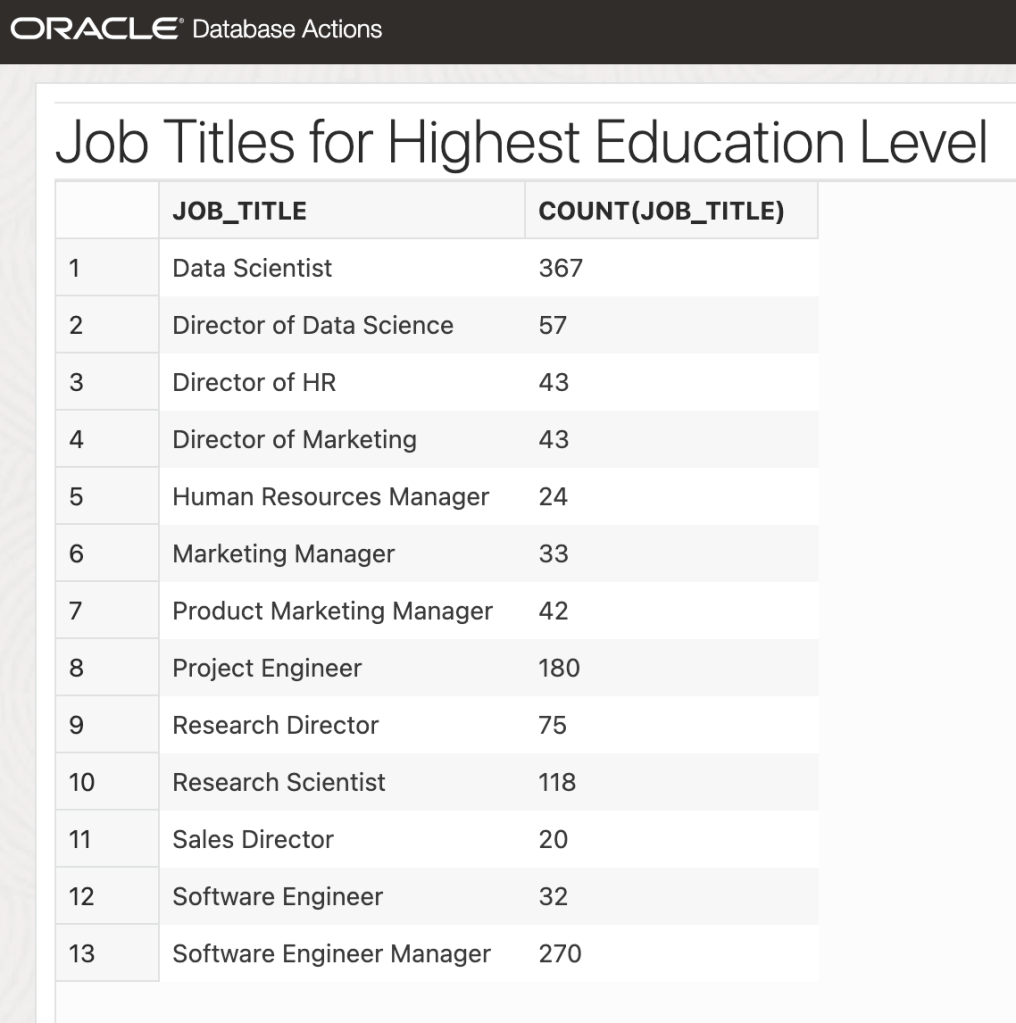
Very quickly, we’ll go from a uploading a Salary.csv dataset to rendering a chart of Job Titles for the highest education level and permitting RESTful queries on data…

Example chart generated on a sharable URL
Query the CSV data through ORDS RESTful interface

Salary Data

Let’s start with a CSV dataset. For this exercise we’ll use a public domain Salary by Job Title and Country from kaggle.com. The download is a ZIP archive with two files. In this case it is just the Salary.csv which will be used.

This dataset provides a comprehensive collection of salary information from various industries and regions across the globe.
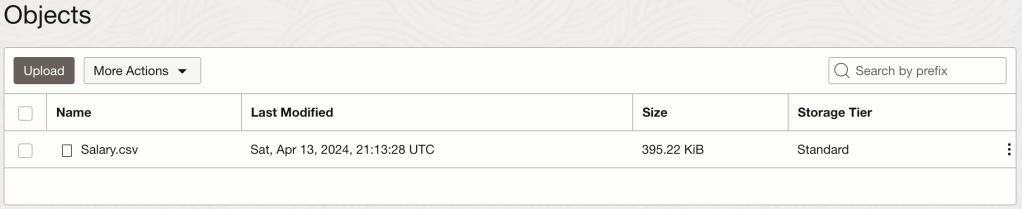
Oracle Object Storage Buckets will be used for storing the Salary.csv

I’m not going into all the details of downloading the archive file, unzipping it, creating a bucket, and uploading the Salary.csv but needless to say, those are important steps to get you this stage…

Dataset is uploaded to my ‘example-bucket’

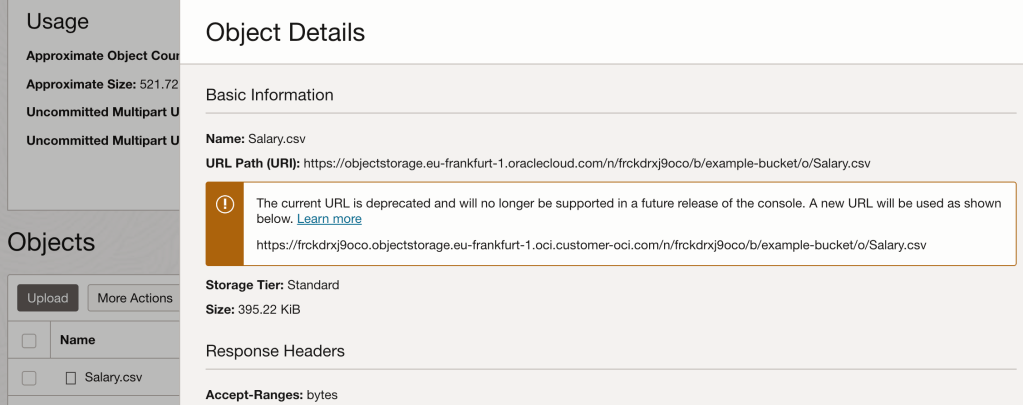
Note that the file has a URL for accessing and downloading it but that URL is not publicly accessible.

The file can be accessed at this URL, but not publicly

External Table

In the database, the DBMS_CLOUD package can create a table which has it’s data loaded from the CSV file. To get access to object storage from the database we require a credential object through DBMS_CLOUD.CREATE_CREDENTIAL. Details on achieving that are already covered in Ulrike’s Oracle Object Storage Access for all Oracle Databases with DBMS_CLOUD article and my previous article Data move mojo with ORDS 21.3.0. In fact, I’m going to reuse that DATAPUMP_CRED_NAME credential. That’s just out of convenience for me. You be you and do your own thing.

To create the SALARY table we must specify a column list with data types and sizes. That requires figuring out, based on the data and also the description on kaggle.com, what data types makes sense. Some columns are obviously numeric, but it is not always clear how big or small those columns should be.

begin 
    DBMS_CLOUD.CREATE_EXTERNAL_TABLE(table_name=>'SALARY', 
                   credential_name => 'DATAPUMP_CRED_NAME',
                   file_uri_list => 'https://frckdrxj9oco.objectstorage.eu-frankfurt-1.oci.customer-oci.com/n/frckdrxj9oco/b/example-bucket/o/Salary.csv',
                   format => json_object('type' VALUE 'CSV', 'skipheaders' VALUE '1'),
                   column_list =>'Age NUMBER(4,1),
                                  Gender varchar2(6),
                                  Education_Level NUMBER(1),
                                  Job_Title varchar2(100),
                                  Experience NUMBER(4,1),
                                  Salary NUMBER(9,2),
                                  Country varchar2(200),
                                  Race varchar2(100),
                                  Senior NUMBER(1)'
                            );
end;
/

Note that the file_uri_list parameter came directly from the object details panel in Object Storage.

Unless there’s a syntax error, creating the table will always work. You’ll only find out about problems when you run a select query. That’s when the DB attempts to read the file.

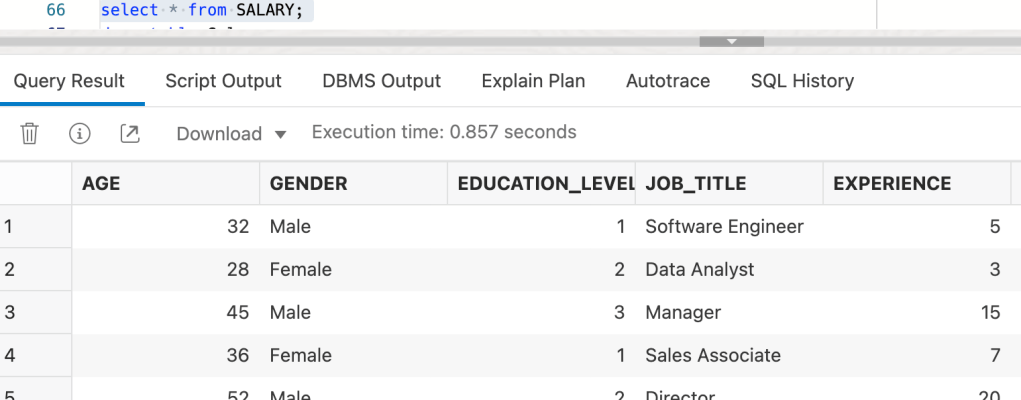
If you have done this right…select * from salary returns data from the Salary.csv file.

Chart

ORDS Database Actions has a charts and dashboard feature that we’re going to use now. Charts enable you to create charts from the database. The chart is constructed using the input SQL command. Dashboards enable you to group charts together to create reports. Let’s define a bar chart showing the number of job titles for the highest education level. So that the chart is not too busy I’m limiting the chart to only show job titles that have more than 10 occurrences.

Defining a bar chart for job titles

For simplicity my chart definition says that it is unprotected, so it is publicly available and anyone can see it with the URL. That’s ok with this scenario because the data is in the public domain anyway but please consider the protection on your charts and dashboards.

That URL can be shared and it will render in the browser like this…

Note that the data can be viewed as a chart, or as a table.

Although the chart and its data is available to anyone with the URL, the data is just the data for the chart.

No direct access to the original Salary.csv data, just aggregation from a specific query

For many folks the only way they can create a chart based on a CSV file and share it is through using a spreadsheet and sharing that, which means sharing the underlying data. In this case the data is not shared, just the chart. So far so cool. Now let’s look at sharing that data and allowing clients to query it.

AutoREST

This will be a short section. It is as simple as:

EXEC ORDS.ENABLE_OBJECT(p_object => 'SALARY');

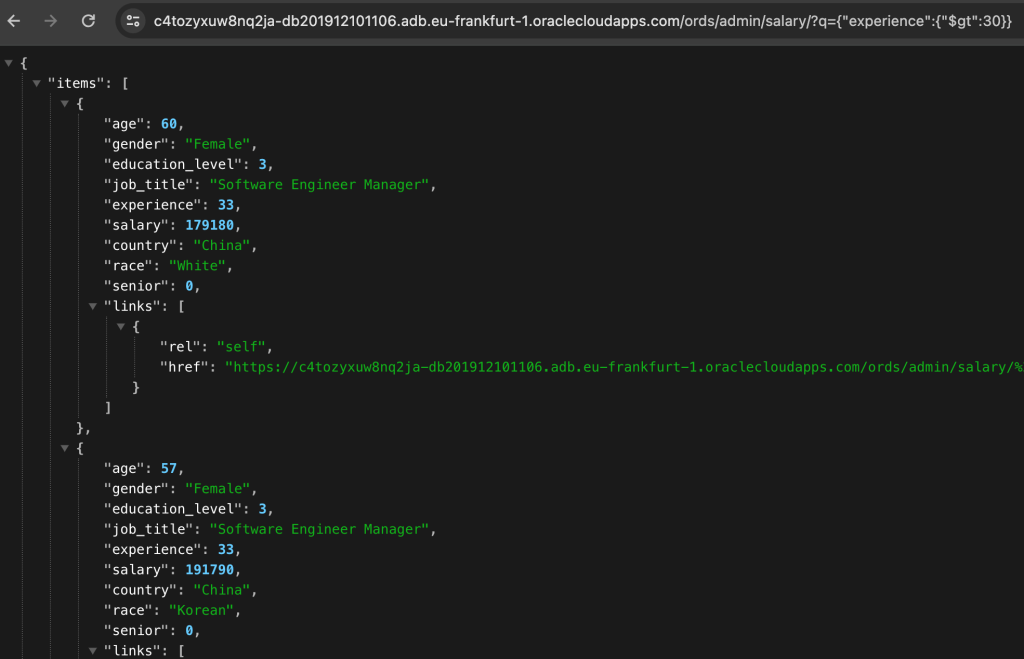
That’s it. The SALARY table is now accessible through a REST service at /ords/<my schema>/salary/. Moreover, the Filter Object query parameter provides a powerful search mechanism through the Salary.csv file. For example, let’s find people in the data set with more than 30 years experience: q={"experience":{"$gt":30}}

Records in the CSV can be search with relational operators!

You can’t do that so easily in a text editor 😁

See Filter Objects in the ORDS Developer Guide for more information. Of course this RESTful URL can be protected to require a authorisation for accessing it too while the chart is left unprotected.

Note that with standard REST Enabled tables you can perform DELETE, GET, POST and PUT methods but with external tables, the only functional method is GET. All others will get a HTTP 555 response with this message: ORA-30657: operation not supported on external organized table.

Conclusion

If you have followed the above steps you have opened up new ways of accessing, sharing and interrogating data in a CSV file.

To reiterate, when using an external table the data comes from files in the Cloud or from files in a directory. The data does not get loaded or copied into a table in the database. Drop in a new Salary.csv file with different data and it is immediately picked up on the next query.

The combination of Object Storage, Autonomous Database and Oracle REST Data Services provide some interesting options for doing more with CSV files. It has its limits though. To be realistic, large volumes of data and complex queries would require actually loading copies of the data into the database. For that one should consider Autonomous Database Data Studio to load the data. You can still use ORDS as above to share the data as charts or expose a RESTful interface to the data.

This article was inspired by Ulrike’s January blog post. More excellent articles on data management can be found at https://blogs.oracle.com/authors/ulrike-schwinn. Well worth a look.

ORDS 24.1.0 is faster

Updated for 23ai. The structure for Duality Views changed from 23free to 23ai release. In summary, the identifiers for rows are now _id rather than driverId, raceId, teamId.

ORDS 24.1.0 was released today and is available for download at https://oracle.com/rest. The release notes outline the enhancements and bug fixes. Many are notable. That includes performance improvements for JSON-Relational Duality Views and AutoREST in general.

Here’s an outline of test results using ORDS 24.1.0 running in my Developer DB VM on my laptop. It’s not a blindingly fast Oracle Exadata database setup so the absolute response times are nothing to write home about but the comparison of ORDS 24.1.0 over 2 previous ORDS releases is the point of the exercise here.

Noticeable improvement in the Duality View response time statistics for ORDS 24.1.0
Similarly, a noticeable improvement in the Table response time statistics for ORDS 24.1.0

Data Shape

The data shape is the RESTful Car-Racing Example. In particular the GET of TEAM and TEAM_DV data through ORDS. Using k6 scripts for generating requests, there are 10 concurrent clients that are sending GET resource item requests 1,000 times each. The resource item identifier, team_id, is random so not the same row is returned ever time. The data set is not huge by any stretch of the imagination and does not reflect a likely production data shape. However, the purpose here is to compare changes in response times and throughput.

Authentication

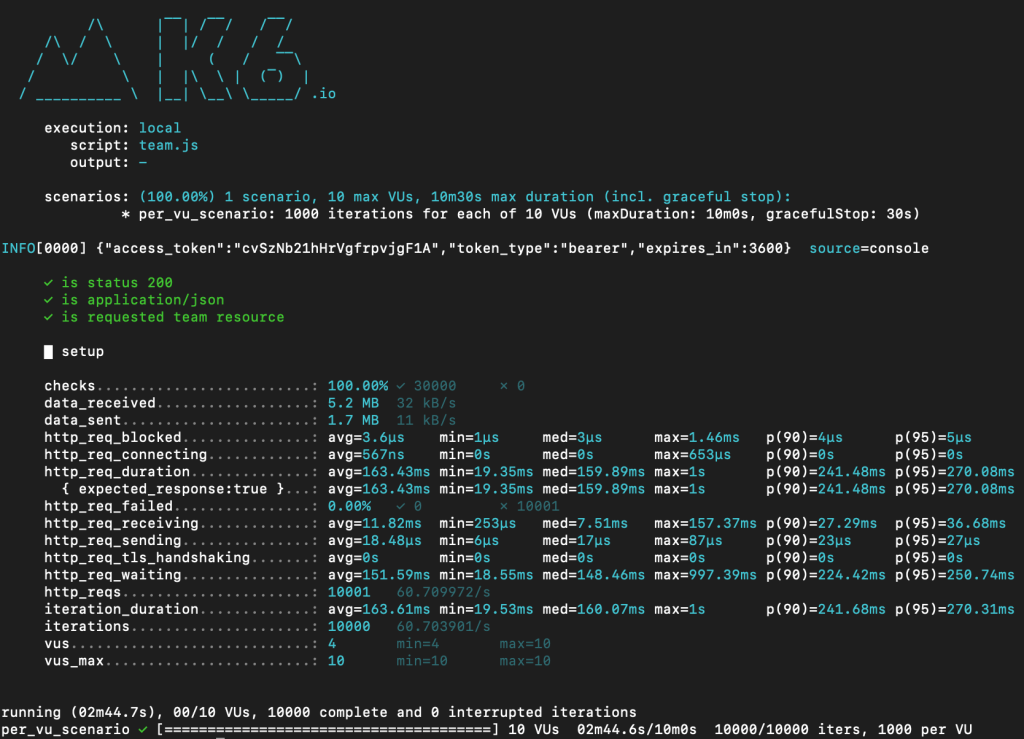
Those AutoREST services provided by ORDS for the tables and duality views are protected because that’s most likely to be the situation in production. The k6 script is hard coded with client id and client secret for authentication. When the k6 test script starts the first thing performed is to get an access / bearer token which is then subsequently used for every request generated by the script. You will notice in every script run this output indicating the token that will be sent for every request.

INFO[0000] {"access_token":"u2mkjkD3lyJXDQYqgjedag","token_type":"bearer","expires_in":3600}  source=console

Checks

There is also the output for checks performed on every response to ensure the expected data is returned. For example, if the authorisation token was invalid, the response status code would not be 200.

     ✓ is status 200
     ✓ is application/json
     ✓ is requested team resource

More on the k6 scripts later. Now let’s look at the database and ORDS configuration.

Configuration

Here’s a breakdown of the Developer DB VM configuration where the database and various versions of ORDS were run for the tests. The version of both ORDS and the Java Runtime Environment have been modified so if you are not familiar with that process see Get the latest – Enhance your DB Developer VM

Database

The same Oracle Database 23 Free edition that came with the Developer DB Virtual Machine is used. The HR schema is REST Enabled and contains the Car-Racing Duality View database objects.

ORDS Settings

The default configuration settings are used. These are the same configuration settings for all versions included in the test.

Default, out of the box, configuration that came with the Developer DB VM

Java Runtime Environment

The virtual machine was originally packaged with Oracle Java 11.0.19 but it is easy to change that. In this virtual machine Oracle GraalVM for Java 17 is used.

It is straight forward to download another JRE distribution and create a symbolic link to it from your $ORDS_HOME/jre directory. The ORDS shell script will use that Java Runtime Environment irrespective of the $PATH or $JAVA_HOME environment variable.

[oracle@localhost ~]$ /home/oracle/ords/jre/bin/java --version
java 17.0.9 2023-10-17 LTS
Java(TM) SE Runtime Environment Oracle GraalVM 17.0.9+11.1 (build 17.0.9+11-LTS-jvmci-23.0-b21)
Java HotSpot(TM) 64-Bit Server VM Oracle GraalVM 17.0.9+11.1 (build 17.0.9+11-LTS-jvmci-23.0-b21, mixed mode, sharing)

That is the setup for every test run. Startup a specific version of ORDS in standalone mode using the same configuration folder, and JRE, for each ORDS version.

  • Start ORDS in standalone mode: /home/oracle/ords-23.3.0/bin/ords serve
  • Start the test run: k6 run team_dv.js
  • Gather the results
  • Start the test run: k6 run team.js
  • Gather the results
  • Shutdown ORDS

Repeat for /home/oracle/ords-23.4.0/ and /home/oracle/ords-24.1.0/ to cover those releases too. Not sure how to get your Developer DB VM to have multiple versions of ORDS? Take a look at Get the latest – Enhance your DB Developer VM.

Results

The test runs involve sending requests to GET a random team record, either as a Team Duality View query or query directly on the Team Table that the duality view uses.

Results – ORDS 23.3.0

ORDS 23.3.0 AutoREST Duality View

Duality View row GET using ORDS 23.3.0
iteration_duration:
avg=474.61ms
min=77.88ms
med=469.71ms
max=1.79s
p(90)=671.22ms
p(95)=741.16ms

throughput 20.917985/s

ORDS 23.3.0 AutoREST Table

Table row GET using ORDS 23.3.0
iteration_duration:
avg=130.91ms
min=18.3ms
med=132.64ms
max=390.02ms
p(90)=190.82ms
p(95)=212.67ms

throughput: 75.742323/s

Results – ORDS 23.4.0

ORDS 23.4.0 AutoREST Duality View

Duality View row GET using ORDS 23.4.0
iteration_duration: 
avg=451.33ms
min=76.64ms
med=450.22ms
max=1.22s
p(90)=642.21ms
p(95)=696.75ms

throughput 22.055704/s

ORDS 23.4.0 AutoREST Table

Table row GET using ORDS 23.4.0
iteration_duration: 
avg=163.61ms
min=19.53ms
med=160.07ms
max=1s
p(90)=241.68ms
p(95)=270.31ms

throughput: 60.703901/s

Results – ORDS 24.1.0

Now for the test run with the latest version of ORDS.

Oracle REST Data Services version : 24.1.0.r0960841
Oracle REST Data Services server info: jetty/10.0.20
Oracle REST Data Services java info: Java HotSpot(TM) 64-Bit Server VM 17.0.9+11-LTS-jvmci-23.0-b21

ORDS 24.1.0 AutoREST Duality View

Duality View row GET with ORDS 24.1.0
iteration_duration:
avg=134.29ms
min=9.97ms
med=90.28ms
max=1.41s
p(90)=261.21ms
p(95)=522.78ms

throughput: 73.321615/s

ORDS 24.1.0 AutoREST Table

Table row GET with ORDS 24.1.0
iteration_duration:
avg=88.72ms
min=11.99ms
med=84.26ms
max=619.03ms
p(90)=134.83ms
p(95)=153.84ms

throughput: 111.435388/s

K6 Scripts

The scripts are quite simple. There are effectively only 3 files involved and they are all available at this github gist: https://gist.github.com/pobalopalous/dcf572abfce1b18f7f49168918231765

  • ords_auth.js provides a function for getting a bearer token
  • team.js tests the AutoREST endpoint for TEAM table and uses a function imported from ords_auth.js to get an access token. It is hardcoded with a client_id and client_secret and randomly gets team data based on their team_id.
  • team_dv.js tests the AutoREST endpoint for TEAM_DV duality view and uses a function imported from ords_auth.js to get an access token. It is hardcoded with a client_id and client_secret and randomly gets team data based on their team_id.

Do it yourself

With the RESTful Car-Racing Example data you should be able to run the same k6 scripts for testing your environment. If you have not done so already install k6 and download the team.js and team_dv.js script files. Just note that the CLIENT_ID and CLIENT_SECRET values will have to change for you database.

const ORDS_CLIENT_ID = 'ymDCZv5ePvte2kN8seOygw..';
const ORDS_CLIENT_SECRET = 'alU5L4Xp5GXOoT-qo9v6UQ..';

It is explained in the RESTful Car-Racing Example article how to get this information from the database. If your schema or port number is different, you’ll have to modify those too.

The upshot from my test runs is approximately 3 times improvement on throughput per second for JSON-Relational Duality Views and 2 times improvement for the throughput per second for a table. Your results may show different absolute response times but I expect you will see a similar improvement ratio when comparing with previous versions of ORDS.

Reply in the comments with your own findings. I look forward to hearing from you.