Implement an MCP Server with ORDS and MLE JavaScript

Oracle provides MCP Server options for your database

If you are serious about building out a secure, scalable and fully integrated MCP experience in your organisation then focus on dedicated Oracle products rather than rolling your own. Start with:

If you want to explore the specification and learn some concepts then read on…

  1. 🎯 The Objective
  2. 📍 Introduction
  3. 🔍 What Is MCP?
  4. 🚀 Why ORDS + MLE JavaScript?
  5. 🛠️ MCP Handler Implementation in ORDS
    1. 🧩 1. Setup – REST enable the database schema and grant MLE privileges
    2. 🧱 2. Defining the MCP Module and Template
    3. ✍️ 3. JavaScript MLE Handler Source
  6. 🔐 Securing the MCP Handler
  7. 🧪 Deploying and Testing the MCP Server
    1. 🛰️ Deploy to Oracle Autonomous Database
    2. 🧰 Test with Tools
      1. ✅ MCP Inspector
      2. 🤖 Claude Desktop (with mcp-remote)
  8. ⚠️ Limitations and Next Steps
    1. 🔐 OAuth2 Support Limitations
    2. 🚫 Lack of Streamable HTTP and Notifications
    3. 🔧 Future Enhancements
  9. 🧠 Summary

🎯 The Objective

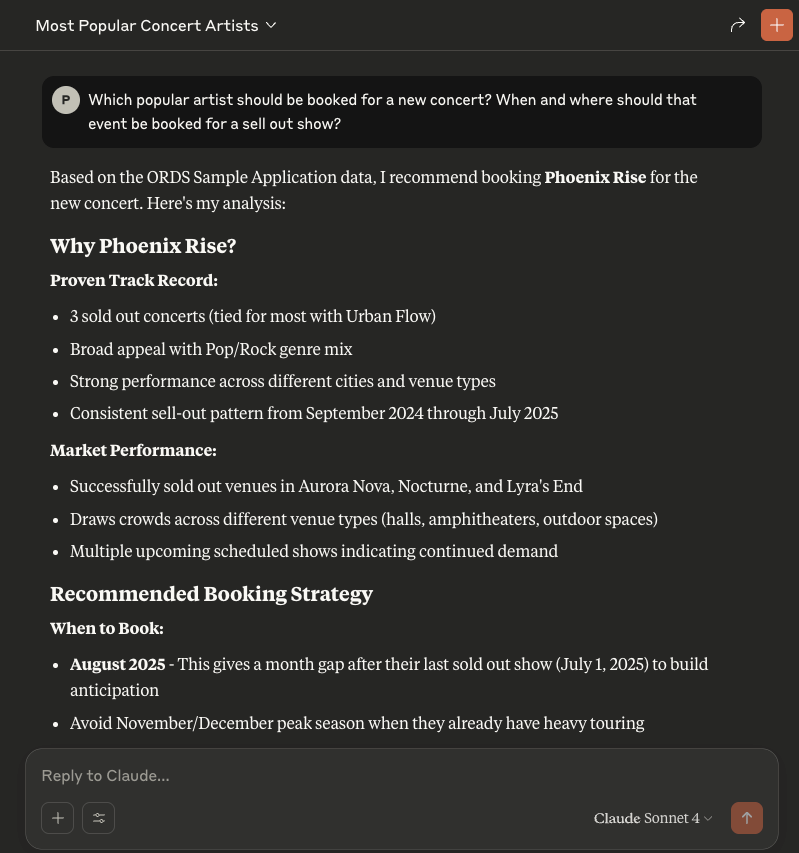
An example of what we want to achieve with the ORDS Concert Application data and an ORDS MCP Server Handler

📍 Introduction

The Model Context Protocol (MCP) is a growing standard for enabling AI tools to interact seamlessly via structured requests. MCP is an open standard that enables AI assistants like Claude, ChatGPT, or Cline to securely connect to external data sources and tools. Think of it as a universal adapter that lets AI models interact with the world beyond their training data.

In this article, we’ll demonstrate how to implement an MCP server directly in Oracle using ORDS (Oracle REST Data Services) and JavaScript MLE (Multilingual Engine). With just a few lines of JavaScript and SQL, you can build an HTTP-based MCP server embedded in your Oracle database. This runs securely, for free, on the hosted Autonomous Database at cloud.oracle.com. Of course, you can choose to run your own setup on-premise too.

This article continues the series on MLE-based handlers—check out earlier examples at peterobrien.blog/tag/multilingual-engine. In particular, we build on concepts introduced in JSON-RPC in ORDS Using MLE JavaScript (Oracle 23ai) and the ORDS Sample Application that is mentioned in 🎉 Data Science in Concert: Inspect Data from the ORDS Sample Application with R!

Here be dragons! Keep in mind that you are using AI tools where access to your database is being permitted. Even if you are running your LLM inside your network, you are still asking an agent to decide on actions based on what it discovers. Be careful with your data and database resources. Only make accessible what is required for the workflow you want to automate. Use the database security and auditing facilities available.

Security, Security, Security

🔍 What Is MCP?

The Model Context Protocol is a JSON-RPC–based interface for exchanging AI capabilities, models, prompts, and resource metadata. Without MCP, AI assistants are like incredibly smart people locked in a room with no internet, phone, or way to access current information or perform actions. They can only work with what they learned during training. MCP breaks down these walls by providing a standardised way for AI models to:

  • Stay current with live information
  • Access real-time data from APIs, databases, and services
  • Control applications and systems
  • Retrieve files and documents
  • Execute actions in the real world

MCP operates on a client-server architecture:

  • MCP Client: The AI assistant (like Cline or Claude)
  • MCP Server: A program that provides specific capabilities (tools, resources, or prompts)

The protocol defines how these communicate through three main primitives:

  • Resources: Static or dynamic content that the AI can reference.
  • Tools: Functions the AI can execute.
  • Prompts: Templates that help the AI understand how to use resources and tools effectively in specific contexts.

The MCP specification states that a server should supports methods such as:

  • initialize: describes the server and its capabilities
  • tools/list: enumerates available tools
  • tools/call: executes a named tool
  • prompts/list: lists available prompts
  • resources/list: lists downloadable resources

That’s not an exhaustive list and they are not all mandatory to implement. In fact, the only one truly required is initialize but you might find an MCP client that expects others to be implemented.

An MCP server can be local, on the same machine running your MCP client (using standard i/o) or remote (using streamable HTTP). The Model Context Protocol server for the Oracle Database is an example of a local MCP server which is accessed using standard i/o. In this article we’ll implement a HTTP based remote server which will not involve any streamable functionality but will support the synchronous request/response aspects of the specification. Note that the most recent version of the MCP specification(Protocol Revision: 2025-06-18) has removed server side events as a supported transport.

MCP clients (like Claude) expect a standard JSON response structure and often use OAuth2 for authentication. Not every authorisation scenario outlined in the specification will be covered in this article.

🚀 Why ORDS + MLE JavaScript?

ORDS can serve as the HTTP interface for all of this functionality — directly from your Oracle database. By combining ORDS with the JavaScript Multilingual Engine (MLE) in Oracle 23ai, you can:

  • Implement MCP server methods entirely in server-side JavaScript.
  • Query live database content when responding to MCP tool calls.
  • Package and publish database-backed tools to AI agents without building a separate backend service.
  • Secure everything with OAuth2 client credentials.

This makes it possible to turn your database into an MCP-compatible API that works with modern AI tooling—without leaving the Oracle environment and without sharing more than you need to.

In this example we’ll provide a get_events tool which lists the results of querying the SEARCH_VIEW in the ORDS_CONCERT_APP schema. That information can be gleaned from the REST Enabled endpoint for that view but your AI Assistant does not have access to that. When coding your own MCP Server through ORDS handlers you can provide access to data as you see fit.

Using the Model Context Protocol server for the Oracle Database will give full access to your database schema and therefore is the most powerful option but you’re unlikely to be sharing those DB credentials with anyone else. Implementing your own MCP Server allows you to greatly restrict that access.

🛠️ MCP Handler Implementation in ORDS

There’s some PL/SQL in this article but it is just the invocation of ORDS APIs to create the user defined resources. The real logic is in JavaScript which executes in the database. You can expand on this and implement your own logic for tools, resources or prompts. Refer to the ORDS mle/handler documentation for more information on that.

Note that although we’re using OAuth2 client credentials flow there are other authorisation options available. This is something that one must choose wisely because there are some aspects of the MCP specification with regard to authorisation discovery which is not currently supported by ORDS. Moreover, there are MCP clients that do not implement or support all the options available. In some cases, such as with Claude desktop, that support may only be available for certain paid subscriptions or premium level plans.

In this article we will protect the ORDS module and have a client credentials OAuth2 client which means we have to request an access token manually and then use it in our MCP server reference. That is not ideal but is a limitation of some of the tools used. More about limitations later.

Here’s the actual ORDS module and handler setup used in our implementation…

🧩 1. Setup – REST enable the database schema and grant MLE privileges

This article is based on the ORDS Sample Application so the database account used is ORDS_CONCERT_APP. It will already be REST Enabled but will require the privileges to execute JavaScript in the database. You can run this as an administrator user, such as ADMIN in the Autonomous Database.

GRANT EXECUTE ON JAVASCRIPT TO ORDS_CONCERT_APP;
GRANT EXECUTE DYNAMIC MLE TO ORDS_CONCERT_APP;

🧱 2. Defining the MCP Module and Template

Now, while logged in as the ORDS_CONCERT_APP user run the following to create the structure for your implementation. This will define a path /mcp/server for the service but it will require a handler for the POST method.

BEGIN
ORDS.DEFINE_MODULE(
p_module_name => 'mcp',
p_base_path => '/mcp/');

ORDS.DEFINE_TEMPLATE(
p_module_name => 'mcp',
p_pattern => 'server');

END;
/

✍️ 3. JavaScript MLE Handler Source

The handler responds to MCP methods such as initialize, tools/list, and tools/call. Here I detail the JavaScript portion so that section can be described and explained:

      (req, res) => {
        let response = {
          jsonrpc: "2.0",
          id: null
        };

        try {
          const rpc = req.body;
          response.id = rpc.id ?? null;

          if (rpc.jsonrpc !== "2.0" || !rpc.method) {
            response.error = {
              code: -32600,
              message: "Invalid Request"
            };
          } else if (rpc.method === "initialize") {
            // Respond with server capabilities
            response.result = {
              protocolVersion:"2025-06-18",
              capabilities: {
                tools: {listChanged: false}
              },
              serverInfo: {
                name: "ORDSHandlerExampleServer",
                title: "Example MCP Server implemented in ORDS mle/javascript",
                version: "0.0.1"
              }
            };
          } else if (rpc.method === "tools/list") {
            // Respond with tools list
            response.result = {
                tools: [
                    {
                        name: "get_events",
                        title: "Events Information Provider",
                        description: "Get information on ORDS (Oracle REST Data Services) Sample Application events. The events view brings together artist, venue and schedule concert data. The attributes include EVENT_NAME,ARTIST_NAME,ARTIST_ID,EVENT_ID,EVENT_DATE,EVENT_DETAILS,EVENT_STATUS_NAME,EVENT_STATUS_ID,VENUE_ID,VENUE_NAME,CITY_NAME,MUSIC_GENRES",
                        inputSchema: {
                            type: "object"
                        }
                    }
                ]
            };
          } else if (rpc.method === "tools/call") {
            // Call the get_events tool if that was the tool requested
            if (rpc.params.name === "get_events") {
                const query = ''select * from search_view'';
                const res = session.execute(query);
                textContent = [];
                for (let row of res.rows) {
                  textContent.push({type:"text", text: JSON.stringify(row)});
                };

                response.result = {
                    content: textContent,
                    "isError": false
                };
            } else {
               response.error =  {
                    code: -32602,
                    message: "Unknown tool: invalid_tool_name"
                }
            }
          } else {
            // Unsupported method
            response.error = {
              code: -32601,
              message: "Method not found"
            };
          }

        } catch (e) {
          response.error = {
            code: -32700,
            message: "Parse error",
            data: e.message
          };
        }

        res.status(200);
        res.content_type("application/json");
        res.send(JSON.stringify(response));
      }

At line 2, similar to the /rpc/handler example in the previous article, we define the result structure for a successful response. We are expecting that all requests that we should act on will have an id, so the response as an id field. We copy that across at line 9.

Lines 16 – 28 deal with initialisation which tells the MCP client about the MCP server and its capabilities. In this case we’re saying that the MCP server implementation only provides tools and it does not send notifications if the tool definitions change.

...
} else if (rpc.method === "initialize") {
response.result = {
protocolVersion: "2025-06-18",
capabilities: { tools: { listChanged: false } },
serverInfo: {
name: "ORDSHandlerExampleServer",
title: "Example MCP Server implemented in ORDS mle/javascript",
version: "0.0.1"
}
};
} else ...

Lines 29 – 42 deal with returning the list of tools that the MCP server supports. The description of the tool is important because that is what helps your AI Assistant determine if the tool will be useful for the given workflow.

...
} else if (rpc.method === "tools/list") {
response.result = {
tools: [
{
name: "get_events",
title: "Events Information Provider",
description: "Get information on ORDS (Oracle REST Data Services) Sample Application events. The events view brings together artist, venue and schedule concert data. The attributes include EVENT_NAME,ARTIST_NAME,ARTIST_ID,EVENT_ID,EVENT_DATE,EVENT_DETAILS,EVENT_STATUS_NAME,EVENT_STATUS_ID,VENUE_ID,VENUE_NAME,CITY_NAME,MUSIC_GENRES",
inputSchema: {
type: "object"
}
]
};
} else ...

Lines 43 – 62 are where the real action is. These lines deal with the invocation of the requested tool. In this case the only tool supported is called get_events which is for a specific query on the database. When you are implementing your own MCP server using ORDS handlers you can code this for your own AI integration needs. Note that the specification allows for various content types. For simplicity, in this case, we are constructing an array of text content entries. Although structuredContent could also be used here that content type is not supported by many MCP clients.

...
} else if (rpc.method === "tools/call") {
if (rpc.params.name === "get_events") {
const query = ''select * from search_view'';
const res = session.execute(query);
textContent = [];
for (let row of res.rows) {
textContent.push({type:"text", text: JSON.stringify(row)});
};

response.result = {
content: textContent,
"isError": false
};
} else {
response.error = { code: -32602, message: "Unknown tool: invalid_tool_name" };
}
} else ...

The remainder of the JavaScript code includes placeholders for listing prompts, resources and a little error handling. You can expand on these as you see fit.

Here’s the full handler definition statement to run in your database:

BEGIN
ORDS.DEFINE_HANDLER(
p_module_name => 'mcp',
p_pattern => 'server',
p_method => 'POST',
p_source_type => 'mle/javascript',
p_items_per_page => 0,
p_comments => 'MCP server handler example',
p_source =>
'
(req, res) => {
let response = {
jsonrpc: "2.0",
id: null
};

try {
const rpc = req.body;
response.id = rpc.id ?? null;

if (rpc.jsonrpc !== "2.0" || !rpc.method) {
response.error = {
code: -32600,
message: "Invalid Request"
};
} else if (rpc.method === "initialize") {
// Respond with server capabilities
response.result = {
protocolVersion:"2025-06-18",
capabilities: {
tools: {listChanged: false}
},
serverInfo: {
name: "ORDSHandlerExampleServer",
title: "Example MCP Server implemented in ORDS mle/javascript",
version: "0.0.1"
}
};
} else if (rpc.method === "tools/list") {
// Respond with tools list
response.result = {
tools: [
{
name: "get_events",
title: "Events Information Provider",
description: "Get information on ORDS (Oracle REST Data Services) Sample Application events. The events view brings together artist, venue and schedule concert data. The attributes include EVENT_NAME,ARTIST_NAME,ARTIST_ID,EVENT_ID,EVENT_DATE,EVENT_DETAILS,EVENT_STATUS_NAME,EVENT_STATUS_ID,VENUE_ID,VENUE_NAME,CITY_NAME,MUSIC_GENRES",
inputSchema: {
type: "object"
}
}
]
};
} else if (rpc.method === "tools/call") {
// Call the get_events tool if that was the tool requested
if (rpc.params.name === "get_events") {
const query = ''select * from search_view'';
const res = session.execute(query);
textContent = [];
for (let row of res.rows) {
textContent.push({type:"text", text: JSON.stringify(row)});
};

response.result = {
content: textContent,
"isError": false
};
} else {
response.error = {
code: -32602,
message: "Unknown tool: invalid_tool_name"
}
}
} else {
// Unsupported method
response.error = {
code: -32601,
message: "Method not found"
};
}

} catch (e) {
response.error = {
code: -32700,
message: "Parse error",
data: e.message
};
}

res.status(200);
res.content_type("application/json");
res.send(JSON.stringify(response));
}
');
END;
/


🔐 Securing the MCP Handler

ORDS provides built-in OAuth2 support for securing handlers. In this example, we use the Client Credentials flow, where:

  • Using a client ID and secret request that ORDS issues a bearer token.
  • In your MCP Client configure the MCP Server entry to use that bearer token.
  • Requests to /mcp/server must include an Authorization: Bearer <token> header.

To secure the handler:

DECLARE
L_PRIV_ROLES owa.vc_arr;
L_PRIV_PATTERNS owa.vc_arr;
L_PRIV_MODULES owa.vc_arr;
BEGIN
ORDS.CREATE_ROLE(p_role_name => 'MCPAgentRole');

L_PRIV_ROLES( 1 ) := 'MCPAgentRole';
L_PRIV_MODULES( 1 ) := 'mcp';
ORDS.DEFINE_PRIVILEGE(
P_PRIVILEGE_NAME => 'blog.peterobrien.MCPServerExamplePriv',
P_ROLES => L_PRIV_ROLES,
P_PATTERNS => L_PRIV_PATTERNS,
P_MODULES => L_PRIV_MODULES,
P_LABEL => 'MCP Server Example Privilege',
P_DESCRIPTION => 'Restricts access to the example MCP Server module'
);
END;
/

Make sure the MCP client you use supports this flow (not all do—see Limitations below).

Speaking of clients, we must now define the OAuth2 client which will get access to this protected service. Note that in this case, in order to be able to use the access token for longer, we’re setting the token duration to 8 hours. This example specifies ChangeMe as the secret to use so now is a good time to choose another value or examine the ORDS_SECURITY documentation for other options for generating secrets.

DECLARE
l_client_cred ords_types.t_client_credentials;
BEGIN
l_client_cred := ORDS_SECURITY.REGISTER_CLIENT(
p_name => 'MCPClient',
p_grant_type => 'client_credentials',
p_description => 'MCP Client to the example MCP Server.',
p_client_secret => ords_types.oauth_client_secret(p_secret=>'ChangeMe'),
p_support_email => 'test@example.org',
p_token_duration => 28800);

ORDS_SECURITY.GRANT_CLIENT_ROLE(
p_client_name => 'MCPClient',
p_role_name => 'MCPAgentRole');
COMMIT;
sys.dbms_output.put_line('CLIENT_ID:' || l_client_cred.client_key.client_id);
sys.dbms_output.put_line('CLIENT_SECRET:' || l_client_cred.client_secret.secret);
END;
/

That will create a client and output the generated CLIENT_ID and CLIENT_SECRET. You will have to remember these values because they are needed to get an access token. This can be achieved through curl:

curl -i -k --user <client_id>:<client_secret> --data "grant_type=client_credentials" https://<my ORDS server>/ords/ords_concert_app/oauth/token

Replace the variables as appropriate. For example:

curl -i -k --user IV2YsD5Z0sr8_Wvgd0U1jQ..:ChangeMe --data "grant_type=client_credentials" https://c9abzixuw5nq9si-kop3yqis71qcmbx2.adb.eu-frankfurt-1.oraclecloudapps.com/ords/ords_concert_app/oauth/token

That will give you an access token which you will use later.

{
"access_token":"8kbzUqtgsDrCTNKB6Xb32w",
"token_type":"bearer",
"expires_in":28800
}

🧪 Deploying and Testing the MCP Server

🛰️ Deploy to Oracle Autonomous Database

This handler works with Autonomous Database using their hosted ORDS with 23ai. That’s the simplest and most convenient to get started with this example although you can run this on your own infrastructure.

🧰 Test with Tools

You can test your MCP server using the following tools but there are other MCP clients available:

  • MCP Inspector: Enter the /mcp/server URL and token to explore responses interactively.
  • 🤖 Claude Desktop (with mcp-remote): Add your server as a remote tool and use get_events inside Claude chat.

✅ MCP Inspector

The MCP Inspector is a browser based tool for testing and debugging MCP servers. It provides an interactive interface and proxy mechanism that simplifies the development, inspection, and validation of MCP servers before integrating them with AI assistants or production systems. It is the best place to start verifying your handler.

It requires Node.js and is as easy to start as npx @modelcontextprotocol/inspector

Start the inspector – it hosts a mini web server and opens a browser to show the UI
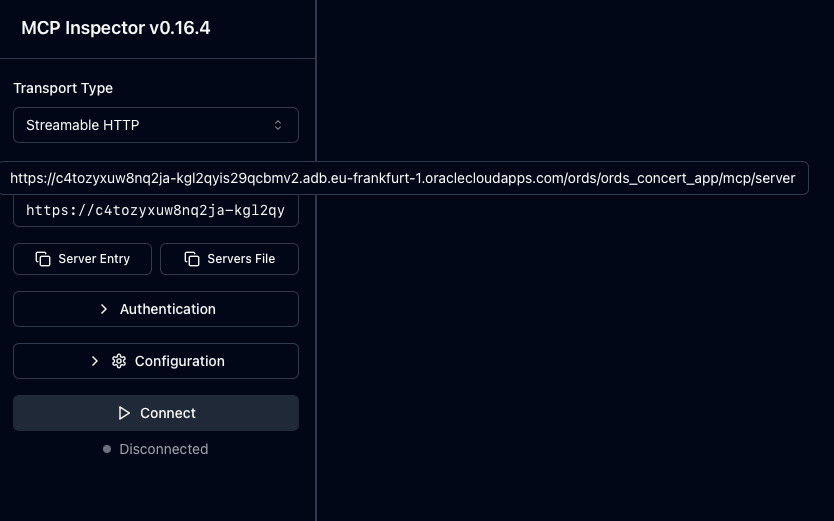
In the UI enter the MCP server address – This is the full path for mine hosted in Frankfurt region
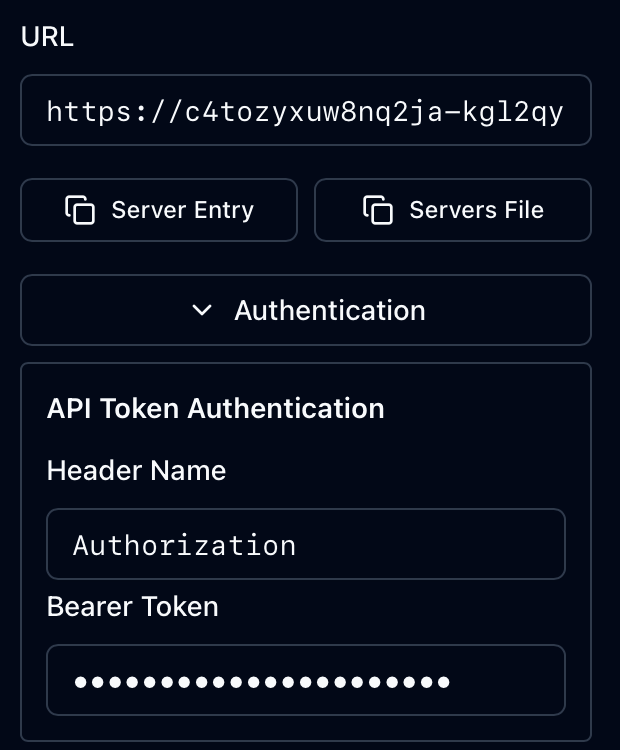
Set the Authorization header with the access token as Bearer Token value
The inspector tool invoking your hosted MCP Server implementation

With the Authentication details provided just press the Connect button. As you can see from the above recording you get live data from your MCP Server mle/handler implementation. The invocation of the relevant methods initialize, tools/list and tools/call can be seen in the history.

Now that you know the MCP Server implementation works and complies with the specification it is time to plug this into an AI Assistant which can operate as an MCP Client. One example is Claude Desktop.

🤖 Claude Desktop (with mcp-remote)

Claude is an AI assistant created by Anthropic. It is built to assist with a wide variety of tasks – from answering questions and helping with analysis to writing, coding, math, creative projects, and having conversations on a wide range of topics. Claude.ai refers to the online version of the AI chatbot, while Claude Desktop is a dedicated application for Windows and macOS that allows users to access Claude’s features directly on their computer, offering a more streamlined and efficient experience. Although still in beta mode…Claude Desktop can connect to remote MCP servers, allowing you to access tools and data hosted on the internet. This integration enhances Claude’s capabilities by enabling it to perform tasks using resources from various external services. However, it does have its limitations. For example, although the free version works with local MCP servers to use remote MCP servers directly requires an upgrade to a paid plan.

To work around that we’ll use mcp-remote which will act as a local MCP server proxying to your remote server.

Manage your list of MCP Servers in the Developer section of Claude Desktop Settings

The Edit Config button will open up a file explorer window with your claude_desktop_config.json file selected. Edit that file and add an entry for your MCP Server.

{
  "mcpServers": {
    "ORDS-handler-example": {
      "command": "npx",
      "args": [
	"mcp-remote",
	"https://c4tozyxuw8nq2ja-kgl2qyis29qcbmv2.adb.eu-frankfurt-1.oraclecloudapps.com/ords/ords_concert_app/mcp/server",
	"--header",
	"Authorization:${AUTH_HEADER}"
      ],
      "env": {
        "AUTH_HEADER": "Bearer 8kbzUqtgsDrCTNKB6Xb32w"
      }
    }
  }
}

Note that that you will have to specify your access token and restart Claude Desktop to pick up the change. In the above example the ORDS-handler-example is defined to execute the npx command to run the mcp-remote Node.js package locally. Additional command parameters include the URL for the remote MCP Server and an instruction to include an Authorization header. Note that the access token from earlier is used here.

Once Claude Desktop is restarted, let’s start asking questions. The AI Agent knows that it has an MCP Server available to it that has a tool for retrieving concert events.
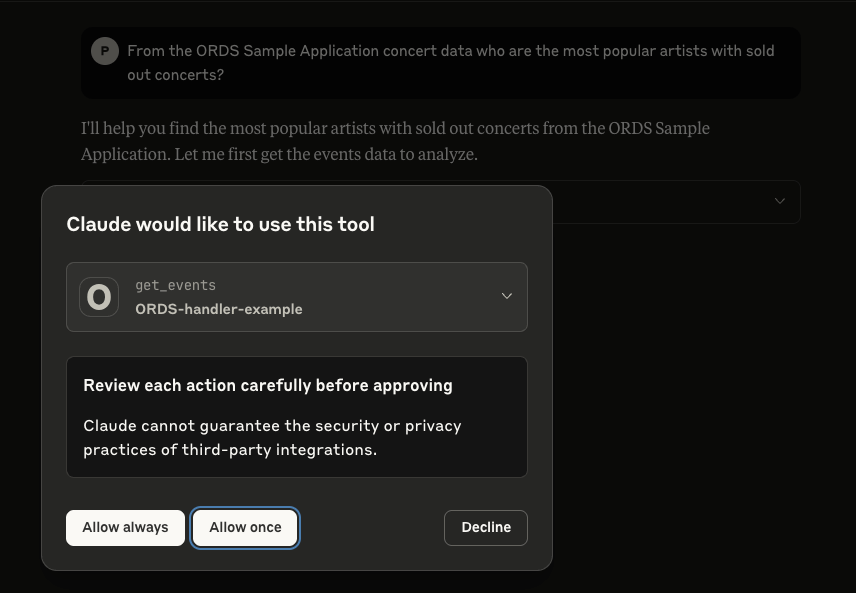
At startup Claude Desktop got the list of tools available from the MCP Server

Note that it is best practice to not give an agent unsupervised access to your tools and resources so in the majority of cases, select “Allow once” so that each action is reviewed before executing.

So let’s ask Claude a question:
From the ORDS Sample Application concert data who are the most popular artists with sold out concerts?
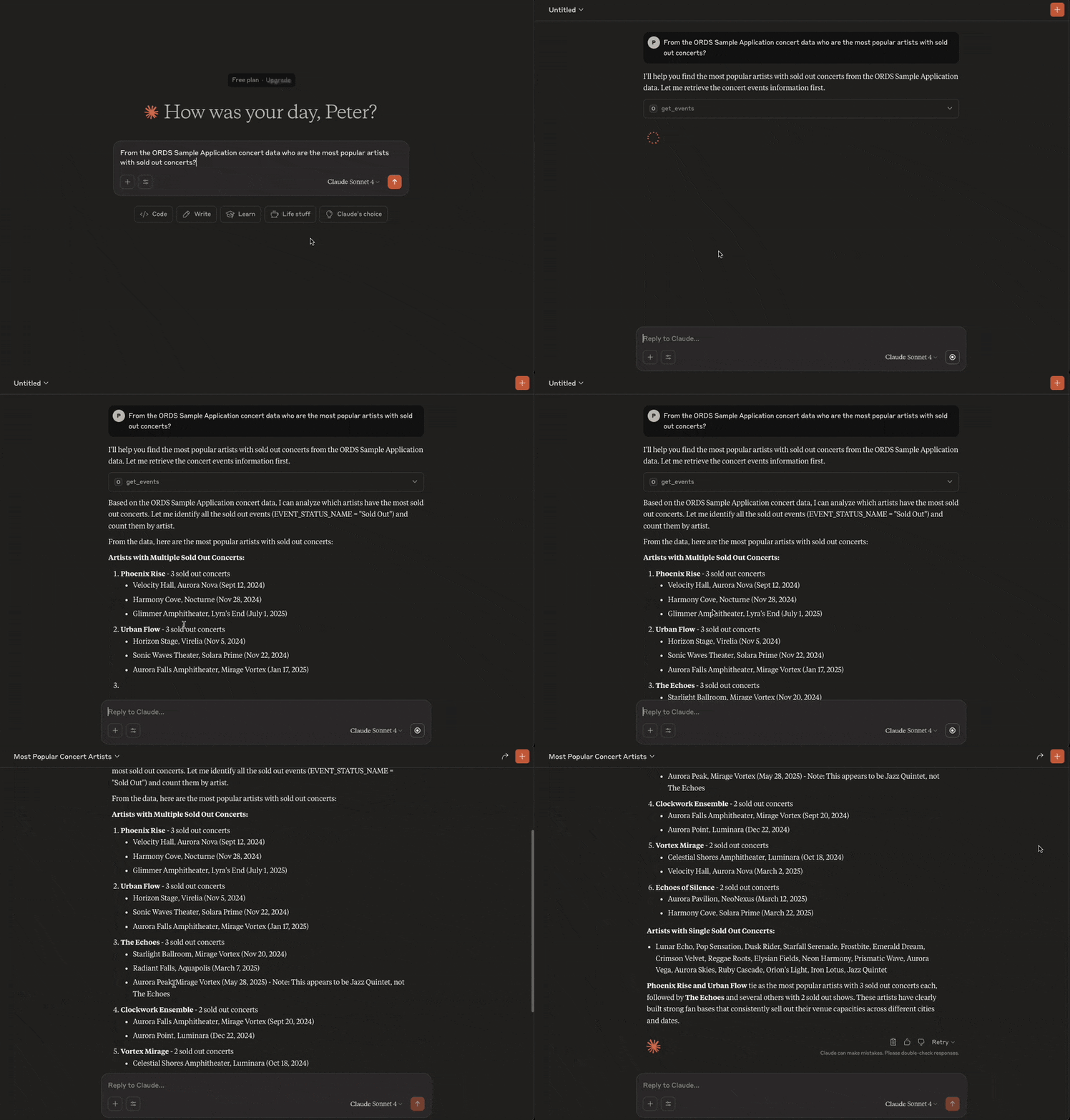
Claude gets the live data and performs its analysis on it

And that’s it! You now can now chat with an AI Assistant to gain insight on your ORDS Sample Application concert events, venues and artists.


⚠️ Limitations and Next Steps

🔐 OAuth2 Support Limitations

Some MCP clients—such as Claudedo not fully support OAuth2 client credentials at the time of writing. This may require:

  • Temporarily disabling OAuth2 for local testing.
  • Creating a public ORDS endpoint for development use.

Neither of which are really viable options. Remember the security, security, security statement at the top!

ORDS does not currently provide support for the OAuth2 flow to list identity providers and that reduces the integration options. The approach mentioned in this article to have an access token that lasts longer than the default 1 hour is not practical in the long term. However, you may find an MCP client that works with one of the other OAuth2 flows.

🚫 Lack of Streamable HTTP and Notifications

One limitation of this ORDS mle/javascript MCP server implementation is the absence of streamable HTTP responses and real-time notifications.

  • Streamable HTTP: The MCP specification allows servers to return results progressively, which is useful for long-running operations or large responses. ORDS handlers currently return only complete responses, meaning agents must wait until all processing finishes before receiving data.
  • Notifications: MCP also supports server-initiated notifications to inform clients of changes (e.g., new events becoming available). At present, ORDS does not provide a mechanism for pushing such asynchronous messages, so clients must re-poll endpoints to detect updates.

While these limitations do not prevent basic MCP functionality, they reduce efficiency for agents expecting real-time updates or streamed results.

🔧 Future Enhancements

Here are some possible next steps to build on this example mle/javascript handler:

  • Add a tool for managing events
  • Implement dynamic prompt generation in prompts/list.
  • Add support for downloading resources.
  • Log incoming MCP requests in a table for auditing.
  • Move the logic into an MLE Module so that the JavaScript code is better structured.
  • Explore the use of different OAuth2 security flows which will work with you chosen MCP client.

🧠 Summary

With just a few lines of MLE JavaScript and an ORDS handler definition, you can turn your Oracle database into a lightweight MCP HTTP server.

This approach allows Oracle developers to publish tools, prompts, and data to modern AI tools like Claude—without deploying external services. Moreover, the data and database resources that are shared is limited to what is specifically coded for in your handler.

📚 Continue exploring: More MLE Articles, https://github.com/oracle/mcp and Model Context Protocol server for the Oracle Database
JSON-RPC in ORDS Using MLE JavaScript (Oracle 23ai)

From time to time we get asked if Oracle REST Data Services ( ORDS ) can support certain formats or specifications such as YAML, OData or JSON-RPC. The simple answer is yes. Previously I provided an example plugin to convert the JSON response from ORDS into a YAML structure. A plugin is not the only option. One can create a user defined resource to implement almost anything. If using Oracle 23ai, that implementation can be in PL/SQL or JavaScript.

With the advent of a Model Context Protocol server for the Oracle Database it is timely to revisit the JSON-RPC options because MCP uses JSON-RPC as its transport wire format.

So let’s look at how one can use JSON-RPC with ORDS and Oracle 23ai in the hosted Oracle Autonomous Database.

JSON-RPC Protocol

The JSON-RPC protocol offers a minimal, transport-agnostic mechanism for structured remote procedure calls using JSON. It’s widely used in blockchain, embedded systems, and distributed APIs.

With Oracle Database 23ai, you can now implement a JSON-RPC endpoint directly inside the database using ORDS and the Multilingual Engine (MLE) with JavaScript — no extra middle tier or external Node.js runtime required.

In this post, we’ll build a standards-compliant JSON-RPC handler using ORDS MLE JavaScript, based on the canonical example from Wikipedia.

🧪 JSON-RPC Example

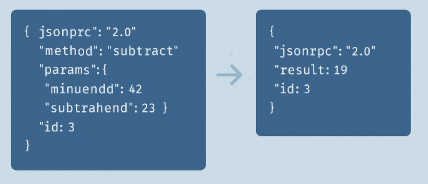
We’ll accept this standard JSON-RPC request:

{
"jsonrpc": "2.0",
"method": "subtract",
"params": { "minuend": 42, "subtrahend": 23 },
"id": 3
}

And return this result:

{
"jsonrpc": "2.0",
"result": 19,
"id": 3
}

The example implementation will just perform subtract, no other methods. However, this is essentially what the documented JSON-RPC V2 example is all about.

Using ORDS and Oracle 23ai with Autonomous Database

The entire example brings together a number of components and hosted services. One can accomplish all this on-premise, but it is more effort. Let’s briefly talk about those key constituents…

Oracle Autonomous Database (Serverless) is a fully managed, cloud-native database service on Oracle Cloud Infrastructure (OCI) that eliminates the complexity of database administration. It automatically handles provisioning, scaling, patching, tuning, backups, and security. The serverless deployment model allows developers to focus purely on data and logic without worrying about infrastructure or resource management.

Oracle Database 23ai introduces advanced AI and developer features, including the Multilingual Engine (MLE) — a lightweight JavaScript runtime embedded inside the database. MLE allows developers to write and run JavaScript code natively alongside SQL and PL/SQL, enabling modern use cases like JSON processing, protocol translation, and procedural logic without leaving the database.

Oracle REST Data Services (ORDS) is also hosted and managed within the Autonomous Database environment. ORDS enables developers to expose RESTful APIs directly from SQL, PL/SQL, or JavaScript (via MLE) using the Oracle 23ai database. It supports secure endpoints, OAuth2, pagination, OpenAPI integration, and more — without the need for an external application server.

Together, this stack allows developers to:

  • Build microservices and APIs with JavaScript inside the database
  • Expose data securely using REST over HTTPS via hosted ORDS
  • Deploy completely serverless solutions on Oracle Cloud, fully managed and auto-scaled

Many of these are accessible for free in the OCI Free Tier. Yes for free.

Step by step

In this example I’ll start with an Oracle 23ai database in the Frankfurt region using the Free Tier. I have a REST Enabled database user called JSONRPCEXAMPLE with the standard roles to create a database session and resources in the database.

Granted Roles for JSONRPCEXAMPLE database user

🔒 Step 1: Grant Required Privileges

Using Oracle 23ai is a necessity because it contains the Multi Language Engine for running JavaScript but each database user does require permission to use it. My JSONRPCEXAMPLE database user has been given that permission:

GRANT EXECUTE ON JAVASCRIPT TO JSONRPCEXAMPLE;
GRANT EXECUTE DYNAMIC MLE TO JSONRPCEXAMPLE;
Granting required MLE privileges.

In my hosted Oracle 23ai database I executed the above as the ADMIN user.

Now to connect as the REST Enabled JSONRPCEXAMPLE user and actually implement that User Defined Resource.

🚀 Step 2: Create the ORDS Module and Handler

There are plenty of options to get a connection to the database for running this SQL Script. The most popular options are sqlcl, SQL Developer for VS Code and Database Actions.

Use the following script to define the ORDS module, template, and MLE handler. This version is fully correct for Oracle 23ai and adheres to the format specified in the ORDS Developer Guide.

BEGIN
  ORDS.DEFINE_MODULE(
    p_module_name    => 'jsonrpc',
    p_base_path      => '/rpc/',
    p_comments       => 'JSON-RPC endpoint'
  );

  ORDS.DEFINE_TEMPLATE(
    p_module_name => 'jsonrpc',
    p_pattern     => 'handler'
  );

  ORDS.DEFINE_HANDLER(
    p_module_name      => 'jsonrpc',
    p_pattern          => 'handler',
    p_method           => 'POST',
    p_source_type      => ORDS.source_type_mle_javascript,
    p_source           => q'~ 
 (req, resp) => {
   let jsonrpc_response = {
    jsonrpc: "2.0",
    id: null
   };

   try {
    const jsonrpc_request = req.body;
    jsonrpc_response.id = jsonrpc_request.id ?? null;

    if (jsonrpc_request.jsonrpc !== "2.0") {
      jsonrpc_response.error = {
        code: -32600,
        message: "Invalid Request"
      };
    } else if (jsonrpc_request.method === "subtract") {
      const { minuend, subtrahend } = jsonrpc_request.params;
      jsonrpc_response.result = minuend - subtrahend;
    } else {
      jsonrpc_response.error = {
        code: -32601,
        message: "Method not found"
      };
    }

   } catch (e) {
    jsonrpc_response.error = {
      code: -32700,
      message: "Parse error",
      data: e.message
    };
  }
  resp.content_type("application/json");
  resp.status(200);
  resp.send(JSON.stringify(jsonrpc_response));
 }
~',
    p_comments         => 'MLE JavaScript JSON-RPC handler'
  );

  COMMIT;
END;
/

Running the script in the hosted Database Actions

Since this is only an implementation for subtract, you can take it on as an additional exercise to introduce more calculator operations.

Also consider moving the logic into an MLE Module or even using a predefined JavaScript Mathematics library for your calculator logic. See Transform your SQL Results with Mustache and ORDS JavaScript Handlers for an example of using JavaScript libraries through the MLE Module concept.

You have probably noticed that the handler always returns HTTP Status Code 200 even if there is an error. The JSON-RPC Error Object section of the specification does not state any expected behaviour around the transport protocol for an error scenario so you will have to determine what is appropriate for your organisation.

🧪Step 3: Test the Endpoint

Use curl, Postman, or any HTTP client:

curl -X POST \
https://my-db.oraclecloudapps.com/ords/jsonrpcexample/rpc/handler \
-H "Content-Type: application/json" \
-d '{
"jsonrpc": "2.0",
"method": "subtract",
"params": { "minuend": 42, "subtrahend": 23 },
"id": 3
}'

You’ll get this JSON-RPC 2.0 response:

{
"jsonrpc": "2.0",
"result": 19,
"id": 3
}

Try it without specifying an id or without params to see how the implementation responds.

You will also note that this service is not secured and it would be best practice to restrict access to authorised users only. This can be achieved by defining an ORDS Privilege for the module or pattern of the service URI. Take a look at Configuring Secure Access to RESTful Services to find out more.

✅ Conclusion

Oracle Database 23ai’s MLE JavaScript support allows you to run lightweight protocol handlers—like JSON-RPC—directly in the database, without the need for a plugins. With just a few lines of code, ORDS becomes a smart, standards-compliant backend for modern APIs to meet your integration needs.

Key takeaways:

  • Use (req, resp) => {} function syntax for MLE JavaScript in ORDS.
  • Grant EXECUTE ON JAVASCRIPT and EXECUTE DYNAMIC MLE to your user.
  • Validate incoming JSON-RPC payloads according to spec.
  • Secure access using ORDS privileges.

Transform your SQL Results with Mustache and ORDS JavaScript Handlers

When dealing with SQL data, format and structure is crucial. Raw data isn’t always the most readable or useful format, especially when you need to expose it through an API. This is where Oracle REST Data Services (ORDS) comes in handy. It provides a secure and convenient JSON representation of the SQL query results in a JSON format by default. In this article, we’ll walk through using ORDS JavaScript handlers with the Mustache template engine to format an XML response from SQL query results. What we cover here is based on the previous article Multilingual Engine (MLE) for JavaScript Handlers. That article introduced an ORDS Module called demo_mle_javascript and in this article we will add to it.

The high level flow

Introducing the key components

Oracle REST Data Services (ORDS)

Oracle REST Data Services (ORDS) is a powerful tool that allows you to expose database functionalities as RESTful services. It simplifies the process of creating APIs for your Oracle database, making it easier to integrate with other systems and applications.

Mustache Template Engine

Mustache is a logic-less template engine that helps you format data into any desired format. Its simplicity and flexibility make it a great choice for rendering text in a wide variety of formats: HTML, JSON, XML, etc. Mustache uses templates to define the structure of the output, which can then be populated with data.

Oracle 23ai Database and the Multilangual Engine

With Oracle Database Multilingual Engine (MLE), developers have the option to run JavaScript code through dynamic execution or with persistent MLE modules stored directly in the database.

Bringing all together

Just as with the previous article which showcased Multilingual Engine (MLE) for JavaScript Handlers in ORDS we will use the 23ai database available at Oracle Autonomous Database. There we have a /ords/hr/demojs/employee/:id GET handler which has a JavaScript implementation for running a SELECT query to get an employee record for a employee_id provided in the URI.

In this article we’ll implement in JavaScript a GET handler to return all employee records but in an XML format. It will be very similar to the previous handler but reuse a JavaScript library so there’s actually less code. The additional step is that the JavaScript Mustache template engine will be imported into an MLE Module and then referred to by our JavaScript source in our ORDS JavaScript handler to transform the JSON representation of a query result set into an XML document returned by the service.

Defining the Mustache MLE Module

Mustache JavaScript

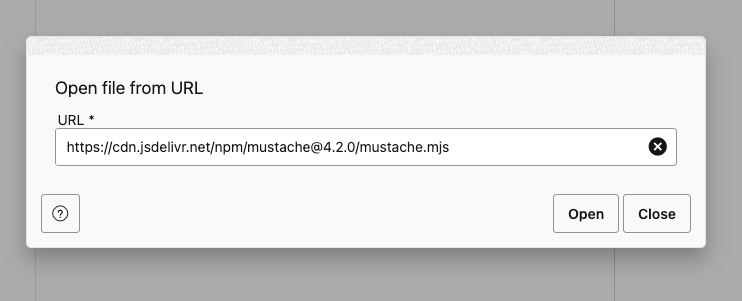
To use Mustache in ORDS JavaScript handler, you need to define it as an MLE module so that it can be imported by the dynamic MLE JavaScript in the handler source. The simplest way to get this done is include it from a content delivery network like jsDelivr. Here’s the URL for Mustache version 4.2.0: https://cdn.jsdelivr.net/npm/mustache@4.2.0/mustache.mjs.

The availability of JavaScript components like this supports self-contained and reusable code, key to developing successful software projects. We will use this library unmodified. However, due to a difference in architecture, module imports behave slightly differently in the Oracle Database when compared to other development environments. For example, JavaScript source code used with Node.js is stored in a specific directory structure on disk. MLE modules are stored together with the database, rather than in a file system, so must be referenced in a different manner. Let’s get that Mustache MLE module defined

Creating the MLE Module in Autonomous Database

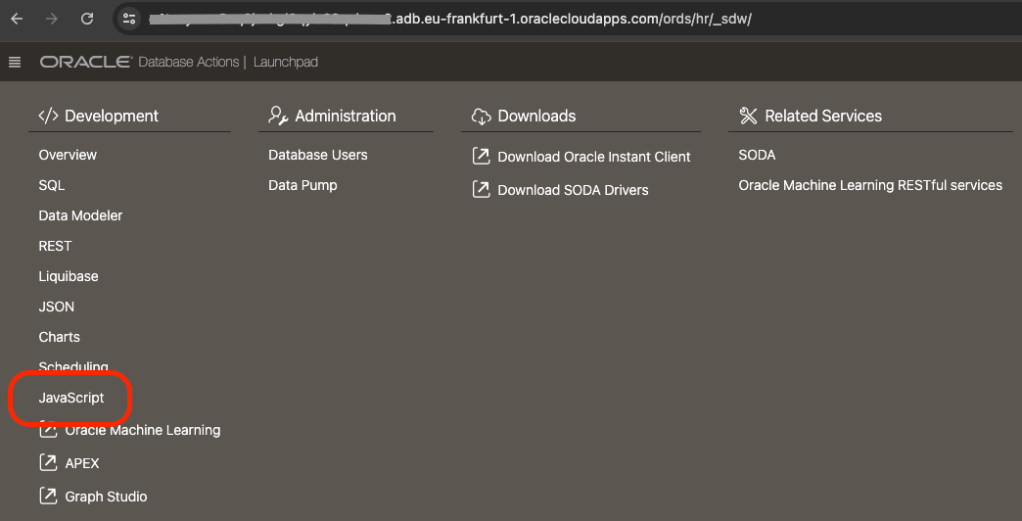
The simplest way to define a module, from an external source, in an 23ai Autonomous Database is to use ORDS Database Actions. Note that one must be using a 23ai database, otherwise the menu option in Database Actions does not appear. So, first step, login to Database Actions ( AKA SQL Developer Web ) https://my-autonomous-database.oraclecloudapps.com/ords/sql-developer and choose the Development->JavaScript menu option…

The Development->JavaScript section provides a handy UI for managing MLE Modules
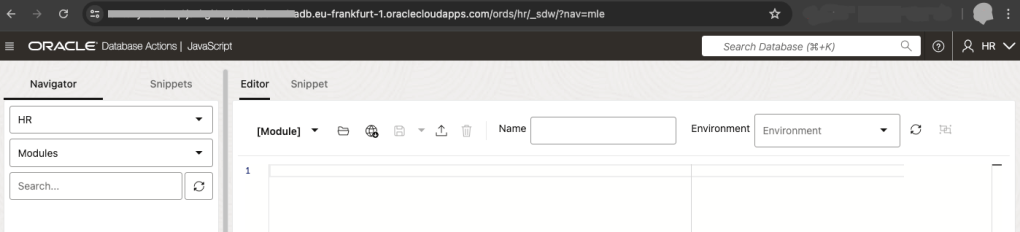
If this is your first time defining an MLE Module the JavaScript area in Database Actions will look like this

In the MLE Editor there is a globe icon with an arrow pointing downwards. This is the Open from URL button. Press that, enter the URL https://cdn.jsdelivr.net/npm/mustache@4.2.0/mustache.mjs and press the Open button to load the text.

You should then see the source in the MLE Module editor. Enter MUSTACHE as the name ( leave the Environment info blank ) and press the Save icon to create the MLE Module.

Save the MLE Module source and call it MUSTACHE

The last part of that source, at line 764, the JavaScript exports a mustache object and that is what we will refer to in our own JavaScript: export default mustache;

Now, to use that MLE Module it must be included in an MLE Environment. Amongst other things, MLE environments are used for name resolution of JavaScript module imports. For this example we will define an MLE Environment called LIBRARY_ENV where we specify a namespace for modules we want to reuse.

Let’s switch to an SQL Worksheet environment for the rest of this article. Run this to create that environment…

CREATE MLE ENV LIBRARY_ENV IMPORTS ('mustache' module MUSTACHE);

With that in place, we’re now ready to create our JavaScript handler.

Developing the ORDS REST Service

Now, define a JavaScript handler that will query all records from HR.EMPLOYEES table and format the SQL results into an XML response using Mustache. The service will be part of the existing demo_mle_javascript module and available at employees/ so we will define a template and a handler:

begin
  ORDS.DEFINE_TEMPLATE(
      p_module_name    => 'demo_mle_javascript',
      p_pattern        => 'employees/');

  ORDS.DEFINE_HANDLER(
      p_module_name    => 'demo_mle_javascript',
      p_pattern        => 'employees/',
      p_method         => 'GET',
      p_source_type    => 'mle/javascript',
      p_mle_env_name   => 'LIBRARY_ENV',
      p_source         => 
q'~ 
 (req, resp) => {
    const query = 'select * from employees order by employee_id';
         const res = session.execute(query);
    const mustache = await import('mustache');

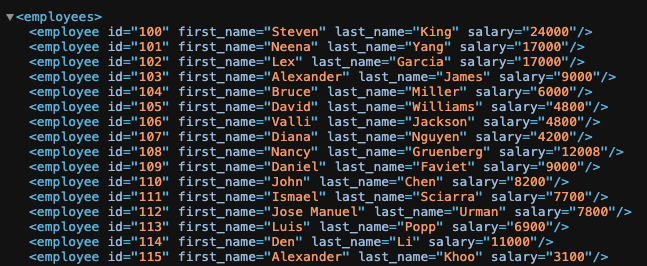
    var template = '<employees>{{#rows}} <employee id="{{EMPLOYEE_ID}}" first_name="{{FIRST_NAME}}" last_name="{{LAST_NAME}}" salary="{{SALARY}}"/>{{/rows}}</employees>';

    var output = mustache.default.render(template, res);
    resp.content_type('application/xml');
    resp.status(200);
    resp.send(output);
}
~'
      );
end;

Let’s break that down and talk about the distinct parts…

ORDS.DEFINE_TEMPLATE(
      p_module_name    => 'demo_mle_javascript',
      p_pattern        => 'employees/');

Not much to explain about the above. We’re defining a pattern for a URI to add to an existing ORDS REST Service module and will have one or more handlers defined.

The parameters to the DEFINE_HANDLER procedure are more interesting so let’s take a look at them:

p_module_name    => 'demo_mle_javascript',
This states which module the handler belongs to.

p_pattern => 'employees/',
This states which template in that module the handler belongs to.

p_method => 'GET',
Handlers are define for a specific HTTP method. This handler will be for GET requests.

p_source_type => 'mle/javascript',
Handler source can be of various types. Some simple such as a basic select query and some more complex such as pl/sql block. This handler's source is dynamic MLE JavaScript.

p_mle_env_name => 'LIBRARY_ENV',
When dynamic MLE JavaScript imports a module it must state the MLE Environment where that module's namespace is defined. This is important for this handler's source and MUST be specified.

The p_source parameter content is more complex and deserves it’s own explanation. At a high level the steps are:

  1. Define a query and execute it, storing the reference to the results in a variable called res
  2. Import the Mustache MLE module and refer to it as mustache. Note that import is asynchronous so we wait for it to complete.
  3. Defines a Mustache template for the XML structure. The curly bracket syntax is Mustache specific. Refer to Mustache documentation for more information.
  4. Formats the data using Mustache and save that as a variable called output. Note that we reference the default object because that is what was in the export definition in the imported mustache.mjs
  5. Sends the formatted XML as the HTTP response.

Remember that, as per ORDS REST JavaScript Handler developer guide documentation that the defined JavaScript code must be inside an anonymous function that receives the following two parameters: ORDS request object and ORDS response object. In the p_source parameter for this handler those two parameters are called req and resp respectively.

(req, resp) => {
// define the query
const query = 'select * from employees order by employee_id';
// execute it
const res = session.execute(query);
// import the mustache JavaScript library
const mustache = await import('mustache');

// define the template
var template = '<employees>{{#rows}} <employee id="{{EMPLOYEE_ID}}" first_name="{{FIRST_NAME}}" last_name="{{LAST_NAME}}" salary="{{SALARY}}"/>{{/rows}}</employees>';

// format the data from the result set
var output = mustache.default.render(template, res);

// send the formatter XML as the HTTP response
resp.content_type('application/xml');
resp.status(200);
resp.send(output);
}

Testing and Debugging

Testing the Endpoint

To test your new RESTful service, use tools like Postman or curl. Here’s an example using curl:

curl -X GET https://cust-23aidb.adb.eu-frankfurt-1.oraclecloudapps.com/ords/hr/demojs/employees/

Obviously your server hostname will be different. Also, you don’t have to be using the HR schema or have your ORDS REST Service module base path as demojs. So your URL could be way different but if you’ve gotten this far, you’ve already figured that out.

You should see an XML response formatted according to your Mustache template.

Debugging Common Issues

  1. JavaScript Errors: Check for syntax errors or issues with the JavaScript handler.
  2. SQL Query Problems: Ensure your SQL query is correct and returns the expected results.
  3. Template Errors: Verify the Mustache template syntax and placeholders.

Conclusion

In this article, we’ve shown how to use Mustache and ORDS JavaScript handlers to transform SQL query results into beautifully formatted XML. By following these steps, you can enhance the presentation of your data and make it more accessible and readable.

Additional Resources

Try implementing this solution in your projects and feel free to share your experiences or ask questions in the comments below!

Multilingual Engine (MLE) for JavaScript Handlers

The eagle eyed amongst you would have noticed this in the ORDS 24.1.1 release notes

ORDS now supports user-defined REST Resource Handlers powered by the Oracle Database Multilingual Engine (MLE) for JavaScript—the ORDS.DEFINE_HANDLER procedure now includes a new ‘mle/javascript’ p_source_type for MLE JavaScript modules stored directly in the Oracle database.

The Multilingual Engine (MLE) was a significant innovation introduced in Oracle Database 21 for providing In-Database JavaScript and now is a key feature of Oracle Database 23ai. In Data Magic: Oracle HR REST Service with Faker.js Sample Data I provided an example ORDS REST Services PL/SQL block handler which interacted with an MLE JavaScript module and an MLE Call Specification to generate sample data for the HR Employees table.

The new handler type mle/javascript in ORDS 24.1.1 now makes it possible to code business logic in JavaScript and make that available over HTTP(S). With Oracle Database 23ai and ORDS 24.1.1 available on cloud.oracle.com for free it is even easier to explore the capabilities of JavaScript-as-a-Service with ORDS.

Get a Database 23ai autonomous database at cloud.oracle.com

The goal for this article to walk you through defining a GET handler which uses JavaScript to run a select query based on a parameter passed and then return some JSON data. We’ll use the HR sample schema and the EMPLOYEES table in particular.

Permissions

Not every database user will have the database privileges to execute dynamic JavaScript in the database so we must first get those permissions in place.

GRANT EXECUTE ON JAVASCRIPT TO HR;
GRANT EXECUTE DYNAMIC MLE TO HR;

The above will have to be executed by a sufficiently privileged user. With the Autonomous Database at cloud.oracle.com that could be the ADMIN user.

Define the service

Assuming the HR schema is already REST Enabled simply connect to the database as that user and run the following…

BEGIN
  ORDS.DEFINE_MODULE(
      p_module_name    => 'demo_mle_javascript',
      p_base_path      => '/demojs/',
      p_items_per_page => 25,
      p_status         => 'PUBLISHED',
      p_comments       => 'Demonstrate MLE Javascript Handler functionality in ORDS 24.1.1.
Javascript-as-a-Service.');

  ORDS.DEFINE_TEMPLATE(
      p_module_name    => 'demo_mle_javascript',
      p_pattern        => 'employees/:id',
      p_priority       => 0,
      p_etag_type      => 'HASH',
      p_etag_query     => NULL,
      p_comments       => NULL);

  ORDS.DEFINE_HANDLER(
      p_module_name    => 'demo_mle_javascript',
      p_pattern        => 'employees/:id',
      p_method         => 'GET',
      p_source_type    => 'mle/javascript',
      p_items_per_page => 0,
      p_mimes_allowed  => NULL,
      p_comments       => NULL,
      p_source         => 
' 
 (req, resp) => {  
    const query = ''select employee_id, first_name, salary from employees where employee_id = :1'';
    const res = session.execute(query, [req.uri_parameters.id]);

    if (res.rows.length > 0) {
        var employee_item = {};
        employee_item[''employee_id''] = res.rows[0].EMPLOYEE_ID;
        employee_item[''first_name''] = res.rows[0].FIRST_NAME;
        employee_item[''salary''] = res.rows[0].SALARY;
        resp.content_type(''application/json'');
        resp.json(employee_item);
    } else {
        resp.status(404);
    }
}
');
        
COMMIT;

END;

We’ll take a look at that handler definition in detail a little later but for now, let’s try it out. Send a GET request to /ords/hr/demojs/employees/102 and you will see the results of the query executed:

{
"employee_id": 102,
"first_name": "Lex",
"salary": 17000
}

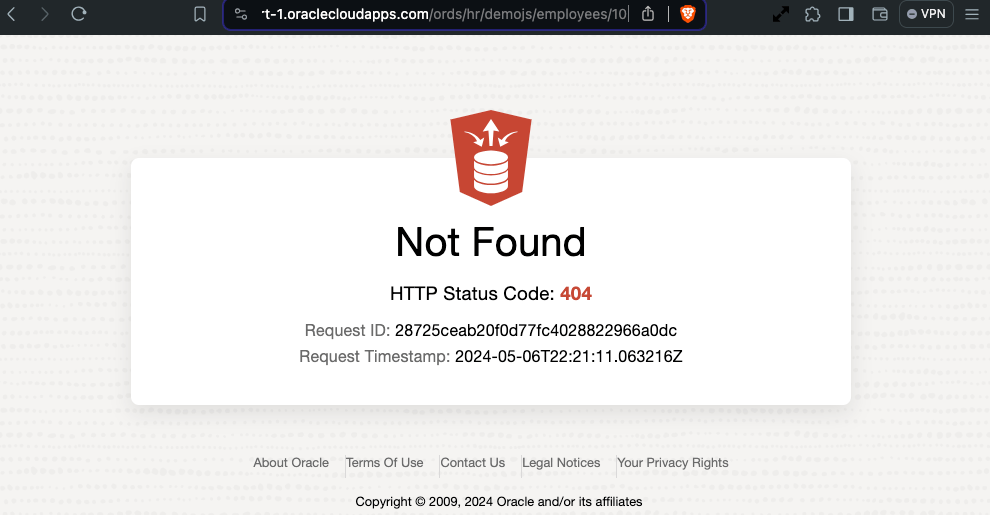
Specify an employee identifier that does not exist and you should get a HTTP 404 response.

Using the mle/javascript handler on Autonomous Database to indicate a record was not found

Handler in detail

The first thing to point out is the new handler source type: mle/javascript.

      p_source_type    => 'mle/javascript',

Note that this source type is not only applicable to the DEFINE_HANDLER procedure but also the DEFINE_SERVICE procedure too.

The source is a dynamic definition of JavaScript function which is passed a HTTP Request object and a HTTP Response object. In the source we can specify what variable names will be used for those two objects. It is fairly common to refer to them as req and resp but any names will do. In our case, we’ll stick to the convention.

(req, resp) => {
... JavaScript goes here ! ...
}

In-Database JavaScript references

The database session for the request can be referred through the variable session and functions can be invoked, such as running a query. In this snippet we define a query which takes a bind variable and provide a value from the HTTP Request URI when executing that query.

const query = 'select employee_id, first_name, salary from employees where employee_id = :1';
const res = session.execute(query, [req.uri_parameters.id]);

Recall that the id was defined as a parameter in the template definition. The res reference now contains the result set metadata and rows reference for the executed query.

Evaluate the query results and set the HTTP Response

Check the result set to see if there are any rows. If there are, construct a JSON object to return in the HTTP Response. Otherwise, just set the HTTP status code to 404.

if (res.rows.length > 0) {
var employee_item = {};
employee_item['employee_id'] = res.rows[0].EMPLOYEE_ID;
employee_item['first_name'] = res.rows[0].FIRST_NAME;
employee_item['salary'] = res.rows[0].SALARY;
resp.content_type('application/json');
resp.json(employee_item);
} else {
resp.status(404);
}

Note that for ease of readability I have removed the escaping single quotes from any string references.

Further reading

There are a lot of concepts that have been quickly skimmed over. ORDS initially introduced a limited JavaScript-as-a-Service product offering with javascript module plugins which required GraalVM. With MLE the JavaScript execution can be performed in the database so a GraalVM runtime environment is not required but more significantly, any REST Enabled database user can define their JavaScript business logic and make it available as a REST service.

Two important MLE related documents to discover more about what you can do with MLE are:

Through REST Enabling packages, procedures and functions, or supporting custom pl/sql handlers, ORDS makes it easy to access business logic associated with your data. Now you have another string to your bow: mle/javascript.

More detailed documentation and examples to come.

Data Magic: Oracle HR REST Service with Faker.js Sample Data

About a year ago Oracle 23c Database Free became available as a preview of the new “converged database” which introduces a huge range of application developer concepts right in the database. Since then I’ve written a couple of articles about it in the context of the Oracle Developer DB Virtual Machine…

April 2023
January 2024

The latter covers upgrading your version of ORDS which is important for this article which will explore some Oracle Multilingual Engine ( MLE ) concepts which will require ORDS 23.4.0 ( or later ) just for the simplicity of the MLE editing support in Database Actions.

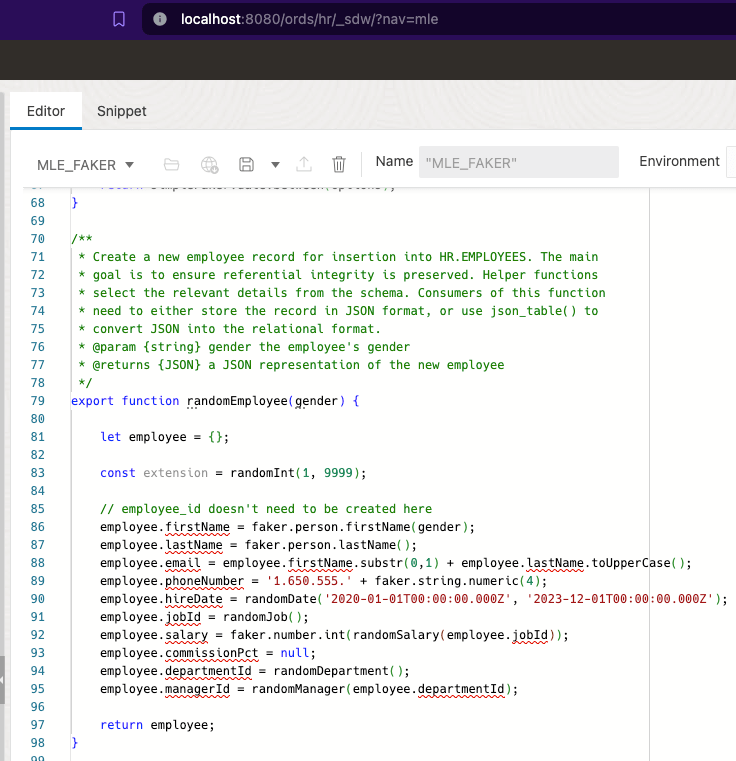
The goal here is to take Javascript based function which generates sample data and make that available as a REST service which will return data in a format which can be POSTed to the REST Enabled HR Employees table. Strictly speaking there’s no great advantage there because you could do that all in the DB anyway, but what gets covered here is the approach to take JSON data from Javascript and return it in the snake case format which can be used in Oracle REST Data Services.

Today we’re building on previous articles. In fact, the starting point is Jeff Smith’s Using JavaScript to create test data in Oracle Database 23c. Jeff’s blog post highlights all that Martin Bach’s article Using faker-js/Faker to generate test data respecting referential integrity in Oracle Database 23c delivers, showing how to follow Martin’s steps in Database Actions MLE JS editor. That can be run in your Oracle Developer DB Virtual Machine with ORDS 23.4.0. Of course you could just use the database in the VM and have ORDS 23.4.0 running outside it too. Either way, once you’ve gone through Jeff’s blog post you will have an MLE JavaScript module in place called MLE_FAKER and an MLE Call Specification called MLE_FAKER_API.

Therefore you can run this select statement to get a JSON object with random data for the HR Employee record:

select mle_faker_api.random_employee('female') employee;
Employee is a JSON object with random values but should be valid
The randomEmployee function uses camel case for field names
Responses for REST Enabled objects use snake case

You would think that you could use the generated JSON object as the payload body for a POST to the REST Enabled HR Employees table. The difference in naming convention for field names prevents that from happening. Send the mle_faker_api.random_employee JSON object to ORDS and you will get a HTTP 400 Bad Request response. Of course we could change the MLE_MAKER function implementation to use snake case. That would deviate from what Martin has implemented and he may have subsequent articles building on that implementation so it’s best to avoid interfering with that.

Camel to Snake – we’ll handle it

It is quite simple really, we write a PL/SQL block handler which will take the fields from the JSON object and define the OUT parameters using the field naming convention we want. The handler takes a gender parameter to pass to the call specification and defines the data types for the fields. The database JSON_VALUE function is key here…

DECLARE
random_employee JSON;
BEGIN
select mle_faker_api.random_employee(:gender)
into random_employee;
:first_name := JSON_VALUE(random_employee, '$.firstName');

For your convenience here is a script to define the module/template/handler…

BEGIN
  ORDS.DEFINE_MODULE(
      p_module_name    => 'mle_faker_api',
      p_base_path      => '/faker/',
      p_items_per_page => 25,
      p_status         => 'PUBLISHED',
      p_comments       => NULL);

  ORDS.DEFINE_TEMPLATE(
      p_module_name    => 'mle_faker_api',
      p_pattern        => 'employee',
      p_priority       => 0,
      p_etag_type      => 'HASH',
      p_etag_query     => NULL,
      p_comments       => NULL);

  ORDS.DEFINE_HANDLER(
      p_module_name    => 'mle_faker_api',
      p_pattern        => 'employee',
      p_method         => 'GET',
      p_source_type    => 'plsql/block',
      p_mimes_allowed  => NULL,
      p_comments       => NULL,
      p_source         => 
'DECLARE
  random_employee JSON;
begin
select mle_faker_api.random_employee(:gender) into random_employee;
:first_name := JSON_VALUE(random_employee, ''$.firstName'');
:last_name := JSON_VALUE(random_employee, ''$.lastName'');
:email := JSON_VALUE(random_employee, ''$.email'');
:phone_number := JSON_VALUE(random_employee, ''$.phoneNumber'');
:hire_date := JSON_VALUE(random_employee, ''$.hireDate'');
:job_id := JSON_VALUE(random_employee, ''$.jobId'');
:salary := JSON_VALUE(random_employee, ''$.salary'');
:commission_pct  := JSON_VALUE(random_employee, ''$.commissionPct'');
:department_id := JSON_VALUE(random_employee, ''$.departmentId'');
:manager_id := JSON_VALUE(random_employee, ''$.managerId'');

end;');

  ORDS.DEFINE_PARAMETER(
      p_module_name        => 'mle_faker_api',
      p_pattern            => 'employee',
      p_method             => 'GET',
      p_name               => 'gender',
      p_bind_variable_name => 'gender',
      p_source_type        => 'URI',
      p_param_type         => 'STRING',
      p_access_method      => 'IN',
      p_comments           => NULL);

  ORDS.DEFINE_PARAMETER(
      p_module_name        => 'mle_faker_api',
      p_pattern            => 'employee',
      p_method             => 'GET',
      p_name               => 'first_name',
      p_bind_variable_name => 'first_name',
      p_source_type        => 'RESPONSE',
      p_param_type         => 'STRING',
      p_access_method      => 'OUT',
      p_comments           => NULL);

  ORDS.DEFINE_PARAMETER(
      p_module_name        => 'mle_faker_api',
      p_pattern            => 'employee',
      p_method             => 'GET',
      p_name               => 'last_name',
      p_bind_variable_name => 'last_name',
      p_source_type        => 'RESPONSE',
      p_param_type         => 'STRING',
      p_access_method      => 'OUT',
      p_comments           => NULL);

  ORDS.DEFINE_PARAMETER(
      p_module_name        => 'mle_faker_api',
      p_pattern            => 'employee',
      p_method             => 'GET',
      p_name               => 'email',
      p_bind_variable_name => 'email',
      p_source_type        => 'RESPONSE',
      p_param_type         => 'STRING',
      p_access_method      => 'OUT',
      p_comments           => NULL);

  ORDS.DEFINE_PARAMETER(
      p_module_name        => 'mle_faker_api',
      p_pattern            => 'employee',
      p_method             => 'GET',
      p_name               => 'phone_number',
      p_bind_variable_name => 'phone_number',
      p_source_type        => 'RESPONSE',
      p_param_type         => 'STRING',
      p_access_method      => 'OUT',
      p_comments           => NULL);

  ORDS.DEFINE_PARAMETER(
      p_module_name        => 'mle_faker_api',
      p_pattern            => 'employee',
      p_method             => 'GET',
      p_name               => 'hire_date',
      p_bind_variable_name => 'hire_date',
      p_source_type        => 'RESPONSE',
      p_param_type         => 'STRING',
      p_access_method      => 'OUT',
      p_comments           => NULL);

  ORDS.DEFINE_PARAMETER(
      p_module_name        => 'mle_faker_api',
      p_pattern            => 'employee',
      p_method             => 'GET',
      p_name               => 'job_id',
      p_bind_variable_name => 'job_id',
      p_source_type        => 'RESPONSE',
      p_param_type         => 'STRING',
      p_access_method      => 'OUT',
      p_comments           => NULL);

  ORDS.DEFINE_PARAMETER(
      p_module_name        => 'mle_faker_api',
      p_pattern            => 'employee',
      p_method             => 'GET',
      p_name               => 'salary',
      p_bind_variable_name => 'salary',
      p_source_type        => 'RESPONSE',
      p_param_type         => 'DOUBLE',
      p_access_method      => 'OUT',
      p_comments           => NULL);

  ORDS.DEFINE_PARAMETER(
      p_module_name        => 'mle_faker_api',
      p_pattern            => 'employee',
      p_method             => 'GET',
      p_name               => 'commission_pct',
      p_bind_variable_name => 'commission_pct',
      p_source_type        => 'RESPONSE',
      p_param_type         => 'DOUBLE',
      p_access_method      => 'OUT',
      p_comments           => NULL);

  ORDS.DEFINE_PARAMETER(
      p_module_name        => 'mle_faker_api',
      p_pattern            => 'employee',
      p_method             => 'GET',
      p_name               => 'department_id',
      p_bind_variable_name => 'department_id',
      p_source_type        => 'RESPONSE',
      p_param_type         => 'INT',
      p_access_method      => 'OUT',
      p_comments           => NULL);

  ORDS.DEFINE_PARAMETER(
      p_module_name        => 'mle_faker_api',
      p_pattern            => 'employee',
      p_method             => 'GET',
      p_name               => 'manager_id',
      p_bind_variable_name => 'manager_id',
      p_source_type        => 'RESPONSE',
      p_param_type         => 'INT',
      p_access_method      => 'OUT',
      p_comments           => NULL);


COMMIT;

END;

Now a simple GET will return a generated sample Employee record using the snake case naming convention.

curl http://localhost:8080/ords/hr/faker/employee?gender=male

{
"first_name":"Tommie",
"last_name":"Dach",
"phone_number":"1.650.555.5072",
"job_id":"SA_MAN",
"department_id":20,
"email":"TDACH",
"hire_date":"2022-04-25T13:29:04.961000Z",
"salary":16520.0,
"manager_id":201
}

Which in turn can be used in a POST request to insert the record for real and generate an employee id.

The Employee JSON object is accepted and Tommie is employee number 221 !

Since one of the steps covered in Martin’s blog posts dealt with importing existing Javascript libraries ( Faker ) into the database, the transformation of the generated Employee JSON structure could possibly be achieved through Javascript libraries such as change-case. That’s a homework exercise for extra merit.

The real foundational work for this simple example of generating HR Employee sample data has been laid by Martin Bach. It was through building on that with a visual representation of the steps through ORDS’s Database Action UI that Jeff Smith brought it to my attention. I am grateful to both for the starting point they provided.