Performance testing of asynchronous processes

Generally, the most complicated part of performance testing is getting the data shape right. Populating the system with thousands of users, records and so on is made easier by data generation tools, but it still requires a lot of thought. Often the testing simply involves making a request and asserting that the response time was within acceptable limits. Systems that validate the parameters, particularly time based parameters, in these requests make it a bit more complicated to automate the performance testing. Think of session tokens, or other sets of data that are only valid for a short period of time.

When working on Social CRM we had a similar challenge. There are a number of processes that are asynchronous and to further complicate matters, involve email. The reset password process is a good example. There are 3 steps:

  1. Initiate reset password – A user specifies an email address and the system sends an email asking do they really want to reset their password. This email contains a URL with a number of parameters to verify that only the person receiving the email can move to the next step.
  2. Confirm reset password – A user clicks on the URL link in the email to confirm that they want to reset their password. The system verifies the parameters, generates a new temporary password and sends the user an email. The user can not log in with this temporary password.
  3. Complete reset password – A user clicks on the URL link in the email, enters their temporary password and their new password in order to be able to log into the system.
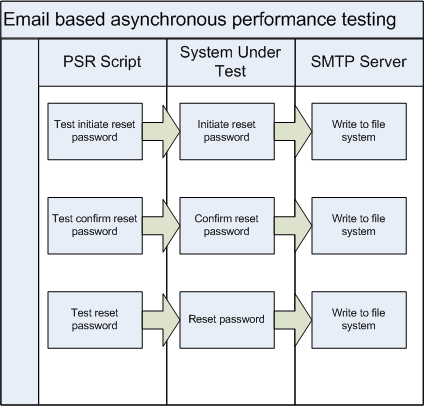

A number of these parameters are not stored anywhere, except in the email. There are other system checks and balances to verify some of these parameters. Therefore, when automating the performance testing, it is not possible to populate the database with a full set of valid data and run the script. Access to the generated email content is required. This is where SubEthaSMTP and Wiser help out.

By having an implementation of Wiser to write the emails to a file, all of the time based parameters, that are not stored anywhere, are available for a subsequent performance testing script to refer to.

When is automated testing required?

This question gets asked a lot, particularly as there is a cost in implementing automated tests. There is also a benefit, but it is harder to quantify. When a development team has a limited amount of time between releases there is often a preference to implement new functionality rather than automate testing for existing functionality. With Agile Software Development methodologies, the role of the tester is more complex, but automation of testing is clearly a responsibility.

It is easy to say that 100% of the system functionality should be tested automatically and to ensure that regressions do not occur, that this testing should be performed by a developer before they check in changes. It is hard to justify the cost of doing so as the information on how many defects automated testing prevented does not often get recorded.

The simplest place to start is to review the regression defects that have been raised in the past. This should highlight the functionality that tends to break the most when changes are made. After implementing automated regression testing the journey starts in growing the range of automated test suites. Assuming, of course, that developers are using the automated testing before checking in their changes, one should also see a reduction of the regression defects being raised in areas with automated testing.

Lost in translation – Globalisation Gotchas

When we think of Globalisation, we often think of the manufacture and trade of goods. With the advent of the European Union came the more formalised notion of ‘the four freedoms’ (people, goods, services, capital) of the internal market. People, goods and capital is fairly tangible, but what is interesting from an IT point of view is globalisation (or free movement) of services. It’s not just fashionable to outsource your call centre department, but also development effort.

High speed internet aspect takes care of one of the challenges of communication, but what about the language itself? When outsourcing, how does one ensure the requirements are communicated correctly. Using online translation tools can go horribly wrong. In this case journalists from Isreal managed to insult a prominent Dutch politician and his mother!

The top destination for outsourcing is India. India has the world’s second largest labour force with 516.4 million (2007 est.), 27% of them involved services (2003 est.). Global consultancy firm PricewaterhouseCoopers has more details. This is a highly skilled, well educated workforce and though not always needed, Hindi translation, Punjabi translation and Urdu translation services are available. While Hindi is the official language, English enjoys the status of ‘subsidiary official language’. Certainly within the services sector there is a English language revolution going on. Add to that the fact that most of the development languages, and IT infrastructure product documentation, are in English and there are obvious advantages here.

Outsourcing is no longer just for Fortune 500 companies. Small and mid-sized firms, as well as busy professionals, can outsource their work to increase their productivity and free time for more important commitments. It’s time for the world to take advantage of this revolution.

Vivek Kulkarni (CEO Brickwork India and former IT Secretary, Bangalore)


Of course this level of outsourcing still requires commitment and a lot of upfront preparation and documentation. A lot of industries are moving away from the heavy weight processes of the 20th century. It will be interesting to see how Agile development methodologies, which put a greater emphasis on communication over documentation, work with distributed development teams, in different timezones. Feel free to share your experiences.

Social CRM Goes Live!

Announced at last year’s OpenWorld, and previewed at last month’s Enterprise 2.0 Conference, Oracles’ Social CRM goes live today at http://sales.oracle.com. This adds another social network, although quite a unique one, to the Oracle social grid.

So, how does Social CRM compare to the Oracle social networks and what makes it so special? Let’s look at what is in the Oracle Community already. There are blogs, forums and wikis that bring together people who are interested in Oracle products and technology. They provide the communication aspect of collobaration. And, more importantly, it is collobaration around what Oracle sells.

Social CRM introduces tools to support the doing aspect of colloboration. However, it is collobaration around the products and services you sell. The heavy weight, process driven, data entry intensive tools of which we are so familiar with, and still serves a valuable purpose in the enterprise, does not cater for every aspect of how business is done. The human element in selling, in particular, is not easily modelled. Social CRM is a small step in the right direction with tools, such as Sales Prospector, to increase sales and decrease data entry.

My own involvement in Social CRM started in January of this year, looking after the Security and User Provisioning side of the platform. Of course we hadn’t even reached code chill before we started work on the next version, so we are still very busy. Watch out for more (1, 2) later in the year. For me, the most rewarding part of the work is, coincidentally, the collaboration. You see, Social CRM is made possible through Agile software development practices. It is collaborative from the inside out.

Practices of an Agile Developer


Title: Practices of an Agile Developer

Authors: Venkat Subramaniam & Andy Hunt
Publisher: Pragmatic Bookshelf

If you are looking for a step by step guide on running your software development projects, THIS IS NOT THE BOOK! This book, published in 2006 but still very valid today, collects the personal habits, ideas, and approaches of successful agile software developers and presents them in a series of short, easy-to-digest tips. There are 45 tips in all, covering a broad range of subjects such as the development process , incremental learning, etc. The format taken for each tip is quite interesting. As well as the indepth explanation and case study references, each tip has:

  • A taunt from the devil. That voice in your head that seems perfectly reasonable, but is infact taking you to a world of pain in the future.
  • Advice from your guardian angel. The counter-argument to the devil’s shenanigans.
  • A ‘What it feels like’ section. Nice short description of what happens when the tip is applied.
  • A ‘Keeping your balance’ section. This really reflects the Agile Development philosophy of adapting to the circumstances.

The authors have taken this approach out of the firm belief that the most important part of software development takes place in the developers head, so there is little focus on tools. However, they do provide a little sidebar called the Agile Toolkit which outlines the uses for:

  • Wiki
  • Version Control
  • Unit Testing
  • Build Automation & Continuous Integration

These tools support Agile Development, which the book describes as follows:
Agile Development uses feedback to make constant adjustments in a highly collaborative environment. Emphasis is mine, but I think this is a very good definition.

To summarise, Practices of an Agile Developer provides pragmatic ways of approaching the development process and your personal coding techniques as well as your own attitudes, issues with working on a team, and how to best manage your learning.