
Oracle REST Data Services (ORDS) 25.3.0 has just been released, and one of the highlights for developers is a significant performance improvement for Basic Authentication when paired with the latest Oracle 23ai database patch. In this article, we’ll show real-world “before and after” results from requests to an ORDS handler running in the Autonomous Database (ADB) Frankfurt region, demonstrating how ORDS 25.3.0 drastically reduces authentication response times.
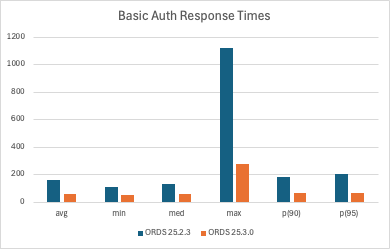
All values are milliseconds.
Note: It is recommended to use OAuth for authentication and authorisation rather than Basic Authentication where possible.
Background
Basic Authentication is widely used in ORDS for accessing secured REST endpoints. Note that, one is recommended to use OAuth2 over Basic Authentication for both performance and security reasons. See the ORDS Best Practices document. However, that is not always possible because for some clients their only authentication mechanism available is Basic Authentication. While simple to implement, verifying usernames and passwords can introduce latency, especially under load or in high-frequency request scenarios. Of course the biggest security issue is that one is sending username and password credentials for a database user over the network with every request. Even with HTTPS, it is best to avoid this practice.
For our tests, we used the events query handler from the ORDS sample application. This handler is part of the ORDS Sample Application ( also known as ORDS Concert App ), which you can explore here: ORDS Remix JWT Sample.
All tests were executed against an Autonomous Database instance in the Frankfurt region to ensure realistic production-like conditions.
Test Setup
We compared two configurations:
- ORDS 25.2.3 (previous version)
- ORDS 25.3.0 (latest release)
- Oracle 23ai database with the most recent RU, which contains enhancements specifically for faster ORDS basic authentication. More specifically, that’s RDBMS 23.10 which has been available in Autonomous Database for about a week now.
The test scenario:
- A k6 script making 100 sequential requests to the ORDS handler
- 200ms pause between requests to avoid ADB rate limiting (all requests came from the same IP)
- k6 executed from Dublin, with ORDS and the database hosted in Frankfurt, introducing a consistent network latency
- The protected service is the ORDS Concert App events handler.
Note: The details of the k6 script and execution environment will be provided in a dedicated section below.
Before: ORDS 25.2.3 Performance
The statistics for ORDS 25.2.3, recorded a few days ago at the same time of day as the latest test, are as follows (all durations in milliseconds):
| Metric | Duration (ms) |
|---|---|
| Avg | 160.448 |
| Min | 108.257 |
| Med | 129.354 |
| Max | 1118.475 |
| P90 | 183.042 |
| P95 | 204.627 |
Analysis:
- Average response time was ~160ms
- Maximum response exceeded 1 second, highlighting potential bottlenecks
- P95 and P90 values show noticeable tail latency, which can affect user experience
After: ORDS 25.3.0 Performance
After upgrading to ORDS 25.3.0 and applying the latest Oracle 23ai patch, the same test yielded dramatically improved results:
| Metric | Duration (ms) |
|---|---|
| Avg | 59.195 |
| Min | 51.607 |
| Med | 54.811 |
| Max | 273.553 |
| P90 | 65.565 |
| P95 | 68.708 |
Analysis:
- Average response time reduced by ~63%
- Minimum response time shows roughly a 52% improvement, but compared with the 63% average improvement, it suggests that the fastest possible request was already bounded mostly by network latency (Dublin → Frankfurt).
- Maximum response reduced by ~76%
- P90 and P95 values significantly lower, resulting in more consistent and predictable performance
- The improvements are immediately noticeable for real-world API requests
Why the Improvement Happens
The performance gains are made possible by enhancements in Oracle 23ai that were introduced specifically for ORDS:
- Faster verification of username and password
- Tight integration as a trusted Oracle database tools application
- Optimized authentication path within ORDS 25.3.0

In practice, this means that if basic authentication is your only option because of the client or integration tool used for consuming your ORDS REST services you will see a noticeable improvement in response times, even in high-volume scenarios.
One such example is the Oracle Database API for MongoDB where basic authentication is the only option with the MongoDB Wire protocol interface. Improving the connection time for customers using Oracle RDBMS to persist data for their MongoDB applications was the primary driver for this initiative with ORDS and 23ai.
OAuth Bearer Token Performance
The use of OAuth is still recommended over Basic Authentication because it is more secure. It was dramatically faster than Basic Authentication too but as you can see from these OAuth bearer token test runs for the same service there is almost parity on response times now.
| Metric | Duration (ms) |
|---|---|
| Avg | 54.966722 ( 5ms better ) |
| Min | 38.9794 ( 12ms better ) |
| Med | 45.7988 ( 9ms better ) |
| Max | 234.4554 ( 39ms better ) |
| P90 | 74.56998 ( 9ms worse ) |
| P95 | 87.19764 ( 18ms worse ) |
Observations:
- Apart from the P90 and P95 metrics the OAuth bearer token is still more performant
- These tests just involve 1 single client making sequential requests and the performance profile with multiple concurrent requests should be significantly beter.
- Consider using OAuth JWT Profile with an external identify provider for even faster response times.
k6 Script Details and Execution
Here is the sequential_100.k6 script that was used to record the response times and avoid the Autonomous Database request rate limiting on the OCI Free Tier.
import http from 'k6/http';
import { check, sleep } from 'k6';
import { Trend, Rate } from 'k6/metrics';
import encoding from 'k6/encoding';

// Test configuration
export let options = {
  vus: 1,              // single VU so requests are sequential
  iterations: 1,      // run default() once (we loop 100 times inside)
  thresholds: {
    // Require 100% of requests to be successful (status 200)
    'successful_requests': ['rate==1'],
    // Example response-time threshold (optional) - adjust to your needs
    'response_time_ms': ['p(95) < 500']
  },
};

// Request details. Change these for your environment.
const URL = 'https://mytenancy-my23ai.adb.eu-frankfurt-1.oraclecloudapps.com/ords/ords_concert_app/authuser/v1/events/';
const USER = 'ORDS_CONCERT_APP';
const PASS = 'MyConcertAppDatabaseUserPassword';

// Basic auth header
const AUTH_HEADER = 'Basic ' + encoding.b64encode(`${USER}:${PASS}`);

// Metrics
let responseTimeTrend = new Trend('response_time_ms');
let successRate = new Rate('successful_requests');

export default function () {
  for (let i = 0; i < 100; i++) {
    // Perform request with Authorization header
    let res = http.get(URL, {
      headers: {
        Authorization: AUTH_HEADER,
        'Accept': 'application/json'
      }
    });

    // Record timing (milliseconds)
    responseTimeTrend.add(res.timings.duration);

    // Assert HTTP 200 for each request and update success rate
    const ok = check(res, {
      'status is 200': (r) => r.status === 200
    });
    successRate.add(ok);

    // Log any failures to console for quick debugging
    if (!ok) {
      console.error(`Request #${i + 1} failed — status: ${res.status}, body: ${res.body ? res.body.slice(0,200) : 'empty'}`);
    }

    // Wait 200 ms between requests to respect rate limits
    sleep(0.2);
  }
}
Some details to call out:
At line 7 we define the test options which specify how many concurrent users ( 1 in this case ) and how many requests to send ( 100 in this case ). Also defined here are some minimum success criteria, also known as thresholds, such as all responses must have HTTP 200 status code and no response should take longer than 500 milliseconds.
At line 19 the details of URL as well as username & password are specified. You will change these to match your environment.
At line 27 custom metrics for response time and success rate are defined. These will be the key metrics that we’re interested in.
At line 33, inside a for loop which is executed 100 times the request is sent, thresholds checked, metrics recorded and then a wait for 200ms. The 200ms wait is to avoid rate limiting because all requests are coming from the same IP address. This 200ms wait is not included in the response metrics.
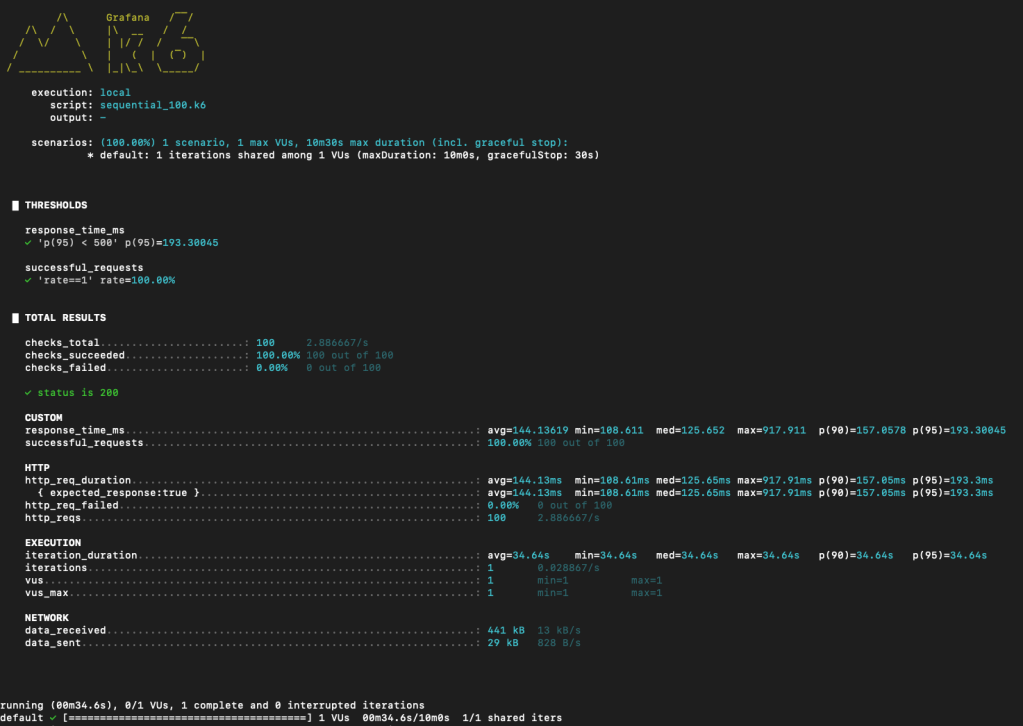
When gathering the statistics I ran the sequential_100.k6 5 times and recorded the average of the various metrics. This was to smooth out any intermittent spikes in network or database activity.

Conclusion
ORDS 25.3.0, when paired with Oracle 23ai and its latest patch, provides a remarkable improvement in Basic Authentication performance.
Key takeaways:
- Average authentication response time dropped from ~160ms to ~59ms
- Max response time and tail latency drastically reduced
- Real-world API workloads benefit from more consistent and faster performance
- If Basic Authentication is your only option you will see improvements but you really should be using OAuth2 where you can.
Developers should consider upgrading to ORDS 25.3.0 and applying the latest Oracle 23ai patch to take full advantage of these optimizations.
 Peter's Random Topic Library