
When dealing with SQL data, format and structure is crucial. Raw data isn’t always the most readable or useful format, especially when you need to expose it through an API. This is where Oracle REST Data Services (ORDS) comes in handy. It provides a secure and convenient JSON representation of the SQL query results in a JSON format by default. In this article, we’ll walk through using ORDS JavaScript handlers with the Mustache template engine to format an XML response from SQL query results. What we cover here is based on the previous article Multilingual Engine (MLE) for JavaScript Handlers. That article introduced an ORDS Module called demo_mle_javascript and in this article we will add to it.

Introducing the key components
Oracle REST Data Services (ORDS)
Oracle REST Data Services (ORDS) is a powerful tool that allows you to expose database functionalities as RESTful services. It simplifies the process of creating APIs for your Oracle database, making it easier to integrate with other systems and applications.
Mustache Template Engine
Mustache is a logic-less template engine that helps you format data into any desired format. Its simplicity and flexibility make it a great choice for rendering text in a wide variety of formats: HTML, JSON, XML, etc. Mustache uses templates to define the structure of the output, which can then be populated with data.
Oracle 23ai Database and the Multilangual Engine
With Oracle Database Multilingual Engine (MLE), developers have the option to run JavaScript code through dynamic execution or with persistent MLE modules stored directly in the database.
Bringing all together
Just as with the previous article which showcased Multilingual Engine (MLE) for JavaScript Handlers in ORDS we will use the 23ai database available at Oracle Autonomous Database. There we have a /ords/hr/demojs/employee/:id GET handler which has a JavaScript implementation for running a SELECT query to get an employee record for a employee_id provided in the URI.
In this article we’ll implement in JavaScript a GET handler to return all employee records but in an XML format. It will be very similar to the previous handler but reuse a JavaScript library so there’s actually less code. The additional step is that the JavaScript Mustache template engine will be imported into an MLE Module and then referred to by our JavaScript source in our ORDS JavaScript handler to transform the JSON representation of a query result set into an XML document returned by the service.
Defining the Mustache MLE Module
Mustache JavaScript
To use Mustache in ORDS JavaScript handler, you need to define it as an MLE module so that it can be imported by the dynamic MLE JavaScript in the handler source. The simplest way to get this done is include it from a content delivery network like jsDelivr. Here’s the URL for Mustache version 4.2.0: https://cdn.jsdelivr.net/npm/mustache@4.2.0/mustache.mjs.
The availability of JavaScript components like this supports self-contained and reusable code, key to developing successful software projects. We will use this library unmodified. However, due to a difference in architecture, module imports behave slightly differently in the Oracle Database when compared to other development environments. For example, JavaScript source code used with Node.js is stored in a specific directory structure on disk. MLE modules are stored together with the database, rather than in a file system, so must be referenced in a different manner. Let’s get that Mustache MLE module defined
Creating the MLE Module in Autonomous Database
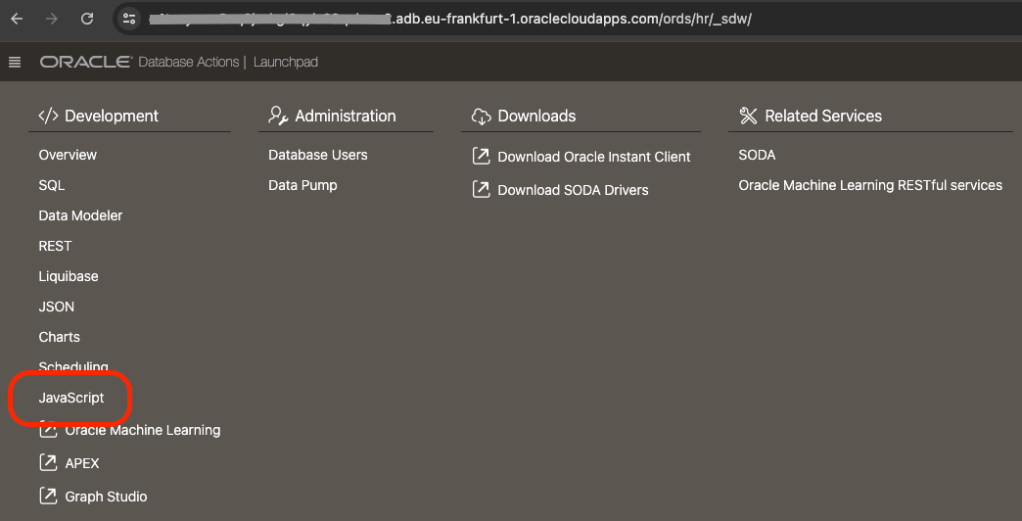
The simplest way to define a module, from an external source, in an 23ai Autonomous Database is to use ORDS Database Actions. Note that one must be using a 23ai database, otherwise the menu option in Database Actions does not appear. So, first step, login to Database Actions ( AKA SQL Developer Web ) https://my-autonomous-database.oraclecloudapps.com/ords/sql-developer and choose the Development->JavaScript menu option…
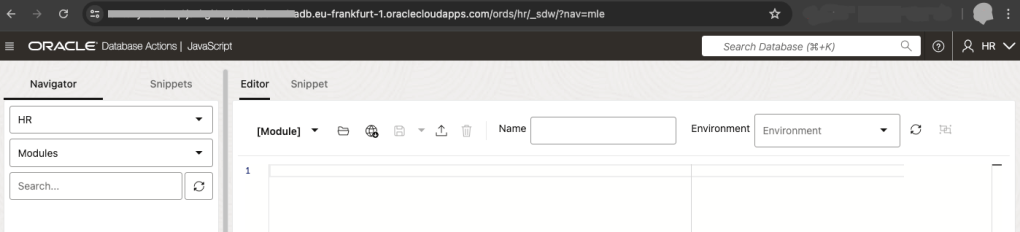
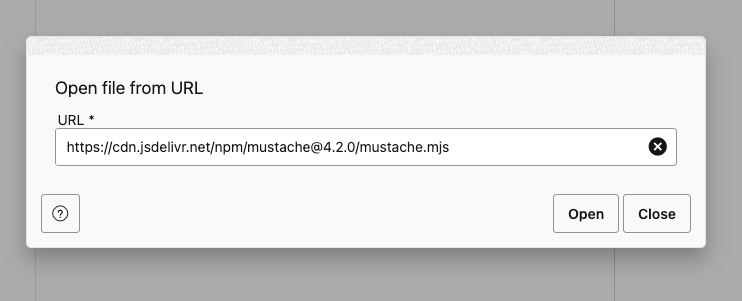
In the MLE Editor there is a globe icon with an arrow pointing downwards. This is the Open from URL button. Press that, enter the URL https://cdn.jsdelivr.net/npm/mustache@4.2.0/mustache.mjs and press the Open button to load the text.
You should then see the source in the MLE Module editor. Enter MUSTACHE as the name ( leave the Environment info blank ) and press the Save icon to create the MLE Module.

The last part of that source, at line 764, the JavaScript exports a mustache object and that is what we will refer to in our own JavaScript: export default mustache;
Now, to use that MLE Module it must be included in an MLE Environment. Amongst other things, MLE environments are used for name resolution of JavaScript module imports. For this example we will define an MLE Environment called LIBRARY_ENV where we specify a namespace for modules we want to reuse.
Let’s switch to an SQL Worksheet environment for the rest of this article. Run this to create that environment…
CREATE MLE ENV LIBRARY_ENV IMPORTS ('mustache' module MUSTACHE);
With that in place, we’re now ready to create our JavaScript handler.
Developing the ORDS REST Service
Now, define a JavaScript handler that will query all records from HR.EMPLOYEES table and format the SQL results into an XML response using Mustache. The service will be part of the existing demo_mle_javascript module and available at employees/ so we will define a template and a handler:
begin
  ORDS.DEFINE_TEMPLATE(
      p_module_name    => 'demo_mle_javascript',
      p_pattern        => 'employees/');

  ORDS.DEFINE_HANDLER(
      p_module_name    => 'demo_mle_javascript',
      p_pattern        => 'employees/',
      p_method         => 'GET',
      p_source_type    => 'mle/javascript',
      p_mle_env_name   => 'LIBRARY_ENV',
      p_source         =>
q'~
 (req, resp) => {
    const query = 'select * from employees order by employee_id';
         const res = session.execute(query);
    const mustache = await import('mustache');

    var template = '<employees>{{#rows}} <employee id="{{EMPLOYEE_ID}}" first_name="{{FIRST_NAME}}" last_name="{{LAST_NAME}}" salary="{{SALARY}}"/>{{/rows}}</employees>';

    var output = mustache.default.render(template, res);
    resp.content_type('application/xml');
    resp.status(200);
    resp.send(output);
}
~'
      );
end;
Let’s break that down and talk about the distinct parts…
ORDS.DEFINE_TEMPLATE(
      p_module_name    => 'demo_mle_javascript',
      p_pattern        => 'employees/');
Not much to explain about the above. We’re defining a pattern for a URI to add to an existing ORDS REST Service module and will have one or more handlers defined.
The parameters to the DEFINE_HANDLER procedure are more interesting so let’s take a look at them:
p_module_name    => 'demo_mle_javascript',
This states which module the handler belongs to.

p_pattern        => 'employees/',
This states which template in that module the handler belongs to.

p_method         => 'GET',
Handlers are define for a specific HTTP method. This handler will be for GET requests.

p_source_type    => 'mle/javascript',
Handler source can be of various types. Some simple such as a basic select query and some more complex such as pl/sql block. This handler's source is dynamic MLE JavaScript.

p_mle_env_name   => 'LIBRARY_ENV',
When dynamic MLE JavaScript imports a module it must state the MLE Environment where that module's namespace is defined. This is important for this handler's source and MUST be specified.
The p_source parameter content is more complex and deserves it’s own explanation. At a high level the steps are:
- Define a query and execute it, storing the reference to the results in a variable called
res - Import the Mustache MLE module and refer to it as
mustache. Note that import is asynchronous so we wait for it to complete. - Defines a Mustache template for the XML structure. The curly bracket syntax is Mustache specific. Refer to Mustache documentation for more information.
- Formats the data using Mustache and save that as a variable called
output. Note that we reference the default object because that is what was in the export definition in the imported mustache.mjs - Sends the formatted XML as the HTTP response.
Remember that, as per ORDS REST JavaScript Handler developer guide documentation that the defined JavaScript code must be inside an anonymous function that receives the following two parameters: ORDS request object and ORDS response object. In the p_source parameter for this handler those two parameters are called req and resp respectively.
(req, resp) => {
    // define the query
    const query = 'select * from employees order by employee_id';
    // execute it
    const res = session.execute(query);
    // import the mustache JavaScript library
    const mustache = await import('mustache');

    // define the template
    var template = '<employees>{{#rows}} <employee id="{{EMPLOYEE_ID}}" first_name="{{FIRST_NAME}}" last_name="{{LAST_NAME}}" salary="{{SALARY}}"/>{{/rows}}</employees>';

    // format the data from the result set
    var output = mustache.default.render(template, res);

    // send the formatter XML as the HTTP response
    resp.content_type('application/xml');
    resp.status(200);
    resp.send(output);
}
Testing and Debugging
Testing the Endpoint
To test your new RESTful service, use tools like Postman or curl. Here’s an example using curl:
curl -X GET https://cust-23aidb.adb.eu-frankfurt-1.oraclecloudapps.com/ords/hr/demojs/employees/
Obviously your server hostname will be different. Also, you don’t have to be using the HR schema or have your ORDS REST Service module base path as demojs. So your URL could be way different but if you’ve gotten this far, you’ve already figured that out.
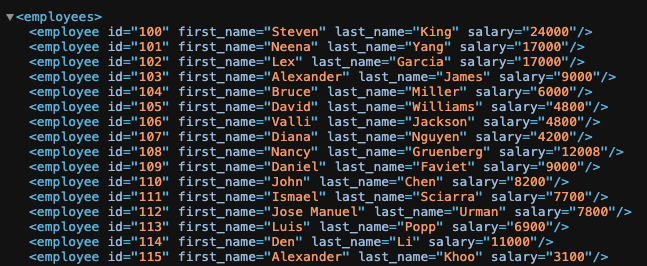
You should see an XML response formatted according to your Mustache template.
Debugging Common Issues
- JavaScript Errors: Check for syntax errors or issues with the JavaScript handler.
- SQL Query Problems: Ensure your SQL query is correct and returns the expected results.
- Template Errors: Verify the Mustache template syntax and placeholders.
Conclusion
In this article, we’ve shown how to use Mustache and ORDS JavaScript handlers to transform SQL query results into beautifully formatted XML. By following these steps, you can enhance the presentation of your data and make it more accessible and readable.
Additional Resources
Try implementing this solution in your projects and feel free to share your experiences or ask questions in the comments below!
 Peter's Random Topic Library
2 thoughts on “Transform your SQL Results with Mustache and ORDS JavaScript Handlers”