
Updated for 23ai. The structure for Duality Views changed from 23free to 23ai release. In summary, the identifiers for rows are now _id rather than driverId, raceId, teamId.
Oracle Database 23c Free introduced the concept of JSON-Relational Duality Views which allows you to overlay a JSON document representation over a relational data model. In this article we’ll take Car-Racing Duality View Tutorial setup script and build on that to explore Oracle’s RESTful interface to Duality Views – Oracle REST Data Services (ORDS)
What Are JSON-Relational Duality Views?
JSON-Relational Duality Views provide a seamless way to interact with both JSON documents and relational data within Oracle Database. These views expose relational data as JSON documents, allowing developers to perform query and DML (Data Manipulation Language) operations using conventional SQL or directly with JSON.
Key Features and Benefits:
Unified Access:
- Developers can choose their preferred approach: SQL for relational data or JSON for document-centric applications.
- Changes made via one method automatically reflect in the other, maintaining consistency.
Updatable Views:
- Duality views allow insertion, update, deletion, and querying of documents.
- Inserting a row into the root table creates a new document, and changes propagate automatically.
Document-Identifier Field:
- Each document has an identifier (e.g.,
_id) that corresponds to the primary-key columns of the underlying tables. - Ensures efficient updates and consistency.
Integration with APIs:
- Use SQL/JSON functions, Oracle Database API for MongoDB, Simple Oracle Document Access (SODA), or Oracle REST Data Services (ORDS) to manipulate data.
- Analytics, reporting, and machine learning can operate on the same data using SQL, PL/SQL, JavaScript, or C.
Car-Racing Example: The Track Ahead
Data related to Formula 1 car races are used in Oracle documentation to present the feature. In our car-racing example, we’ll explore three kinds of documents:
1. Team Document
Contains information about racing teams, including team names and the drivers associated with each team. The underlying tables are TEAM and DRIVER. Example team duality view structure:
{
  "_id":307,
  "name":"Williams",
  "points":15,
  "driver":[
    {
      "driverId":115,
      "name":"Alexander Albon",
      "points":15
    },
    {
      "driverId":116,
      "name":"Logan Sargeant",
      "points":0
    }
  ]
}
2. Driver Document
Represents individual drivers, including their names, and team affiliations. The underlying tables are DRIVER, TEAM and DRIVER_RACE_MAP. Example driver duality view structure:
{
  "_id":115,
  "name":"Alexander Albon",
  "points":15,
  "teamId":307,
  "team":"Williams",
  "race":[
    {
      "driverRaceMapId":22,
      "raceId":202,
      "name":"Saudi Arabian Grand Prix",
      "finalPosition":3
    }
  ]
}
3. Race Document
Captures race details, podium standings, and results for each driver. The underlying tables are RACE, DRIVER, and DRIVER_RACE_MAP. Example driver duality view structure:
{
  "_id":202,
  "name":"Saudi Arabian Grand Prix",
  "laps":50,
  "date":"2022-03-27T00:00:00",
  "podium":{},
  "result":[
    {
      "driverRaceMapId":24,
      "position":1,
      "driverId":101,"
      name":"Max Verstappen"
    }
  ]
}
These example Duality Views and their corresponding tables can be created using DualityViewTutorial.sql which sets to scene for Using JSON-Relational Duality Views.
Setup for Oracle REST Data Services (ORDS)
The Using JSON-Relational Duality Views chapter outlines some examples of using ORDS and references the Support for JSON-Relational Duality View chapter in the ORDS documentation but does not go into details on how to achieve that.
Here’s an additional script for REST Enabling the tables and views so that an access token is required to access them. The following has been tested using the Oracle Developer DB Virtual Machine with Oracle 23free Database. See previous articles on the topic: Oracle Developer DB Virtual Machine – a closer look and Get the latest – Enhance your DB Developer VM. The database account used is HR which has already been REST Enabled. From here on, every URL will start with http://localhost:8080/ords/hr/ because that is the easiest to reference with the Developer DB Virtual Machine.
BEGIN
    ords.enable_object(p_object => 'TEAM', p_auto_rest_auth => TRUE);
    ords.enable_object(p_object => 'DRIVER', p_auto_rest_auth => TRUE);
    ords.enable_object(p_object => 'RACE', p_auto_rest_auth => TRUE);
    ords.enable_object(p_object => 'DRIVER_RACE_MAP', p_auto_rest_auth => TRUE);
    ords.enable_object(p_object => 'RACE_DV', p_object_type => 'VIEW', p_auto_rest_auth => TRUE);

    ords.enable_object(p_object => 'DRIVER_DV', p_object_type => 'VIEW', p_auto_rest_auth => TRUE);

    ords.enable_object(p_object => 'TEAM_DV', p_object_type => 'VIEW', p_auto_rest_auth => TRUE);

    oauth.delete_client(p_name => 'Car Racing Client');
    oauth.create_client(p_name => 'Car Racing Client',
                    p_grant_type => 'client_credentials',
                    p_description => 'Used for interacting with Car Racing Duality View Examples',
                    p_owner => sys_context( 'userenv', 'current_schema' ),
                    p_support_email => 'janus@example.com',
                    p_privilege_names => null);
  OAUTH.grant_client_role(
    p_client_name => 'Car Racing Client',
    p_role_name   => 'oracle.dbtools.role.autorest.HR.TEAM'
  );

  OAUTH.grant_client_role(
    p_client_name => 'Car Racing Client',
    p_role_name   => 'oracle.dbtools.role.autorest.HR.DRIVER'
  );
  OAUTH.grant_client_role(
    p_client_name => 'Car Racing Client',
    p_role_name   => 'oracle.dbtools.role.autorest.HR.RACE'
  );
  OAUTH.grant_client_role(
    p_client_name => 'Car Racing Client',
    p_role_name   => 'oracle.dbtools.role.autorest.HR.DRIVER_RACE_MAP'
  );
  OAUTH.grant_client_role(
    p_client_name => 'Car Racing Client',
    p_role_name   => 'oracle.dbtools.role.autorest.HR.RACE_DV'
  );
  OAUTH.grant_client_role(
    p_client_name => 'Car Racing Client',
    p_role_name   => 'oracle.dbtools.role.autorest.HR.DRIVER_DV'
  );
  OAUTH.grant_client_role(
    p_client_name => 'Car Racing Client',
    p_role_name   => 'oracle.dbtools.role.autorest.HR.TEAM_DV'
  );

    COMMIT;
END;
/
That pl/sql block makes the tables and views available through ORDS AutoREST but to access them requires authorisation and Car Racing Client OAuth client is created with the necessary roles to do that. It is a client credentials OAuth client so to see the username and password generated for it just run this query:
SELECT client_id, client_secret
FROM user_ords_clients
WHERE name = 'Car Racing Client';
CLIENT_ID                   CLIENT_SECRET
--------------------------- --------------------------------
x9mADG7hKJNlj4LNITBJ3Q..    alRNwbRmezM2E0YDPTe6eA..
That CLIENT_ID and CLIENT_SECRET are the username and password to use to get an access token so that the tables and views can be accessed through ORDS. More on getting that access token later. For now, let’s look at the tables and views. Send a request to http://localhost:8080/ords/hr/open-api-catalog/ and list of services available will include:
   {
      "name": "RACE",
      "links": [
        {
          "rel": "canonical",
          "href": "http://localhost:8080/ords/hr/open-api-catalog/race/",
          "mediaType": "application/openapi+json"
        }
      ]
    },
    {
      "name": "TEAM",
      "links": [
        {
          "rel": "canonical",
          "href": "http://localhost:8080/ords/hr/open-api-catalog/team/",
          "mediaType": "application/openapi+json"
        }
      ]
    },
    {
      "name": "DRIVER",
      "links": [
        {
          "rel": "canonical",
          "href": "http://localhost:8080/ords/hr/open-api-catalog/driver/",
          "mediaType": "application/openapi+json"
        }
      ]
    },
    {
      "name": "RACE_DV",
      "links": [
        {
          "rel": "canonical",
          "href": "http://localhost:8080/ords/hr/open-api-catalog/race_dv/",
          "mediaType": "application/openapi+json"
        }
      ]
    },
    {
      "name": "TEAM_DV",
      "links": [
        {
          "rel": "canonical",
          "href": "http://localhost:8080/ords/hr/open-api-catalog/team_dv/",
          "mediaType": "application/openapi+json"
        }
      ]
    },
    {
      "name": "DRIVER_DV",
      "links": [
        {
          "rel": "canonical",
          "href": "http://localhost:8080/ords/hr/open-api-catalog/driver_dv/",
          "mediaType": "application/openapi+json"
        }
      ]
    },
    {
      "name": "DRIVER_RACE_MAP",
      "links": [
        {
          "rel": "canonical",
          "href": "http://localhost:8080/ords/hr/open-api-catalog/driver_race_map/",
          "mediaType": "application/openapi+json"
        }
      ]
    }
Follow those canonical links for an OpenAPI V3 description of the services available. For example, http://localhost:8080/ords/hr/open-api-catalog/driver_dv/ will show something like this…
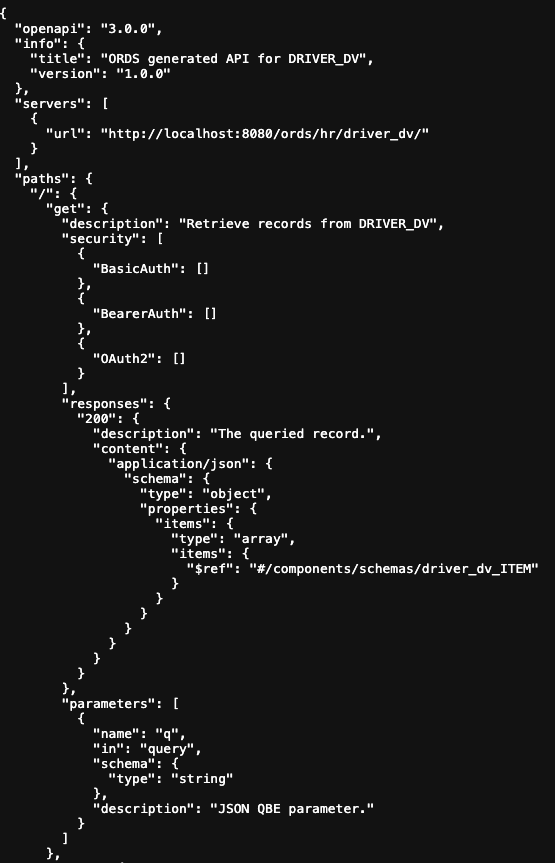
That OpenAPI V3 document can be imported into your development or integration tools so you can get started with building clients to use the services straight away. As a convenience, ORDS Database Actions provides a graphical interface for the OpenAPI document.
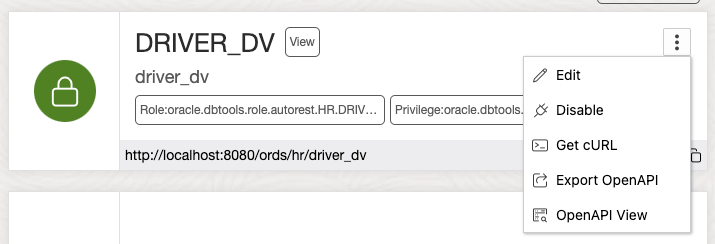
Select OpenAPI View for a visual representation of the OpenAPI V3 document.
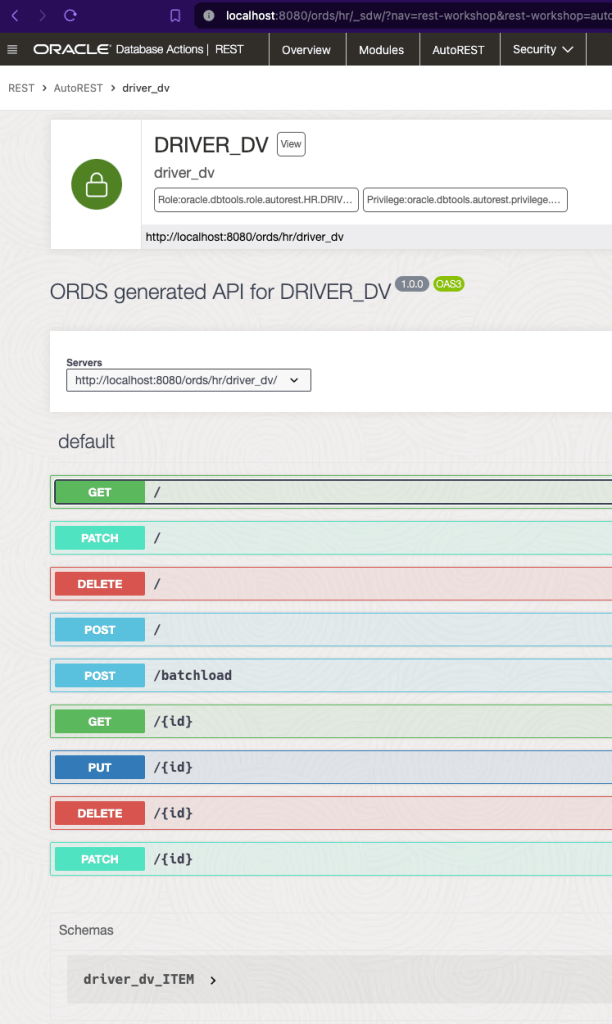
Try It Out
In that OpenAPI View there’s even the option to invoke that service directly from your browser.
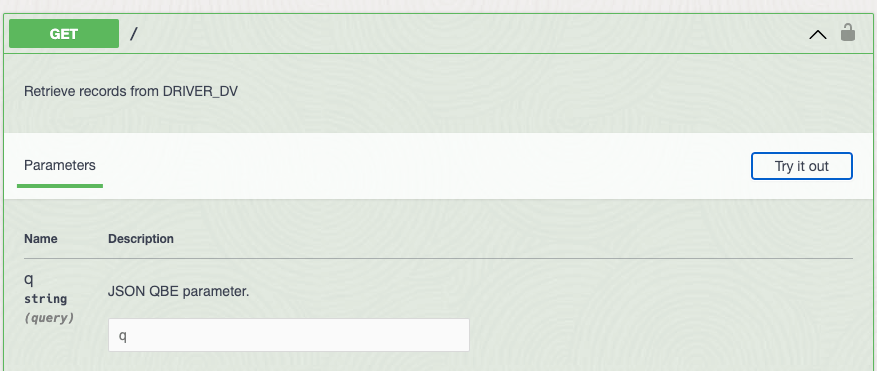
Click on “Try it out” and an Execute button appears at the bottom of the Parameters section.
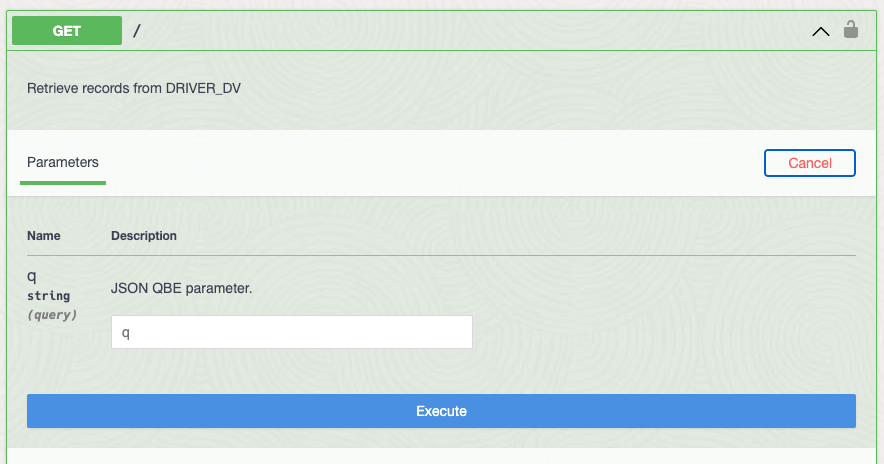
The parameters are optional so just press that Execute button to “Retrieve records from DRIVER_DV”. Note that this is the same as running the following from the command line:
curl -X 'GET' \
  'http://localhost:8080/ords/hr/driver_dv/' \
  -H 'accept: application/json'

The DRIVER_DV, in fact none of the Car-Racing example tables and duality views, can be accessed through ORDS without authorisation.
Client Access Token
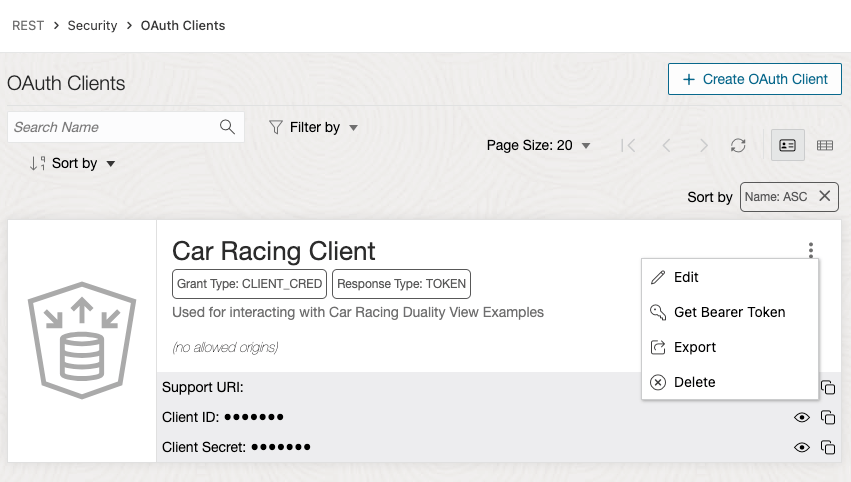
Let’s get that access token. The PL/SQL block for REST Enabling the tables and views also created a client with the necessary roles for access them: Car Racing Client. We retrieved the Client ID and Client Secret ( aka username and password ) earlier. Those credentials are used to obtain an access token and that access token is sent with every request to ORDS. The database user can revoke that access token and even remove the OAuth client so it is more secure than always relying on usernames & passwords. ORDS supports a variety of OAuth types as well as JWT Profiles for OpenID Connect. Now back to getting that access token…
Command Line
Using the Client ID and Client Secret as username and password the access token can be retrieved using cURL:
curl \
--user x9mADG7hKJNlj4LNITBJ3Q..:alRNwbRmezM2E0YDPTe6eA.. \
--data 'grant_type=client_credentials' \
http://localhost:8080/ords/hr/oauth/token

{
 "access_token":"Fs5Lrsu1g6XAP1mGXMnUig",
 "token_type":"bearer",
 "expires_in":3600
}
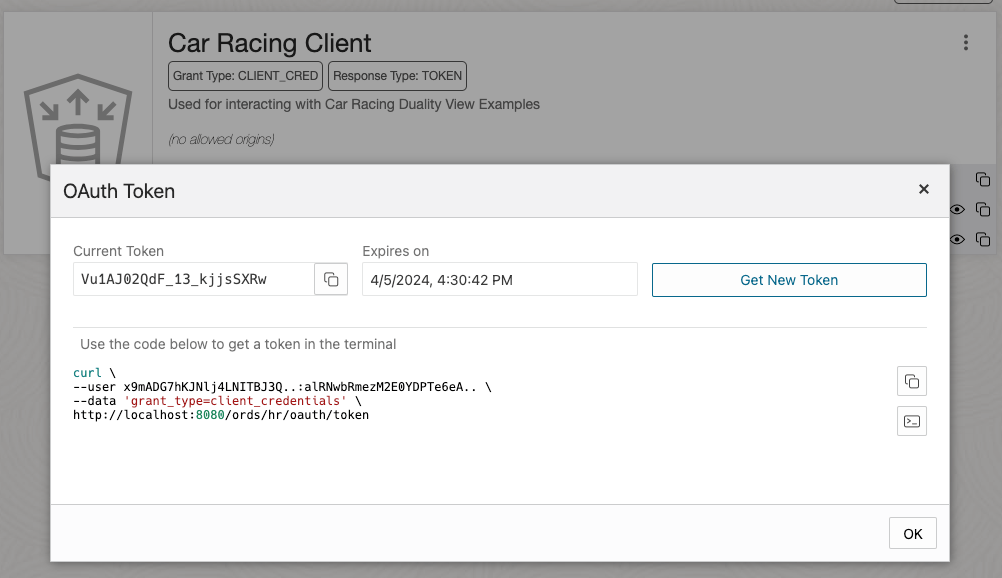
Note that every time a new OAuth access token ( aka Bearer token ) is issued the previous one issued for that OAuth client is invalidated. You only need to request a new one when the current one is about, or has already, expired.
Using Database Actions
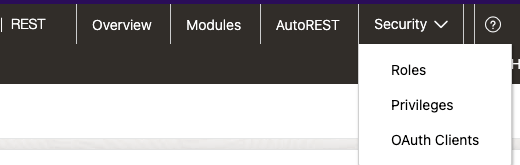
While in ORDS Database Actions REST Workshop and logged in as the HR user you can retrieve that information too by selecting Security -> OAuth Clients.
Try It Out Again!
Now that we have a valid bearer token Vu1AJ02QdF_13_kjjsSXRw let’s use that in the OpenAPI View to try executing requests again. Navigate back to the OpenAPI View for DRIVER_DV.

The Authorize button will launch a dialog box to set the bearer / access token to be used when making requests. Other authorisation flows are supported but since we have a bearer token already we’ll just set that…
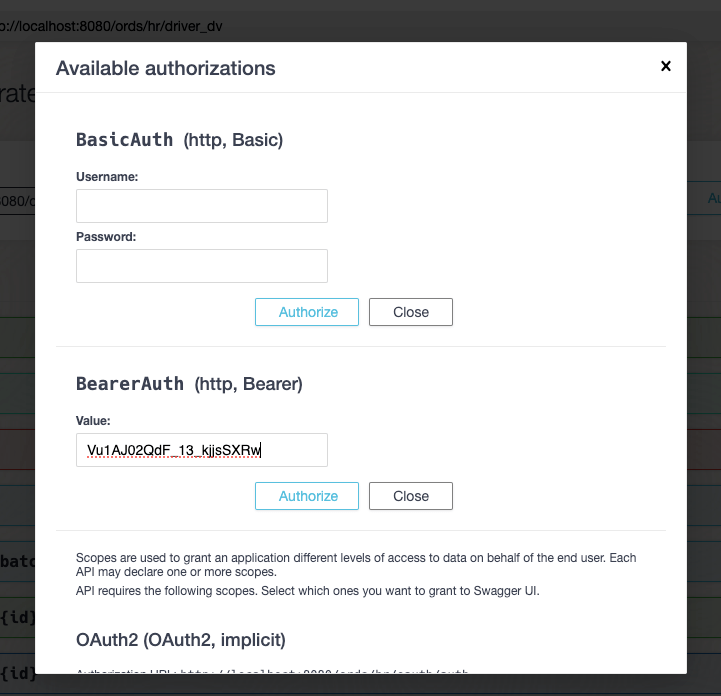
Enter the BearerAuth value and press Authorize to have it saved in the browser session. Now all HTTP requests executed in the OpenAPI View will have this token until you go back this “Available authorizations” dialog and press Logout. Let’s now use that token. Press the “Close” button and now you’ll see that the padlocks now show as locked. Repeating the steps for executing a GET request to Retrieve records from DRIVER_DV we now see data returned…
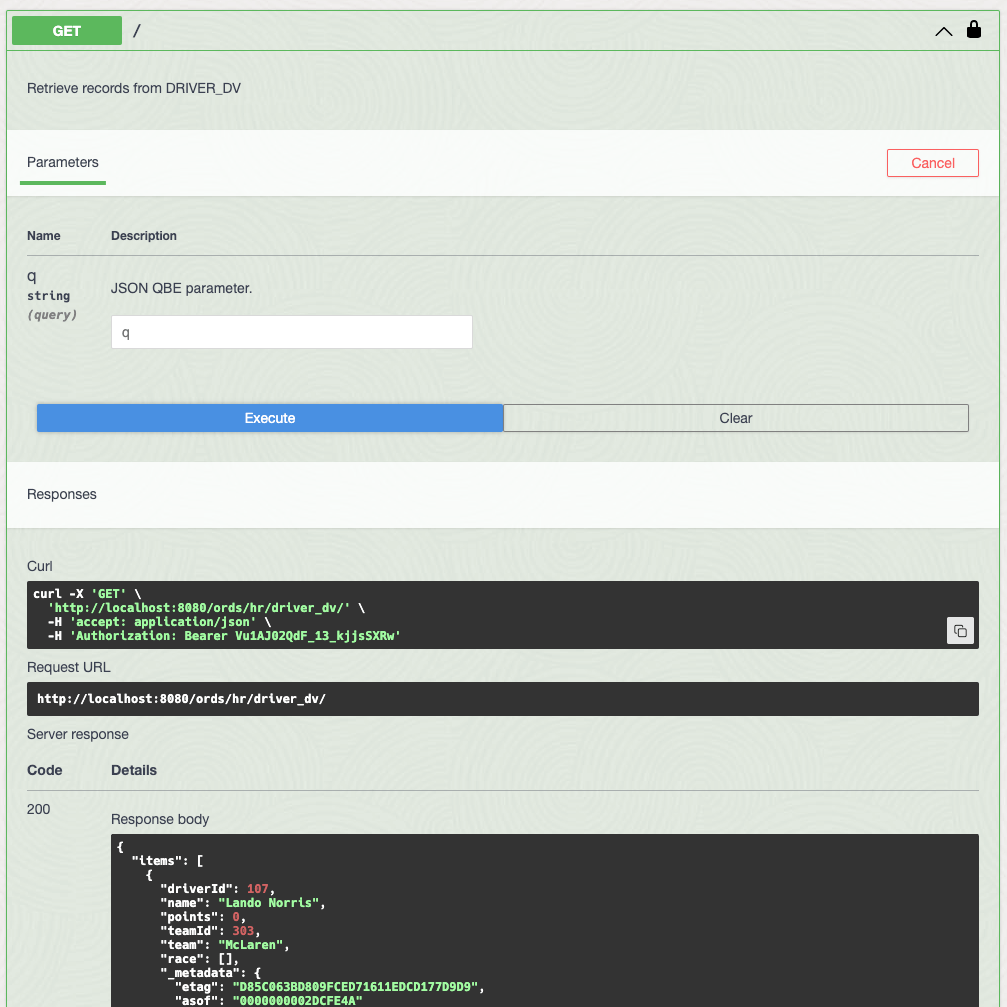
Note that the corresponding cURL command is also displayed so this could also has been executed from the command line as:
curl -X 'GET' \
  'http://localhost:8080/ords/hr/driver_dv/' \
  -H 'accept: application/json' \
  -H 'Authorization: Bearer Vu1AJ02QdF_13_kjjsSXRw'
There are a lot more operations listed so experiment on what you can do through the OpenAPI View or from cURL. Note that Duality View JSON QBE parameter for querying uses the same syntax as SODA so it is not exactly the same as the Filter Object syntax used for AutoREST of relational tables and views.
How about trying to create a new driver record?
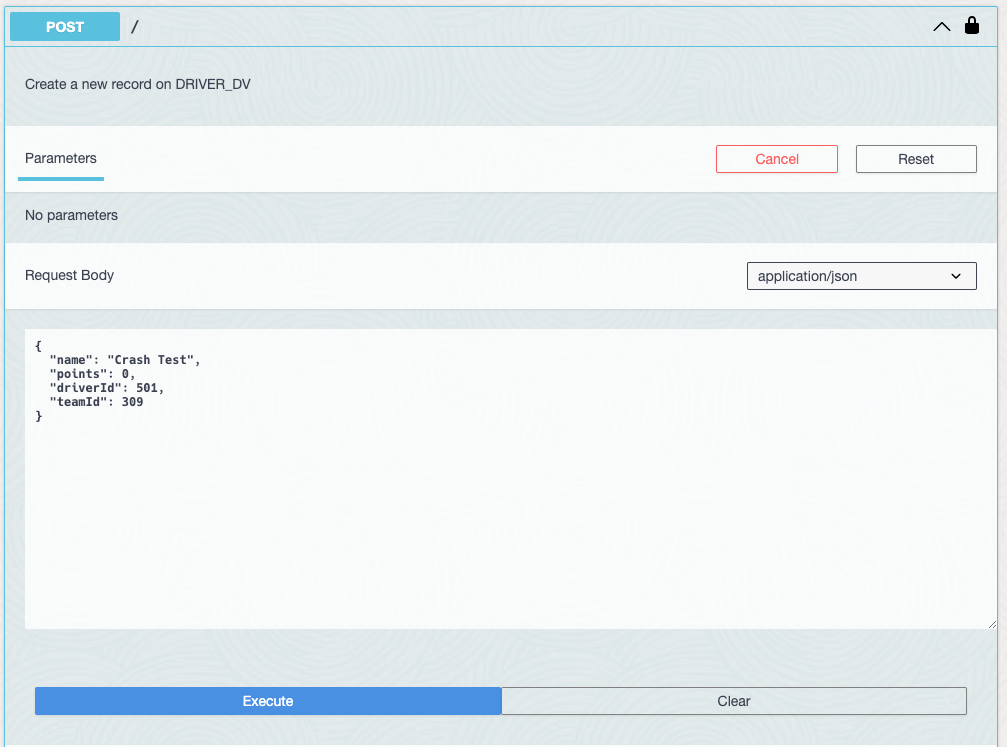
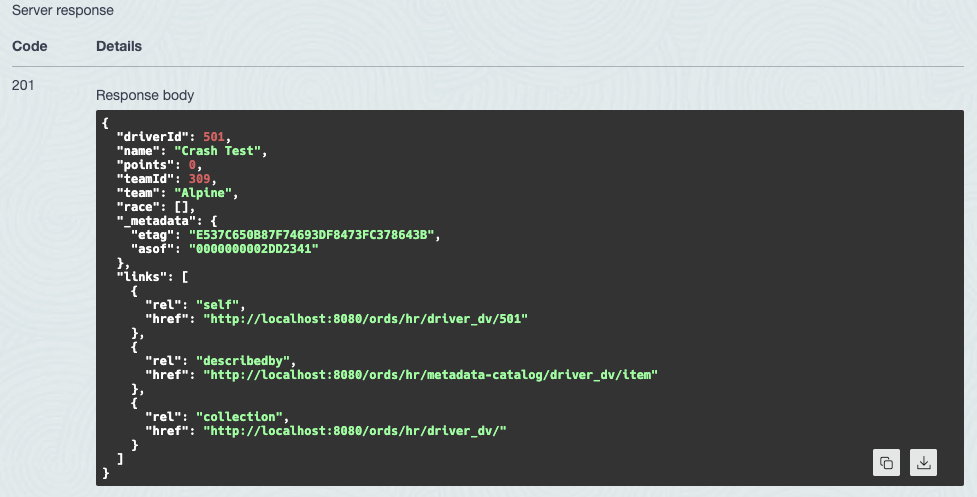
Build out the team
Using those Duality View services now let’s start creating new teams and drivers using batchload which is covered in the ORDS documentation. This allows you to perform multiple inserts of data that spans multiple tables. In this case the TEAM and DRIVER tables behind the TEAM_DV Duality View. The add-team.json file contains data for 7 more teams with 2 drivers each. Download it and use the file to populate those tables in one single request…
curl -i -X POST --data-binary @add-team.json \
  -H "Content-Type: application/json" \
  -H 'Authorization: Bearer Vu1AJ02QdF_13_kjjsSXRw' \
  'http://localhost:8080/ords/hr/team_dv/batchload
HTTP/1.1 200 OK
Content-Type: text/plain
Transfer-Encoding: chunked

#INFO Number of rows processed: 7
#INFO Number of rows in error: 0
#INFO Last row processed in final committed batch: 7
SUCCESS: Processed without errors
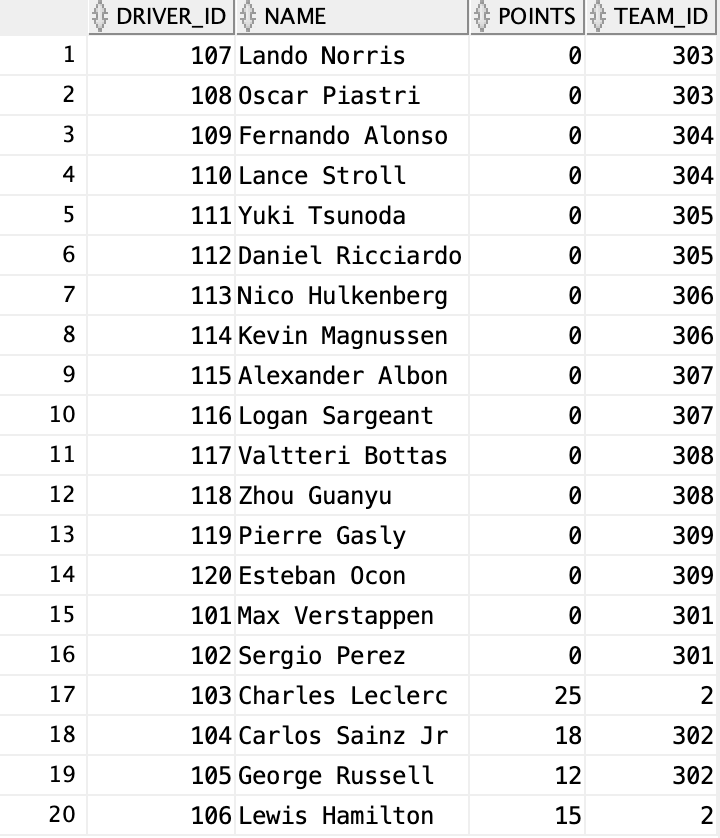
Relational Table
So far the focus has been on Duality Views but as one can see from the above image, the underlying table(s) for a Duality View get updated. ORDS can also provide access to these relational tables and the above PL/SQL block provided we have already configured that.
Let’s populate a few race results using ORDS:
curl --request POST \
  --url http://localhost:8080/ords/hr/driver_race_map/ \
  --header 'Content-Type: application/json' \
  --header 'Authorization: Bearer Vu1AJ02QdF_13_kjjsSXRw' \
  --data '{"race_id"   : 202, "driver_id" : 119, "position" : 4}'

curl --request POST \
  --url http://localhost:8080/ords/hr/driver_race_map/ \
  --header 'Content-Type: application/json' \
  --header 'Authorization: Bearer Vu1AJ02QdF_13_kjjsSXRw' \
  --data '{"race_id"   : 202, "driver_id" : 115, "position" : 3}'

curl --request POST \
  --url http://localhost:8080/ords/hr/driver_race_map/ \
  --header 'Content-Type: application/json' \
  --header 'Authorization: Bearer Vu1AJ02QdF_13_kjjsSXRw' \
  --data '{"race_id"   : 202, "driver_id" : 103, "position" : 2}'

curl --request POST \
  --url http://localhost:8080/ords/hr/driver_race_map/ \
  --header 'Content-Type: application/json' \
  --header 'Authorization: Bearer Vu1AJ02QdF_13_kjjsSXRw' \
  --data '{"race_id"   : 202, "driver_id" : 101, "position" : 1}'
Thanks to the driver_race_map_trigger created when we ran the DualityViewTutorial.sql script we can now see the impact on the DRIVER table with Max Verstappen going from zero points to 25.

GraphQL
In this Car-Racing example the underlying tables for the Duality Views have been REST Enabled which also means they can be queried using GraphQL if ORDS is running on Oracle GraalVM Enterprise Edition with JS component installed. The advantage of GraphQL is that it allows you to define a query across the relational tables without having to define a Duality View but it would be a read only query. You do not get the create, update and delete capabilities of JSON-Relational Duality Views.
In this section we will take a look at a GraphQL query which can return the race date which is not currently included in the Driver Duality View. As a reminder, the Driver DV row looks like this:
{
  "_id":101,
  "name":"Max Verstappen",
  "points":25,
  "teamId":301,
  "team":"Red Bull",
  "race":[
    {
      "driverRaceMapId":8,
      "raceId":202,
      "name":"Saudi Arabian Grand Prix",
      "finalPosition":1
    }
  ]
}
It shows the data from DRIVER table, the team name from TEAM table, the RACE name and DRIVER_RACE_MAP finalPosition. However, it does not show the date of the race. Albeit in a slightly different structure, this GraphQL query will return the same data, plus the date of the race:
query Drivers {
  driver
  {
    driver_id
    name
    points
    team_id
    team_team_id {
        name
    }
    driver_race_map_driver_id {
        driver_race_map_id
        race_id
        race_race_id {
            name
            race_date
        }
        position
    }
  }
}
It is slightly more nested and uses names reflecting the foreign key constraints between the tables but it does include race_date. Running the query through cURL is simply a POST to the GraphQL endpoint.
curl --location 'http://localhost:8080/ords/hr/_/graphql' \
--header 'Content-Type: application/json' \
--header 'Authorization: Bearer vSs7J_ILrcynMaPWyVcQLA' \
--data '{"query":"query Drivers {\n  driver \n  { \n    driver_id \n    name \n    points \n    team_id\n    team_team_id {\n        name\n    }\n    driver_race_map_driver_id {\n        driver_race_map_id\n        race_id\n        race_race_id {\n            name\n            race_date\n        }\n        position\n    }\n  }\n}","variables":{}}'
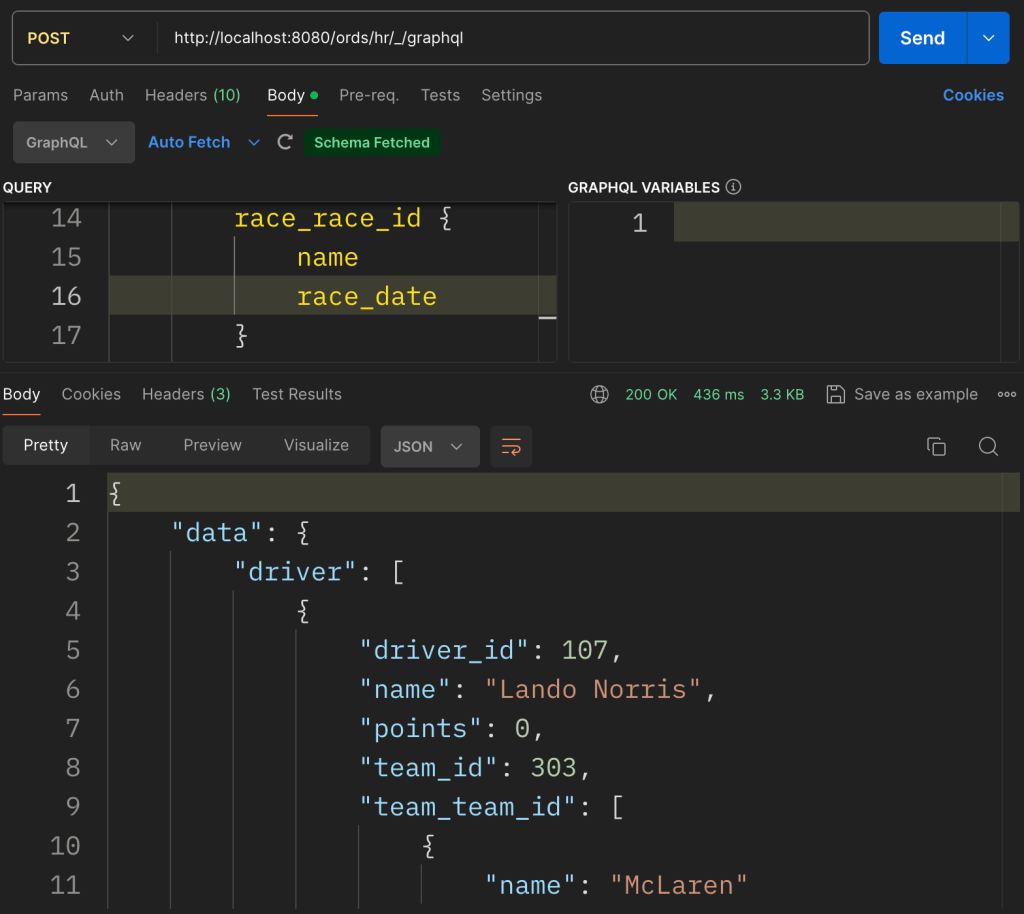
Note that running the query through postman still requires setting the access bearer token. The added advantage of postman’s support for GraphQL is that it will use the same endpoint ( /ords/hr/_/graphql ) to automatically fetch the GraphQL schema so developing the query is guided. Here is the GraphQL query response for that query. It is quite long but it is informative to compare it with the corresponding DRIVER_DV Duality View structure.
{
"data": {
"driver": [
{
"driver_id": 107,
"name": "Lando Norris",
"points": 0,
"team_id": 303,
"team_team_id": [
{
"name": "McLaren"
}
],
"driver_race_map_driver_id": []
},
{
"driver_id": 108,
"name": "Oscar Piastri",
"points": 0,
"team_id": 303,
"team_team_id": [
{
"name": "McLaren"
}
],
"driver_race_map_driver_id": []
},
{
"driver_id": 109,
"name": "Fernando Alonso",
"points": 0,
"team_id": 304,
"team_team_id": [
{
"name": "Aston Martin"
}
],
"driver_race_map_driver_id": []
},
{
"driver_id": 110,
"name": "Lance Stroll",
"points": 0,
"team_id": 304,
"team_team_id": [
{
"name": "Aston Martin"
}
],
"driver_race_map_driver_id": []
},
{
"driver_id": 112,
"name": "Daniel Ricciardo",
"points": 0,
"team_id": 305,
"team_team_id": [
{
"name": "RB"
}
],
"driver_race_map_driver_id": []
},
{
"driver_id": 111,
"name": "Yuki Tsunoda",
"points": 0,
"team_id": 305,
"team_team_id": [
{
"name": "RB"
}
],
"driver_race_map_driver_id": []
},
{
"driver_id": 113,
"name": "Nico Hulkenberg",
"points": 0,
"team_id": 306,
"team_team_id": [
{
"name": "Haas"
}
],
"driver_race_map_driver_id": []
},
{
"driver_id": 114,
"name": "Kevin Magnussen",
"points": 0,
"team_id": 306,
"team_team_id": [
{
"name": "Haas"
}
],
"driver_race_map_driver_id": []
},
{
"driver_id": 115,
"name": "Alexander Albon",
"points": 15,
"team_id": 307,
"team_team_id": [
{
"name": "Williams"
}
],
"driver_race_map_driver_id": [
{
"driver_race_map_id": 6,
"race_id": 202,
"race_race_id": [
{
"name": "Saudi Arabian Grand Prix",
"race_date": "2022-03-27T00:00:00Z"
}
],
"position": 3
}
]
},
{
"driver_id": 116,
"name": "Logan Sargeant",
"points": 0,
"team_id": 307,
"team_team_id": [
{
"name": "Williams"
}
],
"driver_race_map_driver_id": []
},
{
"driver_id": 118,
"name": "Zhou Guanyu",
"points": 0,
"team_id": 308,
"team_team_id": [
{
"name": "Kick Sauber"
}
],
"driver_race_map_driver_id": []
},
{
"driver_id": 117,
"name": "Valtteri Bottas",
"points": 0,
"team_id": 308,
"team_team_id": [
{
"name": "Kick Sauber"
}
],
"driver_race_map_driver_id": []
},
{
"driver_id": 119,
"name": "Pierre Gasly",
"points": 12,
"team_id": 309,
"team_team_id": [
{
"name": "Alpine"
}
],
"driver_race_map_driver_id": [
{
"driver_race_map_id": 5,
"race_id": 202,
"race_race_id": [
{
"name": "Saudi Arabian Grand Prix",
"race_date": "2022-03-27T00:00:00Z"
}
],
"position": 4
}
]
},
{
"driver_id": 120,
"name": "Esteban Ocon",
"points": 0,
"team_id": 309,
"team_team_id": [
{
"name": "Alpine"
}
],
"driver_race_map_driver_id": []
},
{
"driver_id": 101,
"name": "Max Verstappen",
"points": 25,
"team_id": 301,
"team_team_id": [
{
"name": "Red Bull"
}
],
"driver_race_map_driver_id": [
{
"driver_race_map_id": 8,
"race_id": 202,
"race_race_id": [
{
"name": "Saudi Arabian Grand Prix",
"race_date": "2022-03-27T00:00:00Z"
}
],
"position": 1
}
]
},
{
"driver_id": 102,
"name": "Sergio Perez",
"points": 0,
"team_id": 301,
"team_team_id": [
{
"name": "Red Bull"
}
],
"driver_race_map_driver_id": []
},
{
"driver_id": 105,
"name": "George Russell",
"points": 12,
"team_id": 302,
"team_team_id": [
{
"name": "Ferrari"
}
],
"driver_race_map_driver_id": []
},
{
"driver_id": 104,
"name": "Carlos Sainz Jr",
"points": 18,
"team_id": 302,
"team_team_id": [
{
"name": "Ferrari"
}
],
"driver_race_map_driver_id": []
},
{
"driver_id": 103,
"name": "Charles Leclerc",
"points": 43,
"team_id": 2,
"team_team_id": [
{
"name": "Mercedes"
}
],
"driver_race_map_driver_id": [
{
"driver_race_map_id": 7,
"race_id": 202,
"race_race_id": [
{
"name": "Saudi Arabian Grand Prix",
"race_date": "2022-03-27T00:00:00Z"
}
],
"position": 2
}
]
},
{
"driver_id": 106,
"name": "Lewis Hamilton",
"points": 15,
"team_id": 2,
"team_team_id": [
{
"name": "Mercedes"
}
],
"driver_race_map_driver_id": []
}
]
}
}
GraphQL requires ORDS to be running on GraalVM with the JS component installed but unlike Duality Views, you don’t require Oracle RDBMS 23 to use it. The Car-Racing relational tables could still be used in a 19c database for example. However, JSON-Relational Duality Views in Oracle RDBMS release 23 can do so much more.
Crossing the Finish Line
In this blog post we have taken the Car Racing example Duality Views and their corresponding tables, created using DualityViewTutorial.sql, and REST Enabled them for secure RESTful access through ORDS. Using batchload we loaded multiple team and driver records in one single request. We have interacted with the underlying tables and even performed dynamic cross table join queries using GraphQL. By introducing GraphQL into the conversation it makes the Duality View advantages much clearer.
JSON-Relational Duality Views provide a powerful bridge between the structured world of relational databases and the flexible world of JSON documents. Whether you’re building APIs, applications, or analytical tools, these views offer a unified approach to data manipulation on the fast track. 🏁🚀
 Peter's Random Topic Library
One thought on “RESTful Car-Racing Example”