
About a year ago Oracle 23c Database Free became available as a preview of the new “converged database” which introduces a huge range of application developer concepts right in the database. Since then I’ve written a couple of articles about it in the context of the Oracle Developer DB Virtual Machine…
The latter covers upgrading your version of ORDS which is important for this article which will explore some Oracle Multilingual Engine ( MLE ) concepts which will require ORDS 23.4.0 ( or later ) just for the simplicity of the MLE editing support in Database Actions.
The goal here is to take Javascript based function which generates sample data and make that available as a REST service which will return data in a format which can be POSTed to the REST Enabled HR Employees table. Strictly speaking there’s no great advantage there because you could do that all in the DB anyway, but what gets covered here is the approach to take JSON data from Javascript and return it in the snake case format which can be used in Oracle REST Data Services.
Today we’re building on previous articles. In fact, the starting point is Jeff Smith’s Using JavaScript to create test data in Oracle Database 23c. Jeff’s blog post highlights all that Martin Bach’s article Using faker-js/Faker to generate test data respecting referential integrity in Oracle Database 23c delivers, showing how to follow Martin’s steps in Database Actions MLE JS editor. That can be run in your Oracle Developer DB Virtual Machine with ORDS 23.4.0. Of course you could just use the database in the VM and have ORDS 23.4.0 running outside it too. Either way, once you’ve gone through Jeff’s blog post you will have an MLE JavaScript module in place called MLE_FAKER and an MLE Call Specification called MLE_FAKER_API.
Therefore you can run this select statement to get a JSON object with random data for the HR Employee record:
select mle_faker_api.random_employee('female') employee;

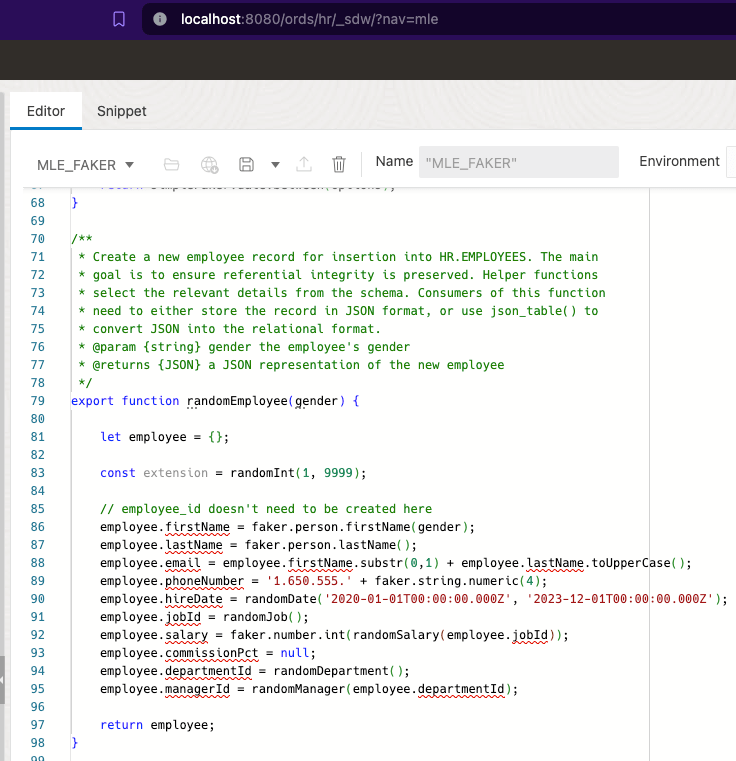

You would think that you could use the generated JSON object as the payload body for a POST to the REST Enabled HR Employees table. The difference in naming convention for field names prevents that from happening. Send the mle_faker_api.random_employee JSON object to ORDS and you will get a HTTP 400 Bad Request response. Of course we could change the MLE_MAKER function implementation to use snake case. That would deviate from what Martin has implemented and he may have subsequent articles building on that implementation so it’s best to avoid interfering with that.
Camel to Snake – we’ll handle it
It is quite simple really, we write a PL/SQL block handler which will take the fields from the JSON object and define the OUT parameters using the field naming convention we want. The handler takes a gender parameter to pass to the call specification and defines the data types for the fields. The database JSON_VALUE function is key here…
DECLARE
  random_employee JSON;
BEGIN
select mle_faker_api.random_employee(:gender)
       into random_employee;
:first_name := JSON_VALUE(random_employee, '$.firstName');
For your convenience here is a script to define the module/template/handler…
BEGIN
  ORDS.DEFINE_MODULE(
      p_module_name    => 'mle_faker_api',
      p_base_path      => '/faker/',
      p_items_per_page => 25,
      p_status         => 'PUBLISHED',
      p_comments       => NULL);

  ORDS.DEFINE_TEMPLATE(
      p_module_name    => 'mle_faker_api',
      p_pattern        => 'employee',
      p_priority       => 0,
      p_etag_type      => 'HASH',
      p_etag_query     => NULL,
      p_comments       => NULL);

  ORDS.DEFINE_HANDLER(
      p_module_name    => 'mle_faker_api',
      p_pattern        => 'employee',
      p_method         => 'GET',
      p_source_type    => 'plsql/block',
      p_mimes_allowed  => NULL,
      p_comments       => NULL,
      p_source         =>
'DECLARE
  random_employee JSON;
begin
select mle_faker_api.random_employee(:gender) into random_employee;
:first_name := JSON_VALUE(random_employee, ''$.firstName'');
:last_name := JSON_VALUE(random_employee, ''$.lastName'');
:email := JSON_VALUE(random_employee, ''$.email'');
:phone_number := JSON_VALUE(random_employee, ''$.phoneNumber'');
:hire_date := JSON_VALUE(random_employee, ''$.hireDate'');
:job_id := JSON_VALUE(random_employee, ''$.jobId'');
:salary := JSON_VALUE(random_employee, ''$.salary'');
:commission_pct  := JSON_VALUE(random_employee, ''$.commissionPct'');
:department_id := JSON_VALUE(random_employee, ''$.departmentId'');
:manager_id := JSON_VALUE(random_employee, ''$.managerId'');

end;');

  ORDS.DEFINE_PARAMETER(
      p_module_name        => 'mle_faker_api',
      p_pattern            => 'employee',
      p_method             => 'GET',
      p_name               => 'gender',
      p_bind_variable_name => 'gender',
      p_source_type        => 'URI',
      p_param_type         => 'STRING',
      p_access_method      => 'IN',
      p_comments           => NULL);

  ORDS.DEFINE_PARAMETER(
      p_module_name        => 'mle_faker_api',
      p_pattern            => 'employee',
      p_method             => 'GET',
      p_name               => 'first_name',
      p_bind_variable_name => 'first_name',
      p_source_type        => 'RESPONSE',
      p_param_type         => 'STRING',
      p_access_method      => 'OUT',
      p_comments           => NULL);

  ORDS.DEFINE_PARAMETER(
      p_module_name        => 'mle_faker_api',
      p_pattern            => 'employee',
      p_method             => 'GET',
      p_name               => 'last_name',
      p_bind_variable_name => 'last_name',
      p_source_type        => 'RESPONSE',
      p_param_type         => 'STRING',
      p_access_method      => 'OUT',
      p_comments           => NULL);

  ORDS.DEFINE_PARAMETER(
      p_module_name        => 'mle_faker_api',
      p_pattern            => 'employee',
      p_method             => 'GET',
      p_name               => 'email',
      p_bind_variable_name => 'email',
      p_source_type        => 'RESPONSE',
      p_param_type         => 'STRING',
      p_access_method      => 'OUT',
      p_comments           => NULL);

  ORDS.DEFINE_PARAMETER(
      p_module_name        => 'mle_faker_api',
      p_pattern            => 'employee',
      p_method             => 'GET',
      p_name               => 'phone_number',
      p_bind_variable_name => 'phone_number',
      p_source_type        => 'RESPONSE',
      p_param_type         => 'STRING',
      p_access_method      => 'OUT',
      p_comments           => NULL);

  ORDS.DEFINE_PARAMETER(
      p_module_name        => 'mle_faker_api',
      p_pattern            => 'employee',
      p_method             => 'GET',
      p_name               => 'hire_date',
      p_bind_variable_name => 'hire_date',
      p_source_type        => 'RESPONSE',
      p_param_type         => 'STRING',
      p_access_method      => 'OUT',
      p_comments           => NULL);

  ORDS.DEFINE_PARAMETER(
      p_module_name        => 'mle_faker_api',
      p_pattern            => 'employee',
      p_method             => 'GET',
      p_name               => 'job_id',
      p_bind_variable_name => 'job_id',
      p_source_type        => 'RESPONSE',
      p_param_type         => 'STRING',
      p_access_method      => 'OUT',
      p_comments           => NULL);

  ORDS.DEFINE_PARAMETER(
      p_module_name        => 'mle_faker_api',
      p_pattern            => 'employee',
      p_method             => 'GET',
      p_name               => 'salary',
      p_bind_variable_name => 'salary',
      p_source_type        => 'RESPONSE',
      p_param_type         => 'DOUBLE',
      p_access_method      => 'OUT',
      p_comments           => NULL);

  ORDS.DEFINE_PARAMETER(
      p_module_name        => 'mle_faker_api',
      p_pattern            => 'employee',
      p_method             => 'GET',
      p_name               => 'commission_pct',
      p_bind_variable_name => 'commission_pct',
      p_source_type        => 'RESPONSE',
      p_param_type         => 'DOUBLE',
      p_access_method      => 'OUT',
      p_comments           => NULL);

  ORDS.DEFINE_PARAMETER(
      p_module_name        => 'mle_faker_api',
      p_pattern            => 'employee',
      p_method             => 'GET',
      p_name               => 'department_id',
      p_bind_variable_name => 'department_id',
      p_source_type        => 'RESPONSE',
      p_param_type         => 'INT',
      p_access_method      => 'OUT',
      p_comments           => NULL);

  ORDS.DEFINE_PARAMETER(
      p_module_name        => 'mle_faker_api',
      p_pattern            => 'employee',
      p_method             => 'GET',
      p_name               => 'manager_id',
      p_bind_variable_name => 'manager_id',
      p_source_type        => 'RESPONSE',
      p_param_type         => 'INT',
      p_access_method      => 'OUT',
      p_comments           => NULL);


COMMIT;

END;
Now a simple GET will return a generated sample Employee record using the snake case naming convention.
curl http://localhost:8080/ords/hr/faker/employee?gender=male

{
  "first_name":"Tommie",
  "last_name":"Dach",
  "phone_number":"1.650.555.5072",
  "job_id":"SA_MAN",
  "department_id":20,
  "email":"TDACH",
  "hire_date":"2022-04-25T13:29:04.961000Z",
  "salary":16520.0,
  "manager_id":201
}
Which in turn can be used in a POST request to insert the record for real and generate an employee id.

Since one of the steps covered in Martin’s blog posts dealt with importing existing Javascript libraries ( Faker ) into the database, the transformation of the generated Employee JSON structure could possibly be achieved through Javascript libraries such as change-case. That’s a homework exercise for extra merit.
The real foundational work for this simple example of generating HR Employee sample data has been laid by Martin Bach. It was through building on that with a visual representation of the steps through ORDS’s Database Action UI that Jeff Smith brought it to my attention. I am grateful to both for the starting point they provided.
 Peter's Random Topic Library
One thought on “Data Magic: Oracle HR REST Service with Faker.js Sample Data”